Indie game storeFree gamesFun gamesHorror games
Game developmentAssetsComics
SalesBundles
Jobs
TagsGame Engines

General Decker Question and Answer Thread Sticky

A topic by ahmwma created Aug 06, 2025 Views: 2,619 Replies: 112
Viewing posts 1 to 31
(+4)

Some users have mentioned having a question or two that were small enough that they didn't feel like they wanted to make a new thread.

So here's a place to ask and answer general questions about Decker.

No question too small or silly! It's always good to ask if you're feeling confused about something

-----

If your question is about Lil (the scripting language) specifically you could check out the Lil Programming Questions thread instead.
Hey! I'm  trying to build decker on linux and I'm getting an error. Mind you that I have close to 0 coding knowledge and its a miracle I'm able to even use linux so the problem  might be obvious.


$ make

In file included from ./c/decker.c:3:

./c/dom.h: In function ‘deck_write’:

./c/dom.h:2882:37: error: ‘js_decker_html’ undeclared (first use in this function)

 2882 |                 str_addz(&r,lmiutf8(js_decker_html,js_decker_html_len));

      |                                     ^~~~~~~~~~~~~~

./c/dom.h:2882:37: note: each undeclared identifier is reported only once for each function it appears in

./c/dom.h:2882:52: error: ‘js_decker_html_len’ undeclared (first use in this function)

 2882 |                 str_addz(&r,lmiutf8(js_decker_html,js_decker_html_len));

      |                                                    ^~~~~~~~~~~~~~~~~~

./c/dom.h:2891:37: error: ‘js_lil_js’ undeclared (first use in this function)

 2891 |                 str_addz(&r,lmiutf8(js_lil_js,js_lil_js_len));

      |                                     ^~~~~~~~~

./c/dom.h:2891:47: error: ‘js_lil_js_len’ undeclared (first use in this function)

 2891 |                 str_addz(&r,lmiutf8(js_lil_js,js_lil_js_len));

      |                                               ^~~~~~~~~~~~~

./c/dom.h:2892:37: error: ‘js_danger_js’ undeclared (first use in this function)

 2892 |                 str_addz(&r,lmiutf8(js_danger_js,js_danger_js_len));

      |                                     ^~~~~~~~~~~~

./c/dom.h:2892:50: error: ‘js_danger_js_len’ undeclared (first use in this function)

 2892 |                 str_addz(&r,lmiutf8(js_danger_js,js_danger_js_len));

      |                                                  ^~~~~~~~~~~~~~~~

./c/dom.h:2893:37: error: ‘js_decker_js’ undeclared (first use in this function)

 2893 |                 str_addz(&r,lmiutf8(js_decker_js,js_decker_js_len));

      |                                     ^~~~~~~~~~~~

./c/dom.h:2893:50: error: ‘js_decker_js_len’ undeclared (first use in this function)

 2893 |                 str_addz(&r,lmiutf8(js_decker_js,js_decker_js_len));

      |                                                  ^~~~~~~~~~~~~~~~

In file included from ./c/decker.c:9:

./c/io_sdl2.h: In function ‘base_path’:

./c/io_sdl2.h:75:87: warning: zero-length gnu_printf format string [-Wformat-zero-length]

   75 |         if(t){snprintf(path,PATH_MAX,"%s",t);SDL_free(t);}else{snprintf(path,PATH_MAX,"");}

      |                                                                                       ^~

./c/decker.c: In function ‘main’:

./c/decker.c:4314:57: error: ‘examples_decks_tour_deck’ undeclared (first use in this function)

 4314 |         if(!deck){str doc=str_new();str_add(&doc,(char*)examples_decks_tour_deck,examples_decks_tour_deck_len);load_deck(deck_get(lmstr(doc)));}

      |                                                         ^~~~~~~~~~~~~~~~~~~~~~~~

./c/decker.c:4314:82: error: ‘examples_decks_tour_deck_len’ undeclared (first use in this function)

 4314 |        if(!deck){str doc=str_new();str_add(&doc,(char*)examples_decks_tour_deck,examples_decks_tour_deck_len);load_deck(deck_get(lmstr(doc)));}

      |                                                                                 ^~~~~~~~~~~~~~~~~~~~~~~~~~~~

make: *** [Makefile:66: c/build/decker] Error 1

(+1)

The js_decker_html variable should be defined in c/resources.h which should be automatically built when it needs to be.

If you rm c/resources.h and then make V=1 c/resources.h do you get any error message?

(1 edit) (+2)

Doing that solved the issue! Thanks!:-) You're getting a special thanks in my first decker project lol

I'm slightly surprised/confused by the behavior of the new pattern/color support in text fields.

It seems as if the pattern doesn't persist past whatever text you initially marked with that pattern. If I write out some text and make it green, if I continue to then write further text past that, it will revert back to the default black, and my new added text will be black. I also can't set the whole field to a specific pattern, so as to change that black default, at least not from what I can see from the GUI.

This is in contrast to the behavior when changing fonts, where the behavior is such that any text I write past the point where I changed the font will continue to be in that font. This does have some wrinkles that aren't always intuitive when mixing fonts, but it does mean I continue to write into a text field in that font as expected without any special interaction, and I can save myself even those headaches by just setting the font property of the field itself, thus insuring that it defaults back to that font.

I bring all this up because it sort of negatively effects my workflow to how I've been working with text fields for the current project. When I'm writing a long card of text, usually my method is just to make one large field on the card, set the default font of that, and then I take advantage of interact mode's ability to just write directly into the field. Makes it easier to write long texts rather than doing it in the field properties. 

But this kinda doesn't work with the color support, because I can't set the field to be all one color and just write away. Plus, on my current project, the text is over a mostly black background, so it's unreadable until I change the color. It's a minor detail, and I can work around it, it's just unexpected I guess.

(+3)

So this might help a bit, but basically there's two ways of setting the colour/pattern of text in a field. It sounds like what you're doing is using the "select a bunch of text and change it with the text menu" option, which yeah does seem to not affect newly added text. But you can also select the field in widget mode, go into the properties (double-click or widget -> properties) and then there's a "pattern" button. If you set the pattern or colour there, that becomes the default for that field, so when you're writing into it in interact mode it'll come up as the colour you want. Hopefully this helps / makes sense.

(+1)

oh! all those words and yet so there is a button for that. that should make this much easier but also begs the question how I missed it. 😜

I have some cards with a bunch of fields in them, and I want them to line up nicely, so I used the “snap to grid” function. Eventually I decided that the default 16x16px grid was a bit too chunky, and dropped down to an 8x8px grid so I could have spaces smaller than a field, as well as larger.

But now when I need to adjust a field, I have to go in and change the grid spacing back to 8x8px every time - it defaults to 16x16px every time I start Decker.

Is there a way to have the default grid size stored in the deck?

Developer(+2)

Currently grid settings aren't persisted anywhere, but I'll give it some thought; possibly it could be stored in deck files, or perhaps it might make sense to expose scripted control via the app interface.

How do I insert/drag and drop an image and have it be full width? I just starting using Decker and regardless of image size my images are being resized, even 512 × 342 GIFs are resized when dragged+dropped. What am I missing? Thanks!

Developer(+2)

With the selection still active, you can choose "Edit -> Resize to Original" or "Edit -> Resize to Card" from the menu to preserve the original dimensions of the image or snap it to the dimensions of the card, respectively.

(+1)

Amazing! Thank you and great project really. I am a Haskell and Lua novice and am enjoying Lil

Excuse me, I have a lot of questions. I hope you don't mind. Before asking, I want to say that English is not my native language. And I've tried to read the documentation on how to use this software. There's still a lot that confuses me, but behind the scenes of your animation The Riddle of The Temple has helped me quite a bit with some of the basics of Decker, especially the canvas. And I'm very grateful for the tutorial you created. My biggest problem, aside from language, is focus. Tutorials with a lot of text make me lose focus and my mind wanders. Actually, I wasn't like this before, until an incident happened to me that will remain personal. And I'm using a translator for this message.

So I have a total of 5 questions:

1. How can I make the dialogizer animate the dialogue with sound simultaneously with the puppeteer module or when the dialogue script comes from a field?

2. How can I make a card have background sound, whether it's a song or the sound of rain, that continues to play in the background? Can the sound continue to play even when moving between cards?

3. Since I see your animations are very cool, can you give me tips or perhaps your workflow in creating animations in Decker? I'm trying to create animations with the Zazz module. The difficulty I encounter is that I'm inconsistent with the size of each animation frame, so sometimes the animations look bad and overlap each other.

4. Is it possible for the zazz animation to remain active while the dialogue is running? Or there's some alternatives to do it?

5. I'm having trouble understanding how to use cardname.widgets[“widgetname”] in the tutorial you created. I tried to find it in your animation, but I still don't understand. I want to be able to create a game with a lock mechanism. What I mean is, there is a door whose key must be found elsewhere to open it. Like an escape room. And if I can make it, how can I reset it back to the beginning? Like, if you restart the game, the door is locked again and the key is hidden again?

Maybe I'm asking too many questions, sorry about that. I don't really have much experience in coding, except with Scratch, and that was years ago. I'm also looking for new activities. Besides making mini projects with Decker, I've also started learning HTML. I want to make a website. And I'm still learning. For me, starting to understand how to use Dialogizer and Zazz is a great achievement for someone with little experience like me.

I understand a little English, which is good news. I don't want to make you think too hard about how to answer my questions so that I understand. And if I still don't understand, I will ask in more specific way. And when my project is finished, is it okay if the language is not English? I want to show it to the public. Or maybe not.

and i'm from Indonesia 👋

(+3)

Hi! I'll do my best to answer your questions, but please let me know if anything doesn't make sense to you, and I will try to explain more clearly.

1:

When you're doing the style settings in Dialogizer, there's two key attributes to get it to animate with sound. The first is "tsound" which specifies a sound to play for each word, and the second is "speed" which specifies how fast or slow the text will appear.

For example, if you have a script in a field and a sound:

o:()
o.tsound:"sound1"
o.speed:3
dd.open[deck o]
dd.say[field1.value]
dd.close[]


2:

When you play a sound using the "play" command you can specify that you want it to loop. When you do this then it will loop continuously including over other cards, until a command is used to stop it.

To start a sound:

play["sound1" "loop"]

and to stop it:

play[0 "loop"]

3:

One way to make it easier to keep animation frames consistent and lined up is to use the grid functionality. When you're in drawing mode, in the View menu there is an option to "Show Grid Overlay" which will add a grid to the screen that you can use to line everything up. And if you click "Grid and Scale..." then you can change the size of the grid if you need to.

4:

Yes! As part of the setup for Puppeteer, you will have added an "on animate do" function - this is what Dialogizer uses to work at the same time as Puppeteer and other scripts. So if you add the zazz commands here then they will run as well.

For example, in a current project I have this in a card-level script to make the zazz animations work.

on view do
 zazzanimations[]
 go[card]
end
on zazzanimations do
 zazz.flipbook[coffee coffeeframes 0.0015]
end
on animate do
 zazzanimations[]
 pt.animate[deck]
end

I've put the zazz command in its own function so that I only have to change it in one place.


5:

So basically you will need to create a separate card with checkboxes on it, to store the values. E.g. make a card called "flags". Then you add a checkbox on this card named "gotkey"

You can in your code refer to the value of this card like so:

#to get the value
flags.widgets.gotkey.value
#or to set the value
flags.widgets.gotkey.value:1

You can reset it by having some code that runs at the start to reset the value to 0, or if you set the checkbox as "volatile" then it will automatically reset when the deck opens.


I hope this all makes sense. If you have more questions I'm sure people here would be happy to help out.

And I think it is absolutely OK to share projects that aren't in English. I know there have been a few Decker projects that are in languages other than English. People may not be able to understand it but you shouldn't let that stop you!

(+1)

Thank you, Millie, your answer helped me understand Decker better. I understood almost everything you taught me, even though there were a few errors here and there. But at least I'm starting to understand. Apparently, my biggest problem that made me doubt my ability to write script lines was that I often forgot to write some quotation marks or ‘strings’ and made typos. So, I actually lack confidence in my abilities because of this small flaw. If I had known earlier, maybe I wouldn't be so confused about Decker and feel so inferior. Maybe it would be a good idea for Decker to have a syntax highlighting feature in the future.

Hey! I've got 2 questions right now. One's more general, and one's a problem I've got with my code right now lol.

1. I wanted to make a canvas that does something on both the up and down click of a mouse  (Similar to how a button widget changes color when its clicked down on, but doesn't count as "clicked" until the mouse button unclicked over it.) and was wondering if there was any code to do something like that. Preferably, I want it so that the canvas counts as "Unclicked" when the mouse is also taken off of the canvas while clicked.

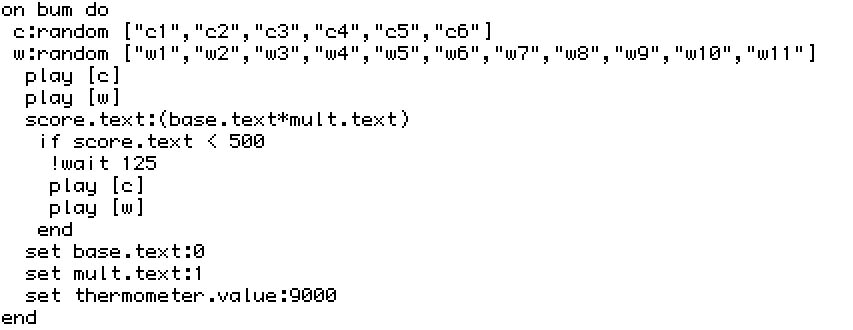
2.For some reason, the If Statement I'm using here isn't activating when I want it to, and I can't figure out why. My guesses is that either it's having trouble because it's reading from a text field, or because mult.text  routinely has 2 decimal points (Numbers like 1.35 and that kinda stuff) so the score.text also has 2 decimal points and that is messing it up somehow.  Either way, I kinda have no idea what I'm doing admittedly.

(Also, if someone has a better way to store number variables so they automatically round up/down from a decimal point, tell me and my life is yours.)

(1 edit) (+5)

For your first question, a canvas gets the click event on mouse-down, and the release event on mouse-up, so you can make the canvas change colour while the button is held down:

on click pos do
 me.pattern:colors.red
 me.rect[0,0 me.lsize]
end

on release pos do
 me.pattern:colors.white
 me.rect[0,0 me.lsize]
end

(obviously you can do fancier painting than that if you want)

The release event also gives you the position of the pointer at the time the button was released, relative to the top-left corner of the canvas. If the position is below and to the right of the top-left corner, and above and to the left of the bottom-right corner, then it’s within the canvas, and you can do whatever the canvas-button is supposed to do:

if min (pos>0,0),(pos<me.lsize)
 alert["whatever I'm supposed to do"]
end

For your second question, I can’t easily spot an error (though I’m pretty sure you don’t need set); in this situation I’d wrap show[] around different parts of the code to double-check that the values being calculated were the ones I expected. show[] takes a sequence of expressions, logs them to the Listener, and returns the first one, so you can wrap it around expressions without changing how your code runs. So, this code will run exactly the same as the example above:

if min show[(pos>0,0) "<-- to the bottom right"],show[(pos<me.lsize) "<-- to the top left"]
 alert["whatever I'm supposed to do"]
end

…but produces this output in the Listener:

(1,1) "<-- to the bottom right"
(0,1) "<-- to the top left"

For your third question, the floor operator drops the fractional part of a number:

 floor 1.0,1.4,1.5,1.6,2.0
(1,1,1,1,2)

If you want round-to-nearest rather than always-round-down, you can add 0.5 before hand:

 floor 0.5+(1.0,1.4,1.5,1.6,2.0)
(1,1,2,2,2)
(+1)

Alrighty, I'm back! I've started putting all of your of the advice you've given to work, but I still haven't been able to get the If Statement to work. 

I used the show code to make sure that that score.text is receiving numbers properly, and I also used the floor function to make sure that there were no decimal points in the score, but that didn't seem to work either. I also tried switching the field to both Plain Text and Code, but that didn't seem to fix anything either.

One thing I have come to realize is that when i make it so that the score.text is supposed to be Less Than the given number, it will always activate regardless of the number larger or smaller. And it seems to work the opposite with Greater Than, with it never activating instead. (I also tried to set the number it's compared to to a negative one,  and the results were the same) If anyone has any ideas as to what is going on, please tell me cuz I'm getting a little desperate.

Anyways, thank you Screwtapello for the help. Even if I can't get that one system working, seeing my scores finally not have a bunch of little decimal numbers hanging off of the end has eased a sense of peace upon my soul, one which I cannot describe accurately with words alone. Your help is appreciated.

Developer(+2)

The .text attribute of a field is a string. Comparing numbers to strings in Lil can have surprising results, because in this case Lil makes the comparison lexicographically:

3>"12"  # 1
3>12    # 0

To avoid this problem, you can use an arithmetic identity operation to coerce the string into a number before performing a comparison:

  myField.text  # "12"
0+myField.text  # 12

Alternatively, use the .data attribute of the field instead: this will ask Decker to interpret the contents of the field as LOVE (a superset of JSON):

myField.text     # "12"
myField.data     # 12
otherField.text  # "[11,22,33]"
otherField.data  # (11,22,33)

Yet another option would be to store numbers in Slider Widgets instead of fields; a slider's .value attribute is always a number. Does that help?

(+1)

I'll have to do some more research on what all this means, but I have gotten it working now. Thank you!I Like Your Funny Words, Magic Man - Meming Wiki

I HAD A QUESTION!
is it possible to have the widgets outside of Decker, like just chilling on my desktop or smthn or is that not possible?

(+2)

Unfortunately, No. Though that sounds fun. :) Decker Widgets share a name with phone Widgets but they do different things.

If you wanted to use Decker's Widgets for your own personal use on your computer you could definitely make a small nice looking deck that holds Widgets that do small helpful things that you'd like to have access to on your desktop... (I'm imagining things like a clock, a to-do list, a pomodoro timer, a place for writing notes, etc.) but the widgets would still have to be entirely inside Decker.

Quick question - with grids, is there any way to have a hidden column, aside from the few built-in always hidden columns?

Basically I'm trying to build a file list where I show the user "friendly" names but when they select one I then have the actual path to the file hidden behind the scenes and I can load that. Is there a way I can have that as a column in the same table, hidden but accessible through scripting, or would I need a separate invisible grid elsewhere with the "real" values?

Developer(+2)

You can set the .widths property of a grid widget to a list of column widths in pixels. Any columns thus set to 0px wide will be completely hidden from view and skipped over when navigating by cell. Grids will also automatically hide any rightmost columns that don't fit within the width of the widget, so making leftward columns a bit wider can scrunch the secret columns out of view. (Columns have resize handles in between column labels while in Interact mode!)

(+3)

Aha, that should work! Thank you!

(+1)

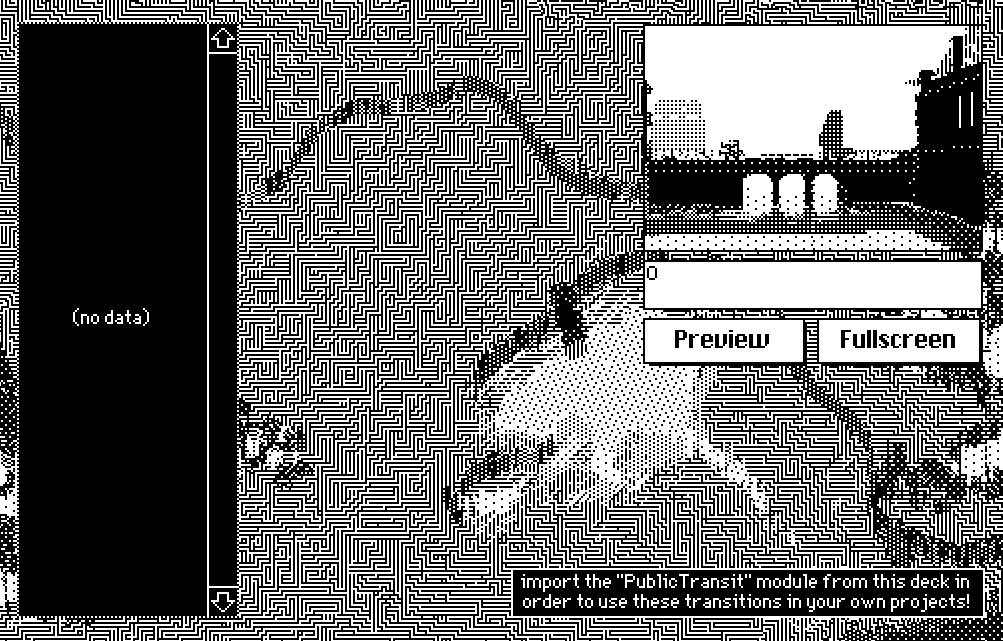
Another question! For some reason when I try and download the latest version of Public Transit, it doesn't have any of the transitions, and doesn't seem to add them to my Decks when I import in the PublicTransit resource either.


This has occurred in both the downloaded sample decks that come with Decker, and downloading straight from the web version of Public Transit. I want that Melt transition soooooooo bad man, it reminds me of Balatro.

(1 edit) (+3)

I might be wrong but I think you're using an older version of Decker. Possibly 1.54 or earlier. 

The reason I think that is because Decker 1.55 introduced some changes to Lil. The description box under the preview is showing a "0" which suggests that your version of Decker is from before "nil" was introduced.

Could you update to a more recent version and let us know if that fixed it?

(+2)

Yep, you were exactly right! I did have the newest version downloaded, but I didn't realize that It was still opening every deck with the old version I had sitting around. Thank you!

i don't know why i can't figure it out, but i can't use any colours with the animated patterns no matter what i do. i just want red and black instead of white and black lmao. any idea what i'm doing wrong?

(+2)

The “Patterns Interface” section of the Decker docs describes the animated patterns as:

A list of up to 256 pattern indices for animated patterns.

You can include solid “red” and “black” in the animated sequence because they have pattern indices (35 and 1). But if you want a pattern pattern, those are described as:

An 8x8 image interface comprised of patterns 0 and 1.

So actual patterns can’t have red in them, only patterns 0 and 1, which are (by default) white and black. You could set palette 32 to be red instead of white to get red-and-black animations, but that would make every white pixel red, which probably isn’t what you want.

Developer(+2)

As a concrete example, assuming the default palette, if you wanted to set animated pattern 28 to red and black alternating as fast as possible you could use The Listener to issue the following Lil snippet:

patterns[28]:35,47

To halve the speed you could double up each pattern index, e.g.:

patterns[28]:35,35,47,47

There are more examples of this sort of thing in All About Color.

Is that clear?

it's still confusing to me because i have a smooth brain BUT it is adding some colour to the thing so i'm gonna keep playing with it. thank you!

I'm having some troubles working out how to iterate through every row in a grid

If I use like "each x in grid.value" I get each column separately. And I can do it if I refer to each row with the index like "each x in count y" and then "grid.value[x]" that seems to be an option but I can't seem to find a way of getting the total size so that I know how far to go.

Is there something I'm missing? Is there a cleverer way of doing this?

Developer

The "rows" primitive turns a table into a list of dictionary, with each dictionary representing a row.

You can thus iterate over the rows of the table stored in a grid something like:

each row in rows mygrid.value
 # ...
end

More broadly, though, what are you trying to do? There might be better alternatives depending on the application.

I'm working on the launcher for my Deck Kiosk - so I'm starting with the sample code you sent me with the directory listing but I want to have it go through and  open up each deck and pull out the name (and maybe the author) for each deck so that things look a bit friendlier than just a filename. I tried doing it as part of the select statement but it didn't seen to work, I guess because the function I was using didn't work nicely over a vector?

(+2)

Hi, I've just started using Decker and it's great. Really fantastic environment to play in. Congratulations!

My question is probably obvious to someone versed in Lua or Lil, but if I want to stock a grid with items from a column in another grid, how could i do that? For example, to display a list of items being carried in an inventory.

At present I have 'invlist' which is a grid containing all the possible items, with names and other date (such as a parameter number for their effects. But I want to have the ability to select from a list of held items which would be displayed on the cards. So I need to draw in data from the names column of 'invlist' to populate a grid based on a numerical list of what the player is holding  However, everything I try seems to hit a brick wall Any newbie advice for populating grids and/or adding items to them?

Developer(+1)

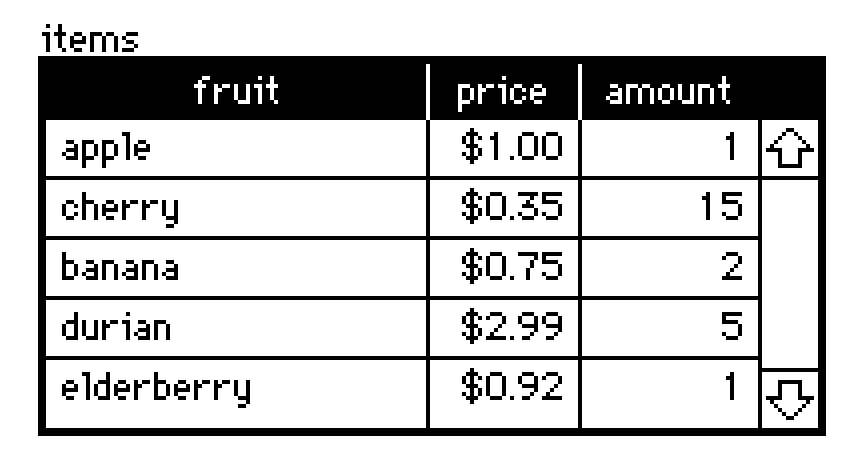
Grid widgets, like this example named "items":


contain tables. You can read or write the table of a grid widget via the .value attribute of the grid. Tables can be indexed numerically (looking up rows) or by strings (looking up columns):

items.value
# +--------------+-------+--------+
# | fruit        | price | amount |
# +--------------+-------+--------+
# | "apple"      | 1     | 1      |
# | "cherry"     | 0.35  | 15     |
# | "banana"     | 0.75  | 2      |
# | "durian"     | 2.99  | 5      |
# | "elderberry" | 0.92  | 1      |
# +--------------+-------+--------+
items.value[3]
# {"fruit":"durian","price":2.99,"amount":5}
items.value.fruit
# ("apple","cherry","banana","durian","elderberry")

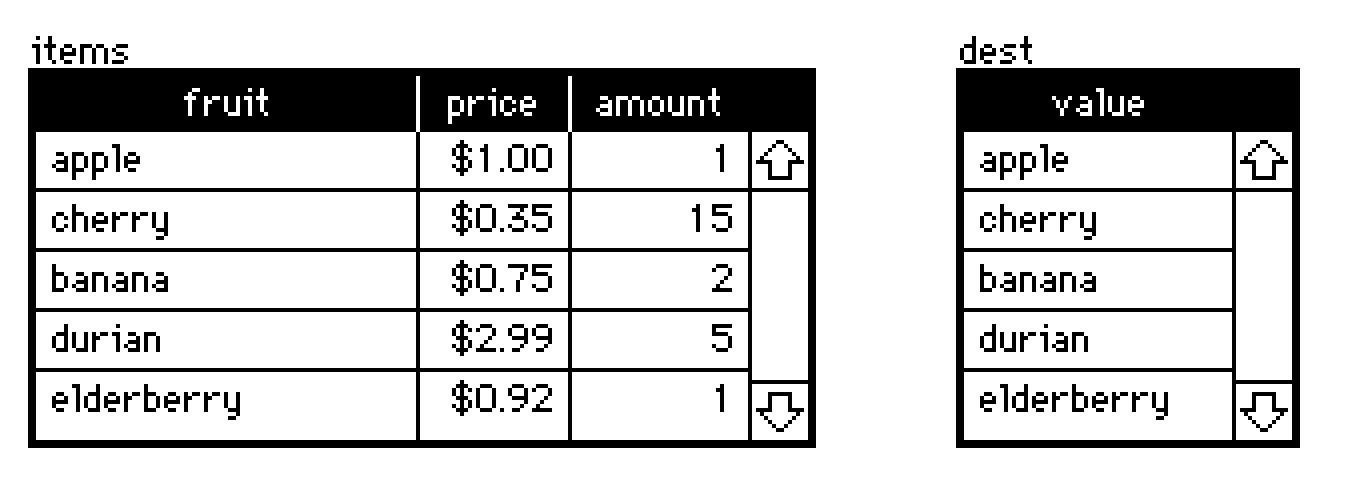
In the simplest case of populating another grid with a specific column of a source grid, assigning a list to the destination grid's .value attribute will implicitly cast it to a table:

dest.value:items.value.fruit


For more complex transformations of data, there's Lil's query language:

select fruit price where amount>2 from items.value
# +----------+-------+
# | fruit    | price |
# +----------+-------+
# | "cherry" | 0.35  |
# | "durian" | 2.99  |
# +----------+-------+

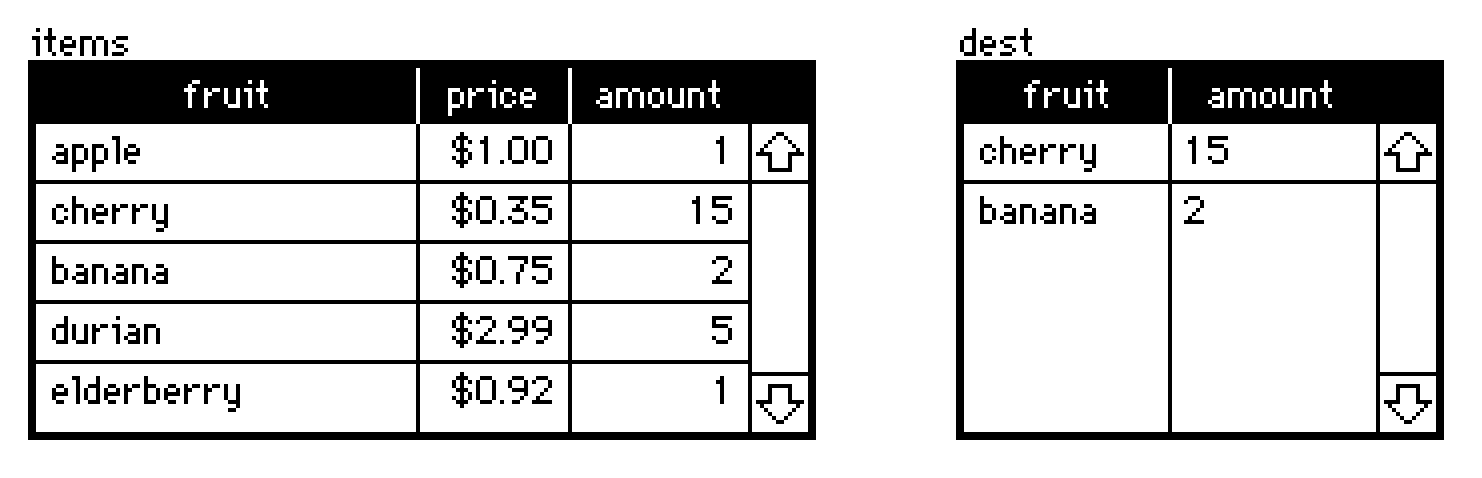
A query never modifies tables in-place; it returns a new table. Just like before, we can take the source grid's .value, query it, and assign the result to another grid's .value attribute:

dest.value:select fruit amount where fruit in "cherry","banana" from items.value


There are many examples of using queries on tables in the Lil reference manual section Lil, The Query Language. If you aren't using it already, Decker's Listeneris very helpful for trying queries interactively or generally testing out snippets of code.

Does any of that point you in a useful direction? I can try to furnish more specific examples of how to formulate queries for your project if you provide additional detail about how your data is organized.

Thank you - this has got me very close.

I came up with something like

 invdisplay.value:select Name where Item in 0, 1 from invlist.value

This allows me to fill invdisplay with the names of items 0 and 1 from invlist, which is great!

But I also have  a grid for tracking the inventory, so it is a table containing a single column of values such as 0, 2, 5, for example.

I just can't figure out how to turn that column into something usable in this select query, since something like the following does not work:

invdisplay.value:select Name where Item in carrying.value from invlist.value

Any clues?!

All the best,

Phil

Developer(+1)

You have several approaches available.

The @ operator can be used to index a list, dictionary, or table by a list of indices or keys. For example:

items.value
# +--------------+-------+--------+
# | fruit        | price | amount |
# +--------------+-------+--------+
# | "apple"      | 1     | 1      |
# | "cherry"     | 0.35  | 15     |
# | "banana"     | 0.75  | 2      |
# | "durian"     | 2.99  | 5      |
# | "elderberry" | 0.92  | 1      |
# +--------------+-------+--------+
items.value.fruit @ 0,2,3
# ("apple","banana","durian")

Indexing a table in this way gives us a list of rows (each a dictionary), but we can glue those back together with the "table" operator:

items.value @ 0,2,3
# ({"fruit":"apple","price":1,"amount":1},{"fruit":"banana","price":0.75,"amount":2},{"fruit":"durian","price":2.99,"amount":5})
table items.value @ 0,2,3
# +----------+-------+--------+
# | fruit    | price | amount |
# +----------+-------+--------+
# | "apple"  | 1     | 1      |
# | "banana" | 0.75  | 2      |
# | "durian" | 2.99  | 5      |
# +----------+-------+--------+

To clarify my earlier examples, in most applications the "in" operator attempts to check whether an item on the left (or each item in a list on the left) appears within a list on the right:

3 in 2,4,5        # 0
5 in 2,4,5        # 1
(3,5) in 2,4,5    # (0,1)

Within a query, you could do something roughly equivalent to our first example by referencing the implicit "magic column" named "index":

select where index in 0,2,3 from items.value
# +----------+-------+--------+
# | fruit    | price | amount |
# +----------+-------+--------+
# | "apple"  | 1     | 1      |
# | "banana" | 0.75  | 2      |
# | "durian" | 2.99  | 5      |
# +----------+-------+--------+

If your desired indices are stored in a table, you'll need to pluck out a column of that table before you can compare it to another column with "in" or index with "@":

invgrid.value
# +-----------+
# | itemIndex |
# +-----------+
# | 0         |
# | 2         |
# | 3         |
# +-----------+
invgrid.value.itemIndex
# (0,2,3)
table items.value @ invgrid.value.itemIndex
# +----------+-------+--------+
# | fruit    | price | amount |
# +----------+-------+--------+
# | "apple"  | 1     | 1      |
# | "banana" | 0.75  | 2      |
# | "durian" | 2.99  | 5      |
# +----------+-------+--------+
select where index in invgrid.value.itemIndex from items.value
# +----------+-------+--------+
# | fruit    | price | amount |
# +----------+-------+--------+
# | "apple"  | 1     | 1      |
# | "banana" | 0.75  | 2      |
# | "durian" | 2.99  | 5      |
# +----------+-------+--------+

You might consider keeping track of inventory items based on their names, or some other semantically meaningful "id" or key column, rather than by index; it could be more human-readable, and if you make any mistakes writing your queries it may be more obvious where something has gone wrong.

I would also like to note that grids aren't the only way to store collections of data within Decker, and may not always be the simplest choice. For example, you could also store a list of indices in a field widget via its .data attribute. Say we have a field named "myList":

myList.data:11,22,33

The field will visually show the data as "[11,22,33]". If we read myList.data we can reconstitute the list:

myList.data   # (11,22,33)

Does that help?

(+1)

Thank you again! I am away from my machine RN, but I will give these a try tomorrow!

(+1)
invgrid.value.itemIndex 
# (0,2,3)

Thanks! This was what i was missing! :) Thank you so much for all the wonderful examples.

i edited the march script to get a "vibrate" effect; i was aiming for a screenshake but i need to figure out how to make widgets bigger than the canvas (otherwise it just leaves the background in view when shaking) but that's not what i'm doing today.

today i used this script:

on view do
 zazz.march[p1,p2 canvas1 0.05]
 go[card]
end
successfully on one deck:

the big image is the canvas, with the two lil guys being the points it moves between. worked pretty well for a total newbie like me.

hoooooooooowever................... no matter what i do, i cannot seem to recreate it in my other deck. not when i copy the whole card, and not when i do it step by step.

but it just. won't move. at all.

even when i paste the card into this deck it doesn't work and i'm a little at a loss about how i fumbled this LOL. when i paste THIS card back into the vibrate deck that works, it works?? sorry. it's probably something super basic.

(+3)

Possibly a silly question, but did you make sure to add the "zazz" module to your other deck?

(1 edit)

hahahahahaha nope....... that must be it. but if i'm being honest, i have absolutely no idea how to add a module at all. anyway....

i pulled it over from resources but nothing has changed, which was my only guess as to how to import a module. i must have missed the tutorial on this part specifically somewhere, my bad.

(+3)

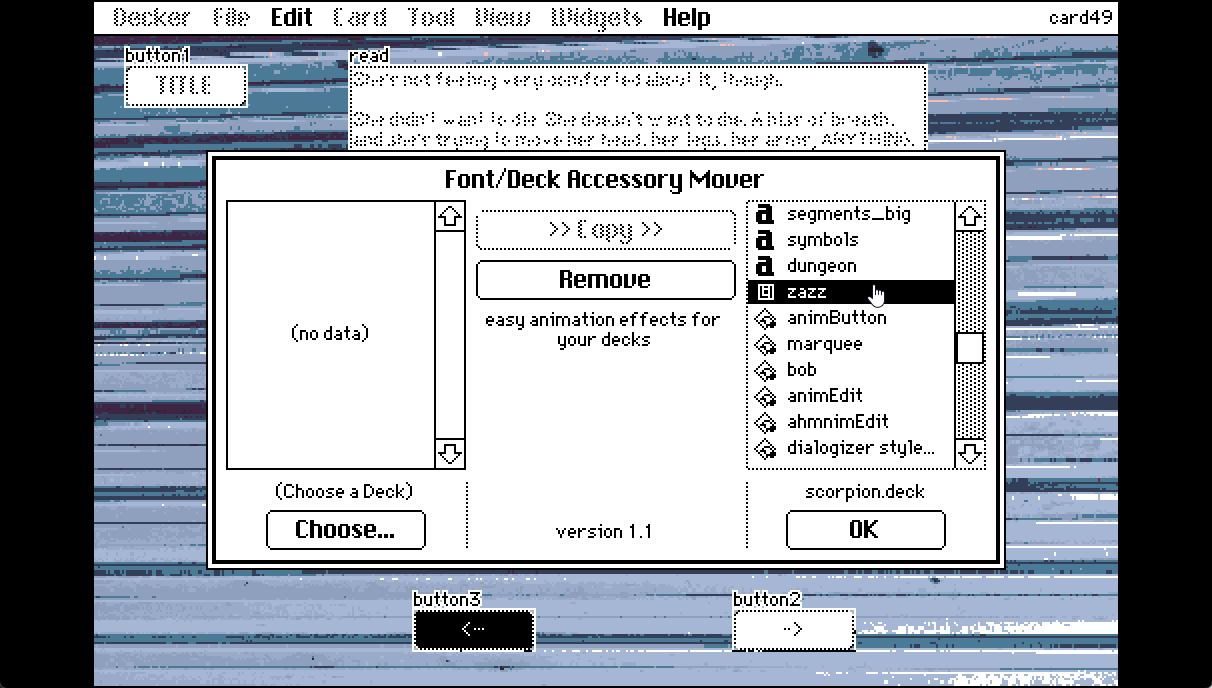
Basically you open the deck you need to have the module in, and then drag the deck that has the module into the window. That'll pop up the Font/DA mover and you can move the module across. It looks like you've done that but with still no luck?

Any chance you can upload the deck somewhere so we can have a look?

(+3)

ahhh. i had used import resources, and imported zazz from there. i had to delete that zazz and then drag it in like you said, but now it works? not sure why but. hey. it's working now LOL.

thanks for your help.

(+3)

Hello! I've discovered decker a few days ago and I've been experimenting and messing around on it, recently I discovered the bazaar of contraptions, they are so cool, but I'm not sure where I have to insert the code to put it on my deck.

I've been reading the documentation, tough I haven't finished yet (discovered decker right around finals week, whoops) I'm not sure if the answer is in the documentation, but if it is could someone point to me where to look? (I didn't what to clutter the contraption bazaar with my silly question but lmk if I should ask directly in there) 

(2 edits) (+3)

Not a silly question!

The short answer is you can use ctrl+v (or Edit > Paste Widget in the menu) while you're looking at a card.

The slightly longer answer is this:

Decker's image data, widgets (including contraptions) and even whole cards can be copied and pasted between decks very easily.

As an example: if you copy a plain button widget and then paste it somewhere else... you get a matching button.
But if you paste it into a text editor like notepad you get something that looks a little bit like the code blocks in the contraption bazaar:

%%WGT0{"w":[{"name":"button1","type":"button","size":[60,20],"pos":[230,164]}],"d":{}}

That's because this is what widgets look like when they're stored in your system's clipboard. They start with %%WGT and contain all the information about their size and scripts and data, etc.

So Decker will know that if there's a  %%WGT at the start of a string that you're pasting (that you copied from the bazaar) that means you're pasting a widget!

Just like it would recognize %%IMG as image data or %%CRD as being a whole card.

We're using the forums as a place to pass this easy kind of copy-and-paste clipboard data to each other in order to share our inventions and tools. Because it just works. :)

So, yeah, when you copy a contraption from the bazaar you can just paste it directly onto a card!

Have fun, and good luck with your finals!

(+2)

OMG thanks!! tbh i was literally reverse engineering by reading the code and copying the script parts but doing my own widgets, it was so time consuming, haha. This way is def more easy!! And thanks for the good wishes! have a lovely day.

(+1)

How do I delete cards?

(+1)

The easiest way is to cut them. Use [ Card > Cut Card ] from the menu bar, and then just don't ever paste them back in.

(This gives you a small window to get your card back before it's gone for good.)

(+1)

Thank you!

Is there ANY way to resize an internal canvas(es) on a contraption resize? I cannot figure out how to do it for the life of me. I’ve put it in “on view” for the contraption card, I’ve put it on some internal widgets that have an animate property and are firing every 60Hz.

The ONLY way that it seems to work is in the prototype view, then yes, my canvases are resized to the size of the prototype when interact is turned on. But, as soon as I plop that contraption instance in a card, nope! My canvases refuse to resize. It’s like the size of the canvases are now static and refuse to take a resize parameter.

Is this some sort of limitation of decker or… what am I missing? I feel like I’ve tried everything and whatever it is going to be is probably not intuitive.

Alternatively, I suppose I could put them on an internal state image, which is what I am really using them for, for double buffering and compositing (though, I do need a draw line from a canvas). But, then that raises another question, I am uncertain where to initialize long term state on a card or contraption. I feel like if I put it in the card’s/contraption’s/prototype’s main script, it will get overridden when that script fires again. Does it go in an “on view” with an “initialized sentinel value”?

Also, is there a working example of get_ and set_ for prototypes? The examples don’t help me and everything I’ve tried doesn’t work either.

(+1)

Is there ANY way to resize an internal canvas(es) on a contraption resize?

If you make your prototype “resizable” (when you’re editing a prototype, from the “Prototype” menu make sure the last item “Resizable” is ticked), then you should be able to resize the contraption when you add it to a card. If you also tick “Show Margins” in the Prototype menu, you’ll also get four little handles you can use to mark the left, right, top and bottom margins of the prototype: any part of a widget that is between the edge of the prototype and the margins will stay at that fixed distance from the edge, any part of a widget that is in the middle will be proportionally resized as the contraption is resized.

%%WGT0{"w":[{"name":"prototype11","type":"contraption","size":[98,91],"pos":[86,66],"def":"prototype1","widgets":{"canvas1":{"size":[81,41]}}}],"d":{"prototype1":{"name":"prototype1","size":[100,100],"resizable":1,"margin":[0,25,0,0],"widgets":{"canvas1":{"type":"canvas","size":[83,46],"pos":[8,9]}}}}}

If you paste the above widget definition into a card, you’ll get a contraption with a canvas in the top half of it. The top edge of the canvas is between the top edge of the prototype and the top margin, so it stays at a fixed distance from the top of the contraption as it is resized. The bottom edge of the canvas is between the top and bottom margins, so it moves proportionally as the contraption is resized.

If you are trying to write code to reposition widgets in a deck, that should work, but it may be overidden by the “built in” resizing behaviour described above? I’m not sure, I haven’t tried it.

But, then that raises another question, I am uncertain where to initialize long term state on a card or contraption.

The best place to put long-term state on a card or contraption is in a widget. Widgets don’t have to be in the centre “white” part of a prototype, you can stash them in the dark-grey border area - but make sure they’re locked so the user can’t accidentally interact with them. For most data types (numbers, strings, lists, dicts, tables) you can just use a regular field, and read and write its .data property. If you want to store a bunch of images (such as sprites), the best way is to use a rich-text field; you can paste the images in, and access them from code by reading the .images property.

Also, is there a working example of get_ and set_ for prototypes?

If you edit a prototype and choose “Script…” from the Prototype menu, you can enter a handler like this:

on get_foo do
 "here's a foo"
end

Then, let’s say you make a contraption from this prototype, called mycontraption. If you say mycontraption.foo, that will evaluate to the string "here's a foo". Here’s a pasteable example of that in action:

%%WGT0{"w":[{"name":"mycontraption","type":"contraption","size":[100,100],"pos":[86,66],"def":"prototype1","widgets":{}},{"name":"button1","type":"button","size":[84,20],"pos":[93,40],"script":"on click do\n alert[mycontraption.foo]\nend","text":"Gimme a foo"}],"d":{"prototype1":{"name":"prototype1","size":[100,100],"margin":[0,0,0,0],"script":"on get_foo do\n \"here's a foo\"\nend","widgets":{}}}}

Setting works the same way: define on set_foo val do ... end and it will be called when code does mycontraption.foo:somevalue.

If you want to be able to get and set values interactively, rather than just through code, you can also use “attributes”, but that’s an optional, additional layer on top of get_foo and set_foo that you don’t have to worry about otherwise.

(1 edit)

Thanks, I’ll try these.

As for the resizing widgets and what you’ve said, my gut is that it might be being overridden by the internal resizing logic, I’m not sure really.

What I have experienced is that I have them offscreen, since they are acting as compositing buffers. The “resize event” works fine, as it is triggered by some code that is being run in an animated widget - ONLY when it’s in the prototype view. As soon as an instance of the prototype becomes a contraption instance, all of that code stops working. The canvases will not resize anymore.

Also, thanks for the confirmation on the state. I kind of figured it was like Pd (Pure Data) and it would go in a widget, like how Pd does it.

(+1)

If you can provide an example contraption that exhibits the behaviour you describe, that would help. If you can set it up in a new deck, you can select the contraption, do Edit → Copy Widgets, and then paste the result into a reply here. That’s what I did to create the examples in my reply - if you copy a contraption, Decker even includes its prototype.

(+1)

Thanks for the offer, but I’ve decided on another route.

I’m doing what I wanted through modules, deck.add, etc. That does work for me and it’s clearer to me what’s happening.

It’s more work for me to avoid the prototype/contraption interface, but that’s how it goes.

(+2)

I figured out what the problem was. I didn’t realize you needed to call card.update[] when changing subordinate widget sizes.

Actually, no - that wasn’t it.

Anyways, I’ll have the contraption done soon, but I think I am running into a corner case where it doesn’t like resizing when a canvas is beyond the boundaries or something. The clipping gets to be incorrect and things start wrapping even though I explicitly set the sizes of the canvas and clip.

(1 edit)

I figured it out. I don’t know if it’s a bug or a limitation, but it’s easy to reproduce:

A prototype/contraption background image will not resize itself. It is fixed, no matter what. For instance, if I make a prototype at (200,200) and then resize it, the image is fixed. It also causes strange compositing errors near the edge of the contraption if I am actively drawing into it.

To get around it, I will have to use another canvas as the background image, rather than the contraption’s image - because they should be resizing themselves, obeying the margins. The prototype’s/contraption’s card does not, and is permanently fixed size.

Also, maybe I am abusing the use of the prototype/contraption base image and it is not supposed to be drawn into during interaction.

(+1)

Ah, yeah. The “margins” of a prototype also divide up the prototype background into a 3x3 grid. When a contraption is resized: the top-left tile of the prototype is drawn at the top-left corner of the contraption; the top-centre tile of the prototype is tiled horizontally across the top of the contraption; the top-right tile of the prototype is drawn at the top-right corner of the contraption, and so forth.

The default introduction/tutorial deck you get when you launch Decker has a page on “contraptions”, and one of the examples is a “resizable decorative border” contraption that demonstrates the behaviour nicely.

If you want to draw the background with code, you’ll need a canvas widget if only because the Image protocol you get from card.image doesn’t provide a lot of drawing primitives. You can use a “hidden” canvas widget, draw the background you want, then do card.image:canvas.copy[0,0 canvas.lsize] to paste it onto the contraption background, or (much easier) just make the canvas widget cover the area of your prototype, and Decker’s default resize behaviour (with the margins and such) will make sure it stays in place as the contraption is resized.

(2 edits) (+1)

That’s exactly what I do, except the problem is the base image of the prototype/contraption will be fixed. If I resize the contraption, and the image started at (200,200) after instantiation, it remains at (200,200). It cannot be changed. I’ve tried on view or a subordinate widget that tries to resize it - it stays fixed.

Then, when I composite the subordinate canvases into it, and the contraption is resized, the image will wrap. The image will not resize itself and I can’t force it to resize.

The only way I have gotten around this is by maximizing the card on the prototype page so it starts with a very large image buffer, and then shrink it on view, when it’s actually instantiated. Except, that has problems, too.

So, I figure the only real fix is to not draw on the prototype’s/contraption’s base image, but on a canvas, and show the canvas.

Yep - it works now. It’s either a bug or limitation.

  • If the final target of the composite is the prototype/contraption card image, there are compositing errors and it (the image attached to the prototype/contraption card) will never resize.
  • If I use a “visible” canvas as the target, it does resize and all compositing errors go away.

Hello, I found a Sokoban-like decker game called "sokoban" in the "examples" folder. I would really like to know a simple tutorial on how to use and make the "mover" widget. I want to incorporate it into my decker to enhance interactivity

I have another question. How can I limit the number of action steps for followers in Path? To align with and advance the plot development, I don't want players to run around on the map. At the same time, I want followers to trigger events when their steps are exhausted or at specific locations. Sorry for asking so many questions, but I really want to make this game well.

I've really encountered many problems because I don't know how to use quotation marks, so I always end up with nested plain text boxes and code text boxes, which looks like a mess of code. But there's nothing I can do about it. Now, I really want to know how to directly quote and execute code text boxes in a visual novel with one-time options

I'm going to come back to all of your questions when I have time to reply more thoroughly, but could you explain a little more about what's going on with your quotation marks? Is it because they're used in your story's dialog and also in code?

Thank you for taking the time to answer my question, and I'm sorry that my translation software didn't convey the meaning accurately. What I actually meant to say is that I don't know how to "quote". For example, in the "dd.chat" function, using "at:,bt:" to directly reference the answer to a question, and later I found that writing "at:XX.value" can also reference the content of a field named XX. But now I want to know how to execute the code inside the field like "eval[XX.text()1]"

(+3)

Hello!  

Some of the questions you've asked are difficult for me because I'm not very familiar with how these examples work or I'm not sure what the correct answer would be for your project. I've learned a little bit but I have more questions for you. 

I really want to make sure I understand what you need so I can either figure it out or look up the answer.

Asking specific questions helps me give you more specific answers. 

Regarding Sokoban and "Mover":

From what I understand about the sokoban example... "Mover" was made specifically to move boxes inside of a Sokoban-like game and most of the code in the example relates to that. 

What do you like about "Mover"? 

  • Being able to move a character on a grid with the arrow keys? 
  • Sokoban gameplay? 
  • Something else?
  • What kind of gameplay would you like in your game from something like "Mover"?

Regarding path:

From what I understand, this is what you need:

  1. A way to limit the number of steps taken when the follower moves
  2. A way to make an event happen when the follower runs out of their limited steps
  3. A way to make an event happen when the follower arrives at a specific location

Have you coded a way to make events happen when your follower arrives at a location yet? 
Is there anything else that you're trying to understand how to do with path?

Regarding "quotes": 

From what I understand you'd like to allow the player to choose a dialog option and then have the game run some code depending on what they chose? Is the code in the other text field more dialog (dd / visual novel format) or something else?

Do you want the player to be able to return to the original choice and pick another dialog option?
Or
Is this a one-time event where they can only choose one answer?

I'm sorry if I didn't understand something! Thank you for being patient.

How do I make audio loop in decker when exported as  .html? The audio seems to pause after the first 10 seconds even when i use play["sound" "loop"]. It does not pause in the .deck version.

How long does it pause for?

Permanently, it does not play again after the first 10 seconds. 

Does looping work for you in the official All About Sound deck? In my browser (Firefox on Linux) I can click “Start Loop” and it runs for at least 11 loops (that’s when I got bored).

What browser are you using, on what platform?

How long is the sound that you’re looping?

Thank you for your reply!

Strangely, yes, it works in the All About Sound deck. I'm using Safari on Mac, and the sound runs the full 10 second limit that Decker has. I believe I'm using Decker version 1.54. 

If you wish to check it out, you can find my project on https://puter-and-tunep-games.itch.io/inspiration-strikes. It might be the case that it's working for other browsers, and I have some weird local issue going on. 

(+1)

Ah, here’s what I see:

  • when I start the game, no sound
  • when I click on the background, the background loop plays once
  • when I click on the “next” button, there’s still no background music
  • if I press the left-arrow key on the keyboard to go back to the first card, the background loop begins playing, and loops properly

From the documentation, under Web-Decker and Native-Decker:

Most web browsers do not allow programs to play audio until the user has interacted with a page, so any play[] commands issued before a user has clicked, tapped, or pressed a keyboard key will have no effect.

I think this is what you’re bumping into, since your deck tries to play audio when the first card appears. The simplest workaround would be to also start looping the sound on the second card, so that whether somebody’s using Web Decker or Native Decker, they get the background loop eventually. A more complex solution would be to add a pre-title card that the user has to click through to get to the title card.

(+1)

Thank you so, so much!! This solved my problem and it works perfectly now - I added it on the second card :D

Developer

For the record, I'd strongly recommend updating Decker.

v1.54 is over 8 months old; we're up to v1.61.

(+1)

Thanks! I’ll make sure to update as soon as I get the chance. 

Does Decker support drawing pads? Im trying to make sure im not doing something wrong on my end. i just wanna use the drawing tools with my drawing pad

(+1)

Yeah! If I'm doing art stuff I usually have Decker fullscreen on my display tablet. 

What OS are you using? And can you describe any problems you're having currently?

(1 edit)

Sure I'm on windows 11! and no worries on replying take your time (there are alot of comments in this thread.) basically I have a drawing pad, it's called One by Wacom. I just kinda plug it in and i can draw with it, I can't really do that with Decker tho. I've tired updating drivers messing with some settings for the actual tablet but can't seem to get it to smoothly draw in the program. It either draws random uncontrolled lines or nothing at all. Even selecting tools is pretty rough.
I tried messing around with Decker but I've kinda hit a wall lol.

Should i check out some of the code? Maybe look through how to use Decker with a tutorial ?? Anything you have to offer helps, i really wanna make a deck but using the mouse all the time sucks( not complaining about the program just frustrated)

Thanks for getting back to me!!


(1 edit) (+1)

As much as I support looking at the documentation and learning more about Decker (:D) I don't think there's anything in there that would help with the tablet issue. Decker should be as easy to use when you plug in your tablet as other art programs are... but computers can be weird and sometimes we need to poke at them to make them work.

If you don't mind... I have two things I'm curious about:

Are you having the same tablet trouble in both Web Decker and in Native Decker?
If you don't know what I mean by that, Web Decker is the version that runs in your web browser (like this copy of the official tour or wigglypaint) and Native Decker is the standalone program that you download and run on your computer.

The other thing I'm wondering is whether or not there are some settings inside of Wacom's driver software (Wacom Center?) that could be adjusted. My tablet has a different driver software so I'm not sure.... but from what I know about Wacom it's possible to create program-specific settings (like shortcuts, etc) and maybe there's some way to modify how your tablet interacts with Decker in there? (Maybe?)

(+1)

lol heard heard.

Thanks for explaining Web and Native to me! I'm using native on my Asus VivoBook, it's running Windows 11. I have not tried the web version yet but can give it a whirl.
I did try messing around with Wacom's tablet settings mostly with the pen and clicking, but I may need to look at some more options after checking out the documentation for the tablet itself. I could be missing and not seeing I'll update with areply either tonight (10:30pm right now) or tomorrow morning before work!!

so it seems like the web version works much perfectly with the drawing pad. does this means i need to redownload the native version?? im not opposed to using the web version but hoping i can fix the problem with the native version so i can use that instead.
****side question**** 

I want to understand more of the way the tools work for Decker where can I find documentation again

Developer

An offline copy of Decker's documentation is included with the Native-Decker download inside the "Docs" folder.

You can also access the latest docs through the links in the Help menu, or the links on the main decker website.

(1 edit) (+1)

Hi how would i make it so a piece of text follows me throughout the whole deck. Like if i wanted a score to be tracked across the entire deck so it can get updated and is seen in all cards how would i do that? Like the score would be in the top right corner! thank you!

Developer(+1)

State in a deck, like a score counter, needs to live in a widget, on some card.

The straightforward way to have a global score counter would be to make a field (or slider) widget somewhere on a specific card; let's call the card "inventory" and the field "score". Scripts on another card can then refer to that field by one of its "fully-qualified" names:

deck.cards.inventory.widgets.score
inventory.widgets.score

For example, to add 100 points to the score, a button script might be

on click do
 inventory.widgets.score.data:100+inventory.widgets.score.data
end

Or, using a local variable to reduce repetition,

on click do
 s:inventory.widgets.score
 s.data:100+s.data
end

In fact, if you're referring to this widget constantly throughout your deck, you might consider setting up an alias in the deck-level script:

scoreCounter:deck.cards.inventory.widgets.score

After which point you could just use the name "scoreCounter" in any script, on any card.

Each card could have their own "score" field (perhaps volatile) that is drawn from the central source-of-truth score counter and updated when the card gets a view[] event:

on view do
 score.data:scoreCounter.data
end

(Note that when you change the score counter you will generally also want to call view[] to perform this update.)

Does that make sense?

If you're interested in making this even tidier- at the cost of some additional up-front complexity- I could describe how to use a contraption to build a "game HUD" that behaves like a single object shared across many cards.

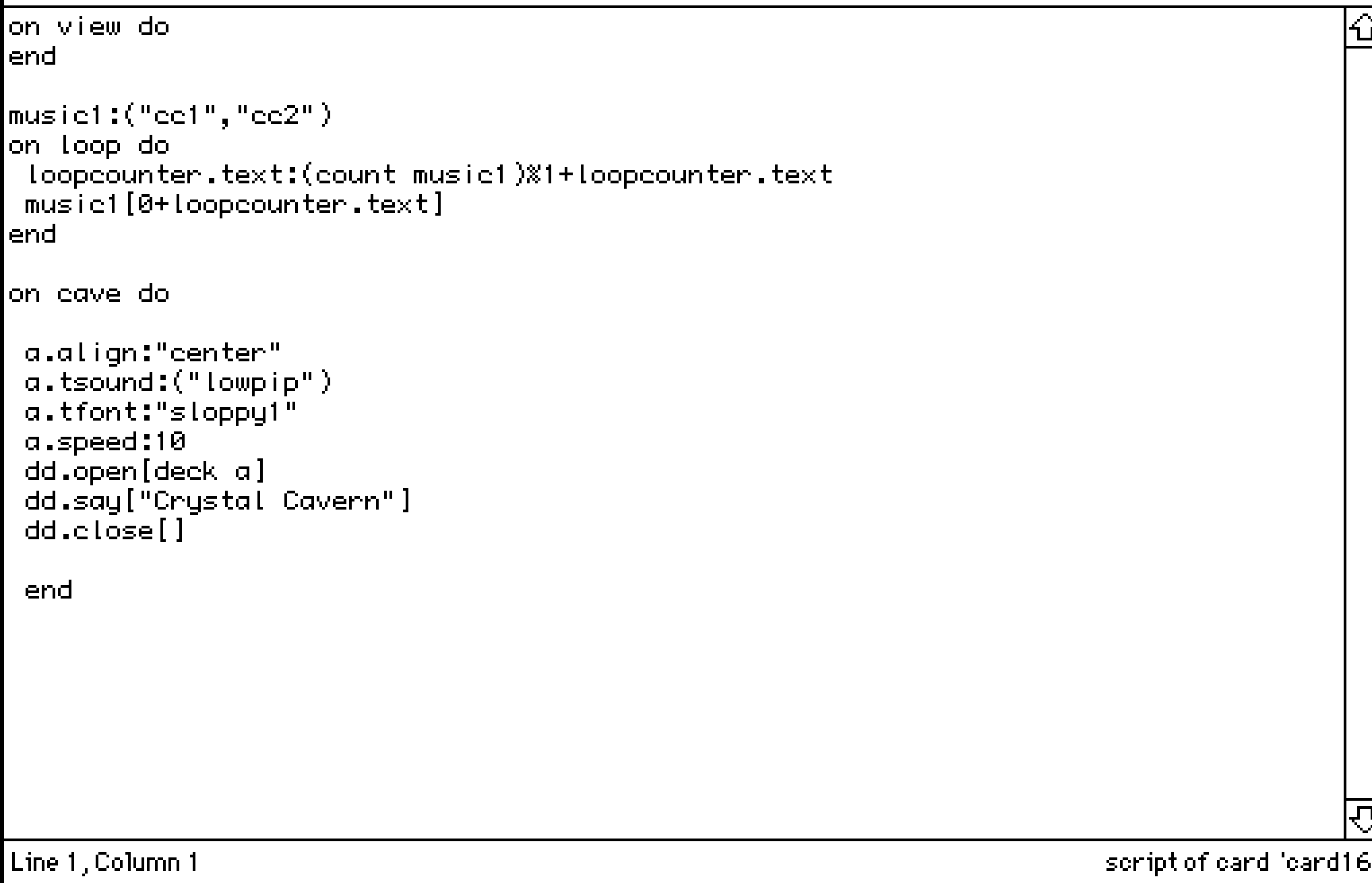
Hi! I am looping two pieces of audio, however it ONLY loops the second piece, rather than first -> second -> first -> second. How can I fix this? Does it have to be about my duration of audio? (cc1 is 10 seconds and cc2 is around 7 seconds)

(+3)

Your audio duration should be fine! 

After experimenting with a deck where I have a similar audio looping setup I think my best guess is that the script is expecting to find a Field that has the name "loopcounter" on the same card you're on and it's not finding it so it can't correctly loop through your clips. 
(Because nothing is loopcount-ing, y'know?)

It could be that it doesn't exist, or it has a typo in the name or it does exist by that name but it's on another card... something like that. 

(+2)

That was exactly the case, had the field in another card 😭 Thank you so much!

Is there a way to have a button pressed on another card, then have it checked by another button on a different card?

For instance, if I have a card/room called Pieces, and two other cards that are Puzzle Rooms, I want a button in each puzzle room to be pressed in order for the button in Pieces to do something. To make it sound simpler, I want the player to steal treasures from both rooms, before going into final room to leave.

This is what I have, however it keeps believing  that the buttons are not being pressed.

on click do
if puzzleroom.button1.pressed and puzzpleroom2.button2.pressed
 dd.open[deck]
 dd.say["You successfully stolen all treasures!"]
 dd.close[]
 go["end"]
else
  alert["You must collect all treasures to leave!."]
end
end

And then for my puzzle rooms buttons, I have the same thing:

on click do
pressed:true 
end

Am I doing it right? Forgive me if this is silly, I am still trying to wrap my around this...

(+1)

You’re almost there, but unfortunately Decker doesn’t allow you to add a pressed attribute to a button like that. If you want to keep track of a flag like “treasure taken”, the easiest thing would be to make a button in the puzzle-room called treasuretaken, configure it to be a checkbox, and “Show None”. Then the button that takes the treasure can do:

on click do
 treasuretaken.value:1
end

(note that you have to say 1, not true: Decker’s scripting language Lil does not recognise true and false specially, and treats them both as undefined variables)

…and the button that checks for taken treasures can do:

on click do
if puzzleroom1.treasuretaken.value & puzzleroom2.treasuretaken.value
 dd.open[deck]
 dd.say["You successfully stolen all treasures!"]
 dd.close[]
 go["end"]
else
 alert["You must collect all treasures to leave!"]
end
end

(note that the way to say “both these things must be true” is & not and - Lil does not recognise and either)

Thank you so much, this helped a ton! But weirdly, I don't know if it's just me, but when I make it checkbox + show none, I am unable to press it.

(+3)

Yes, if a checkbox is set to "show none" you can't interact with it. I think in the example given the idea is you have a hidden checkbox that stores whether the button is pressed, and then you have your normal visible button with code in it to set the value in the checkbox. I hope this makes sense?

I see! Thank you so much, was feeling kind of stupid LOL I will mess around with this!

(+2)

Hopping in too (Hello!)

There is a fun thing about buttons which is often overlooked -- All buttons can store a value, not just checkboxes.

So you don't need a second button to be a checkbox at all.

We often talk about checkboxes because the mark is visible and easier to understand but if you don't want to have a separate hidden checkbox you can change your button back to what it was originally and use this script in it:

on click do  
me.value:1 
end

When you use "me" like this in a script it refers to the widget the script is attached to... so the button (of any style you like and any name) will set it's own value to "1" when this script is inside of it and the button is clicked.

One more small correction, in the beginning of your progress checking script:

on click do  
if puzzleroom.widgets.button1.value & puzzleroom2.widgets.button2.value

Putting .widgets. between the card name and the widget name is an important part of telling Decker where to find your widget. 

Of course, use the correct names for your particular buttons and cards at this moment!

A side note about setting the value in a hidden or non-checkbox button:

Doing it this way has a side effect of being a little harder to uncheck the buttons when you want to reset the game while testing it.... but you could set these two particular buttons as 'Volatile' if you wanted to. 

That makes it so you can clear their .value anytime using [ File > Purge Volatiles ] in the menu. 

This would also remove their .value when the project is saved.

Volatile is dangerous to use on anything precious and irreplaceable -- but it's fine for temporary things like progress checkmarks.

If you feel comfortable using it you can select the widget you're using to store this progress .value and use [Widgets > Volatile] to make it Volatile.

(Again, this is not for anything precious like your art assets! Disposable .values only here!)

This whole project sounds lovely :D We're all rooting for you.

(+2)

You don't understand how much I appreciate the help! The .widgets helped a lot-- I was not understanding why it wasn't working until I realized. I cannot wait to show everyone what I was able to make during the last few weeks! It is very scuffed though!

(+2)

I tried to use unless operator with side-effects, and I was surprised that it doesn't short circuit.

potato_card: deck.add["card" "potato"] unless deck.cards["potato"]

The above creates a new card regardless of whether a "potato" card exists. I was hoping that the left term would not be evaluated  (a.k.a short-circuits) if the right term was not nil.

Is there a better (more idomatic) way to get this short circuit behavior? This is what I'm currently doing:

potato_card: if deck.cards["potato"] deck.cards["potato"] else deck.add["card" "potato"] end

Thank you!

Developer(+3)

"unless" does not short-circuit; No operators in Lil do.

In this specific case I would probably write

if !deck.cards.potato deck.add["card" "potato"] end

and then subsequently use "deck.cards.potato". Even if you then also assign it to a variable, the end result is slightly shorter.

(+2)

I'm working on a game in decker that includes a few doll-maker/dress up games. For the clothes I've pasted images into draggable canvases (i'm basing it on the layouts of games like dollzmania), and I was just wondering if there's an easy way to be able to have a button for players to reset the card so that the clothes are in their original spots. i saw in another thread someone asked a similar question and it was suggested that they use the listener to get the canvas position and set it so that the canvas returns to that spot when they go to the next card. however, that'd mean scripting in the position of each separate object, and for my project it would be really fiddly to do if there's like 15 items of clothing on the card. Any advice? I'm new to Decker so I'm still getting the hang of things, but i'm loving it so far! 

Developer(+1)

You could write a script to record the position of all the canvases automatically (rather than recording every coordinate by hand), stash those positions in a field somewhere, and then have another script re-apply them when appropriate.

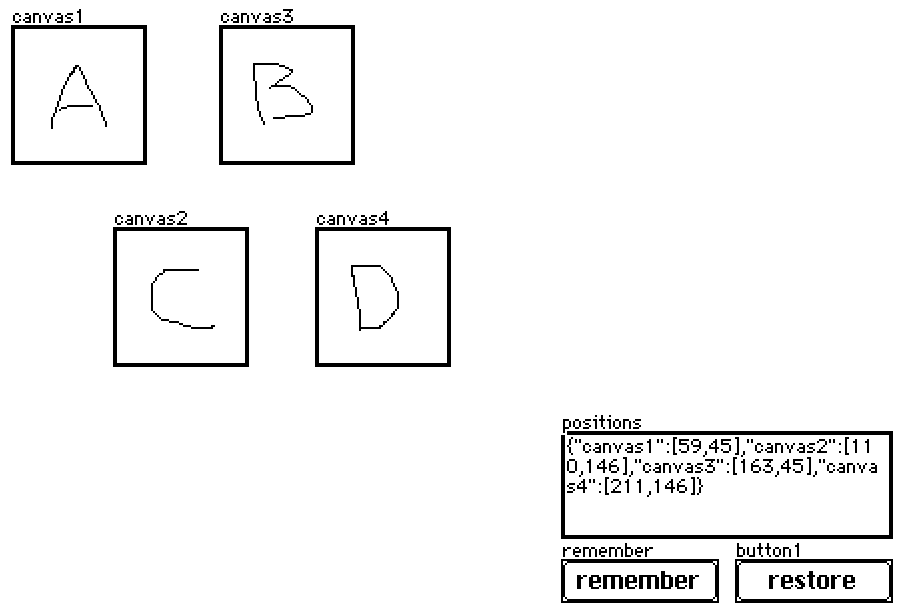
Let's say you have widgets something like this:

The "remember" script looks like:

on click do
 p:select key value..pos where value..type="canvas" from card.widgets
 positions.data:raze p
end

And the "restore" script looks like:

on click do
 each pos name in positions.data
  card.widgets[name].pos:pos
 end
end

In practice, this field and buttons will probably be hidden (set to "show none"). If you ever want to record the current state of the canvases without un-hiding the buttons you can simulate a click via the listener:

remember.event.click

Does that make sense?

(+1)

Is there any hotkey for swapping between widget and interact mode, and if not could add one? I'm aware of the option to click between in the toolbar, but would prefer to have bound key. Currently, it requires a lot of cursor travel for something need to do quite often when testing out a project. Thanks!

(1 edit) (+1)

The keyboard shortcuts that I know (In native Decker) for swapping between modes are F1 for Interact Mode, F2 for Widget Mode (And F3 - F12 are for the drawing tools). I hope this helps!

(+2)

Ah, that works with function modifier on mac, thanks! 

(+1)

Hi! I am a total newbie on Decker and English is not my native language so sorry for the mistakes :).
I am trying to make invisible cliking buttons or an « object button » , like when i click on a fish it takes me to another card. I am currently using the button widget and make it invisible but when i click on it it show the rectangle shape in white :( .  I was trying to use the canvas widget but i really don’t understand how it work…  I am begging for help 🙏

Developer(+3)

If you want a button to be clickable but have absolutely no visual effect when clicked, set the style to "Invisible" and then additionally apply "Show Transparent" (found in the Widgets menu).

I'm making a prototype, where I set a button's text based off a string attribute.

This works until I open the button's prototype, whereupon that attribute gets reset and the button's text resets to the prototype's default is. I don't observe this behavior for example when using field.text as the string persists between opening's of the prototype. 

I'm reading through the documentation but missing what the determining factor in whether a property gets reset between prototype openings. 

I can use a hidden field, but that complicates things as the button will still get reset when opening the prototype so needs a restore call etc.

Deck with an example of the behavior: https://munro.itch.io/decker-question

Developer(+1)

From the reference manual's description of the Prototype Interface,

when a definition is updated, the nameposshowlockedanimatedvolatilefontpattern, and script attributes of Contraptions will be preserved, as well the valuescrollrowcol, and image content of the widgets they contain (as applicable) if they have been modified from their original values in the prototype, but everything else will be regenerated from the definition. The state of contraptions is kept, and the behavior and appearance is changed.

Any other state that you wish to survive prototype modification should be stashed in internal widgets; I recommend refreshing these settings (alongside applying settings from the enclosing contraption instance like .font and .locked, where appropriate) in the view[] event handler in the prototype script.

(+1)

Ah, so because button's text is not the value it doesn't get kept, however a field's text is a value so field text does get kept? Thanks for clarification and the snippet!

Developer (1 edit) (+1)

Just to be clear, a field's .value attribute, which is represented as a rich text table, is the complete, underlying contents stored in the field. Fields have .text, .images, and .data attributes which can be read and written, but all three are alternate views/subsets of the same contents (as a plain-text string, as a list of inline images, and as encoded/decoded LOVE data, respectively), as scripting conveniences.

Buttons have a .value attribute as well, but it represents the boolean (1/0) value of checkboxes, and has no relationship to the .text attribute of the button, which controls the button's label.

Sliders have a .value attribute which corresponds to their numerical value, and Grids have a .value attribute which corresponds to the table data they contain.

Hellooo complete and utter noob here. I've used Macromedia Director back in the day which in tunr was very inspired by HyperCard so i was delighted to find this project :) However i have a small question: is there any way to get more colors working in a project? Again, i will admit i know next to nothing about the tool (yet) apart from a bit of tinkering but i think if we were able to at least use graphics with 256 colors the possibilities for retro adventure games would be endless :)


Thanks so much for creating it!

(+2)

Currently, no. 16 colors is the cap. Though the troublemaker in me might mention that it's 16 colors at a time, not per project.

The way I look at it is that 16 colors is definitely a creative constraint... but you can do a surprising amount with a well crafted palette.

Having fun tinkering! :D

(1 edit)

Is there a way to enable microphone recording in the downloaded version on mac? I get the prompt to allow microphone permissions in the browser version, but the desktop version I haven't gotten the prompt. I don't see it as an option in Privacy & Security settings. Tried reseting microphone permissions but no luck.