


On Sale: GamesAssetsToolsTabletopComics
Indie game storeFree gamesFun gamesHorror games
Game developmentAssetsComics
SalesBundles
Jobs
TagsGame Engines

A.C. Danvers

32
Posts
4
Topics
48
Followers
4
Following
A member registered Mar 28, 2016 · View creator page →

Creator of

Recent community posts

Decker community · Created a new topic CoCo40 - a font port

Got bored, made a font.
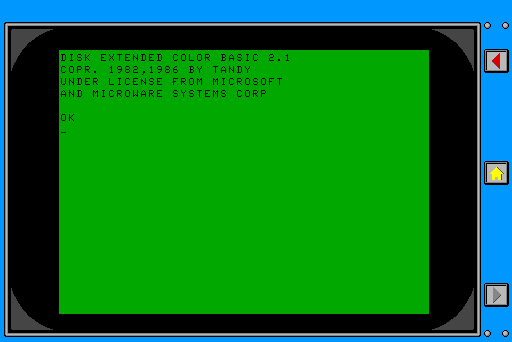

It's a port of the character set from the MC6847T1, specifically the set with true lowercase support, a modified version of which was used in the Tandy Color Computer 2 and 3. Because of the way the character generator works, this results in looking like it appears in the 40 column text mode, hence the name CoCo40.

The layout of the font is kinda weird. In the original ROM, each character has an 8x12 space, but only 5x7 of that space is used (5x9 for lowercase characters that dip below the line). To fit this into Decker format and have the spacing look roughly correct, I went with 5x12 with 3 pixels of spacing. 

The CoCo actually uses the same font for all three text modes; 32, 40, and 80 columns, but because the 80 column mode is drawn at double the horizontal resolution but the same vertical resolution, it comes out condensed. Wasn't sure how to simulate that in Decker, since it relies on the distortion of a CRT to achieve the result it does on real hardware.

There's also a few characters that might be slightly inaccurate, and it's missing the extended accented characters because with so little space it's hard to make them legible (the CoCo 3 had a few and many of them are painfully difficult to distinguish, especially on a CRT).

You can find the deck with the font on my website, here: https://redpanda.fun/CoCo40.html
oh! all those words and yet so there is a button for that. that should make this much easier but also begs the question how I missed it. 😜

I'm slightly surprised/confused by the behavior of the new pattern/color support in text fields.

It seems as if the pattern doesn't persist past whatever text you initially marked with that pattern. If I write out some text and make it green, if I continue to then write further text past that, it will revert back to the default black, and my new added text will be black. I also can't set the whole field to a specific pattern, so as to change that black default, at least not from what I can see from the GUI.

This is in contrast to the behavior when changing fonts, where the behavior is such that any text I write past the point where I changed the font will continue to be in that font. This does have some wrinkles that aren't always intuitive when mixing fonts, but it does mean I continue to write into a text field in that font as expected without any special interaction, and I can save myself even those headaches by just setting the font property of the field itself, thus insuring that it defaults back to that font.

I bring all this up because it sort of negatively effects my workflow to how I've been working with text fields for the current project. When I'm writing a long card of text, usually my method is just to make one large field on the card, set the default font of that, and then I take advantage of interact mode's ability to just write directly into the field. Makes it easier to write long texts rather than doing it in the field properties. 

But this kinda doesn't work with the color support, because I can't set the field to be all one color and just write away. Plus, on my current project, the text is over a mostly black background, so it's unreadable until I change the color. It's a minor detail, and I can work around it, it's just unexpected I guess.

Yeah, I will still keep using the shadowtext widget because I think it's probably less fiddly than doing it by hand and I only use it for titles and buttons, but main body text in my current project mostly will get redone with the new field because it's easier to work with and supports links. Swings and roundabouts, as they say. 

OMG! Colored text?! 

There's a "what job are you" quiz in RevInc, and the deck isn't locked, so you can plunder that for ideas if you like: https://annarcana.itch.io/revolution-inc

The short version is I just have a bunch of question widgets, and then a script in the "Calculate!" button polls all those widgets to generate a score for each job based on some simple math. 

You can construct links in rtext with any font via scripting. For example:

Huh. I stand corrected. I tried it from the listener and got the result I described, but maybe that's just an odd quirk of doing it from there instead of a proper event script. 

Decker community · Created a new topic Fonts and links

A confusing wrinkle I tripped over while prototyping a new card: links in rtext cannot be other fonts than "body" except when within a field widget where the widget font property is set to something other than default.

I was very confused by this because RevInc was full of links with custom fonts, so when I was testing out some code involving the "link" event, I was surprised to find that highlighting one of the links to change the font also lost the link. Trying a different tack, I tried changing the font first, then selecting and adding a link ... and that switched the selection font to "body". If you try to brute force it from a script by calling rtext.make with both a custom font and a link argument, you get the even more confusing result of it ignoring the font argument but also not making a link, so you just get a string in "body" font. 

Only by setting the Font property of the widget to some other font can I then make links in that font, but only in that font. I presume this is because the Font property overrides "body" being the default font. RevInc used this a bunch, which is why I didn't realize it acted differently otherwise.

This also seems to have consequences for prototypes/contraptions with rtext attributes, because the form field in the properties dialogue obeys the default behavior, with "body" as the default font. I'm not sure it's even possible to override in that case, though I haven't really tested it. I know it doesn't work with Millie's colourText contraption, not that it matters anyway because of the way it works by drawing text fields to a canvas.

Useful trick I discovered. I have a page with a bunch of character portraits, and then you click on them to make a macWindow popup with a bio. I just have the one macWindow, and the button script updates the text and unhides the window if you closed it.

The problem is that when you've scrolled down in one bio, even after closing and reopening, it still retains the old scroll position, so you end up jumped in the middle of the second bio. Easy fix for this was to modify the `set_value` method to reset the scroll:

on set_value x do 
 field.value: x 
 field.scrollto[0]
end

Ah! So needed to go up the chain. Works great now, thanks!

Something I'm a touch confused by. I wrote a simple "resize" handler for this that sets the window to fixed dimension, ie: 

on resize do
 me.size:320,240
end

This changes the window size as I expect, but when I do the window title disappears. Clicking the corner drag or moving it gets the title back. Is there some extra step I need to invoke to make sure the title draws after the resize? I tried just calling "view[]"/"me.view[]" but that wasn't it.

I'm on Bazzite and ended up compiling from source in an Arch distrobox, but I now realize there's an AUR package for it as well. Just be sure to use the "decker" package and not "decker-bin" as the latter appears to be well out of date.

(1 edit)

Oh bugger, so I am. Type left over from an earlier version. Fixed that and now it works. Jolly good.

Here's the shadowtext version with anchor support:

%%WGT0{"w":[{"name":"title","type":"contraption","size":[461,33],"pos":[12,29],"show":"transparent","def":"shadowtext","widgets":{"canvas1":{"size":[461,33],"pattern":34},"field1":{"pos":[-186,122],"value":{"text":["","Title"],"font":["","deckbuilder"],"arg":["",""]}},"slider1":{"size":[273,25],"pos":[-52,117],"value":34},"slider2":{"size":[226,25],"pos":[300,117],"value":46},"anchorType":{"pos":[545,117],"value":"center"}}}],"d":{"shadowtext":{"name":"shadowtext","size":[100,100],"resizable":1,"margin":[0,0,0,0],"description":"Colour text, with a drop shadow! Exposes a redraw[] function if you need to refresh it manually for whatever reason.","version":2,"script":"on get_colour do\n slider1.value\nend\n\non set_colour x do\n slider1.value:x\n redraw[]\nend\n\non get_shadow do\n slider2.value\nend\n\non set_shadow x do\n slider2.value:x\n redraw[]\nend\n\non get_value do\n field1.value\nend\n\non set_value x do\n field1.value:x\n redraw[]\nend\n\non get_anchor do\n anchorType.text\nend\n\non set_anchor x do\n anchorType.text:x\n redraw[]\nend\n\non redraw do\n canvas1.clear[]\n \n size:canvas1.textsize[field1.value canvas1.size[0]-4]\n canvas1.pattern:slider2.value\n canvas1.text[field1.value 3,3,size anchorType.text]\n canvas1.pattern:slider1.value\n canvas1.text[field1.value 2,2,size anchorType.text]\nend\n\non view do\n redraw[]\nend\n\non get_redraw do\n redraw\nend","attributes":{"name":["value","colour","shadow","anchor"],"label":["Text","Colour (palette index)","Shadow (palette index)","Anchor"],"type":["rich","number","number","string"]},"widgets":{"canvas1":{"type":"canvas","size":[100,100],"pos":[0,0],"locked":1,"volatile":1,"script":"on click pos do\n \nend\n\non drag pos do\n \nend\n\non release pos do\n \nend","show":"transparent","border":0,"scale":1},"field1":{"type":"field","size":[100,20],"pos":[-186,189]},"slider1":{"type":"slider","size":[100,25],"pos":[-52,184],"interval":[0,47],"value":1,"style":"compact"},"slider2":{"type":"slider","size":[100,25],"pos":[65,184],"interval":[0,47],"value":1,"style":"compact"},"anchorType":{"type":"field","size":[100,20],"pos":[184,184]}}}}}

And the normal text version with anchor:

%%WGT0{"w":[{"name":"colourtext1","type":"contraption","size":[100,62],"pos":[104,163],"show":"transparent","def":"colourtext","widgets":{"canvas1":{"size":[100,62],"pattern":34},"field1":{"pos":[-186,151],"value":{"text":["","I seem to be in a spot of bother."],"font":["","ahmArrow"],"arg":["",""]}},"slider1":{"pos":[-52,146],"value":34},"a":{"pos":[73,151],"value":"center"}}}],"d":{"colourtext":{"name":"colourtext","size":[100,100],"resizable":1,"margin":[0,0,0,0],"description":"Like a text box, but with colour! With volatiles now. Exposes a redraw[] function if you need to refresh it manually for whatever reason.","version":1.2,"script":"on get_colour do\n slider1.value\nend\n\non set_colour x do\n slider1.value:x\n redraw[]\nend\n\non get_value do\n field1.value\nend\n\non set_value x do\n field1.value:x\n redraw[]\nend\n\non get_anchor do a.text end\non set_anchor x do a.text:x end\n\non redraw do\n canvas1.clear[]\n canvas1.pattern:slider1.value\n size:canvas1.textsize[field1.value canvas1.size[0]-4]\n canvas1.text[field1.value 2,2,size a.text]\nend\n\non view do\n redraw[]\nend\n\non get_redraw do\n redraw\nend","attributes":{"name":["value","colour","anchor"],"label":["Text","Colour (palette index)","Anchor"],"type":["rich","number","string"]},"widgets":{"canvas1":{"type":"canvas","size":[100,100],"pos":[0,0],"locked":1,"volatile":1,"show":"transparent","border":0,"scale":1},"field1":{"type":"field","size":[100,20],"pos":[-186,189]},"slider1":{"type":"slider","size":[100,25],"pos":[-52,184],"interval":[0,47],"value":1,"style":"compact"},"a":{"type":"field","size":[100,20],"pos":[73,189],"style":"plain"}}}}}
(1 edit)

Hmm. I had experimented with adding anchor to the canvas.text calls but it didn't seem to have any effect, so I took this quote as explanation as to why. But it occurred to me now that it's still wrapping the rtext left-wise so maybe I've misunderstood what anchors do here.

If x is an rtext table and pos is not a rectangle, the anchor a is ignored, text is drawn top-left aligned, and lines are not automatically wrapped.

Here's the modified version I made.

EDIT: got it working. Fixed version below. 

I came here looking for exactly this sort of thing after I'd already started writing my own contraption, and realized "wait I should check first". Well done.

I attempted to modify it further to add anchor support but after failing and then checking the docks, am I correct in gleaning that this isn't possible if the contraption uses rtext? 'Twould be nice to have centered text at least.

and that's why i'm making jam games instead of doing a real job ;)

"deranged in the best way" is my ideal design philosophy <3

There's a trick to the quiz. The secret is there's two questions you need to answer how a corporation would, not how a human would. 

RevInc. is a sci-fi TTRPG about clones, contractors, and conflict.

Built in Decker for Fantasy Camp 2025 and the Dice Exploder 1-Hour Game jam, RevInc. takes the form of an interactive book, complete character creator, interactive GM screen, and other fun greeblies, wrapped around a simple story-driven system with some hopefully fun surprises.

This isn't quite like anything I've made before, mechanically or presentationally, but it's also very much in concert with some of the themes, just with the gloves off.

I hope you enjoy it!

Thanks! And thank you for your custom font and widget work, it wouldn't look so good without it!

It's live! https://annarcana.itch.io/revolution-inc

Revolution Inc. is a TTRPG in the form of an interactive book. The draft's complete now, after almost 3 weeks of feverish scrambling, so I've got the rest of the month to do proofreading and better hypertextification.

Definitely been a learning experience, but the result so far is pretty darn neat, best thing I've made in years. 

Yeah, that makes sense, and also explains something I noticed while working with canvas widgets: they also stop working once you open their script, because it stubs empty handlers that then replace the default drawing behavior. 

The insurance policy I put in for 'enum' was to replace the empty handler with a comment instead, as once a script is populated that suppresses the template filling behavior, but in the future now that I understand what causes it, I'll at least know where to look.

And for sure! I think its very important for people to be able to bungle on main, 'cause everyone else gets to learn. Glad its been helpful. ^^

(2 edits)

I have been using this in a bunch of places in my current deck, and I have somehow managed to break it?

It suddenly fails to update the text when you click the buttons. If I switch modes, from interact to widgets and back, then it updates to the correct value, so the value property is clearly still working, it's just the display part that isn't.

I tried repasting in the widget from the post, in case I'd some how munged it while skimming the prototype code for ideas, but it's still not working. I had something like this happen once before and it was only temporary, I think I fixed it by just quitting without save and reloading the deck, but whatever i did was enough saves and commits back as to make no difference now.

EDIT: Figured it out. The internal slider in 'enum' has no default script, but if you go opening its script, Decker helpfully adds an empty "change" event from the default template for sliders ... for reasons I don't entirely think I understand, this breaks the prototype. Manually deleting that "change" script fixes it again. 🤷🏼‍♀️

(2 edits)

Not actually a question, but a thing that tripped me up and was confusing me. I wrote a bit of code to iterate over an array of strings and slow-print them to a canvas, terminal style. But I was finding some bizarre results when I went to test it: the first line would draw fine, but subsequent lines would go bananas, because somehow the Y coord was changing within the inner loop.

Some simplified code looks like this:

each line y in script
 each c x in line
  x*6,y*13
 end
end
> (((0,0),(6,0),(12,0),(18,0),(24,0),(30,0),(36,0),(42,0),(48,0),(54,0),(60,0),(66,0),(72,0),(78,0),(84,0),(90,0)),
   ((0,0),(6,13),(12,26),(18,39),(24,52),(30,65),(36,78),(42,91),(48,104),(54,117),(60,130),(66,143),(72,156),(78,169),(84,182),(90,195),(96,208),(102,221),(108,234),(114,247)),
   ((0,0),(6,26),(12,52)))

Notice how the Y coord keeps going up where it's not supposed to? 

At first I thought it was something weird with how canvas.text[] works, or that i had my offset or loop logic wrong, but then I realized after comparing this to a version without the multiplication:

each line y in script  
 each c x in line   
  x,y    
 end 
end  
> (((0,0),(1,0),(2,0),(3,0),(4,0),(5,0),(6,0),(7,0),(8,0),(9,0),(10,0),(11,0),(12,0),(13,0),(14,0),(15,0)),
   ((0,1),(1,1),(2,1),(3,1),(4,1),(5,1),(6,1),(7,1),(8,1),(9,1),(10,1),(11,1),(12,1),(13,1),(14,1),(15,1),(16,1),(17,1),(18,1),(19,1)),
   ((0,2),(1,2),(2,2)))

That looks like what you'd expect, right? 

Turns out the problem is operator precedence. Since Lil can do matrix math, what's happening is it's actually multiplying x by a vector of (6,y), then multiplying that by 13, so you get nonsense. Wrapping the two multiplication operations in parens fixes the problem. It didn't occur to me at first 'cause in most languages, `,` isn't an operator, it's just syntax.

This was enough of a weird surprise I thought I would share with folks, in case y'all run into similar.

And now they have a "change" event because I needed one! 

(1 edit)

In the process of making a horizontal version I discovered the transparency mask on the slider is a mess because the card I used got all polluted by some sprite assets I subsequently removed. I've fixed the paste and also here's that horizontal one!

%%WGT0{"w":[{"name":"hSlider1","type":"contraption","size":[144,48],"pos":[358,244],"script":"on change val do\n hs.text:val\nend","def":"hSlider","widgets":{"sliderVal":{},"can":{},"buttonTop":{},"buttonBottom":{},"button1":{},"button2":{},"button3":{},"button4":{},"button5":{},"button6":{},"button7":{}}}],"d":{"hSlider":{"name":"hSlider","size":[144,48],"margin":[0,0,0,0],"description":"Horizontal version of the vertSslider widget.","script":"sliderTop:image[\"%%IMG2ADAAEAD/AGYBBgAoAQIgBgECACUBASADAQQgAwEBACMBASACAQMgAgEDIAIBAQAiAQEgAQECIAYBAiABAQEAIQEBIAIBASAIAQEgAgEBACABASABAQIgAwECIAMBAiABAQEAIAEBIAEBASADAQQgAwEBIAEBAQAgAQEgAQEBIAMBBCADAQEgAQEBABA=\"].transform[\"left\"]\nsliderT:image[\"%%IMG2ADAAEAAQAQEgAQEBIAMBBCADAQEgAQEBACABASABAQEgAwEEIAMBASABAQEAHwESAB0BASASAQEAHAEBIBIBAQAbARYAGQEBIBYBAQATAQQAAQEBIAEBFCABAQEAAQEEAA4BBAABAQEgAQEUIAEBAQABAQQAEwEBIBYBAQAZARYAGwEBIBIBAQAcAQEgEgEBAB0BEgAfAQEgAQEBIAMBBCADAQEgAQEBACABASABAQEgAwEEIAMBASABAQEAEA==\"].transform[\"left\"]\nsliderF:image[\"%%IMG2ADAAEAAQAQEgAQEBIAMBBCADAQEgAQEBACABASABAQEgAwEEIAMBASABAQEAIAEBIAEBASADAQQgAwEBIAEBAQAgAQEgAQEBIAMBBCADAQEgAQEBACABASABAQEgAwEEIAMBASABAQEAIAEBIAEBASADAQQgAwEBIAEBAQAgAQEgAQEBIAMBBCADAQEgAQEBABcBBAAFAQEgAQEBIAMBBCADAQEgAQEBAAUBBAAOAQQABQEBIAEBASADAQQgAwEBIAEBAQAFAQQAFwEBIAEBASADAQQgAwEBIAEBAQAgAQEgAQEBIAMBBCADAQEgAQEBACABASABAQEgAwEEIAMBASABAQEAIAEBIAEBASADAQQgAwEBIAEBAQAgAQEgAQEBIAMBBCADAQEgAQEBACABASABAQEgAwEEIAMBASABAQEAIAEBIAEBASADAQQgAwEBIAEBAQAQ\"].transform[\"left\"]\nsliderBottom:image[\"%%IMG2ADAAEAAQAQEgAQEBIAMBBCADAQEgAQEBACABASABAQEgAwEEIAMBASABAQEAIAEBIAEBAiADAQIgAwECIAEBAQAgAQEgAgEBIAgBASACAQEAIQEBIAEBAiAGAQIgAQEBACIBASACAQMgAgEDIAIBAQAjAQEgAwEEIAMBAQAlAQIgBgECACgBBgD/AGY=\"].transform[\"left\"]\n\non get_value do sliderVal.text+0 end\non set_value v do sliderVal.text:v end\n\non view do\n can.clear[]\n can.paste[sliderTop 0,0]\n can.paste[sliderBottom 128,0]\n \n each x in range 7\n  can.paste[sliderF (16+x*16),0 1]\n end\n \n can.paste[sliderT (16+get_value[]*16),0 1]\nend\n\non change val do\n sliderVal.text:val\n card.event[\"change\" val]\n view[]\nend","template":"on change val do\n \nend","attributes":{"name":["value"],"label":["Value"],"type":["string"]},"widgets":{"sliderVal":{"type":"field","size":[21,20],"pos":[160,0],"show":"none","border":1,"value":"0"},"can":{"type":"canvas","size":[144,48],"pos":[0,0],"locked":1,"script":"on click pos do\n \nend\n\non drag pos do\n \nend\n\non release pos do\n \nend","show":"transparent","border":0,"image":"%%IMG2AJAAMAD/AP8A/wD/AAsBAgAOAQIADgECAA4BAgAOAQIADgECAA4BAgAuAQIADgECAA4BAgAOAQIADgECAA4BAgAOAQIALgECAA4BAgAOAQIADgECAA4BAgAOAQIADgECAC4BAgAOAQIADgECAA4BAgAOAQIADgECAA4BAgC9AQQAiwEBIAQBAQCIAQMgAQECIAEBAwCFAQEgAgEBIAEBAiABAQEgAgEBAH4BByACAQEgAQECIAEBASACAWcAFgECIAYBASACAQEgAQECIAEBASACAQEgZgECABMBASADAQYgAgEBIAEBAiABAQEgAgFmIAMBAQARAQEgAgEDIAQBASACAQEgAQECIAEBASACAQEgZAEDIAIBAQAQAQEgAQECIAYBASACAQEgAQECIAEBASACAQEgZgECIAEBAQAPAQEgAgEBIAcBASACAQEgAQECIAEBASACAQEgZwEBIAIBAQAOAQEgAQECIAMBBSACAQEgAQECIAEBASACAWUgAwECIAEBAQAOAQEgAQEBIAMBBiACAQEgAQECIAEBASACAWYgAwEBIAEBAQAOAQEgAQEBIAMBBiACAQEgAQECIAEBASACAWYgAwEBIAEBAQAOAQEgAQECIAMBBSACAQEgAQECIAEBASACAWUgAwECIAEBAQAOAQEgAgEBIAcBASACAQEgAQECIAEBASACAQEgZwEBIAIBAQAPAQEgAQECIAYBASACAQEgAQECIAEBASACAQEgZgECIAEBAQAQAQEgAgEDIAQBASACAQEgAQECIAEBASACAQEgZAEDIAIBAQARAQEgAwEGIAIBASABAQIgAQEBIAIBZiADAQEAEwECIAYBASACAQEgAQECIAEBASACAQEgZgECABYBByACAQEgAQECIAEBASACAWcAHgEBIAIBASABAQIgAQEBIAIBAQCFAQMgAQECIAEBAwCIAQEgBAEBAIsBBAD/AB4BAgAOAQIADgECAA4BAgAOAQIADgECAA4BAgAuAQIADgECAA4BAgAOAQIADgECAA4BAgAOAQIALgECAA4BAgAOAQIADgECAA4BAgAOAQIADgECAC4BAgAOAQIADgECAA4BAgAOAQIADgECAA4BAgD/AP8A/wD/AAs=","scale":1},"buttonTop":{"type":"button","size":[16,48],"pos":[0,0],"script":"on click do\n v:sliderVal.text+0\n if v\n  sliderVal.text:v-1\n end\n card.event[\"change\" get_value[]]\n view[]\nend","style":"invisible"},"buttonBottom":{"type":"button","size":[16,48],"pos":[128,0],"script":"on click do\n v:sliderVal.text+0\n if v<6\n  sliderVal.text:v+1\n end\n card.event[\"change\" get_value[]]\n view[]\nend","style":"invisible"},"button1":{"type":"button","size":[16,48],"pos":[16,0],"script":"on click do\n sliderVal.text:0\n card.event[\"change\" get_value[]]\n view[]\nend","style":"invisible"},"button2":{"type":"button","size":[16,48],"pos":[32,0],"script":"on click do\n sliderVal.text:1\n card.event[\"change\" get_value[]]\n view[]\nend","style":"invisible"},"button3":{"type":"button","size":[16,48],"pos":[48,0],"script":"on click do\n sliderVal.text:2\n card.event[\"change\" get_value[]]\n view[]\nend","style":"invisible"},"button4":{"type":"button","size":[16,48],"pos":[64,0],"script":"on click do\n sliderVal.text:3\n card.event[\"change\" get_value[]]\n view[]\nend","style":"invisible"},"button5":{"type":"button","size":[16,48],"pos":[80,0],"script":"on click do\n sliderVal.text:4\n card.event[\"change\" get_value[]]\n view[]\nend","style":"invisible"},"button6":{"type":"button","size":[16,48],"pos":[96,0],"script":"on click do\n sliderVal.text:5\n card.event[\"change\" get_value[]]\n view[]\nend","style":"invisible"},"button7":{"type":"button","size":[16,48],"pos":[112,0],"script":"on click do\n sliderVal.text:6\n card.event[\"change\" get_value[]]\n view[]\nend","style":"invisible"}}}}}

Hah, forgot to lock the canvas and discovered you can "scratch" the slider if you do try to drag it. Fixed that. :P

(5 edits)

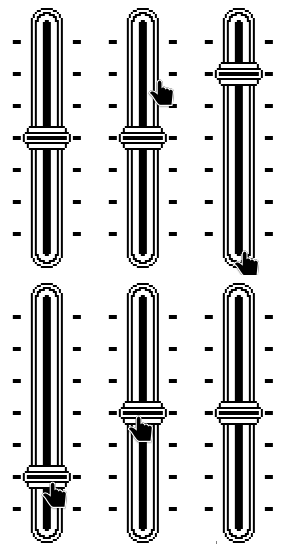
The Slider Knob

I have always had a fondness for the little slider knob that Apple used in the early Mac control panel, and it certainly feels like it fits the Decker aesthetic, but we just have the scrollbar-y looking ones. So I made this today instead of actually writing.


The slider holds a "value" like any other, but because it's so chunky, it only goes from 0 to 6, because that's exactly as many as I needed for the thing I built it for, and also I think that's exactly how many steps the original inspiration had too. It's not draggable, but it is clickable. Clicking one of the ticked areas sets it to that value, while clicking the top and bottom ends of the slider will increment or decrement the value by one. There is also a "change" event that receives the new value.

Hopefully this is useful to someone. The implementation is pretty crude, and could probably be refactored and maybe even made resizable, and the "sprites" are all there in the script so you could probably make it smaller or larger or whatever.

%%WGT0{"w":[{"name":"vertSlider1","type":"contraption","size":[48,144],"pos":[454,99],"script":"on change val do\n vs.text:val+0\nend","def":"vertSlider","widgets":{"sliderVal":{},"can":{},"buttonTop":{},"buttonBottom":{},"button1":{},"button2":{},"button3":{},"button4":{},"button5":{},"button6":{},"button7":{}}}],"d":{"vertSlider":{"name":"vertSlider","size":[48,144],"margin":[0,0,0,0],"description":"Classicly inspired vertical slider widget, created for use in the tension track.","script":"sliderTop:image[\"%%IMG2ADAAEAD/AGYBBgAoAQIgBgECACUBASADAQQgAwEBACMBASACAQMgAgEDIAIBAQAiAQEgAQECIAYBAiABAQEAIQEBIAIBASAIAQEgAgEBACABASABAQIgAwECIAMBAiABAQEAIAEBIAEBASADAQQgAwEBIAEBAQAgAQEgAQEBIAMBBCADAQEgAQEBABA=\"]\nsliderT:image[\"%%IMG2ADAAEAAQAQEgAQEBIAMBBCADAQEgAQEBACABASABAQEgAwEEIAMBASABAQEAHwESAB0BASASAQEAHAEBIBIBAQAbARYAGQEBIBYBAQATAQQAAQEBIAEBFCABAQEAAQEEAA4BBAABAQEgAQEUIAEBAQABAQQAEwEBIBYBAQAZARYAGwEBIBIBAQAcAQEgEgEBAB0BEgAfAQEgAQEBIAMBBCADAQEgAQEBACABASABAQEgAwEEIAMBASABAQEAEA==\"]\nsliderF:image[\"%%IMG2ADAAEAAQAQEgAQEBIAMBBCADAQEgAQEBACABASABAQEgAwEEIAMBASABAQEAIAEBIAEBASADAQQgAwEBIAEBAQAgAQEgAQEBIAMBBCADAQEgAQEBACABASABAQEgAwEEIAMBASABAQEAIAEBIAEBASADAQQgAwEBIAEBAQAgAQEgAQEBIAMBBCADAQEgAQEBABcBBAAFAQEgAQEBIAMBBCADAQEgAQEBAAUBBAAOAQQABQEBIAEBASADAQQgAwEBIAEBAQAFAQQAFwEBIAEBASADAQQgAwEBIAEBAQAgAQEgAQEBIAMBBCADAQEgAQEBACABASABAQEgAwEEIAMBASABAQEAIAEBIAEBASADAQQgAwEBIAEBAQAgAQEgAQEBIAMBBCADAQEgAQEBACABASABAQEgAwEEIAMBASABAQEAIAEBIAEBASADAQQgAwEBIAEBAQAQ\"]\nsliderBottom:image[\"%%IMG2ADAAEAAQAQEgAQEBIAMBBCADAQEgAQEBACABASABAQEgAwEEIAMBASABAQEAIAEBIAEBAiADAQIgAwECIAEBAQAgAQEgAgEBIAgBASACAQEAIQEBIAEBAiAGAQIgAQEBACIBASACAQMgAgEDIAIBAQAjAQEgAwEEIAMBAQAlAQIgBgECACgBBgD/AGY=\"]\n\non get_value do sliderVal.text+0 end\non set_value v do sliderVal.text:v end\n\non view do\n can.clear[]\n can.paste[sliderTop 0,0]\n can.paste[sliderBottom 0,128]\n \n each x in range 7\n  can.paste[sliderF 0,16+(x*16)]\n end\n \n can.paste[sliderT 0,16+(get_value[]*16)]\nend\n\non change val do\n sliderVal.text:val\n card.event[\"change\" val]\n view[]\nend","template":"on change val do\n \nend","image":"%%IMG2ADAAkAACIAIABiACAAYgAQAEIAEAFSABABkgBwABIA8ADCACAAYgAQAaIAIACyACAAYgAQAZIAEAAiABAAogAgAGIAEAGCABAAcgAwABIAMAASADAAUgAwAUIAEABCABAAIgAQABIAIAASAEAAEgAgAEIAQABiABAAwgAgAHIAIABiACAAkBBgANIAMAByACAAYgAgAHAQIABCACAQIABCABAAUgAQABIAIAFwEBAAMBBCABAAIBAQABIAEAGyABAAUBASACAQMgAgEDAAIBASAEAAQgAQATIAEABQEBAAEBAiABAAUBAgABAQEgAQABIAEABiABABIgAQAEAQEAASABAQEAASABAAYBAQABIAEBAQAJIAEAASACABMBASABAQIgAgABAQIAAwECAAEBAQAKIAEABCABAAsgAQAEAQEgAQEBIAEAASABAQQAAwEBIAEBAQALIAEADyABAAQBAQABAQEAAwEEAAMBAQABAQEADCABAAIgAQAQAQEAAQEBAAMBBAADAQEAAQEBAA0gAgARAQEAAQEBAAMBBAADAQEAAQEBACABAQABAQEAAwEEAAMBAQABAQEACiABAAkgAQACIAEABSABAAEgAQEBAAEBAQADAQQAAwEBAAEBASABAAEgAQAFIAEAAiABAAggAQACIAEAASACAAQgAQEBAAEBAQADAQQAAwEBAAEBASABAAQgAgABIAEAASADAAcgAQAEIAIABQEBAAEBAQADAQQAAwEBAAEBAQAFIAIAAyADABMBAQABAQEAAwEEAAMBAQABAQEAAiABAAkgAQACIAEABSABAAEBBAAFAQEAAQEBAAMBBAADAQEAAQEBAAIgAQACAQQABiABAAQgAQACAQQABQEBAAEBAQADAQQAAwEBAAEBAQAFAQQAFwEBAAEBAQADAQQAAwEBAAEBAQAXIAEACAEBAAEBAQADAQQAAwEBAAEBAQAIIAEAASABAAogAQABIAEACAEBAAEBAQADAQQAAwEBAAEBASABAAcgAQABIAEACSABAAIgAQAIAQEAAQEBAAMBBAADAQEAAQEBIAEAByABAAEgAQAMIAEACAEBAAEBAQADAQQAAwEBAAEBAQAIIAEAASABAAkgAgABIAEABSABAAIBAQABAQEAAwEEAAMBAQABAQEAAiABAAUgAQABIAEACSACAAEgAQAFIAEAAgEBAAEBAQADAQQAAwEBAAEBAQACIAEABSABAAEgAQAVAQEAAQEBAAMBBAADAQEAAQEBAA0gAgARAQEAAQEBAAMBBAADAQEAAQEBACABAQABAQEAAwEEAAMBAQABAQEACiABAAkgAQACIAEABSABAAEgAQEBAAEBAQADAQQAAwEBAAEBASABAAEgAQAFIAEAAiABAAggAQACIAEAASACAAQgAQEBAAEBAQADAQQAAwEBAAEBASABAAQgAgABIAEAASADAAcgAQAEIAIABQEBAAEBAQADAQQAAwEBAAEBAQAFIAIAAyADABMBAQABAQEAAwEEAAMBAQABAQEAAiABAAkgAQACIAEABSABAAEBBAAFAQEAAQEBAAMBBAADAQEAAQEBAAIgAQACAQQABiABAAQgAQACAQQABQEBAAEBAQADAQQAAwEBAAEBAQAFAQQAFwEBAAEBAQADAQQAAwEBAAEBAQAXIAEACAEBAAEBAQADAQQAAwEBAAEBAQAIIAEAASABAAogAQABIAEACAEBAAEBAQADAQQAAwEBAAEBASABAAcgAQABIAEACSABAAIgAQAIAQEAAQEBAAMBBAADAQEAAQEBIAEAByABAAEgAQAMIAEACAEBAAEBAQADAQQAAwEBAAEBAQAIIAEAASABAAkgAgABIAEABSABAAIBAQABAQEAAwEEAAMBAQABAQEAAiABAAUgAQABIAEACSACAAEgAQAFIAEAAgEBAAEBAQADAQQAAwEBAAEBAQACIAEABSABAAEgAQAVAQEAAQEBAAMBBAADAQEAAQEBAA0gAgARAQEAAQEBAAMBBAADAQEAAQEBACABAQABAQEAAwEEAAMBAQABAQEACiABAAkgAQACIAEABSABAAEgAQEBAAEBAQADAQQAAwEBAAEBASABAAEgAQAFIAEAAiABAAggAQACIAEAASACAAQgAQEBAAEBAQADAQQAAwEBAAEBASABAAQgAgABIAEAASADAAcgAQAEIAIABQEBAAEBAQADAQQAAwEBAAEBAQAFIAIAAyADABMBAQABAQEAAwEEAAMBAQABAQEAAiABAAkgAQACIAEABSABAAEBBAAFAQEAAQEBAAMBBAADAQEAAQEBAAIgAQACAQQABiABAAQgAQACAQQABQEBAAEBAQADAQQAAwEBAAEBAQAFAQQAFwEBAAEBAQADAQQAAwEBAAEBAQAXIAEACAEBAAEBAQADAQQAAwEBAAEBAQAIIAEAASABAAogAQABIAEACAEBAAEBAQADAQQAAwEBAAEBASABAAcgAQABIAEACSABAAIgAQAIAQEAAQEBAAMBBAADAQEAAQEBIAEAByABAAEgAQAMIAEACAEBAAEBAQADAQQAAwEBAAEBAQAIIAEAASABAAkgAgABIAEABSABAAIBAQABAQEAAwEEAAMBAQABAQEAAiABAAUgAQABIAEACSACAAEgAQAFIAEAAgEBAAEBAQADAQQAAwEBAAEBAQACIAEABSABAAEgAQAVAQEAAQEBAAMBBAADAQEAAQEBAA0gAgARAQEAAQEBAAMBBAADAQEAAQEBACABAQABAQEAAwEEAAMBAQABAQEACiABAAkgAQACIAEABSABAAEgAQEBAAEBAQADAQQAAwEBAAEBASABAAEgAQAFIAEAAiABAAggAQACIAEAASACAAQgAQEBAAEBAQADAQQAAwEBAAEBASABAAQgAgABIAEAASADAAcgAQAEIAIABQEBAAEBAQADAQQAAwEBAAEBAQAFIAIAAyADABMBAQABAQEAAwEEAAMBAQABAQEAAiABAAkgAQACIAEABSABAAEBBAAFAQEAAQEBAAMBBAADAQEAAQEBAAIgAQACAQQABiABAAQgAQACAQQABQEBAAEBAQADAQQAAwEBAAEBAQAFAQQAFwEBAAEBAQADAQQAAwEBAAEBAQAXIAEACAEBAAEBAQADAQQAAwEBAAEBAQAIIAEAASABAAogAQABIAEACAEBAAEBAQADAQQAAwEBAAEBASABAAcgAQABIAEACSABAAIgAQAIAQEAAQEBAAMBBAADAQEAAQEBIAEAByABAAEgAQAMIAEACAEBAAEBAQADAQQAAwEBAAEBAQAIIAEAASABAAkgAgABIAEABSABAAIBAQABAQEAAwEEAAMBAQABAQEAAiABAAUgAQABIAEACSACAAEgAQAFIAEAAgEBAAEBAQADAQQAAwEBAAEBAQACIAEABSABAAEgAQAVAQEAAQEBAAMBBAADAQEAAQEBAA0gAgARAQEAAQEBAAMBBAADAQEAAQEBACABAQABAQEAAwEEAAMBAQABAQEACiABAAkgAQACIAEABSABAAEgAQEBAAEBAQADAQQAAwEBAAEBASABAAEgAQAFIAEAAiABAAggAQACIAEAASACAAQgAQEBAAEBAQADAQQAAwEBAAEBASABAAQgAgABIAEAASADAAcgAQAEIAIABQEBAAEBAQADAQQAAwEBAAEBAQAFIAIAAyADABMBAQABAQEAAwEEAAMBAQABAQEAAiABAAkgAQACIAEABSABAAEBBAAFAQEAAQEBAAMBBAADAQEAAQEBAAIgAQACAQQABiABAAQgAQACAQQABQEBAAEBAQADAQQAAwEBAAEBAQAFAQQAFwEBAAEBAQADAQQAAwEBAAEBAQAXIAEACAEBAAEBAQADAQQAAwEBAAEBAQAIIAEAASABAAogAQABIAEACAEBAAEBAQADAQQAAwEBAAEBASABAAcgAQABIAEACSABAAIgAQAIAQEAAQEBAAMBBAADAQEAAQEBIAEAByABAAEgAQAMIAEACAEBAAEBAQADAQQAAwEBAAEBAQAIIAEAASABAAkgAgABIAEABSABAAIBAQABAQEAAwEEAAMBAQABAQEAAiABAAUgAQABIAEACSACAAEgAQAFIAEAAgEBAAEBAQADAQQAAwEBAAEBAQACIAEABSABAAEgAQAVAQEAAQEBAAMBBAADAQEAAQEBAA0gAgARAQEAAQEBAAMBBAADAQEAAQEBACABAQABAQEAAwEEAAMBAQABAQEACiABAAkgAQACIAEABSABAAEgAQEBAAEBAQADAQQAAwEBAAEBASABAAEgAQAFIAEAAiABAAggAQACIAEAASACAAQgAQEBAAEBAQADAQQAAwEBAAEBASABAAQgAgABIAEAASADAAcgAQAEIAIABQEBAAEBAQADAQQAAwEBAAEBAQAFIAIAAyADABMBAQABAQEAAwEEAAMBAQABAQEAAiABAAkgAQACIAEABSABAAEBBAAFAQEAAQEBAAMBBAADAQEAAQEBAAIgAQACAQQABiABAAQgAQACAQQABQEBAAEBAQADAQQAAwEBAAEBAQAFAQQAFwEBAAEBAQADAQQAAwEBAAEBAQAXIAEACAEBAAEBAQADAQQAAwEBAAEBAQAIIAEAASABAAogAQABIAEACAEBAAEBAQADAQQAAwEBAAEBASABAAcgAQABIAEACSABAAIgAQAIAQEAAQEBAAMBBAADAQEAAQEBIAEAByABAAEgAQAMIAEACAEBAAEBAQADAQQAAwEBAAEBAQAIIAEAASABAAkgAgABIAEABSABAAIBAQABAQEAAwEEAAMBAQABAQEAAiABAAUgAQABIAEACSACAAEgAQAFIAEAAgEBAAEBAQADAQQAAwEBAAEBAQACIAEABSABAAEgAQAVAQEAAQEBAAMBBAADAQEAAQEBAA0gAgARAQEAAQEBAAMBBAADAQEAAQEBACABAQABAQEAAwEEAAMBAQABAQEACiABAAkgAQACIAEABSABAAEgAQEBAAEBAQADAQQAAwEBAAEBASABAAEgAQAFIAEAAiABAAggAQACIAEAASACAAQgAQEBAAEBAQADAQQAAwEBAAEBASABAAQgAgABIAEAASADAAcgAQAEIAIABQEBAAEBAQADAQQAAwEBAAEBAQAFIAIAAyADABMBAQABAQEAAwEEAAMBAQABAQEAAiABAAkgAQACIAEABSABAAEBBAAFAQEAAQEBAAMBBAADAQEAAQEBAAIgAQACAQQABiABAAQgAQACAQQABQEBAAEBAQADAQQAAwEBAAEBAQAFAQQAFwEBAAEBAQADAQQAAwEBAAEBAQAXIAEACAEBAAEBAQADAQQAAwEBAAEBAQAIIAEAASABAAogAQABIAEACAEBAAEBAQADAQQAAwEBAAEBASABAAcgAQABIAEACSABAAIgAQAIAQEAAQEBAAMBBAADAQEAAQEBIAEAByABAAEgAQAMIAEACAEBAAEBAQADAQQAAwEBAAEBAQAIIAEAASABAAkgAgABIAEABSABAAIBAQABAQEAAwEEAAMBAQABAQEAAiABAAUgAQABIAEACSACAAEgAQAFIAEAAgEBAAEBAQADAQQAAwEBAAEBAQACIAEABSABAAEgAQAIIAEAAiABAAQgAQAEAQEAAQEBAAMBBAADAQEAAQEBAAUgAQAJIAIAAiABAAIgAQAEIAEABAEBIAEBASABAAEgAQEEAAMBASABAQEABSADAAggAQACIAEAAiABAAQgAQAEAQEgAQECIAIAAQECAAMBAgABAQEABSADAAkgAQABIAEAAiABAAIgAQABIAEABAEBAAEgAQEBAAEgAQAGAQEAASABAQEgAQAEIAEACCACAAEgAwACIAEAASAEAAUBAQABAQIgAQAFAQIAAQEBIAEAASABAAMgAQACIAIABCABAAQgAQACIAEABCABAAUBASACAQMgAgEDAAIBASACAAQgAQAIIAIAEgEBAAMBBCABAAIBAQABIAIAIgECAAQgAgECABsgAQAMAQYADCACAA4gAQANIAEABCABAAwgAQAIIAIAEyABAAIgAQABIAMACCABAAEgAgAHIAIABSABAA0gAQACIAEAAiACAAkgAQAGIAEAASABAAcgAQANIAEAASADAAEgAwAIIAEAAiABAAQgAQAIIAMABiAGAAEgAQABIAMAASABAAkgAgAZIAEABCABAAEgAgACIAEAASABACAgBQACIAcAASACAA8=","attributes":{"name":["value"],"label":["Value"],"type":["string"]},"widgets":{"sliderVal":{"type":"field","size":[21,20],"pos":[57,1],"show":"none","border":1,"value":"0"},"can":{"type":"canvas","size":[48,144],"pos":[0,0],"locked":1,"border":0,"image":"%%IMG2ADAAkAD/AGYBBgAoAQIgBgECACUBASADAQQgAwEBACMBASACAQMgAgEDIAIBAQAiAQEgAQECIAYBAiABAQEAIQEBIAIBASAIAQEgAgEBACABASABAQIgAwECIAMBAiABAQEAIAEBIAEBASADAQQgAwEBIAEBAQAgAQEgAQEBIAMBBCADAQEgAQEBACABASABAQEgAwEEIAMBASABAQEAIAEBIAEBASADAQQgAwEBIAEBAQAfARIAHQEBIBIBAQAcAQEgEgEBABsBFgAZAQEgFgEBABMBBAABAQEgAQEUIAEBAQABAQQADgEEAAEBASABARQgAQEBAAEBBAATAQEgFgEBABkBFgAbAQEgEgEBABwBASASAQEAHQESAB8BASABAQEgAwEEIAMBASABAQEAIAEBIAEBASADAQQgAwEBIAEBAQAgAQEgAQEBIAMBBCADAQEgAQEBACABASABAQEgAwEEIAMBASABAQEAIAEBIAEBASADAQQgAwEBIAEBAQAgAQEgAQEBIAMBBCADAQEgAQEBACABASABAQEgAwEEIAMBASABAQEAIAEBIAEBASADAQQgAwEBIAEBAQAgAQEgAQEBIAMBBCADAQEgAQEBABcBBAAFAQEgAQEBIAMBBCADAQEgAQEBAAUBBAAOAQQABQEBIAEBASADAQQgAwEBIAEBAQAFAQQAFwEBIAEBASADAQQgAwEBIAEBAQAgAQEgAQEBIAMBBCADAQEgAQEBACABASABAQEgAwEEIAMBASABAQEAIAEBIAEBASADAQQgAwEBIAEBAQAgAQEgAQEBIAMBBCADAQEgAQEBACABASABAQEgAwEEIAMBASABAQEAIAEBIAEBASADAQQgAwEBIAEBAQAgAQEgAQEBIAMBBCADAQEgAQEBACABASABAQEgAwEEIAMBASABAQEAIAEBIAEBASADAQQgAwEBIAEBAQAgAQEgAQEBIAMBBCADAQEgAQEBACABASABAQEgAwEEIAMBASABAQEAIAEBIAEBASADAQQgAwEBIAEBAQAgAQEgAQEBIAMBBCADAQEgAQEBABcBBAAFAQEgAQEBIAMBBCADAQEgAQEBAAUBBAAOAQQABQEBIAEBASADAQQgAwEBIAEBAQAFAQQAFwEBIAEBASADAQQgAwEBIAEBAQAgAQEgAQEBIAMBBCADAQEgAQEBACABASABAQEgAwEEIAMBASABAQEAIAEBIAEBASADAQQgAwEBIAEBAQAgAQEgAQEBIAMBBCADAQEgAQEBACABASABAQEgAwEEIAMBASABAQEAIAEBIAEBASADAQQgAwEBIAEBAQAgAQEgAQEBIAMBBCADAQEgAQEBACABASABAQEgAwEEIAMBASABAQEAIAEBIAEBASADAQQgAwEBIAEBAQAgAQEgAQEBIAMBBCADAQEgAQEBACABASABAQEgAwEEIAMBASABAQEAIAEBIAEBASADAQQgAwEBIAEBAQAgAQEgAQEBIAMBBCADAQEgAQEBABcBBAAFAQEgAQEBIAMBBCADAQEgAQEBAAUBBAAOAQQABQEBIAEBASADAQQgAwEBIAEBAQAFAQQAFwEBIAEBASADAQQgAwEBIAEBAQAgAQEgAQEBIAMBBCADAQEgAQEBACABASABAQEgAwEEIAMBASABAQEAIAEBIAEBASADAQQgAwEBIAEBAQAgAQEgAQEBIAMBBCADAQEgAQEBACABASABAQEgAwEEIAMBASABAQEAIAEBIAEBASADAQQgAwEBIAEBAQAgAQEgAQEBIAMBBCADAQEgAQEBACABASABAQEgAwEEIAMBASABAQEAIAEBIAEBASADAQQgAwEBIAEBAQAgAQEgAQEBIAMBBCADAQEgAQEBACABASABAQEgAwEEIAMBASABAQEAIAEBIAEBASADAQQgAwEBIAEBAQAgAQEgAQEBIAMBBCADAQEgAQEBABcBBAAFAQEgAQEBIAMBBCADAQEgAQEBAAUBBAAOAQQABQEBIAEBASADAQQgAwEBIAEBAQAFAQQAFwEBIAEBASADAQQgAwEBIAEBAQAgAQEgAQEBIAMBBCADAQEgAQEBACABASABAQEgAwEEIAMBASABAQEAIAEBIAEBASADAQQgAwEBIAEBAQAgAQEgAQEBIAMBBCADAQEgAQEBACABASABAQEgAwEEIAMBASABAQEAIAEBIAEBASADAQQgAwEBIAEBAQAgAQEgAQEBIAMBBCADAQEgAQEBACABASABAQEgAwEEIAMBASABAQEAIAEBIAEBASADAQQgAwEBIAEBAQAgAQEgAQEBIAMBBCADAQEgAQEBACABASABAQEgAwEEIAMBASABAQEAIAEBIAEBASADAQQgAwEBIAEBAQAgAQEgAQEBIAMBBCADAQEgAQEBABcBBAAFAQEgAQEBIAMBBCADAQEgAQEBAAUBBAAOAQQABQEBIAEBASADAQQgAwEBIAEBAQAFAQQAFwEBIAEBASADAQQgAwEBIAEBAQAgAQEgAQEBIAMBBCADAQEgAQEBACABASABAQEgAwEEIAMBASABAQEAIAEBIAEBASADAQQgAwEBIAEBAQAgAQEgAQEBIAMBBCADAQEgAQEBACABASABAQEgAwEEIAMBASABAQEAIAEBIAEBASADAQQgAwEBIAEBAQAgAQEgAQEBIAMBBCADAQEgAQEBACABASABAQEgAwEEIAMBASABAQEAIAEBIAEBASADAQQgAwEBIAEBAQAgAQEgAQEBIAMBBCADAQEgAQEBACABASABAQEgAwEEIAMBASABAQEAIAEBIAEBASADAQQgAwEBIAEBAQAgAQEgAQEBIAMBBCADAQEgAQEBABcBBAAFAQEgAQEBIAMBBCADAQEgAQEBAAUBBAAOAQQABQEBIAEBASADAQQgAwEBIAEBAQAFAQQAFwEBIAEBASADAQQgAwEBIAEBAQAgAQEgAQEBIAMBBCADAQEgAQEBACABASABAQEgAwEEIAMBASABAQEAIAEBIAEBASADAQQgAwEBIAEBAQAgAQEgAQEBIAMBBCADAQEgAQEBACABASABAQEgAwEEIAMBASABAQEAIAEBIAEBASADAQQgAwEBIAEBAQAgAQEgAQEBIAMBBCADAQEgAQEBACABASABAQEgAwEEIAMBASABAQEAIAEBIAEBAiADAQIgAwECIAEBAQAgAQEgAgEBIAgBASACAQEAIQEBIAEBAiAGAQIgAQEBACIBASACAQMgAgEDIAIBAQAjAQEgAwEEIAMBAQAlAQIgBgECACgBBgD/AGY=","scale":1},"buttonTop":{"type":"button","size":[48,16],"pos":[0,0],"script":"on click do\n v:sliderVal.text+0\n if v\n  sliderVal.text:v-1\n end\n card.event[\"change\" get_value[]]\n view[]\nend","style":"invisible"},"buttonBottom":{"type":"button","size":[48,16],"pos":[0,128],"script":"on click do\n v:sliderVal.text+0\n if v<6\n  sliderVal.text:v+1\n end\n card.event[\"change\" get_value[]]\n view[]\nend","style":"invisible"},"button1":{"type":"button","size":[48,16],"pos":[0,16],"script":"on click do\n sliderVal.text:0\n card.event[\"change\" get_value[]] \n view[]\nend","style":"invisible"},"button2":{"type":"button","size":[48,16],"pos":[0,32],"script":"on click do\n sliderVal.text:1\n card.event[\"change\" get_value[]]\n view[]\nend","style":"invisible"},"button3":{"type":"button","size":[48,16],"pos":[0,48],"script":"on click do\n sliderVal.text:2\n card.event[\"change\" get_value[]]\n view[]\nend","style":"invisible"},"button4":{"type":"button","size":[48,16],"pos":[0,64],"script":"on click do\n sliderVal.text:3\n card.event[\"change\" get_value[]]\n view[]\nend","style":"invisible"},"button5":{"type":"button","size":[48,16],"pos":[0,80],"script":"on click do\n sliderVal.text:4\n card.event[\"change\" get_value[]]\n view[]\nend","style":"invisible"},"button6":{"type":"button","size":[48,16],"pos":[0,96],"script":"on click do\n sliderVal.text:5\n card.event[\"change\" get_value[]]\n view[]\nend","style":"invisible"},"button7":{"type":"button","size":[48,16],"pos":[0,112],"script":"on click do\n sliderVal.text:6\n card.event[\"change\" get_value[]]\n view[]\nend","style":"invisible"}}}}}

Oh that is a much less clunky solution for handling the toggle effect! Will definitely have to borrow that as well.

Simpler question, how does one utilize the serialized contraptions like your paste? 

The "me.parent.widgets" thing is a mix of my understanding of the namespacing still being a little fuzzy, and also probably me just trying anything I could think of.

In any case: you were correct, re: converting to a number. That sparked off a memory of wondering why there was a "+0" in the "get_value" function in the counter example from the docs, and it seems the answer is that's the quickest way to make sure the text casts to a number. Once I did the same with the result of "answer", the widget works as intended now.

Thanks!

(4 edits)

I've been working on a project for the jam, and at the moment I am rather stuck on a prototype/contraption design. The behavior seems unexpected but I'm new to this and feel like I'm probably just missing something.

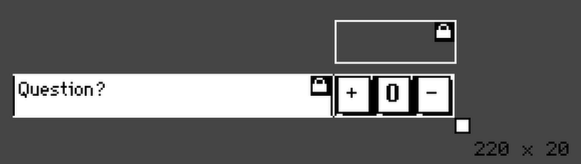
The idea was to make a prefab "question" box, akin to those weird psych questionnaires where you have to answer a series of questions to varying degrees of affirmative/negative. The current design looks like this:


The buttons on the right are meant to act not unlike a radio button: you click one, it goes inverted, uninverts the other two, and stores the new value (1, 0, or -1) in the hidden field above.

The prototype code looks like this:

on get_question do
 questionText.text
end
on set_question v do
 questionText.text:v
end
on get_answer do
 answerVal.text
end
on set_answer v do
 answerVal.text:v
end

With each button having a variant on this script: 


on click do
 me.parent.widgets.answerVal.text:1
 me.show:"invert"
 zeroB.show:"solid"
 minusB.show:"solid"
end

`answerVal` here is the invisible field. `answer` is set up as an attribute with the "number" type.

This works fine when testing within the prototype editor. I can click on the buttons, they toggle as expected, and if I peek at the value in the hidden field, it has the correct one for the currently depressed button.

If I make one of these contraptions on an actual card, though, it breaks. It looks like it's working, but `answer` doesn't actually get updated. Since the goal is to be able to sum the answers from a bank of these contraptions, that is obviously not useful, but I've tried a number of variations on how to handle the stored value and none of them seem to work.
Any ideas?