Indie game storeFree gamesFun gamesHorror games
Game developmentAssetsComics
SalesBundles
Jobs
TagsGame Engines
(+2)

Hi, I've just started using Decker and it's great. Really fantastic environment to play in. Congratulations!

My question is probably obvious to someone versed in Lua or Lil, but if I want to stock a grid with items from a column in another grid, how could i do that? For example, to display a list of items being carried in an inventory.

At present I have 'invlist' which is a grid containing all the possible items, with names and other date (such as a parameter number for their effects. But I want to have the ability to select from a list of held items which would be displayed on the cards. So I need to draw in data from the names column of 'invlist' to populate a grid based on a numerical list of what the player is holding  However, everything I try seems to hit a brick wall Any newbie advice for populating grids and/or adding items to them?
(+1)

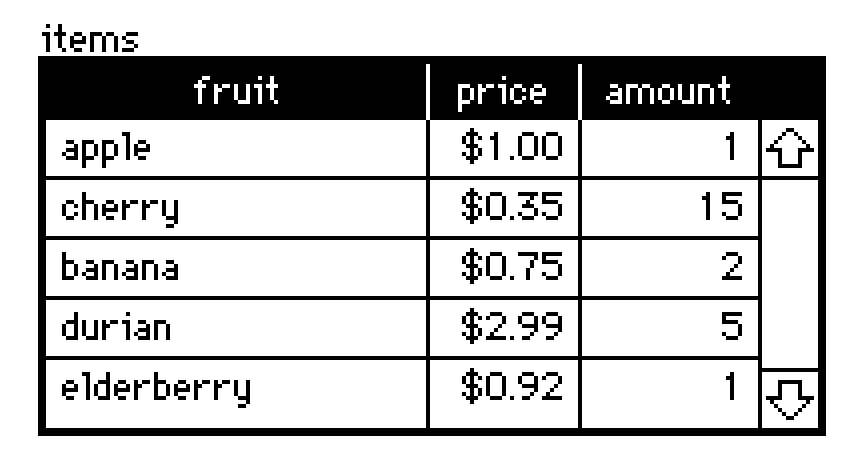
Grid widgets, like this example named "items":


contain tables. You can read or write the table of a grid widget via the .value attribute of the grid. Tables can be indexed numerically (looking up rows) or by strings (looking up columns):

items.value
# +--------------+-------+--------+
# | fruit        | price | amount |
# +--------------+-------+--------+
# | "apple"      | 1     | 1      |
# | "cherry"     | 0.35  | 15     |
# | "banana"     | 0.75  | 2      |
# | "durian"     | 2.99  | 5      |
# | "elderberry" | 0.92  | 1      |
# +--------------+-------+--------+
items.value[3]
# {"fruit":"durian","price":2.99,"amount":5}
items.value.fruit
# ("apple","cherry","banana","durian","elderberry")

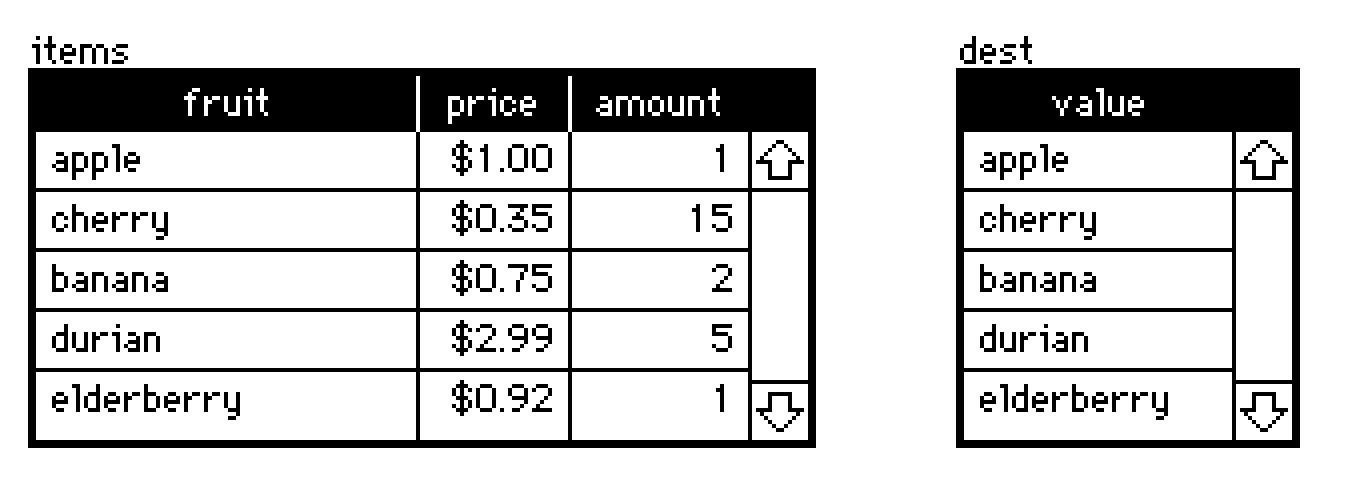
In the simplest case of populating another grid with a specific column of a source grid, assigning a list to the destination grid's .value attribute will implicitly cast it to a table:

dest.value:items.value.fruit


For more complex transformations of data, there's Lil's query language:

select fruit price where amount>2 from items.value
# +----------+-------+
# | fruit    | price |
# +----------+-------+
# | "cherry" | 0.35  |
# | "durian" | 2.99  |
# +----------+-------+

A query never modifies tables in-place; it returns a new table. Just like before, we can take the source grid's .value, query it, and assign the result to another grid's .value attribute:

dest.value:select fruit amount where fruit in "cherry","banana" from items.value


There are many examples of using queries on tables in the Lil reference manual section Lil, The Query Language. If you aren't using it already, Decker's Listeneris very helpful for trying queries interactively or generally testing out snippets of code.

Does any of that point you in a useful direction? I can try to furnish more specific examples of how to formulate queries for your project if you provide additional detail about how your data is organized.

Thank you - this has got me very close.

I came up with something like

 invdisplay.value:select Name where Item in 0, 1 from invlist.value

This allows me to fill invdisplay with the names of items 0 and 1 from invlist, which is great!

But I also have  a grid for tracking the inventory, so it is a table containing a single column of values such as 0, 2, 5, for example.

I just can't figure out how to turn that column into something usable in this select query, since something like the following does not work:

invdisplay.value:select Name where Item in carrying.value from invlist.value

Any clues?!

All the best,

Phil

(+1)

You have several approaches available.

The @ operator can be used to index a list, dictionary, or table by a list of indices or keys. For example:

items.value
# +--------------+-------+--------+
# | fruit        | price | amount |
# +--------------+-------+--------+
# | "apple"      | 1     | 1      |
# | "cherry"     | 0.35  | 15     |
# | "banana"     | 0.75  | 2      |
# | "durian"     | 2.99  | 5      |
# | "elderberry" | 0.92  | 1      |
# +--------------+-------+--------+
items.value.fruit @ 0,2,3
# ("apple","banana","durian")

Indexing a table in this way gives us a list of rows (each a dictionary), but we can glue those back together with the "table" operator:

items.value @ 0,2,3
# ({"fruit":"apple","price":1,"amount":1},{"fruit":"banana","price":0.75,"amount":2},{"fruit":"durian","price":2.99,"amount":5})
table items.value @ 0,2,3
# +----------+-------+--------+
# | fruit    | price | amount |
# +----------+-------+--------+
# | "apple"  | 1     | 1      |
# | "banana" | 0.75  | 2      |
# | "durian" | 2.99  | 5      |
# +----------+-------+--------+

To clarify my earlier examples, in most applications the "in" operator attempts to check whether an item on the left (or each item in a list on the left) appears within a list on the right:

3 in 2,4,5        # 0
5 in 2,4,5        # 1
(3,5) in 2,4,5    # (0,1)

Within a query, you could do something roughly equivalent to our first example by referencing the implicit "magic column" named "index":

select where index in 0,2,3 from items.value
# +----------+-------+--------+
# | fruit    | price | amount |
# +----------+-------+--------+
# | "apple"  | 1     | 1      |
# | "banana" | 0.75  | 2      |
# | "durian" | 2.99  | 5      |
# +----------+-------+--------+

If your desired indices are stored in a table, you'll need to pluck out a column of that table before you can compare it to another column with "in" or index with "@":

invgrid.value
# +-----------+
# | itemIndex |
# +-----------+
# | 0         |
# | 2         |
# | 3         |
# +-----------+
invgrid.value.itemIndex
# (0,2,3)
table items.value @ invgrid.value.itemIndex
# +----------+-------+--------+
# | fruit    | price | amount |
# +----------+-------+--------+
# | "apple"  | 1     | 1      |
# | "banana" | 0.75  | 2      |
# | "durian" | 2.99  | 5      |
# +----------+-------+--------+
select where index in invgrid.value.itemIndex from items.value
# +----------+-------+--------+
# | fruit    | price | amount |
# +----------+-------+--------+
# | "apple"  | 1     | 1      |
# | "banana" | 0.75  | 2      |
# | "durian" | 2.99  | 5      |
# +----------+-------+--------+

You might consider keeping track of inventory items based on their names, or some other semantically meaningful "id" or key column, rather than by index; it could be more human-readable, and if you make any mistakes writing your queries it may be more obvious where something has gone wrong.

I would also like to note that grids aren't the only way to store collections of data within Decker, and may not always be the simplest choice. For example, you could also store a list of indices in a field widget via its .data attribute. Say we have a field named "myList":

myList.data:11,22,33

The field will visually show the data as "[11,22,33]". If we read myList.data we can reconstitute the list:

myList.data   # (11,22,33)

Does that help?

(+1)

Thank you again! I am away from my machine RN, but I will give these a try tomorrow!

(+1)
invgrid.value.itemIndex 
# (0,2,3)

Thanks! This was what i was missing! :) Thank you so much for all the wonderful examples.