

Over 10 years ago we introduced “Co-op” bundles as a way for developers to self-organize bundles of content across multiple accounts with custom revenue sharing.
Since then we’ve hosted thousands of bundles, including the biggest bundles ever hosted.
Our bundle creation tool was originally designed to give the least possible surprises to participants. Once created, a bundle was locked and participants could only approve or deny. If any changes needed to be made an admin would need to be involved or the bundle would have to be recreated. This process was not designed for the wide range of sizes that bundles on itch.io can be, so today we’re launching our revamped bundle creation tools.
We hope you enjoy this update and I’m looking forward to all the new bundles to come.
Editing Updates
- Bundle drafts are now fully editable - Hosts can now fully edit all parts of the bundle’s content while in draft mode assuming no participants have approved it yet. No longer do you need to recreate a bundle if you forgot to add someone, or if you need to modify the splits. You can now work on your draft bundles to get them into the right state before sending them off to your participants to approve.
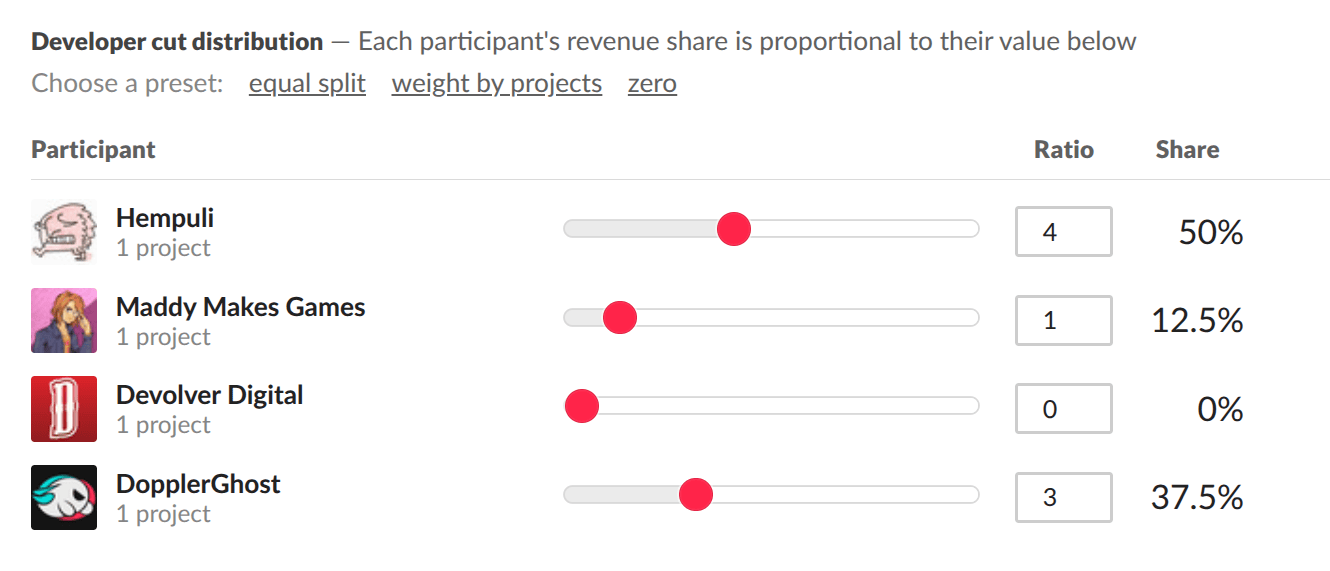
- The bundle split picker has been completely rebuilt - Gone is the very clunky whole number percentage slider. Bundle splits are now done by ratio, and can be accurate up to 2 decimal places. You can easily ensure that everyone’s portion is set to exactly what you want it to be, no matter how large the bundle is.
- Projects can be imported directly from jam or collection URLs - You can paste in the URL of a jam or collection to copy over all the contained projects. This feature perfectly complements our recommendation to use Jams as a means of having a bundle with open submissions. Run your jam, moderate the submissions, then paste in the jam link on the bundle creation page to get your bundle created.
- Project order can be explicitly specified - You can drag and drop the order of projects contained in the bundle when editing to ensure you get the desired presentation on your publicly facing bundle page.
Advanced Hosting tools
Too often we’ve seen someone assemble an impressive bundle, but at the last minute, one of the participants just isn’t responding. In our old system, the entire bundle would have had to be remade. That sucks. We’ve got some advanced tools to help hosts of larger bundles avoid no-shows ruining the entire bundle.
- Up to 15% of projects in a bundle can now be pruned if it will enable the bundle to become publish ready - Remove any participants that aren’t responding if they don’t make up a significant portion of your bundle. This is an opt-in field for bundle hosts. Participants are shown a notice about this when approving.
- It’s now possible to reset the participation of a partially approved bundle - If things aren’t going according to plan and a large percentage of participants just aren’t approving, you can now reset the participation of everyone so that you can edit the bundle’s contents and then send out the approval link again.
Other nice things
The bundle analytics page displays daily/weekly views graph. Additionally, on the top of the analytics page, you’ll find the total views your bundle has received.
Enjoy!