Indie game storeFree gamesFun gamesHorror games
Game developmentAssetsComics
SalesBundles
Jobs
TagsGame Engines

K. A. Laherty

106
Posts
5
Topics
28
Followers
66
Following
A member registered Oct 27, 2014 · View creator page →

Creator of

Recent community posts

Ah; I skimmed the key binding, but missed out on that. Those little quirks like automatic weapon switching can only be figured out by watching other people play the game... my game didn't have it and I never heard a complaint, but I always wondered about it. I was always mixed about it when I experienced it in other games, so I just left empty weapons with a dull "click" sound when they were empty and a little console log like "You picked up a shotgun"-when you picked up a new weapon.

Thanks for the link to the dev videos! I should probably get some sleep soon, but I've subscribed and watched a bit of the first video.  I'm already pleased by seeing the map editor.... The reason "KatzenKlein Redux" only has four levels is because I wrote the map editor while writing the engine... it was sort of like the build engine, but only using quads... I think I'll return to the idea, but I just kept adding to it and never coded an "undo" and "redo"... very simple stuff to implement early, but it became a mess very quickly.... I just didn't like making maps.

I actually wasn't aware that there was a binary client for itch, so I just downloaded it to run on Linux Mint and yeah; it's broken. I searched my own game while logged in and it couldn't find it... but I could just click on it via my username.

My assumption is that this had either been abandoned, or it hasn't been considered "high priority" for a while... either way; the download should be pulled off the main page for now. It's actually not good for how itch is perceived. I'd recommend posting this in one of the "ITCH.IO" forums, underneath "GENERAL". I'd assume under the sub-forum "ideas and feedback", though I would of thought it was "itch app development", but I'm not seeing any complaints there.... 

I'm not connected with the itch.io dev team at all, I'm just a solo game dev, but what operating system are you running? I might be able to help with articulating an inquiry.

(1 edit)

I must admit that I only listened to the demo song, but it led me onto your youtube page and now I'm I follower. Interesting stuff.
I subscribed after listening to "Rockers can't play Jazz they say". I find myself listening to a lot of Jazz and other instrumental work while programming or doing graphics stuff because I just find words too distracting at times, but did you know that in western academic Jazz; guitar bending and sliding is frowned upon? I'm pretty sure they'd frown upon percussive guitar, so I'm only left with 20% poorly played notes! Thank god for Fusion Jazz.
Good stuff man, I hope that you keep it up :)

After reading through the comments, I think it would be wise to actually ask individuals who play and buy games, but do not make them; if they were going to check out a game from outside the steam store front, what would it take? Try and focus on the individuals who are avoidant of more independent store fronts and try to figure out why they might feel uncomfortable browsing and purchasing from a more independent source.

I think I posted four games on itch before actually purchasing a game, because I didn't quite know what the payment processing was... It turns out it was just payPal. Most people can do that, but keep in mind that GooglePlay wants a "google wallet" and there are a ton of ways to pay for things online.

I think there is also the concept of "perceived quality"... It is assumed that there is a form of quality checking on Steam, but terrible games exist on their, so how bad must the games that do not get on steam must be? A customer doesn't know the process of what a developer does to get on steam, so they just assume it's all quality control.

When I tried your site; I got an error the second I clicked on it... is it mean for mobile browsers? I didn't check the browsers development terminal because I was trying to get the non-developer experience, and it's quite the turn off. I'm going to assume that you're just starting up and provide some advice that you should feel comfortable dismissing (I've never sold a game).

Once you set up a payment system, it's quite common to take around 10 to 30 percents of each sale, no matter what you settle on; people will complain, but use a percentage of that income to source connections with social media personalities related to specific genres. Set up game jams and so on. Educate people on the payment system and try to push an anti-DRM mentality. Don't waste your time on an external downloadable storefront, focus on convenience; "make an account, we'll take care of the rest", then you can advertise; "we support indie developers".

If you try to build a store front around the concerns of indie developers; you will get a store front for indie developers, selling to other indie developers, but if you ask the actual market; you might build a functional market.

To directly answer the last part of your post; yeah, I'll post my games anywhere that will have me, but I think you could probably have a slightly higher bar than that. You could have developers proudly posting the first link on their advertisement to your site.

I'm not really a pixel artist (though I do have some experience with it), but I think that a Pokemon fan game would probably be a good place to start since the reference material ranges from simple 8-bit and up, with the first few games being very simple, but effective.

Since you haven't posted any examples, I'll just give the advice I'd give to someone who's just told me that they were interested into getting into pixel art and didn't know where to start.

First off; pick a software... I'd recommend "libreSprite", it's based off "Aseprite", with slightly less features, but completely free and has everything you need to get started. For a more powerful option, I'd recommend Krita (which is also capable of animation), but if you specifically want to make pixel art and pixel animations; libreSprite actually makes it easier to use limited palettes and sprite sheets. I actually use a mixture of both for my current game animation setup.

Second; look at how the artists handled limitations when actually using restricted hardware and study them. I'd highly advise The Spriters Resource. If you can think of a well known game for a retro console, you will probably be able to locate a ripped sprite sheet from it.

Other than that; just keep practising and don't be put off if your early work is terrible... it sort of needs to be since the best way to really learn something is to make mistakes, then try and figure out how to correct them.

Best of luck and I look forward to seeing some pixel art! :D

I think the two things I’d suggest are mouse sensitivity options, and some sort of melee weapon for when you run out of ammo… I ran out a few times and it sort of changes the flow a fair bit.

I love seeing people code their own engines, I made a retro FPS a while ago (though I’m still going through and optimising it for Android) and would love to hear about the experience of coding your game. Have you considered a devlog breaking down some of the technical aspects and issues you had to work through? I can understand if not; posts about data structures and algorithms aren’t that interesting to most people and don’t really advertise the game that well, but I’d be very interested.

Another person asked if you were porting the game to Android, and I hope that you do give porting a go… SDL2 really does make it easier (though, not as much as SDL3), and assuming which libraries you used based off the *.dll files packaged with the game; it shouldn’t actually be too hard… though I’m sort of assuming that you’re using OpenGL 2.1, which is mostly compatible with OpenGL ES 2.0 (for Android and browser ports).

Great stuff, keep up the good work. :D

Thank you and I’m glad you enjoyed the game; it means a lot for me to hear that.

No problem; glad to help.
Trying to figure out what to research and what order to do it can be a pain, but it gets easier over time.
I think the largest hassle I usually have is not knowing specific commonly used terms, but I’ve found that explaining what I’m trying to do to an AI usually provides me with enough terminology that I can use to find research material.

Hi there, I played your game in the the browser and it seems like a solid start.

I think a good place to start expanding would be by making a second enemy with different logic to the current chasing variety, with the goal of setting up a simple system so that adding more variety will be easier in the future. If you’ve never researched “state machines”, I’d advise looking into those since they are very simple to understand and code.

Path finding would also be useful, whether it’s for another enemy, or to make sure the chasing monsters are less likely to get stuck behind obstacles. Being able to use path finding will most probably be very useful for future projects.

After that, I’d probably start trying to work out how your upgrade/ability system works… Does it interact with the state machine? Is it a sub system within the state machine? Do they update per frame, or on specific instances? I think if you're able to loosely describe what you want, researching solutions will become easier.

I think that would be a pretty good start research-wise, since they are easy to find, understand and put together, but will give the game a lot more variety and be skills that you’ll use and refine in the future.

Other than that, I noticed that the browser version still had an “EXIT” option, which you usually don’t want for browser and mobile games since a web or mobile application isn’t expecting the game to terminate itself. In Godot, you should be able use the functions “OS.get_name()” or “OS.has_feature(tag_name:String)” to avoid having to code each version differently.

Hopefully some of this is helpful and best of luck with your future game development :)

No problem; the game’s quite fun so it was a pleasure to play test.

I was originally going to suggest some quick code to allow some easing in and out of the velocity while running, but it’s actually better if you’re willing to research damping because it does really help simulate friction, so you’d be able to set a number for air friction, water friction and different numbers for specific blocks the player collides with, like ice or grass.

I haven’t touched Game Maker in years, so I don’t know if there is just an internal function for handling this, or if you have to code it yourself, but even if you have to code it yourself; it will probably come down to a “lerp” function (Linear interpolation) and looking up something like “frame rate independent damping”. It’s not as complicated as it sounds and it’s super useful because you’ll probably use it in a ton of future projects.

I just played through it and thought it's pretty good and a solid foundation to build upon.

I didn't mind the music, it worked well with the graphic style. I thought the music was a bit simple, but I didn't notice that it was AI generated when I was playing, though I haven't really listened to many AI generated chip tunes... maybe it's more noticeable to other people?
The graphics were cute and vibrant, easy to distinguish what is important and what is a not, and I didn't notice any gameplay related glitches while playing.

Some constructive critique that I can offer (hopefully it comes across as constructive) are:

The movement feels quite stiff compared to how the music and graphics suggest they should feel... Maybe some sort of easing into the running velocity would help? I noticed that tapping a direction to slightly adjust your position felt very stiff and made it hard to make small adjustments.
It looks a little like you're handling your player velocity for walking a bit like:
if (input_right) player.velocity.x = running_speed*delta_time;
Is this correct? If so; it lacks "damping", which can lead to a very stiff ON/OFF feeling to movement. If you look up something like "2D platformer velocity damping delta time tutorial" (without quotes), you'll probably find a lot of differing ways of implementing it. I'd love to be more helpful, but I'd have to see how your player input relates to velocity if I was going to make any really helpful suggestions.

It seems odd that when you're in water; the controls change. I'm guessing it's the kind of thing that I'd eventually adjust to after playing a few water levels, but it felt odd that the jump button becomes disabled once you're in water and you now navigate like a top down game. I think I was expecting something more like a Mario game, where you jump to swim and avoid sinking. Probably not a big thing, but I thought I'd mention it.

The last thing I observed that I thought was a bit jarring was the jellyfish. I think they're the only fleshy entity that can't be harmed, but can harm you. I think it would make more sense if they were little spiked orbs, like Navel mines, but then again; since there are bombs in the game, it would probably be confusing if they didn't explode. Once again; not a big thing, I just found it a little jarring.

Good stuff. I'm interested to see the final product. Best of luck :)

I played it for a while and wrote down some notes.
I liked the graphics and sounds. It was quite cute and seemed to all work together. It was also easy to understand and play.
The fire was fun to play around with too. It was cool seeing the fire spread and lead to trees burning down and boxes exploding.

I thought the actual combat was a bit flat... I've never really been a fan of enemies that just run at you. I think it would be fine for a specific enemy type, but when they all do it; it makes all the combat feel the same. I found that if you just stand still and time your hits, you can just use the same technique for all enemies... and if there's lots of them, you just run past them and let them walk to you. It also felt odd that the enemies would just wait in place until they saw me.

I think I'd suggest looking into some basic path finding (quite a few enemies would get stuck in place when trying to chase, or walk into the fires) and trying to spice things up with some different state patterns for each monster. For example, one of the enemies with a sword might try to follow the player, but find locations that are slightly out of striking distance (I imagine that you could just do a ray cast to find an open position), then lunging in for an attack and quickly moving back again. Maybe some could block, so instead of pushing them away, they push you.

I think a little more visual and audio feedback would help. For example, adding a sound and some sort of colour change or particle effect when drinking a potion. I also found it weird that when I killed the large heart at the top of a tower, I just sort of teleported outside... It feels like there should of been a musical sting and a fade out or something.

I also found it odd that when I zoomed out; the gameplay paused. I'm guessing it's so you can look around and plan, but it just sort of felt odd.
I'm also a bit perplexed about the rolling... I thought it was neat, but I didn't really find any use for it. Running past enemies seemed to work fine and I was a little disappointed that it didn't help when you were on fire (because, y'know; stop, drop and roll). I'm hoping that if you expand the monster attacks patterns, it might become more useful.

Hopefully some of that was helpful. Good work so far. Seems like it will be a fun game :)

I'm not sure if this will help, but if you played it or downloaded it when you were logged into your account; you might be able to find it by looking through your "Things to rate" collection.
To find it, go to "My Library" by clicking on the little downwards arrow to the right of your username, at the top right of the page, it will be under "Explore".
Then on the left side of the screen, under "Library", look for "Things to rate", which will bring up "Things to rate and review". Maybe clicking on sort by "Oldest" might help?

Thanks! That means a lot. I'm hoping to start developing new games soon... just need to finish coding some new tooling.

I played it for a while and found it enjoyable.
I ran it on Linux Mint and it seemed to run fine, but it ended up crashing around 40 minutes in, and unfortunately I wasn't running it through the terminal, so I didn't see if there was any output... I'll try and remember to do that next time, so if it happens again; I might get some sort of error output.

I found some of the user interface things a bit odd... Like how clicking on the visible inventory on the side of the screen didn't switch the active item... I know that using the number hotkeys does this, but it just felt odd that I was using a mouse and I couldn't select them with it. The distance that you can place blocks never reaches the inventory, so it just seems counter intuitive not to be able to click on them.
Another thing that I found odd was when in the shop interface; you can only close it by clicking on the very small "x" and not by hitting "esc" or clicking outside the shop window. There were actually a few times where it seemed logical that hitting escape would exit something, but it didn't, like when viewing the tutorials.

Other than that, everything else seemed to work and felt fine. I think music could really add to the experience... nothing brash, but maybe something ambient and with a moderate melody... I actually think it would be sort of cool if the music was contextual, where it starts out with the ambient wind that you currently have, but slowly changes depending on your current height, sort of suggesting that you're now in different areas and have met new milestones.

I found the narrative tone to be quite charming and probably the biggest reason I'll be coming back to it. I'm interested to see where it goes. Just before it crashed; the shop keeper had started building his pipe contraption (of which I was just starting to steal). It was neat to see the narrative moving forwards in that way.

Great work so far. :)

I tested it on Linux Mint and it seemed to work fine.
One thing that confused me a bit was whether the game is meant to have a lot of negative space on the left and right of the screen? I wasn't sure if it was meant to be this way or was becoming confused by my second monitor being vertical. I hope that makes sense, for some odd reason; I wasn't able to take a screenshot.
If so; have you considered having the viewports on the left and right side, taking up more of the screen?

I'm hoping the final version will allow for 2 controllers. I just played it by myself, but I imagine it would be more fun playing it against someone if we were both using controllers.
I noticed that sometimes the collision for the treasure chest seems a bit off, where driving right into it wouldn't pick it up, but touching its side seemed to work. I originally thought that they couldn't be picked up.
I also found it quite easy to get stuck on land, or on the corner of land... I'm not sure how you handle collision, but I think it would be more fun if you slowly slid back into the water, so you still get penalised, but you don't just get stuck.

I think the game could be quite fun with a bit of work. Off the to of my head, I'd suggest:
Adding momentum. The boats currently feel quite stiff, but I think allowing accumulative velocity with slow damping would make them feel a bit more like they're drifting in the water. Being hit, rammed into or being close to an explosion could also nudge the velocity, giving it a little more chaotic fun.
Power-ups! I imagine having short bursts of speed or spread shots could be fun, but if the momentum is added; you could also add "power-downs", which you could nudge the other player into.
Visual feedback. Maybe making the boats rock back and forward when hit, sway when turning and so on. Maybe a little fire on the boat when it has been hit and a screen shake. I just think it would make it a little more visually interesting.

Hopefully some of that was helpful, sorry if it was a bit all over the place; I'm recovering from the flu.... somewhat dazed. I'd actually like to see where this goes, I love playing local multiplayer with my partner and I think she might actually like playing a game about pirate ships.
Best of luck :)

Thank you! I was looking for a horror developer community. Just joined the discord.

I like to imagine that somewhere out there, their is the conspiracy that the idea of dairy farms using many cows is just "big milker propaganda", and it has become more common for farmers to invest in one giant cow.  Much easier to observe and tend to. The little cows people see are either photoshopped, AI, recoloured photos from the 1950's or just cows that are hired to keep up the illusion.

I think the models look really good and I think you're quite talented, but I wonder if the models are too polygon dense for kind of game you're making...
I'm not great with 3D, but considering that a lot of the detail isn't visible in the gameplay footage, I'd build lower polygon versions of the 3D models and bake the details down to textures... A normal map and diffuse at first, then figure out the rest.
I'd probably pick one important model that you've already made, then try and figure out at what level of detail is actually observable onscreen, then try to limit the high-poly versions to that level of detail.
If you just want to know if your modelling is good; it is, but if you want to optimise your work flow and potentially make the game run faster; I'd look into baking those details onto lower polygon meshes.
Best of luck with your project :)

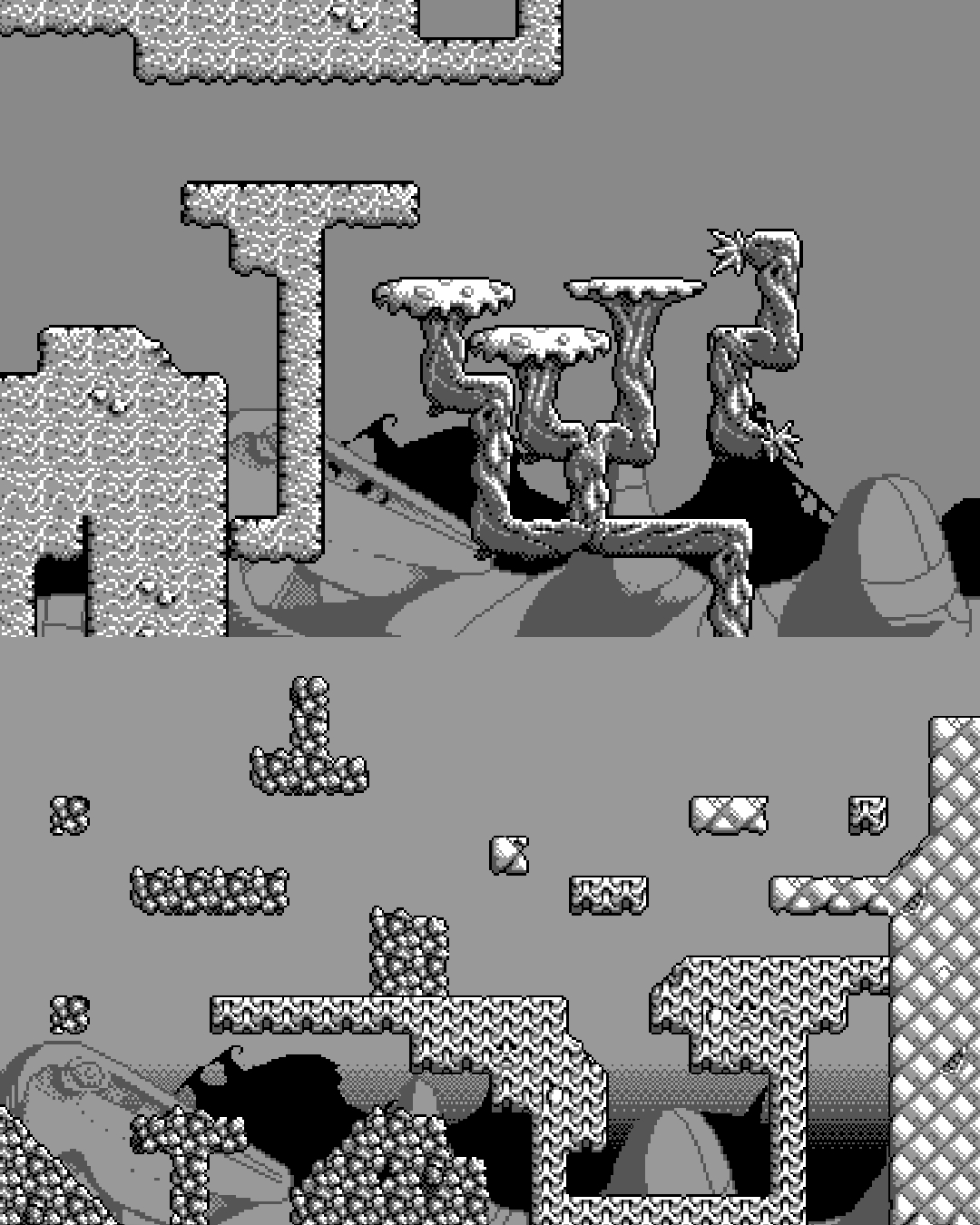
I recently started working on some tilemaps for asset packs.

The first one is a monochromatic scifi gameboy inspired pack... very inspired by one of my favourite gameboy games.
Technically it's not gameboy accurate since gameboy tiles have a max of 4 colours, which includes transparency,
but this set uses 5, if you include transparency... but it's all just 4 shades of grey and made up of 16x16 tiles.
I think this one is nearly ready for its initial release, so hopefully I'll upload it soon.
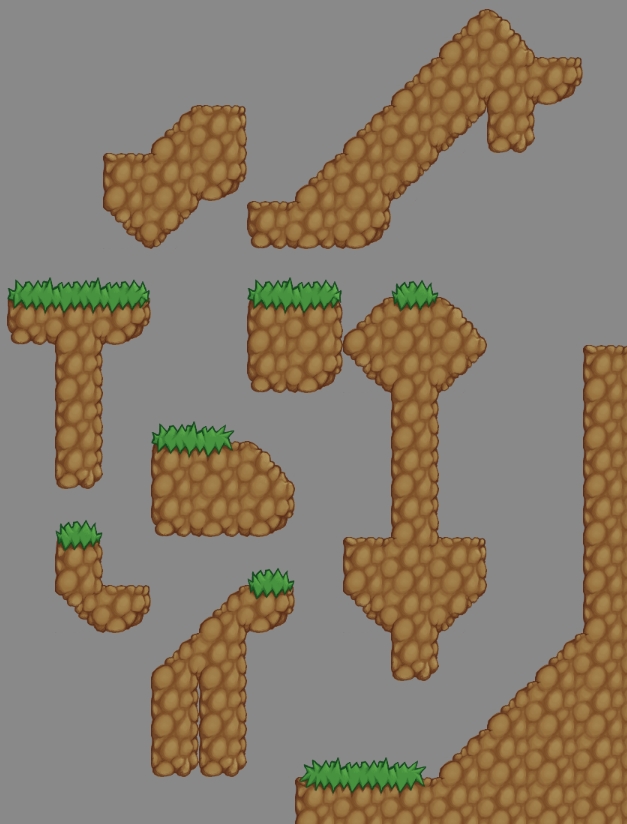
I've also started a 64x64 tilemap of some grassy dirt. I haven't done this kind of tilemap for quite a while, so I'm sort of relearning some of the quirks of connecting hand drawn tiles. This will probably be forest themed... not quite sure yet. This sheet needs a little touching up...

I think it's probably here to stay, but probably not in its current form. It's currently shiny and new, pitched as a solution to everything. I think once the shine has gone, it will probably just be seen part of a tool set and the tooling can be better refined with that goal.
There has also been a recent study (I think it was from MIT?) that reliance on AI is negatively effecting peoples mental capacity (problem solving, attention span and so on), which seems to point toward the benefits of not using AI to "do things for me", but as an additional learning resource, so I'm hoping people pull back from the over reliance on it soon, but who knows? It's hard to tell people that they shouldn't rely on a convenience.

I think it's a hard one.

I don't use AI for my musical or graphical stuff, but I'll use AI when I'm coding large or new projects... I don't get it to code for me, but I'll either explain a system that I'm planning to code to it, to get some feedback and help me think it through, or help me with research and working examples.

Though I'm hoping to move into selling assets and trying to get some commissions; I can see why developers using AI generated assets that they generated themselves might be extremely helpful, whether it's due to a sense of control or a lack of budget. I'd rather a developer make and release a game than not do so, because they can't afford an artist or find one that shares the same vision.

But selling asset packs that are AI generated? I obviously feel a personal discomfort with that. I think if it became common that the expectation would be that if an asset pack was made using AI generation; it was clearly stated, as well as the tooling used; I think I'd be a bit more comfortable with that.
I guess the real fear might actually be the "race to the bottom" that artists might feel. Let us assume the person selling AI generated assets isn't overpricing their work (I literally wouldn't know, I don't think I follow any), and the pricing is based on time required to generate, minimal touch up (maybe just even converting to an optimal format), time required to set up store-page and a small extra like $1; If the buyer perceives something I make to be of even a similar value; I can't compete with that pricing at all.

I think the reality of it all is that once the razzmatazz of AI fades, it will eventually just be seen as common tooling, which will help it be refined. Currently I see it more as a way of producing highly detailed, but somewhat bland placeholders with a lot of iffy copyright issues. The removal of it from itch would just create a secondary market place, where people could find cheaper assets, but possibly never stumble upon the charm of a hand crafted asset pack.

Sorry for the long rambling comment... I think I'm somewhat putting off some homework, but I've sort of been thinking about the subject recently, so I thought I'd try to contribute.

Yeah... so far, apart from Itch, the only marketplace that seems promising is the Samsung marketplace, but I still need to do more research. I've got time since I'm coding a new engine for my 2D stuff, but it's frustrating since I'm shooting myself in the knee when it comes to visibility.
It's a shame since I really like making games that run on a tablet, phone or Android TV box... It's like the poor mans console development.

I looked at the video and the images in the post and I'd say that it's probably a bit too abstract in its current form to interest many people, but I don't think it's a waste of time since you're probably learning a lot while making it, which you can most likely use in future projects.

Are you currently using this in any of your game development projects? I figure the best way of building a useful tool would be building it to solve problems that you yourself can benefit from. That should at least produce the basic foundations of the tool and give it a more specific direction, which you can build upon later.

I'm probably not the intended user, but some things that I can think of that might be beneficial to add (if you haven't already) are:
Edge & face extrusion (This makes generating new and useful vertex data a lot easier)
Polygon cutting (for the same reasons as above)
Grid snapping with level of detail options (It just makes life easier for things like map making)
Undo and redo (I forgot to add this to a 3D level editor and just found it made level editing quite stressful. The earlier you add it; the less complex it is to code)

Best of luck with the project. :)

I think another thing to consider is what kind of work load are you expecting from your visual artist or programmer?

I'd imagine the ease of locating someone unpaid would become smaller as the scope increases. If it's some pixel art that can be knocked out in a few hours, or some specific assets like background artwork or character animation (for a small game); I can see some people contributing to add to their portfolio, or if the programming was a few helper algorithms or building a small system that helps the overall project, maybe even game logic for a small game (like a gamejam game), but if you were after one person to do all the visual assets for a large game, or wanted a single coder to produce underlying systems and game logic for a large game; I imagine those people would be hard to find.

Though this is only my opinion, maybe it's worth consideration (who knows);
I have some experience with programming & visual assets, and I hope to start contributing to other peoples projects (eventually working towards paid commissions), but out of the two, whether paid or free; I expect to stick to contributing visual assets and not offering coding services.

My reasoning is that if I'm offering visual services; it's quite easy to figure out what the client wants, whether they give examples or you can quickly put together some loose samples that can be used to try and figure out what they want. It's also not too hard to jump into a project that already seems to have an overall style and adapt to it; contributing small sections. It's also quite fun to be working on more than one project, switching up style and technique.

I consider programming somewhat different... Even if a person hasn't got a background in visual arts, they can tell you what they like and offer direction, but I'd say coding is a little different. If I was to do all the programming for a project; I'd need to have a clear understanding of what the complete project is intended to be, maybe even a game design document. Programming for a person who doesn't code is a process of turning abstract concepts into working logical systems, which is pretty much what you do when you direct your own code, but if they decide to make changes along the way, you might have to do massive rewrites, which sounds sort of annoying.
Another difference is that even though it may seem that having more coders will make the process easier; there's a high chance that it will cause additional complications... As it was said in "The Tao of Programming":

3.4
A manager went to the Master Programmer and showed him the requirements document for a new application.
The manager asked the Master: "How long will it take to design this system if I assign five programmers to it?"
"It will take one year," said the Master promptly.
"But we need this system immediately or even sooner! How long will it take if I assign ten programmers to it?"
The Master Programmer frowned. "In that case, it will take two years."
"And what if I assign a hundred programmers to it?"
The Master Programmer shrugged. "Then the design will never be completed," he said.

That book is intended to be a humorous text, but I think there's some truth to it. Though I'm really just guessing; I'd say that it would be easier to locate a visual artist, though a programmer might be more in demand, so I'd assume (depending on scope), a programmer would be more expensive, though in reality; I have no clue.

Unfortunately I didn't code in any gamepad controls since I was sort of using it to learn, but I do believe that I have the source code still and I'm currently learning SDL3, so if I update it as a mini-project, I'll make sure to add gamepad controls.

I very much enjoy checking in on this project every so often when it pops up on my feed. Love the addition of music; it's very quirky for a tool but very charming. I think I'd like it more if the music was a clean loop, but very cool.

Thank you, it means a lot.
I'm hoping to spend this year refining my asset making ability so I can produce my first commercial game, but also start doing commissions and release some asset packs.

I can understand why you might be annoyed, but the kind of disclaimer you're wishing to do will not help you.

I've never sold a game, but I wish to do so in the future, so feel free to dismiss me, but stop thinking solely as a developer who wants to make money,  but remember that your sales will be based on people wanting to play and buy indie games.

Have you ever decided to check out a game because of a youtuber?

It sucks that they might make more than you, or if you have a narrative or linear game; they might play through the whole game and lose you sales, but you do not want to be that "angry developer". I know it sucks, but try to work around it.

I hope that you don't think I'm trying to be rude or mean, I'm just really don't want you to do something you'd regret.

Sorry for the late reply; I was away from home, but just checked out the Linux version and read the Devlog.

Cool stuff, very impressed by the size and lack of external dependencies. What are your external includes/libraries?

Two suggestions that I have:
I noticed that the window has both the enlarge and scale options available, but the engine doesn't resize to the new size. The window API you're using should have some sort of flags or functions to disable these options, or you should be able to grab the current window size through an API function, but either way; learning those flags or functions will just give you a little more control for the engine.

I also noticed that one of the maps contains a slope and through Debug mode; I saw that it was created with multiple tiles. It works, but I figure that adding sloped tiles would stop over-draw and be more efficient. You could even allow sliding based off the normal of the slope. I remember THIS article helped me a lot when I was making an AABB vs AABB platformer in the past.  Lots of good stuff that's easy to implement in that article.

I'll definitely keep an eye on the project. I'm a big fan of people coding their own engines :D

Nice. What software was used? If it wasn't for the intro sound; I would of assumed it was a tracker, but it sounded like the "talky bass" effect that you get from mixing bit rate decimation with a resonant low pass filter, with a feedback delay(?)

Cool stuff. I'll check out more later.

No problem, I know how important feedback is and how hard it can be to get at times.

I also hear you about trying to figure out difficulty, or even how "fun" something is after you spend hours speedrunning a game over and over, looking for glitches and trying to balance things. If you can get a friend to play through it, or if someone uploads a video of them playing the game, watching how someone else interacts with it can really help, sometimes even more than direct feedback.

It's probably going to be a while before I release a new game, but thank you for the offer.
Keep up the good work :)

My code is usually an absolute mess until I finally have most of it done and I start to like the project, then I'll either clean it up or rewrite it.

I've used that kind of collision method before and it can work pretty well, but be wary if you're not using a fixed frame rate because delta time lag or high velocity can cause teleporting through AABB's or other odd inconsistencies, but your collisions seem to work fine from what I saw. 

Performance wise; I can' think of anything faster than AABB vs AABB, but are you using quadtrees or some other spacial partitioning? That should minimise the amount of collision checks per frame for entities compared to iterating through an array or list and comparing it to another array or list.

I'm following your page now, so I'll be interested to see where it goes. Keep up the good work :)

Hi there, I had a quick play through so that I could give you some feedback.

It seems fine for an early test, but the game feels a little static... I liked the little touch where some plants sort of sway when you run past them, but I found it a little odd that since the player runs so fast; it wasn't noticeable until I played through the second time, when I was trying to pay more attention to small details.

I don't mind the visuals and think they work, but I think a little more animation would be helpful. I think more frames of animation for the run, lifting the legs and timed better for the movement speed would help bring it together, as well as some sort of idle animation.

I found the difficulty fair and quite forgiving with the respawn points, though maybe too forgiving... It makes sense that there isn't a lives system, but have you considered something like loosing a single gem for every respawn? It might help with getting the player to try again to see if they can get a non-death run for each level.

Though I didn't find any game breaking bugs, I did notice two collision related things that I thought I should bring to your attention:

I found that if you are on the far edge of a platform, the game seems to detect a fall, but the player is still on the platform, so they sit there in this pose:
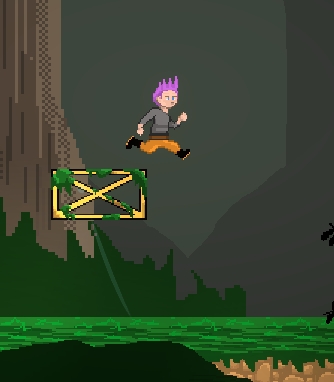
My assumption is that you are using a ray cast to check if the player is currently touching the floor, but this doesn't take into consideration whether the sides of the bounding box are still in contact with the platform. I don't use Unity, but I would check if there is an "onFloor()"-kind of command related to physics/collision detection or if you're able to grab a current list of intersections/collision-points with the player bounding box and check if any exist at the Y location that exists at the bottom of the bounding shape.

I only noticed this one once, in this specific place, but if you stand on the wooden platforms and run to the left, the player will do a little jump as it crosses back onto the grass.
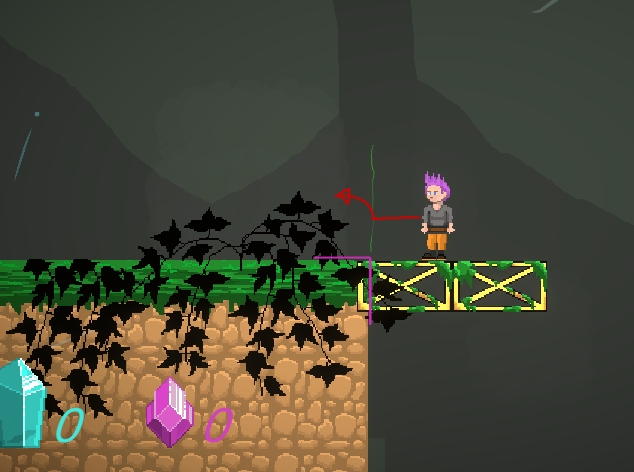
I'm assuming that the top of the grass and top of the wooden platforms are ever-so-slightly unaligned, with the grass being a pixel or so higher, so the player actually intersects with the corner of the grass and slides slightly upwards, leading to a jump. It's not a big thing, but I thought I should make you aware of it.

With the current build of the game, unfortunately I wouldn't say that I found it very fun, so if I stumbled onto it randomly; I probably would play the whole game, but I think it might have potential. Have you considered adding some enemies? I don't mean to fight, but to avoid, like the steam. For this level, I was thinking large bugs, mushroom men and so on. I think it would be more interesting to have some level themed enemies and make the player wonder what's going to be in the next level. Maybe you can bounce off some or use them to actually get to other locations. ...well, just a thought.

Hopefully some of that feedback was helpful.
Best of luck :)

Very cool, I'm always happy to see people writing their own engines. I tried it on Linux Mint using Wine 9.0 via Lutris and it seemed to work fine without any tricky configuration stuff.

I'm impressed by the file size. I use SDL to make porting easier, but it does increase the file size a fair bit and creates a few extra dependencies.  Obviously I'd like to see a Linux port, but I wouldn't have a clue how complicated it is to port the code to use Linux native window and input libraries.

I have a few questions about the engine:
How are you handling collisions? Not the full technical breakdown, but just the general outline.
How are you planning to implement sound?
Are you going to post a Dev-log?

Anywho; good work. I'm interested in seeing where it goes :)

Some recent loose concept sketches:


And some sprite work for a game idea I was playing around with a while ago (I call her "spaghetti girl")


I don't really use firefox or have any experience with GDevelop (Which I think the game was made in), but I had a quick look at what source was available to view from using Brave's developer tools and the javascript section seems to reference Mozilla's extensions relating to WebGL, though when I looked them up; it seems some references are depreciated, so maybe GDevelop hasn't updated their code base for exporting to HTML5? If so, I dunno if the developer can do much about that.

Though a lot of the time, even when an extension is depreciated; browsers will still allow for it (from my understanding).  I'd recommend opening the developer tools after the game loads and checking if there is a recurring error in the Developer console (if you're interested in that kind of thing).

I think a lot of web developers mainly develop using a chromium based browser in mind, then patch compatibility for firefox and other browsers, so a chromium based browser is probably just better for web games right now.

Pretty neat. It's a nice collection and they seem very aimed at classical roguelike development, so I enjoyed that.

I wasn't able to find the GitHub, but are they written in JavaScript? I ask because I thought they might be even more useful as learning material and JavaScript is a very readable language that's easy to convert to other languages.

I also think they might be more useful as functions apposed to stand alone tools, though I do like how you can check them out online as stand alone tools.
For example, converting the dungeon generator to a single function like:

int[] GenerateDungeon( int size_x, int size_y, int density )

Or the Name Generator as:

string[] GenerateName( string[] prefix_list, string[] root_list, string[] suffix_list, int quantity )

(sorry about the weird pseudo-code format... tried to make it like JavaScript, but I haven't touched it in years)
Other than that, I think the map generators need a bit of work, but map generators are always a process of tinkering, so I'm sure you'll refine them over time. I'd actually be interested in seeing the different methods of pattern generation used in your map generator mixed with your Color Palette generation code as some sort of procedural texture generation, but that's just an idea.

Good stuff so far, I hope that you keep expanding on them and experimenting :)

I'm guessing the blurriness is to do with the scaling technique that you're using within your image editor. If you can switch it to "Nearest Neighbour", the pixels should remain sharp. I'm sure that if you google your editing software and use the terms "scale" or "Transform" with the term "Nearest Neighbour", you'll find how to do it pretty quick.
Very nice work. :)