Indie game storeFree gamesFun gamesHorror games
Game developmentAssetsComics
SalesBundles
Jobs
TagsGame Engines

Wigglypaint

A topic by Internet Janitor created Dec 11, 2023 Views: 4,317 Replies: 21
Viewing posts 1 to 11
Developer(+2)

I recently released a tool built with Decker called WigglyPaint:
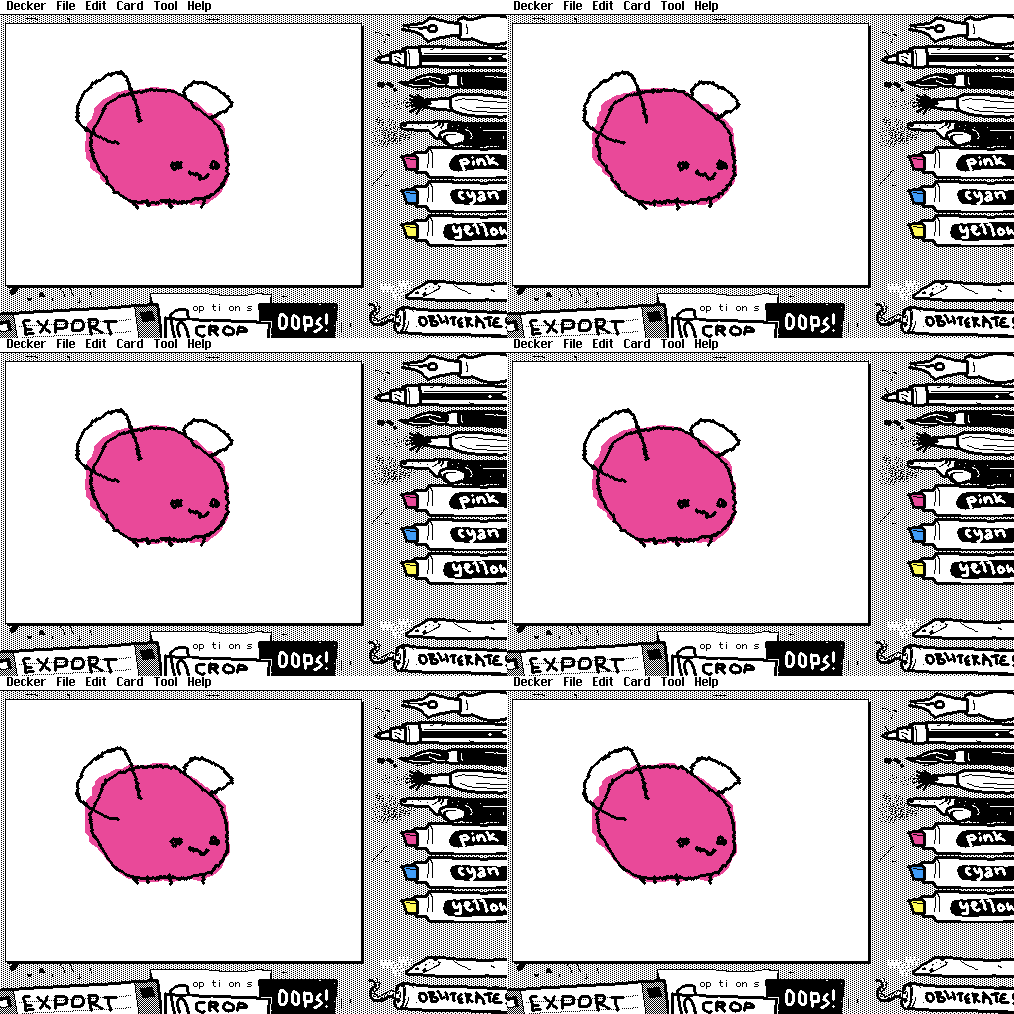
While WigglyPaint is capable of exporting drawings as GIF animations, Decker users should also be aware of a nifty secret feature: the main WigglyPaint drawing surface is a contraption!

By copying and pasting this contraption, you can add wiggly animated drawings to your own decks without writing any code:
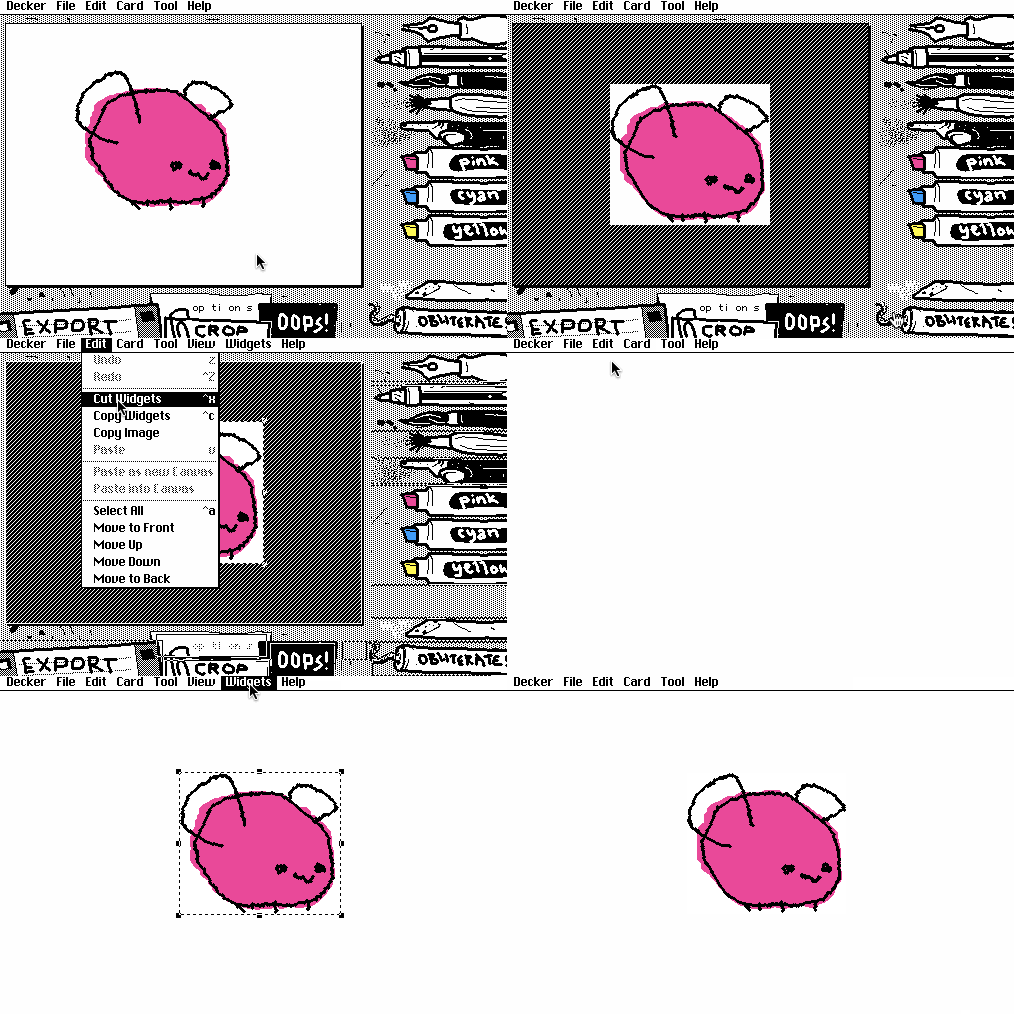

Note that you may wish to lock the pasted contraption (as shown above), to prevent stray extra scribbles!

Populated "wiggler" contraptions take up roughly 4x as much space as a static drawing of the same size, so be sure to crop them appropriately before exporting. They will also respect the ".show" attribute, so semi-transparent wigglers are possible.

(+1)

Thanks for posting this I was just trying to figure this out when you posted.

(+1)

Its too good.

I love it. 

(+1)

Honestly, this is making me want some sort of hyper OS on top of Decker. Some sort of Desktop/supervisor (I hesitate to say hypervisor) etc, where the programs are decks. Like, a Finder/desktop environment with folders where files can be stored etc. Decks can execute other decks. Mount deck images etc. Lil as a shell. Lil scripts as icons that can also be run with a double-click. I dunno, just spitballing ideas. Probably getting too sophisticated for a web app/authoring tool. 

I also would eventually like to see a "home stack" feature like the original HyperCard where we could take several stacks (like zine articles) and put them all together with a parent home stack. 

I think that it's neat that this little applet alone is attracting people to Decker.

(+2)

Hey IJ and Deckheads.

Do you think it would be possible for WigglyPaint (or even standard Decker drawing tool) to have a more robust drawing space with things such as multiple layers with toggable visibility and opacity settings? It would be really cool!

(2 edits)

It may not have everything you want, but this does have layers with toggable visibility for freehand pencil/paint:

https://woodring.itch.io/patternshop

It used to have different compositing operators, other than underpaint. But, I figured the 99% use case was underpaint compositing, so I dropped the rest.

Developer(+6)

I recently published a retrospective for WigglyPaint on my personal site, including my feelings on its explosive popularity, and- unfortunately- its rampant theft, misrepresentation, and fraudulent resale by bad actors: http://beyondloom.com/blog/onwigglypaint.html

(-4)

I sympathise with feelings you have Wiggly-Paint about how its used in the wild.  I don't want to run to conclusions but there is a possibility that they are just some high-school kid with no bad intention, just very limited understanding of the internet and code. Its very easy to 'accidentally' copy WigglyPaint with a LLM.

Anyway a solution I can think of is to add some sort of backed, which cannot be easily copied. Can be something as simple as drawing storage/sharing. 

Hope this helps somewhat!

(2 edits) (+5)

Respectfully, I don't think this is true or a good perspective on the situation.

These sites aren't hosting copies made by LLMs. It's always just Wigglypaint from itch.io re-uploaded. The likelihood of a kid with an LLM "accidentally" generating Wigglypaint down to the pixel, every line of code and also the entire Decker software behind it 1:1... it's not reasonable. And I don't think this is a high schooler's misunderstanding either: 

1) Some of these sites' owners are easily identified as adults. 

2) Some of the sites claim, incorrectly, to be made by Internet Janitor or the "Wigglypaint team". 

3) Tons of them are monetized: apps, referral links to other services, ads and offers of partnerships.

And furthermore, sidestepping any software technicalities: Most of them stole art from the artists here on itch.io to fill up their galleries. One of the apps even used these stolen artworks from itch in their promotional screenshots until more artists bought the app and they could use newly submitted work instead.

I just want to be very clear that these larger deceptive sites are not just run by some confused kid.

(3 edits) (+5)

Not to jump on the bandwagon to bash - but, to give another supporting perspective on this.

Even if it was an LLM, mistake or not, we shouldn’t support that either.

Silicon Valley has perpetrated en masse plagiarism and are telling us that it’s okay. And, they’re in the process of reselling our culture back to us. That’s… a problem.

Personally, I’ve been directly on the receiving end of plagiarism - where someone has stolen my published work to get an advanced university degree. My institution would do nothing about it and threatened to fire me if I kept pressing. It feels bad man - to have your work claimed by others and be normalized.

I generally give my stuff away - because I don’t care if someone copies it or learns from it. But, most people want to be recognized for their work, even if that doesn’t result in compensation. I feel good when someone uses something that I made. I’ll keep my copyright on things that I’ve put enough work into that I want to say, “I made that, isn’t it cool?”

I think that’s why so many people here in the Decker community are anti-AI/ML or are standing up for anti-plagiarism: it’s because we want to share - we want to see someone enjoy something we’ve made. And so, it feels awful when someone else claims your work as their own; LLMs or otherwise, no matter the circumstances.

Plagiarism should never be okay, no matter what form it comes in. Even if it’s a mistake, it’s wrong and we can say it’s wrong.

(-4)

Thanks for the reply! This can be the case as well, I haven't done thorough research when making the previous statement. I think t's good to discuss this and come up with a solution to honour the authors of the software as its a widespread issue.

(+4)

Sorry to get heavy in this thread but I have been looking into the fake Wigglypaint websites and I don't think there's any reason to make up stories about them being run by good-intentioned teenagers or people who "accidentally recreated Wigglypaint with an LLM" or whatever.

  • The sites are often deceptive about who is running them: sometimes claiming to be IJ, sometimes just the "Wigglypaint Team". 
  • They aren't using an accidentally similar program, it's usually either Wigglypaint 1.3 or Wigglypaint 1.5 with IJ's title screen credit removed.
  • Many of them are monetized with ads, subscriptions, apps and referral links to AI services.
  • The vast majority of them stole artwork for their "community galleries". One has even used stolen artwork for their promotional screenshots in the app stores.

And there's a lot of stolen artwork. Overwhelmingly it was taken without permission from artists posting their work here on itch.io. If you posted a drawing on the wigglypaint page here on itch between December 2023 and September 2025 your doodle may have been scraped into one of these galleries. This includes some of our own Decker community folks and even bigger names around the site like Leafo and Kenney.

You can see the write-up here. (It's not perfect, it was written to be a broad collection of evidence and a summary of the issues for affected artists. ) 

Or this spreadsheet of known stolen artwork connected back to the artist's itch.io display names.

This covers: Wigglypaint.com, Wigglypaint.net, Wigglypaint.org, Wigglypaint.io (a.k.a. Jigglypaint.com and the Jigglypaint app), Wigglypaint.run, Wigglypaint.fun, Wigglypaint.art, Wigglypaint.co, Wigglypaint.online, Wiggly-paint.com and Wigglypaintgif.com. 

There are others too, but without art theft or noteworthy lies they didn't make it into the writeup. Most of these sites appeared within a short period of time in mid-2025 when Wigglypaint had a spike of popularity on social media.

And I hope it's obvious (because this is the Decker forum) that the problem here isn't with modding Wigglypaint or taking it apart or learning from it. I've been helping people mod the program off and on and I will continue doing so as long as there's interest. Customizing the program for yourself is fun and easy to do.

The problem is people using a free program to run scams. Ripping off artists while using stolen work as the advertisements to lure them in. 

(-2)

Yeah sorry I feel kinda bad about posting it. I can delete the comment if you want.

With this great effort and research though, wouldn't you have a mechanism in mind that would prevent this misuse?

For fonts the open source license equivalent is SIL Open Font License (OFL), which has a clause which prevents the "reuse" of the "Reserved Font Name". If we would translate this to Wigglypaint it would mean none of these sites are allowed to use the "wigglypaint" name in their brand. These includes many applications you documented.  Technically this is probably already the case in some countries, but I think it is not explicitly stated in the MIT license. 
  
Another license BSD-3 for example has a clause to provide some protection:

> 3. Neither the name of the copyright holder nor the names of its contributors may be used to endorse or promote products derived from this software without specific prior written permission.

(+3)

For the record this has been in progress for a while. I just saw your comment when I came back here to add the findings to the thread. Thank you for at least looking at things.

The research was actually the simple part. The great effort was in getting confirmations from large amount of artists that they didn't give permission for their art to be used. But I think that it was necessary to avoid a different kind of pedant commentary -- the "Well, are you sure the art was used without permission? Couldn't the people behind the sites have contacted these specific artists?" kind of nitpicking. And now I've spoken to enough artists whose work was taken to be very sure about the scale of art theft.

But in any case I'm not the developer of Wigglypaint and have no sway over the license. I'm just an artist and community member who noticed that the creative works of people here on itch being were used as materials to scam people elsewhere and I really didn't like that.

(+4)

To be clear, things like the OFL’s “Reserved Font Name” or the GPL’s “must distribute source code” clause don’t actually do anything to prevent abuse like this. They just give you (in this case, IJ) the legal right to sue people who do break those rules, which means preventing abuse depends on IJ having the time and money to hire lawyers to do the suing, and investigators to figure out who needs to be sued, and possibly more lawyers to figure out which of those people live in countries where international treaties allow them to be sued from whatever country IJ lives in.

Without all that additional stuff, those clauses just amount to saying “don’t be a jerk” in fancier language, which.. I think was already implied.

(+1)(-2)

Suing is very rare. Before that people send a email to the site owner simply stating that they are not complying with the license. Then they usually already feel the heat. Like if they had to change the domain name to something else then wigglypaint, then they cannot ride on the visibility wigglypaint already has .  They would start with zero-visibility, which for low-effort clones, means many of them will get way less traction. For this approach it helps to have it explicitly stated in the license to quote it.

(1 edit) (+3)

wigglypaint is so awesome and epic and i love it so much!!  it's become one of my favorite tools for getting out of  artist muck and getting something out there - and probably my favorite tablet drawing program while traveling since it doesn't matter too much if im in a shaky car or plane lol

I had a question - I've started trying to customize the program for myself more with custom palettes and things, but is there a way to customize the pen tools as well?  I've been wanting to see if it's possible to make the ballpoint pen and airbrush apply thinner, for example, since the 'marker size' option only affects the highlighters.

Also - is there a way to put the pen/brush tools onto the same layer as the highlighter color tools?  this one is not that important but was just curious if it's a reasonably simple modification or not; sometimes I've wanted to go back and be able to color over lines without having to un-wiggle the edges around it with the eraser.  but i also understand this was a design intention, and it makes working with it almost feel like watercolor - there's no going back sometimes!


ty!!

Developer(+3)

It is possible to make these types of modifications, but it will require moderately involved scripting and familiarity with Decker's features. I strongly recommend starting by reading through All About Brushes, which explains how to extend and enhance Decker's native drawing tools. WigglyPaint takes advantage of these features for some of its wiggly drawing tools!

As of WigglyPaint v1.6, changing drawing tools is done via the changetool[] function in the Card-level script of the card "main". The PopOut contraption "pen" has a script that calls changetool[] like so:

on click do
 changetool[me me.name]
end

This in turn writes to the ".brush" attribute of "target", the main drawing area of WigglyPaint.

Drawing is directly carried out by the Wiggler prototype's prototype-level script: In Widgets mode, double-click the main drawing area to get the "Wiggler Properties" modal, then click "Prototype...", and then within the prototype editor choose "Prototype -> Script..." from the menu.

Within this script, we first see get_ and set_ functions used by WigglyPaint to configure the shape of the "highlighters", the eraser, the brush style, mirroring modes, and others. The draw[] function handles actually drawing lines and brush splats, and the drag[] function handles mirroring, playing appropriate brush sound effects, and doing some bookkeeping for the draw[] function.

Let's look at a simplified skeleton of the draw[] function:

on draw x o frames do
 if "eraser"~br.text
  # ...
 elseif "hi"~2 take br.text
  # ...
 elseif "pen"~br.text
  # ...
 elseif "pencil"~br.text
  # ...
 else
  # ...
 end
end

The arguments to this function are "x" (a position on the canvas), "o" (the previous location on the canvas in the current stroke), and "frames" (a list of three images comprising the wiggly animation), and the script also frequently references "br" (a field within the wiggler which tracks the name of the active brush) and "c" (the canvas widget that accounts for the visual appearance of the wiggler and is also used as a temporary drawing surface for brushstrokes). Based on the brush selected, we use the drawing coordinates we're supplied to update the frames of the animation!

The simplest tool is that last "default" option:

c.brush:br.text
each f in frames
  c.paste[f]
  c.line[wiggle[o] wiggle[x]]
  f.paste[c.copy[]]
end

All this does is choose a custom Decker brush by name and then draw lines on each frame, randomly offsetting the start and end coordinates each time. This means that without modifying the wiggler at all, we could use the information in All About Brushes to define a new brush, and then make a button or popout widget which selects that tool by name with changetool[].

The built-in custom brushes WigglyPaint uses are defined in a module called "pens". If you want to see and edit their innards, presently the easiest way is to save wigglypaint as a .deck or .html file, open it in a text editor and search for "{module:pens}". Here's one of the functional brushes you'll find inside:

# 4x4 stipples:
t:image@"\n"split 1 drop"
%%IMG0AAQABAAwMAA=
%%IMG0AAQABMDAAAA=
%%IMG0AAQABAAAYGA=
%%IMG0AAQABADAwAA=
%%IMG0AAQABIAAAIA=
%%IMG0AAQABAAgAEA=
%%IMG0AAQABEAAEAA=
%%IMG0AAQABAAAgBA="
brush[on StippleTiny do random[t] end]

This corresponds to the PopOut contraption in WigglyPaint which is also named "StippleTiny". It selects from a small set of pixel masks every time it "splats" itself along a line. Copying and pasting these "%%IMG..." strings into Decker (without quotes!) will let you see and edit the masks. It's a little tedious, but not as scary as it might initially seem!

The "highlighters" use the end of their names to specify one of Decker's pattern indices to draw in. Their implementation is more complex than a generic drawing tool because they work by compositing their brush shape onto the wiggler's canvas (c) while preserving "black" lines (pattern 1). Here "sh" is another internal field which stores an encoded brush shape image that we need to center at the drawing coordinates:

pat:0+2 drop br.text
img:image[sh.text]
s:img.size
y:x-s/2
each f in frames
 w:wiggle[y]
 f.paste[img.copy[].merge[f.copy[w s].map[1 dict 1 pat]] w 1]
end

If you didn't want to leave black lines alone, this could become simpler; we just need to map pattern 0 of the brush shape to our highlighter's pattern index, and everything else to pattern 0 (transparent) up-front:

pat:0+2 drop br.text
img:image[sh.text].map[0 dict pat 0]
s:img.size
y:x-s/2
each f in frames
 f.paste[img wiggle[y] 1]
end

Wiring this change up to a UI in wigglypaint- a checkbox, togglebutton, etc- is left as an exercise to the reader; you can reference the surrounding code and widgets for how all the other properties of the wiggler work.

Does any of that help?

And how do I make the target detect the checkbox? :v

(+1)

This is generic advice but hopefully it'll point you in the right direction.

In Decker Buttons (including checkboxes) have a .value attribute. The .value can be set to 1 or 0, true or false. If a checkbox is marked that means the value is 1 (true). 

You can have code check whether or not  a specific checkbox is marked and do different things depending on whether or not it is. For example:

if mycheckbox.value 
# some code goes here
else
# optionally you could put some other code that should happen if mycheckbox isn't marked
end

If the checkbox is on a different card (for example, on another card that's named 'options') you may need to refer to it by a longer 'address'.

if options.widgets.mycheckbox.value
# your code goes here
end

Here's another resource about using if statements in Decker. I hope this helps a little!