On Sale: GamesAssetsToolsTabletopComics
Indie game storeFree gamesFun gamesHorror games
Game developmentAssetsComics
SalesBundles
Jobs
TagsGame Engines

LuckyNumber8

162
Posts
6
Followers
A member registered Jul 12, 2017 · View creator page →

Creator of
Recent community posts

Thank you for playing our game! We are stoked that you liked it.

Thanks for playing, I'm glad you enjoyed it!

Thanks for taking the time to play my game! Haha yeah, I need to tweak the Dragoon's behaviour a bit so they don't wander off.  Thank you for the feedback and the kind words.

Thank you for taking the time to play my game, I'm really happy you enjoyed it!

It's a solid platform puzzler and chaining the bombs fits the theme really well! There might be some funny business with your environment bomb colliders, sometimes when Doki walks close to one, she gets caught and start floating upwards. Otherwise it's very polished and an amazing job overall!

Thank you for the kind words and for playing my game! The voice clips were one of my favorite parts too!

Thank you for playing my game! I'm really glad you enjoyed it. The voice clips were my favorite part to work on  as well.

It's a fun idea for a tower defense but I'm not sure if the web version is working properly. It didn't seem like my towers affected the enemy at all and they just pushed through. You picked a great event to commemorate though!

(1 edit)

Wow!! What a fun and well executed game! The art and bgm are great and fit the game well. Really reminded me of playing Time Crisis in the arcade. Amazing job!

It's a really well executed game! The bomb chain mechanics are really well done and the art and soundtrack set the stage for some great vibes. An amazing job overall, well done!

Thanks for playing, I really appreciate it!

Thanks for taking the time to play my game and for the kind words! Yeah I agree, the dragoons might be a bit too attached to Doki. I'll have to tweak that in the code. Thanks again for playing.

Thanks for playing my game, I'm glad you enjoyed it!

It's a cute game and the pixel art is great! I love how quickly it can devolve into absolute chaos, well done!

It's a neat puzzler that fits the theme and is executed well. Great job! I especially like how the gear can cause a chain of bullets to hit other targets. One thing I noticed is that the aim gets a little wonky when you move the camera, it might be an issue of grabbing the local position vs the world position of the cursor. Otherwise an amazing job!

The pixel art looks great and the movement feels nice to execute. It's a shame that the other features didn't make it in time for the deadline. It's a good starting point though, good job!

The art is superb and you really nailed the western aesthetic! From the silent movie effects to the ragtime piano soundtrack, just an immaculate attention to detail, great job! One thing I was unclear about was what to do when the star keys appeared, maybe a quick explanation in the how to play would help. Amazing Job!!

The pixel art is well done and the atmosphere is very cozy. Like the others have mentioned, I think a smaller map would better serve the gameplay. It can be a little frustrating to figure out which buildings you can or cannot enter. It's a good start though, Good Job.

The Pixel art is really well done and the game play is solid although sometimes it's hard to tell when I get hit or if I'm doing more or less damage. Having some damage numbers might be really helpful in conveying changes in attack or health. Overall good job!

It's a very neat idea and executed well. I'm a sucker for rhythm type games. One suggestion would be to consider rearranging the layout so that the prompts move over more of the screen so the player will have a reason to look at the funny emotes and video images. Sometimes I find myself just focusing on the bottom corner which I feel is a shame considering all the great animation work you put in. Overall great job!

It's a really neat sandbox puzzler and was executed really well. Good Job! It might be helpful to mention that you can move the camera around using WASDQE in the controls section of the information page as it might not be obvious to everyone that plays. Again, really well done!

Thanks for kind words and for playing my game! I'm thrilled that you enjoyed it!

Thank you for playing my game, I am very happy that you had fun with it.

Thank you for taking the time to play my game and for the kind comments, I'm glad you enjoyed it

6300 is a pretty sweet score! Thanks for playing my game, I'm very happy that you enjoyed it. 

Thank you for the kind words and for playing my game! I'm so happy that details like the colour change when targeted get noticed, really makes the work put into it feel worth it!

(1 edit)

Yeah, unfortunately I had to leave the rest of the project files out of the repo. During the development of my game, at some point a bug arose that was catastrophic and would crash the editor every time I opened the project. Even copy pasting the individual files and prefabs into a new project didn't fix it. I ended up uninstalling the unity editor and downloading a new copy and re-installing it. I then rebuilt my project from scratch using only the code from the repo. The thing is, I never figured out what caused the bug, and my current project is identical to the buggy one so  I don't want to risk passing around a project that will crash other people's editors.

If you would like to get my code in the repo running, I can list the settings I used:

(Input System) create a new input object, call it "PlayerInputActions", create an action map and call it "KeyboardMap"

Then add a Vector2 action titled "Movement", Vector2 action titled "MousePosition", Button action titled "MouseLeftClick", Button action titled "MouseRightClick", and a Button action titled "LaunchMissile" 

Physics Layers were set up as follows:

6 - Selection, 7-Navigation, 8-Player, 9-Enemy, 10-Ground, 11-Environment, 12- PlayerProjectiles

Assign your player prefab to layer 8, and player projectile prefabs to layer 12, all  enemy unit and projectile prefabs to layer 9, the ground plane to layer 10 and any obstacles to avoid to layer 11
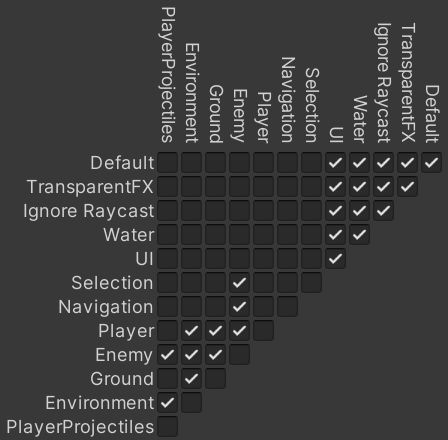

As for setting up the authoring scripts its actually pretty simple, anything in a folder needs to be assigned to a prefab object, otherwise assign each authoring script to an empty object in the scene. Both player and enemy authoring prefabs require a collider component, a URP base color component and a rigidbody component. Missiles are the same as units but with a few tweaks, make sure in the collider component to tick isTrigger and in the rigidbody component untick use Gravity. For the phalanx and cannon, they both use the projectile authoring and only need the collider with isTrigger ticked and a base URP color component.

Assign player and enemy unit prefabs to the Unit Config Authoring Object

Assign player and enemy projectile prefabs to the WeaponConfigAuthoring Object

Place one gameobject with the player spawn authoring script in the scene, and however many enemy spawn authoring scripts in the scene. Select destroyer or fighter for unit type, the other options were aspirational lol.

That should get you most of the way there. Cheers!

Thank you for playing my game, I'm glad you enjoyed. It makes me really happy that the work I put into the game, even the small details like the turret pivot gets noticed.

Thanks for playing my game! I'm glad you had fun with it. Haha yeah, I think Unity's input system defaults to 0 when press both directions are pressed, probably something to explore in the future.

O.O! wow 23700!! that is really impressive!!

Thanks for playing my game, Wow 17900 points is very impressive. The missies will only fire when there is a target within the circle reticle, it will usually turn red to indicate a target is present. As for the cooldown and fixing the missile going underneath the water, there were plans but as with any game jam there just wasn't enough time to implement it. Thanks again for playing.

Thank you for playing! Spamming guns and missiles is the way to go!! Congrats I think 10k is the record so far!

Wow that's a really cool game and the number of actions you can do is very impressive! I did get a game crash when I got in a shoving match with a bunch of the NPC's in front of the door but otherwise it was flawless experience. Definitely a novel use of DOTS's deterministic design, just amazing.  Great job!!

I just wanted to say I'm a fan of your work, and your Youtube  channel is a resource I reference regularly when learning DOTS. It was pretty cool that you livestreamed your development and to be able to see your process towards making games. I look forward to seeing more content from you in the future! Cheers!

It's a fun little shooter and a good demonstration of what you can do with Unity DOTS. I feel like it would be quite an experience if everything was just cranked up by 10X maybe even 100X. Like 100X the enemies and 100X the bullets and see where that goes, The color palette is a nice and easy on the eyes and everything is very readable. Great Job.

It's an impressive simulation and definitely a great showcase what Unity DOTS is capable of. It can be a little overwhelming and maybe because I haven't taken a biology class since high school, it's hard to tell if each replication I did brings me closer to the goal or not. Either way it is very impressive to look at. Amazing Job!

It's an interesting concept but it can be tough to figure out what you are supposed to do. I managed to copy and paste the symbol, but it was very difficult to be able to tell what I was aiming at, I basically spammed the copy key while moving my mouse around the towers general direction until it flashed blue, and the same when copying. An onscreen cursor or reticle would help a lot if you need to aim so precisely.  The Tron-esque aesthetic is very cool and definitely makes you feel like you are in a computer. Good Job!

It's a neat puzzle game and is executed very well. I appreciate that the puzzles look deceptively simple but can get pretty challenging. One quality of life change that I would suggest is to assign rotation input to mouse right click instead of the left. On the 3x3x3 sometimes I would misclick trying to rotate the cube, putting the input on a separate button would help a lot. The aesthetics are top notch and I really like the animations and  transitions between levels. Amazing Job!

It has a great gameplay loop, there are lots of meaningful gameplay decisions to juggle at once and a ton of enemies on screen, definitely a good showcase of the Unity DOTS system. Every round I'm tempted to be greedy and grab another kill before running back just before the timer runs out. Great job!

When you build your game, in the Unity build settings you select a folder to save your build to. Everything in that folder needs to be uploaded to itch.io  for others to be able to play your game. Try downloading some of the other submissions, unzip and look at the files included and you will understand.