Indie game storeFree gamesFun gamesHorror games
Game developmentAssetsComics
SalesBundles
Jobs
TagsGame Engines

Lil Programming Questions Sticky

A topic by Internet Janitor created Oct 28, 2022 Views: 27,122 Replies: 424
Viewing posts 121 to 130 of 130 · Previous page · First page
(1 edit)

I want to use a slider in X card to copy # canvas image in Y then paste it in X canvas. Here's the code:

on change val do
   if me.value = #
      X.paste[deck.Y.widget.#.copy[]]
   end
end

But it doesn't work when I chage the slider value. Am I doing something wrong?
Developer

"#" is not a valid Lil identifier; it is used in Lil scripts to indicate a comment, which ignores the remainder of the line. Lil identifiers are described in the Lil Reference Manual as follows:

Variable and function names may contain any alphanumeric characters (as well as ? and _), but must not start with a digit. 

If you give a widget a name which is not a valid identifier, it will not be automatically available as a local variable, but it can be accessed by name from the card's ".widgets" dictionary:

card.widgets["#"]

Your description of what you're trying to do is inconsistent and unclear. If the idea is to- for example- index into images stored in a rich-text field named Y and paste the image corresponding to the value of the slider ("me") onto a canvas named X, you could use something like:

on change val do
 X.paste[Y.images[val]]
end
(1 edit)

I'm using a slider to switch between images that I want to copy from one set of canvases into a single canvas. I'm not using a ritch text field.

Developer (1 edit)

Presuming the canvases are on the same card and have a naming convention like "c1", "c2", "c3", "c4" and the slider is set to an integer range between 0 and 3 you could write something like

on change val do
 canvases:c1,c2,c3,c4
 X.paste[canvases[val].copy[]]
end

I ended up using a field anyways, lol.

That said, I got a new question, how do I script a button to add or subtract from the existing value of the slider?

Developer(+1)

Presuming a slider named "slider1", you could give a button a script like

on click do
 slider1.value:slider1.value + 1
end

This situation is very similar to one of the examples in The Decker Guided Tour and one of the examples in the introductory primer in the Lil Reference Manual.

(+1)

Thank you.

on click do
 slider1.value:slider1.value - 1
 slider1.event.change[val]
end

I tried using this code to change the value of the slider and execute this script:

on change val do
 Sphere.paste[Assets.images[val]]
 if me.value = 0
    button1.show:"solid"
    button2.show:"solid"
 else
    button1.show:"none"
    button2.show:"none"
 end
end

There is a range from 0 to 4 for the images in a field going down. But, for some reason, the 0th image gets pasted and not the third in the field.

I want it to paste the images in the order of values in the slider with each click and not skip to zero.

(+2)

I think you need to send the event to slider1 in a slightly different way:

slider1.event["change" val]

There's another post on the forums explaining more here.

And you'll also need to define what val is in this context. That could be in either script.

For now I put both changes in button script:

on click do
 slider1.value:slider1.value - 1
 val: slider1.value
 slider1.event["change" val]
end
(+1)

Thank you!

I'm trying to make it so that in my current project of a little visual novel, that if you aren't comfortable with specific content, it boots your back to the 1st card, and if you're okay with said content, it moves to the third page. I have it set up as a boolean, but there may be better ways to go about it, any help I can get with this?

adult_ok:true
on view do
 dd.open[deck]
 dd.say["This game may contain adult themes not suitable for all audiences"]
 r:dd.ask[
  "If you're okay with these terms, proceed forward:"
  ("YES", "NO")
 ]
 if r~0
  adult_ok:true
  dd.say["Then, the Contract has been Sealed."]
 else r~1
  adult_ok:false
  dd.say["Then, the World was covered in Darkness."]
 end
 dd.close[]
end
# later in the game, after the dialog
if not adult_ok
 go["home"]
else
 # continue game normally
end
(+1)

The basic logic you have there is sound, but I can spot a few problems that are likely to trip you up.

The most basic is, Decker doesn’t have true and false constants - those are just variable names and are nil by default, so if true alert["hello"] end will never show an alert, unless you happen to have defined true:1 somewhere else. Where you would write true and false, just change them to 1 and 0 respectively.

The next problem you’re likely to hit is that the value of the adult_ok variable is not preserved between events. If you want to store that value somewhere, you need to store it in something - in this case, probably a button with the “Checkbox” appearance on a card somewhere. If you don’t already have a card to store the state of the game, you can make a new one called, say “gamestate”, put a button named adult_ok on it, give it the “Checkbox” appearance, and then in your code you can do:

gamestate.widgets.adult_ok.value:alert["Are you OK with seeing adult content?" "bool" "Yes"]

…to ask the user and store the resurt in gamestate.widgets.adult_ok.value. Then you can later check it:

if gamestate.widgets.adult_ok.value
 go["adultcontent"]
else
 go["nextmorning"]
end

Of course, that’s assuming you actually want to store the answer and adjust the game accordingly. If you just want to make a disclaimer and only proceed to the actual game if the player clicks “yes”, then you don’t actually need to store that anywhere: if the player winds up anywhere but the first two cards, you can assume they must have clicked “yes” at some point in the past. Then you can just write:

if alert["Are you OK with seeing adult content?" "bool" "Yes"]
 go["thesagabegins"]
else
 go["titlescreen"]
end

…and never worry about it again.

(1 edit) (+1)

Are there in-built functions for reading arrays from image interfaces? I have an interest in adding a 'save as .png' and 'save as .cur' to my deck, minart, but I'm not sure where to start when it comes to image conversion. Is this something that should be done externally?

Developer (1 edit) (+2)

That's a rather expansive question!

Exporting GIF images with write[] and asking users to convert them to other image formats as desired will generally be the simplest approach. Decker natively supports GIF because it's a simple and universally-supported format that is also a good match for Decker's paletted-color model.

If you decide to dig deeper, the image interface has a .pixels attribute which, when read, will give you the pixel values of that image as a list of lists of numbers (a matrix).

These numbers will be Decker pattern indices, so you'd need to do some work to "flatten out" 1-bit patterns and animated patterns (if applicable) and then look up the corresponding RGB colors from Decker's active palette. The internals of the PDF module might be a useful reference.

In principle, you could use an Array interface to construct your own PNG encoder in pure Lil, but this could be a significant amount of work! The CUR format is a bit simpler than PNG and (so far as I'm aware) builds on BMP, which is also relatively straightforward. An encoder is, at least, quite a bit simpler than a decoder, since you can avoid implementing all the features and options you don't need for your intended application.

If you only care about PNG export from web builds of your tools, you could also consider writing a module that uses the danger zone to call some JavaScript from Lil and use ordinary web APIs to perform the conversion. See The Forbidden Library for examples of doing this kind of JS/Lil interop.

Does any of that point you in the right direction?

(+1)

This response gave me more than enough information to work off of - thank you! ^^ I'll most likely look into BMP first and see if I can move my way up from there.

(+2)

show[52 % 2] returns '2' instead of '0' - is that expected behavior for the modulo operation?

Developer (1 edit) (+2)

In Lil, the modulus is the left argument; the opposite order of many other programming languages:

range 15
# (0,1,2,3,4,5,6,7,8,9,10,11,12,13,14)
2 % range 15
# (0,1,0,1,0,1,0,1,0,1,0,1,0,1,0)
(+1)

Im very confused as to how I am meant to do something like a basic inventory, or even a basic variable to keep track of progression?

Im going over the documentation and it feels like it's getting way too in depth with things way too quick, but I cant for the life of me figure that out?

So i assume i need to have a card at the beginning that has variables, so i tried setting some in the on-click of the "start" button i made for my game, but then i tried referencing it and it doesnt seem like it does anything?


is there a good example of something like this setup with more full context than the "primer" in the documentation? one that actually shows all of the relevant scripts, and where they need to go in order for this to work right?

(+2)

If you’re used to other programming languages, Decker is a bit unusual. In most languages, if you wanted to set up a score counter on-screen, you might do something like this:

# Executed at startup
score:0

# In some kind of button
on click do
 score:score+1
end

# Called to redraw the screen
on view do
 canvas.text[score 0,0]
end

This doesn’t work in Decker, because Lil variables do not persist. If you set up a variable inside a function, it’s forgotten when the function returns. If you set up a variable in the top-level of a script (as in the example above), it gets re-executed every time any event is triggered.

Instead, if you want to store state, you need to use widgets. Put a text-field on your card, name it score, position it where you want the score to be visible on-screen, lock it so that the player can’t just edit it. Then you can do:

# In the "New Game" button
on click do
 score.text:0
end

# In some kind of button
on click do
 score.text:score.text+1
end

Instead of the on-screen display being the result of some rendering and calculation, it’s The Actual Thing. If you want to have state that isn’t displayed to the player (things like “has the player opened the doorway hidden behind the bookcase”), you can make them “Show None”, or put them on an entirely different card (sometimes called backstage) that the player can’t get to, and then scripts on other cards can refer to backstage.widgets.score.text.

(+3)

Thank you so much, while I was able to eventually figure this out on my own, I genuinely feel like this little breakdown would have introduced me to the way of doing things in Lil a lot better than what I was able to find in the documentation myself


the specific vernacular of "(cardname).(widgets).(widgetName).text" in particular just completely eluded me in the documentation for some reason

(+4)

One thing that I also find useful for variables is to have one card for all your variables and to write this line of code on the script of your deck:

var:variables.widgets

That way, you don't have to write variables.widgets every time and simply write var.myvariable.value for exemple.

(+1)

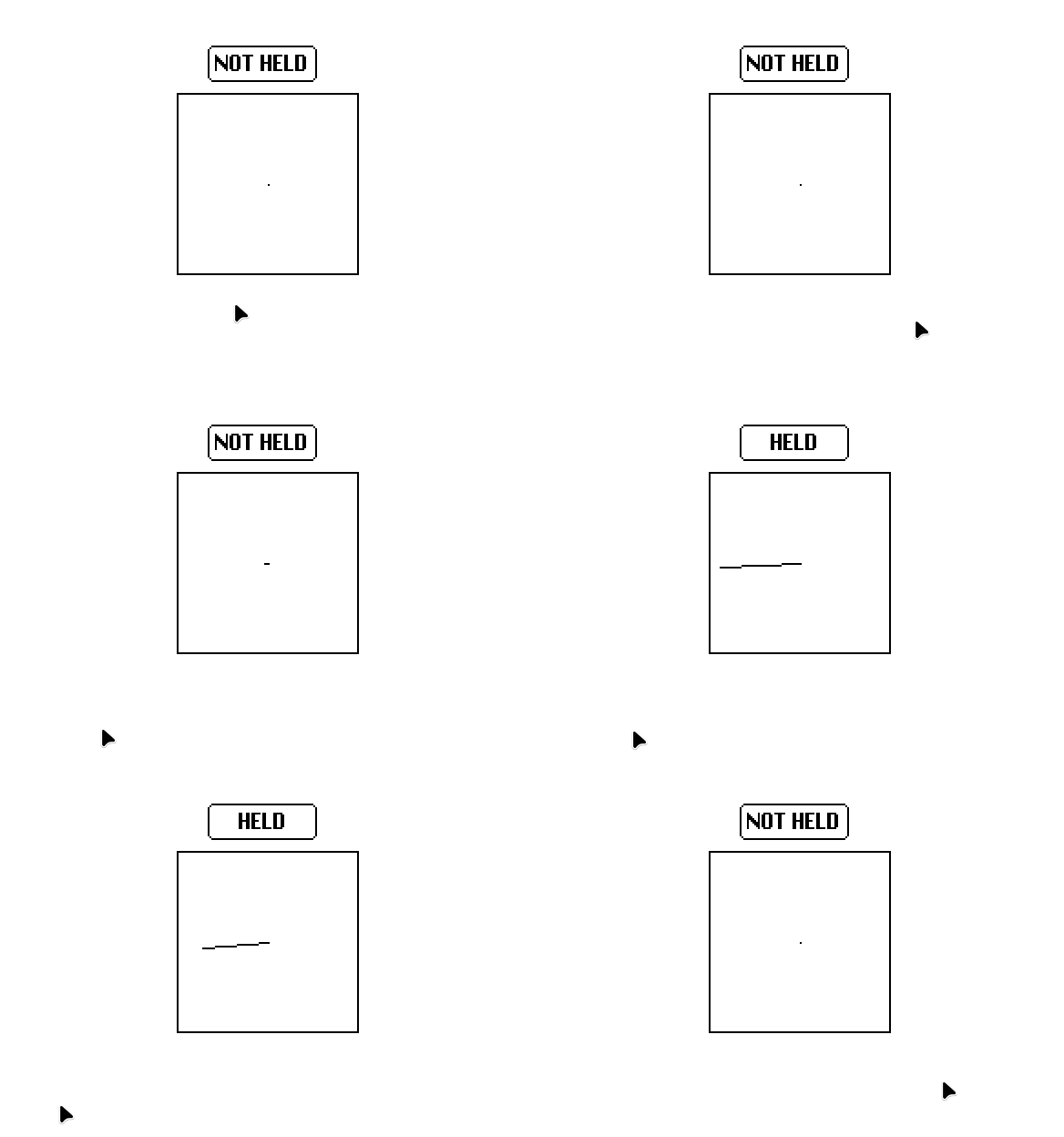
I get a different result using pointer.pos-pointer.prev when the pointer is held down vs when it isn’t, but I’d like them to be the same always, how would I do that?

How are you detecting the difference? What pointing device are you using?

Here’s a canvas that draws a line from its centre to pointer.pos-pointer.prev to visualise how far that points, and in which direction:

%%WGT0{"w":[{"name":"canvas","type":"canvas","size":[100,100],"pos":[206,121],"locked":1,"animated":1,"volatile":1,"script":"on view do\n me.clear[] me.line[me.lsize/2 (pointer.pos-pointer.prev)+me.lsize/2]\nend","scale":1}],"d":{}}

The patterns I get (in Native Decker) when waving my mouse around are pretty similar whether I am holding the button down or not. Maybe the “button down” lines are a bit longer? But it’s hard to tell whether that’s just because my hand posture changes and I’m holding it differently.

(3 edits)

For reference, I’m using my mouse to detect inputs in Native Decker on Linux Mint.

(I added an animated button on top of the canvas to show when my mouse is being held.)

On my end, it’s a pretty substantial difference. Previously, I was using this slider widget to specifically detect changes in Y pos:

%%WGT0{"w":[{"name":"slider","type":"slider","size":[38,151],"pos":[163,94],"locked":1,"animated":1,"script":"on view do\n diff:(pointer.pos[1]-pointer.prev[1])\n me.value:(diff/1)\nend","interval":[-50,50],"style":"vert"}],"d":{}}

Here’s an even fancier version:

%%WGT0{"w":[{"name":"canvas","type":"canvas","size":[100,100],"pos":[206,121],"locked":1,"animated":1,"volatile":1,"script":"on view do\n p:colors.black,colors.red\n i:me.copy[]\n me.clear[]\n me.paste[i (-1,0)]\n me.pattern:p[pointer.held]\n dy:(pointer.pos-pointer.prev)[1]\n c:(1,0.5)*me.lsize\n me.line[c c+(0,dy)]\nend","pattern":47,"brush":1,"scale":1}],"d":{}}

It only draws the Y component of the delta, but it draws in red when the pointer is held and black otherwise, and it slowly scrolls old values off to the left instead of clearing each frame, so you can get a sense of whether the black spikes are smaller than the red spikes.

I do see that in Native Decker (also on Linux), but I don’t see it in Web Decker. In Native Decker, I see about the same difference regardless of whether it’s in a tiny window or full-screen, so I don’t think some scaling factor is being applied the wrong number of times.

I have a directory with files named like:

  • snare-2.wav
  • snare-3.wav
  • snare.wav

I think the files are in that order because that’s how naïve sorting works (the - sorts before .) so that’s the order that Lilt’s dir[] built-in returns them.

I would like to process them according to the obvious order:

  • snare
  • snare-2
  • snare-3

…so I think I need to do two things: trim the last four characters off the filename, and sort by the result.

My first attempt was:

select basename:(-4 drop name)
where type=".wav"
orderby basename asc
from dir["samples"]

…but this doesn’t work. For starters, -4 drop name drops the last 4 item from the name column, not the last 4 characters of each value in the column.

My first attempt was to try -4 drop @ name to “push” the drop deeper into the array, in the same way that sum @ items sums each item individually. Unfortunately, Lil doesn’t seem to understand that syntax, and the docs suggest it should only work for unary operators like sum, not binary operators like drop.

My second attempt was to do the dropping inside a loop:

each r in rows select name
  where type=".wav"
  from dir["samples"]
 -4 drop r.name
end

…but then I went to figure out how to sort the resulting list, and it seems like there’s no way to sort lists, only tables? So this seems to do what I want:

select
orderby name asc
from table (list "name") dict list
 each r in rows
  select name
    where type=".wav"
    from dir["samples"]
  -4 drop r.name
 end

…but that seems like a mess. Surely there’s a better way?

Developer(+1)

Let's say we have a table of directory information that looks like this, for consistency of the following examples:

files:insert dir name type with
 0 "snare-2.wav" ".wav"
 0 "foo.txt"     ".txt"
 0 "snare-3.wav" ".wav"
 0 "snare.wav"   ".wav"
end

Lil query clauses are executed right-to-left, like primitive operators within an expression. We can't define a result column and then reference it in clauses to its right, but we can chain queries, as I'll demonstrate shortly.

You're correct that @ is only useful for spreading unary operations down to the elements of a list, not spreading binary operators. Many binary operators in Lil such as "like", "in", "parse", and "format" generalize to listy left and right arguments in order make them easier to use within queries, but for "drop" this would be ambiguous, so there's no free lunch.

If I wanted to shave off the last four characters of each string in a list of strings I might use an explicit "each" loop:

each x in files.name -4 drop x end
# ("snare-2","foo","snare-3","snare")

In context (since loops are expressions),

select basename:each x in name -4 drop x end type from files
# +-----------+--------+
# | basename  | type   |
# +-----------+--------+
# | "snare-2" | ".wav" |
# | "foo"     | ".txt" |
# | "snare-3" | ".wav" |
# | "snare"   | ".wav" |
# +-----------+--------+

Or, I could factor the basename extraction into a unary helper function, and subsequently use "@"; this is a good approach if "data cleaning" operations like this are ever used in multiple places, and can also clarify intent by giving the operation an explicit name:

on baseof x do -4 drop x end
baseof @ files.name
# ("snare-2","foo","snare-3","snare")

In context,

select basename:baseof @ name type from files
# +-----------+--------+
# | basename  | type   |
# +-----------+--------+
# | "snare-2" | ".wav" |
# | "foo"     | ".txt" |
# | "snare-3" | ".wav" |
# | "snare"   | ".wav" |
# +-----------+--------+

If the filenames you're working with only contain a single "." you could also consider using "parse", which automatically spreads itself to a rightward list of strings and greedily stops consuming characters for the "%s" pattern when it encounters the next literal in the format string:

"%s." parse files.name
# ("snare-2","foo","snare-3","snare")
"%s." parse ("one.wav","two.wav","three.four.wav")
# ("one","two","three")

I'll optimistically use this last strategy going forward; your mileage may vary:

select basename:"%s." parse name type from files
# +-----------+--------+
# | basename  | type   |
# +-----------+--------+
# | "snare-2" | ".wav" |
# | "foo"     | ".txt" |
# | "snare-3" | ".wav" |
# | "snare"   | ".wav" |
# +-----------+--------+

I can then write another query against that table to sort and filter it. Note that by not specifying result columns I get all the columns of the input table:

select orderby basename asc where type=".wav" from select basename:"%s." parse name type from files
# +-----------+--------+
# | basename  | type   |
# +-----------+--------+
# | "snare"   | ".wav" |
# | "snare-2" | ".wav" |
# | "snare-3" | ".wav" |
# +-----------+--------+

If I was only interested in that first column as a list, I could use "extract" instead of "select". If you don't specify a result column for "extract", it defaults to peeling out the first column:

extract orderby basename asc where type=".wav" from select basename:"%s." parse name type from files
# ("snare","snare-2","snare-3")

If that's a daunting query to look at, I could name the subquery and write it like this instead:

bases:select basename:"%s." parse name type from files
extract orderby basename asc where type=".wav" from bases

You can use queries to filter, sort, and aggregate tables, lists, or dicts; the input will be "widened" into a table in the process as needed:

select from "One","Two","Three"
# +---------+
# | value   |
# +---------+
# | "One"   |
# | "Two"   |
# | "Three" |
# +---------+

Thus, if you want to sort a plain list you can query against it and then use "extract". Here's a different formulation to the original problem:

extract "%s." parse name where type=".wav" from files
# ("snare-2","snare-3","snare")
extract orderby value asc from extract "%s." parse name where type=".wav" from files
# ("snare","snare-2","snare-3")

Does that help clear things up?

(+1)

Since Lil queries look like SQL queries, I’ve been trying to use them as SQL queries with all the confusing execution order that implies. It hadn’t occurred to me to think about them as “a pipeline of operations executing right-to-left” but now that you mention it, not only does that make a lot of sense, it’s how I always wished SQL worked anyway.

Having worked with Decker transitions and on loop (both of which have strict limits on how much calculation you can do) I’ve learned to fear each expressions as they can consume a lot of the quota. Since this is a Lilt script those restrictions don’t apply, so I should probably relax and not worry so much about each.

I think I was also worried about chaining queries for similar reasons - calculation quota and my first attempt being clunky and awkward. I guess I need to trust Lil’s automatic conversions more - your chained extract example is much tidier than what I came up with, and basically what I wanted.

You’ve given me a lot to think about, thanks!

(+1)

Hi! Deck is SUPER cool and I'm really digging it, but hooo boy am I not a coder. I feel like this is an extremely simple task, but I just can't figure out how to make a button change the text on itself when clicked. I could do it in like 30 seconds in Twine, so I feel kinda dumb ^^;

The specific use case is I'm trying to have a title page where part of the title is a button that cycles through different words (or chooses one from a list at random). It's a thing I'm going to need to utilize multiple times throughout my project, so any help you can provide is greatly appreciated.

(+1)

A button that randomly chooses a label is pretty straightforward. Paste this as the button’s “click” handler:

on click do
 # Different texts the button might show
 texts:"Click me!","Poke","Nudge","Boop"
 
 # Remove the button's current text from the list,
 # so we don't show the same label twice
 texts:me.text drop texts
 
 # Pick a random text and apply it to the button.
 me.text:random[texts]
end

Cycling through texts is a little more complicated, because we have to figure out where we currently are in the list of options, and what to do when we reach the end:

on click do
 # Different texts the button might show
 texts:"5","4","3","2","1","Boom!"

 # Search through texts looking for
 # the one that matches the old button text 
 oldindex:-1
 each t i in texts
  # If we have found the old text,
  # save its index number as the old index
  if me.text=t oldindex:i end
 end
 
 # If the old index was the last text...
 if oldindex = (count texts)-1
  # ...restart the cycle
  me.text:first texts
  # (you might choose to do something else,
  # like go to the next card)
  
 # If the current text wasn't found...
 elseif oldindex = -1
  # ...start from the beginning
  me.text:first texts
  
 # Otherwise just pick the next text.
 else
  me.text:texts[oldindex+1]
 end

end

(A compact and cryptic way to calculate oldindex might be sum (me.text = texts) * range count texts, I don’t know if there’s an even more compact way)

Developer(+2)

I might write the second example as

on click do
 t:"|" split "5|4|3|2|1|Boom!"
 me.text:t[(count t)%1+sum(me.text=t)*keys t]
end

Using the mod operator (%), taking advantage that for a list x, "keys x" is equivalent to "range count x", and that a failure to find a match for the current button text is harmlessly equivalent to matching the first option.

(3 edits) (+1)

Thanks to both of you!! This example worked perfectly for what I need the title card to do, thank you!

If I'm understanding things correctly, variables are only reserved in the same widget / card? So, for example, if I wanted to invoke this same list of text options elsewhere, I would need to direct it to titlebutton.texts? Can I do that across cards, too?

EDIT: Also, I'm having trouble getting in-line links in fields to work? I want to link to the PUSH SRD  and I've highlighted the relevant text and inserted the link with the Text -> Link menu, but clicking on it with the interact tool doesn't do anything.

Developer(+2)

Variables in scripts within Decker only persist for the duration of an event handler. Static data that you just want to be able to reference from multiple places throughout a deck could be placed in the Deck-level script; go to File -> Properties... in the main menu, click "Script..." and then you can enter a declaration like

title_texts:"First","Second","Third","Fourth"

And then refer to the variable 'title_texts' from any card or widget script.

Again, this is for static data. For information that can change over time- like status flags or an inventory system in a game- you'll need to store the information in widgets somewhere on a card. This is a key idea in Decker: state and code live in physical, observable places within a deck. 

For example, you could also place this list within a field named 'texts' on a card named 'title' in JSON format:

["First","Second","Third","Fourth"]

And then access the contents of that field as a list from elsewhere in a script like

title.widgets.texts.data

For links in a rich text field to be clickable, you need to lock the field. In widget mode, select the field and choose "Widgets -> Locked" from the main menu.

If you haven't seen it already, I highly recommend reading through Phinxel's Phield Notes; it's very beginner-friendly and full of examples you can play with and borrow from for your own projects.

(+1)

I have seen Phinxels! I remembered seeing something about how to lock widgets in there but when I went to find it, I couldn't, so thank you.

One last question and I should hopefully be able to figure the rest out on my own— is there a way to make a button invisible until something else happens? I saw in some other comments in here the idea to make a "gamestate" card with checkboxes for things I want to track, and I'd like to be able to hide a button until a "gamestate.widgets.X.value" is checked.

To provide probably more context than necessary, I'm making a faux-ttrpg as an "about me" for a job application for a creative project. I want the user to click on a button next to the Name field of the "character sheet" to get a story about my name to appear in a text field, and log that they've seen that to make the button for the next character sheet field appear. Once all the fields have been filled, out, I want a "Begin Adventure" button to appear to go to the next section of the game.

I see that there's an "invisible" setting for buttons, but I'm not sure how I could toggle the button type based on a variable. Changing the text field is probably just an "if card.widgets.variable.value then print: "whatever"" kinda deal, so I'm mostly worried about the button visibility.

(1 edit) (+2)

To start with, you probably need the "Show" attribute. Specifically to set things to .show:"none" 

Invisible buttons are more useful for things you want to be able to click that don't look like buttons (for example, navigating around a scene in a point-and-click game). And a "None" button is truly hidden and unclickable until you change their setting, so that seems like what you might be after.

To set a widget to "none" visibility you can do it in code or with the menu while you're editing.  
While Editing you deck: Select a widget and use the menu Widgets > Show None ]

And in code, this sets the visibility of a widget:

widgetname.show:"none"

To make it visible again you would need to set it's show attribute to one of the other visibilities, so this...

widgetname.show:"solid" 

...would set it back to the default visibility it had when you made it. (Other options: "transparent" and "invert")

Just a thought, but if you only need to track the progress on one card for now and you don't need to check back on it later you could just make things appear one by one in the button scripts.

For example, here's a simple example script for a button that sets some text in a field then makes the next button visible:

on click do
myname.text:"Pyrefly Studio"
favefoodbutton.show:"solid"
end

and then script in the next button (favefoodbutton, which just became visible) could be something like

on click do
favefood.text:"Blueberry Ice Cream"
coolfactbutton.show:"solid"
end

etc, etc. These widget names (fields: myname, favefood / buttons: favefoodbutton, coolfactbutton) are made up, of course, so you'll want to make any names match the widgets that actually exist. 

But I hope this helps you get started changing widget visibility and setting the text of a field using scripts.

(+1)

I want to make an isometric game in Decker. I'm able to make things move. But there are some places where I don't want to move beyond.

In other words, I want to have collision mechanics. How do I program that? I vaguely remember someone saying to use the Path module to text whether a patter is or is not to be moved into, but I don't know how that works. I tried looking into Sokoban, but I can't make heads nor tails of it and, after looking into its resources, cannot find anything on the mover module within it which might be able to help me, but I am not sure.

In all honesty, I don't even know where to start and could appreciate some pointers.

(+1)

This is not a complete answer, this is kind of just a gesture towards one. The actual complete answer will kind of depend on what's going on in your game, y'know? But I can point to a couple of things.

Here's some recent discussion of the sokoban example specifically: https://itch.io/post/16368974

And for the path module here's the card that has an example that gives a visual example of the forbidden color thing: https://beyondloom.com/decker/path.html#followeranim (click the checkbox at the bottom) 

Some of the code for this is inside the module, not the deck's scripts but I believe it uses .hist to check parts of the movement grid for a specific color, and forbids movement onto that square of the grid if it finds any.

It should be possible to do something similar with a different kind of movement system too, if the path module itself doesn't have the kind of movement you had in mind.

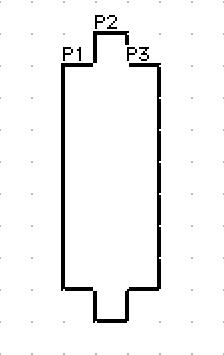
Hm... I have an idea. In that I could have a bunch of canvases, shaped into a rough hexagonal shape, which I will call the "Player," like this:


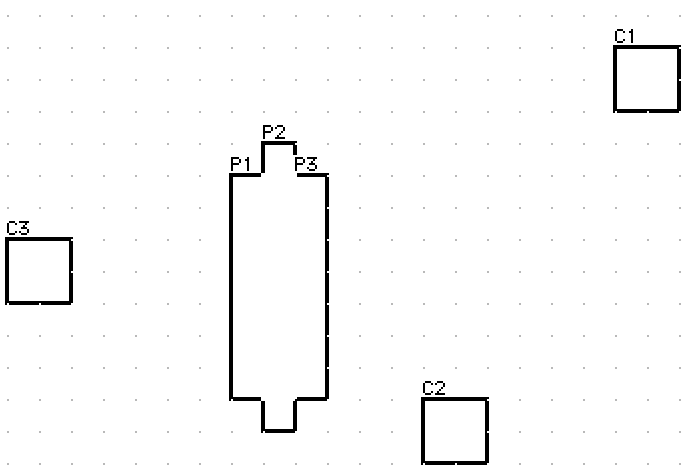
And then have different canvasses act as, I don't know, geometry for the Player to "collide" with. Like this:


I theorize that I can use the Draggable module to collide with the other canvases.

Again, this is theory for me and probably labor intensive, but better than nothing, lol.

(+1)

The thing is, “an isometric game” covers a lot of ground. Some isometric games are just regular top-down 2D games that happen to use sprites drawn from an isometric perspective, even though the games use normal rectangular hit-boxes for collision and movement (though I can’t think of a well-known example off the top of my head). Other isometric games (such as the original Diablo and Diablo II) have everything happen on a regular square grid, then they just draw the grid with isometric graphics. That way, game logic and collisions are still pretty straight-forward, but the game looks more interesting with more overlap than a regular 2D top-down view. Still other games use a real hexagonal grid, which makes logic and collisions more complicated in exchange for being mechanically isometric (the same cost to travel in any direction) as well as visually isometric (a thing looks the same size no matter which way it’s pointing).

Which of those seem the closest to what you want?

Viewing posts 121 to 130 of 130 · Previous page · First page