
absolute cinema. feels really polished and the final boss’ patterns are super cool and varied
that ending was not on my bingo card lol
holy crap that worked?? i mean, awesome! i’m glad we diagnosed that, thanks for sticking with it. if you run into problems with other games like you said, it could be their VRAM utilization might be really high. if they’re using godot, they can change the import mode of an image to ‘VRAM Compressed’ to reduce the workload on the GPU for a quick way to shrink it down
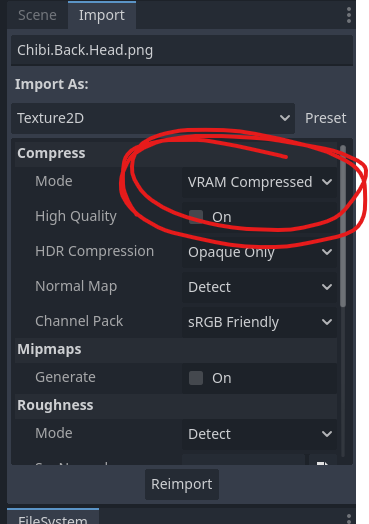
you can monitor the usage in Debugger -> Video RAM as well

hope this can help you check out more games!
it took a little trial and error, but I was finally able to catch that damn tomato. it seems if you press the slide button (‘c’ i think), you gain a lot of speed. I was able to catch up in a matter of seconds lol. one thing though is that it would be nice to lock the camera in place, I kept accidentally turning it then running into walls, but otherwise this was a good time
I loved the combat in this, the way the weapon / dodge would change effect depending on the tactic was really cool, and I appreciate the dodge being able to heal you, it felt like I could switch between offense and defense very fluidly
my only nitpick is that sometimes the targets spawn very close to the bottom of the screen so your combo ends pretty quickly, but that’s ok when the combat feels this good
fantastic job! the use of the bomb mechanic was really creative and I loved all of the different applications, it was a little tough getting use to chaining the bombs to attack but very satisfying once you got it. imo the jump in the middle of the game is WAY harder than the boss I was there for like 20 minutes XD
No worries, it’s a great learning opportunity for me since this is my first jam. I’ve released a version of the game that reduces the VRAM consumption by 67%, you can find it in the downloads with the low_ prefix on the download name.
This should help load more of the textures so they aren’t gray/white rectangles, but it’s unlikely to completely fix the issue. If it does improve, that just means we’re on the right track and I should continue reducing the VRAM consumption. I’m sure there are others like you encountering the same issue, so I’m glad you spoke up.
Oh wow, yeah I’m sorry you’re going through this. That’s by far one of the wildest things I’ve seen in all my years coding.
I have a hunch that there are too many graphics being loaded at once and overloading whatever GPU you have. Is this like a work / casual PC? They usually don’t come with a dedicated graphics card and are integrated into the CPU, so I could see some loading issues coming from that. For now I can try reducing the texture sizes to see if that helps you. Sorry about this!
I’m sorry to hear this, we’ll do our best to help. A couple of follow up questions if you don’t mind:
I’ll be able to look further into this with this info. We’re using C# godot, and it’s known for having lots of video rendering issues, so knowing your hardware details will greatly help.
Thanks for playing everyone! I’ve started putting together a walkthrough to help those who are stuck or may have encountered a bug. It’s still a work-in-progress, but I will be adding to it as I have time throughout the day.
Update: the walkthrough should now be finished (as far as I can tell) https://itch.io/t/5229018/official-walkthrough-wip#post-13852134
This is the official hint-based walkthrough for Dokibird and the Quest for Money. This guide will provide both a hint and the solution for all the puzzles in the game in the event you get stuck and need help, or you’re not sure if something is a bug or not.
There were some tricky things we had to do behind-the-scenes to prevent soft-locks, so please feel free to consult this guide for help, or message Dandylion if you think you’ve found a bug.
The section headers of this guide will contain minor spoilers about the game, so please read at your own discretion.
Do not feel bad if you had to look this part up, we had to set it up in an awkward way to prevent soft-locks so we didn’t need to rewrite the script too much. Apologies.
We’re really happy you enjoyed it! I’ll see if I can confirm if your path has any problems and in the meantime here’s the solution:
Are you able to hover over the numbers above the vault inside the bank? If so, the finger pointer / long dynamite can be used on it to reach the numbers and input the code to the bank vault.
You can do this as early as you get the pointer / long dynamite, letting you beat the game very early, so let us know if the numbers aren’t clickable (that’s definitely a bug lol)
We’ll also see if we can put up a walkthrough because tbh, we actually had to do some things behind the scenes to prevent a couple soft-locks, so some events don’t trigger as naturally as other events.