

Bugs, problems, requests and/or questions? Feel free to reach out!
Hey, thanks for sharing this project. I am about to pull the trigger.
Will you expand upon this / update in the future. Or is it more of a "as is" kinda deal? I feel P. Hourglass aesthetics are not quite matched yet. Is that due to missing development of the add-on or features? Or rather because the source assets like models and textures are different?
87 days ago(+1)
I'll expand it as people request features that make sense, like options for third-person cameras or a lightweight top-down view.
I'll continue fixing bugs as they come up and update it for future Godot versions if they introduce breaking changes.
Regarding the Shadowglass aesthetics, that's more about shapes and colors than what the plugin itself is doing. I'm sure you can achieve something very close to what he's got.
Thank you!
Thanks for the reply. I played around with it a bit and have an issue with ghosting. Is this the 3d person character restriction you mentioned?
Also the performance is not too strong on my limited laptop GPU (AMD ATI Radeon 840M / 860M Graphics), especially when I press play in the editor (it's better in the exported build) and really bad at high screen resolution (~4k).
Since I want and this is for retro aesthetic, I should probably limit the render resolution to <= "480p" anyways?
Sorry for my ignorance and thanks for any explanation/clarification!
85 days ago(+1)
Turns out the plugin wasn’t working properly on Godot v >= 4.6 due to some changes in depth precision handling, but I just uploaded a fix for it!
If the ghosting problem still persists, you could try setting the “Blend Speed” to around 0.1.Let me know if that solves your problem.
Yeah, the performance unfortunately can’t be much better due to the nature of the rendering technique. It relies on 13 cameras to work (1 main camera + 2×6 cubemap cameras). Try reducing the cubemap resolution and see if that improves performance.
Also, make sure all shadows (if you are using any) are set to a really low quality, and avoid using too many point lights in the scene. If you need point lights, reduce their radius a lot and also enable distance fade.
Thank you for the feedback!

85 days ago(+1)
There are a two ways to handle objects that are close to the camera like your car:
A fallback large enough to cover the object: 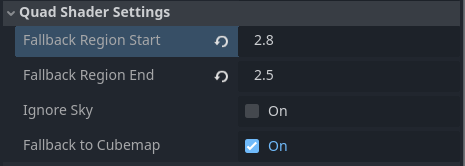 And your meshes still at layer 1.
OR
Keep the fallback region close to the camera: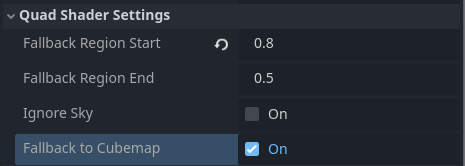 And you move your meshes to Layer 3.
Unfortunately, both require that you don't exclude the sky from rendering.
I can see how excluding the sky while also having nearby objects could be useful. I don't think there's a good workaround for that, but I'll try to come up with something.
Thanks for sharing! However, I am running into an issue where the output does not fall back at all when disoccluded, tested on a new project.
Digging through the fragment shader, it seems that the depth stored in the alpha isn't being read properly, so disocclusion is never detected, because the shader thinks the depth is always the same. Turning the grid size up in the config gives very obvious incorrect projection.
I've only had issues with world scales that are too small or too large. If the effect is working but you're experiencing problems, try scaling the entire scene.
A large grid size will always increase projection errors, since the static cubemap position can end up differing too much from the camera capture position. Try to keep it around two or three character steps in size.
If you want to debug disocclusion, uncomment line 307 in cuby_marching.gdshader. This will highlight all disocclusion areas in magenta (the "Fallback to Cubemap" option must be enabled).
If you encounter other issues, ensure that you're using Forward+ and Godot 4.5.1 or 4.6.3.
If you still run into issues, feel free to reach out — I’ll be here to help until everything is working properly.
Downgrading from 4.6.2 that I was on to 4.5.1 seems to resolve the issue. I can see the magenta appear.
On 4.6.2 and 4.6.3, there's no magenta, and whenever the probe changes position, things don't seem to align properly and there's a strange smearing.
With the same settings in 4.5.1, it looks how I expect, similar to the video.
Good to know — I’ll investigate and reply if I find the reason for this issue. It’s probably related to the compositor.
The smearing is caused by the Temporal Accumulation on the cubemap compute shader. It only affects geometry in the mid to far field ('TA Start' and 'TA End' on the configuration).
Thanks for the feedback!
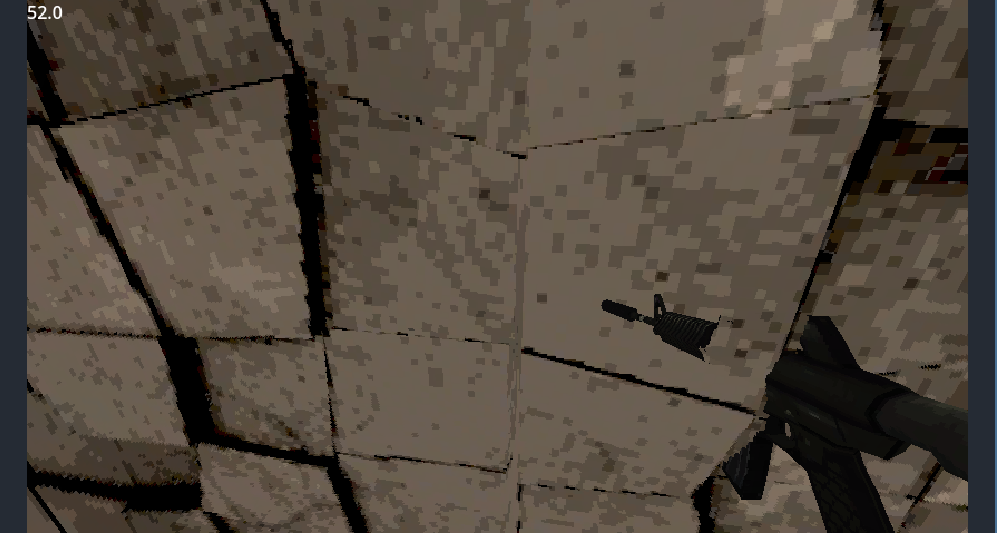
There are multiple ways to prevent weapons from clipping into world geometry:
- Use a separate camera and viewport that renders only the weapon layer.
- Use a raycast or collision shape to retract the weapon when it gets too close to a wall.
- Disable depth testing on the weapon shader.
The first approach may be tricky with this plugin, and since it already uses 13 cameras, I'd recommend either the raycast solution or disabling depth testing. But it can be achieved with a plane right in front of the camera (rendering only your gun) using a viewport texture.
If you want to use the Cuby custom shader on the weapon, duplicate quantize_cuby.gdshader, rename it to something like quantize_cuby_no_depth.gdshader, and change the render_mode line to:
render_mode depth_test_disabled;
This approach might look glitched sometimes or might make you lose the pixelated effect on your weapon.
I'd say the best approach is to retract the weapon using raycasting so it can't clip.