

Thanks for the reply. I played around with it a bit and have an issue with ghosting. Is this the 3d person character restriction you mentioned?
Also the performance is not too strong on my limited laptop GPU (AMD ATI Radeon 840M / 860M Graphics), especially when I press play in the editor (it's better in the exported build) and really bad at high screen resolution (~4k).
Since I want and this is for retro aesthetic, I should probably limit the render resolution to <= "480p" anyways?
Sorry for my ignorance and thanks for any explanation/clarification!
86 days ago(+1)
Turns out the plugin wasn’t working properly on Godot v >= 4.6 due to some changes in depth precision handling, but I just uploaded a fix for it!
If the ghosting problem still persists, you could try setting the “Blend Speed” to around 0.1.Let me know if that solves your problem.
Yeah, the performance unfortunately can’t be much better due to the nature of the rendering technique. It relies on 13 cameras to work (1 main camera + 2×6 cubemap cameras). Try reducing the cubemap resolution and see if that improves performance.
Also, make sure all shadows (if you are using any) are set to a really low quality, and avoid using too many point lights in the scene. If you need point lights, reduce their radius a lot and also enable distance fade.
Thank you for the feedback!

85 days ago(+1)
There are a two ways to handle objects that are close to the camera like your car:
A fallback large enough to cover the object: 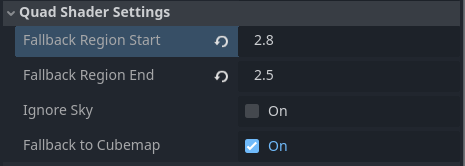 And your meshes still at layer 1.
OR
Keep the fallback region close to the camera: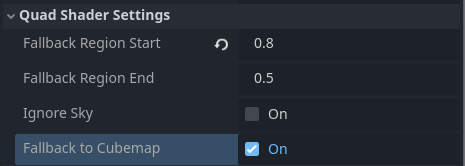 And you move your meshes to Layer 3.
Unfortunately, both require that you don't exclude the sky from rendering.
I can see how excluding the sky while also having nearby objects could be useful. I don't think there's a good workaround for that, but I'll try to come up with something.