Indie game storeFree gamesFun gamesHorror games
Game developmentAssetsComics
SalesBundles
Jobs
TagsGame Engines

How would I do this? (Q&A Thread) Sticky

A topic by MythAtelier created Jun 07, 2022 Views: 10,884 Replies: 152
Viewing posts 21 to 55 of 55 · Previous page · First page

Games such as Pathfinder Adventure Card Game and Aeon's End are doable with this plugin, or they'll be in the future? Both features a single deck for campaign events and enemies, so a minion is just a card instead of having cards by itself. Also, Aeon's End does have cards at table to be buy at any time. Thanks!
Developer (1 edit)

We don't currently support Campaign Decks as it is handled in PACG or Aeon's End. It might be possible to get them working using a dummy Actor that has Cards of a specific type, however, given that Card Actions don't work on the Map Scene that might make things difficult. You would need to handle the entire game inside the Battle Scene as the plugin works currently.

We could look into supporting that in the future as there has been demand for giving the Enemy Troop a single deck and this feature would be an extension of that. Once we have Cards working on Map that let you do this, we will let you know :)

is it possible to make non card skill that can only be activated after using cards?

i tried to make 2 skill types (cards and specials) but when i choose the "specials" skill, it still open as card menu, instead of skills listed in special type.

Developer

By using CGC you are converting any Skills in the Database into Cards so you would not be able to turn the plugin off and on in the middle of a battle. You might be able to use a Common Event which creates a Choice Menu with a selection of Specials and then for each choice you use the Force Action command to execute these skills. This is a limited solution but it would at least let you prototype what you are going for.

Hi there!

I wanted to make an effect happen, or tick up a variable when players run out of cards and have to draw. Can you tell me how I might do this? I don't want it to trigger when they draw a full hand or when their turn ends, but specifically when they run out of cards and have to redraw their hand. 

Developer

Hey SolidusPrime, if you are building your project on MV, this should be possible using YEP Buffs & States Core and YEP Passive States plugins along with Card Game Combat. Create a Passive State that has a <Custom Action End Effect> Notetag. Within the Notetag create an if statement which is looking for the following condition to be met:

<Custom Action End Effect>
if($gameParty.leader()._cardHand.length < 1)
{
  //Make your effect happen here via script calls
}
</Custom Action End Effect>

This condition will check if your Hand is emptied at the end of each Action (in this case, after you have played any card). Set the Passive state to your Actor so that you can see the effects of this happen. Currently it will also check when you End your Turn so you may want your End Turn Skill to set a switch to OFF and prevent this if statement from executing. You will want this switch turned ON at the start of your next Turn so that this effect can trigger again when your hand is emptied. This can be done in the Turn Start Actions parameter of the Card Game Combat plugin.

Hope some of this helps. Let us know if you want to troubleshoot this further :)

(1 edit)

Can we use more than one actor per battle? For example, in games you summon minions such as War of Omens

Or can we pick a few cards from each hero, such as Fate/Grand Order allows (e. g., each hero has 3 cards, but you randomly only pick 5 from the whole party deck)? 

If not, would be it possible in a future update? Thanks.

Developer

Yes, you can definitely use more than one Actor per Battle. You can see how this works in the Demo Project by talking to the other characters on the Island and adding them to your party. We recommend using the Party Battle UI plugin for this purpose as it arranges all the necessary information for an entire party in a much more easily accessible manner.

For the second request, we are still working on the battle system where the Enemy and Player parties have one Deck each and cards are applied to them. Once this system (known as Party Battle Type C) is complete, you should be able to set up battles to work in the manner of Fate G/O.

We recommend using the Party Battle UI plugin

Sorry but, what is this plugin? I googled it but I'm unsure what plugin are you referring. 

Developer

This is one of the plugins we offer in our plugin suite when you buy CGC! It remodels the Battle UI to work better for a card game :)

(+1)

Hey, how are you? Pardon my English again, I'm from Brazil.

Would I be able to set the cost of a card in another attribute, without being the rpg maker default?

For example, I could take the luck parameter, rename it energy, and have heroes that spend energy, while others would use the default that would name it mana.

Or can I only use one attribute for card cost?

Developer

Hey Hawkzera, if you would like to do Custom Costs for Cards and are working in RPG Maker MV, we would recommend adding the YEP Skill Core plugin which our plugin is compatible with. YEP Skill Core allows you to use the <Custom Requirement> and <Custom Cost Display> notetags which can let you use other attributes instead of just HP/MP/TP as part of the Cost. This will requirement some JavaScript knowledge to use, luckily it is well documented on their plugin page. Let us know if this solution works for you or if you require another :)

Does this plugin work for rpg maker mz? I'm using it.

Developer

YEP Skill Core is no longer available in MZ. I believe it is part of the VisuStella plugin suite now which unfortunately is not compatible with Card Game Combat (as per their request). An alternative plugin for MZ would be Eli's Skill Costs which will allow you to specify other attributes as the costs for your skills. While this plugin is not currently compatible with CGC now, we can offer to extend compatibility to it as part of the upcoming Version 1.5.0 patch (which should be out by end of January).

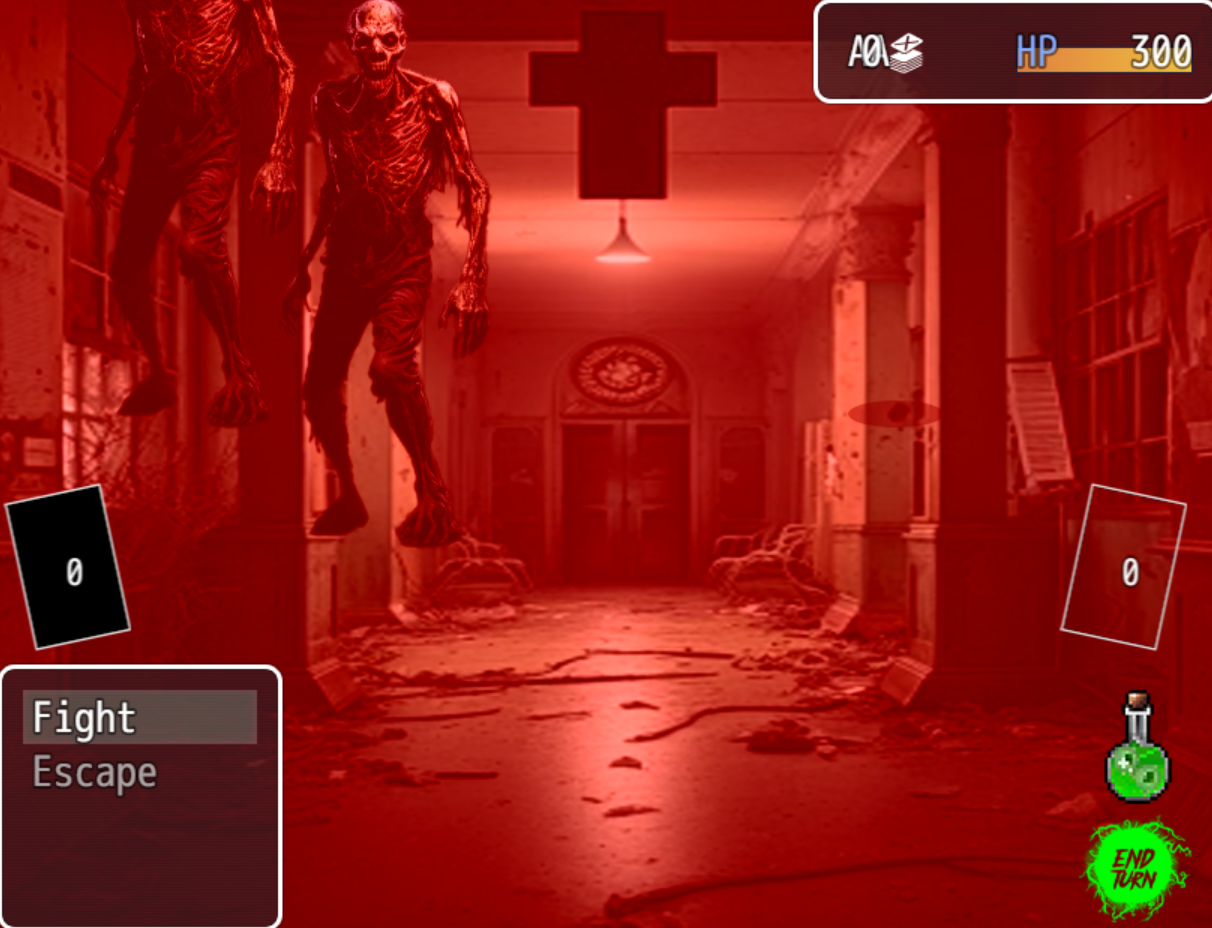
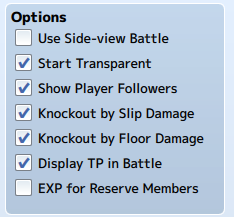
Use Side-View Battle is UNCHECKED, yet whenever I  do combat it will show up normal for half a second and then go to side-view battle and push all of the monsters to the side.  How do I make it so it's  not side-view battle?\


On top of that, how do I make it so your money doesn't show up in the top right. If you notice, it overlaps your name and looks really bad.

Developer

Hi Xyphien,

For the first issue, If you are editing the Demo Project, there are two places you will need to change in order to make Battles in Front View. The first place is the Common Event called Initialize, here we do a script call that sets Side View as the default. You can feel free to remove this line or set the value to false in order to make Front View battles the default.

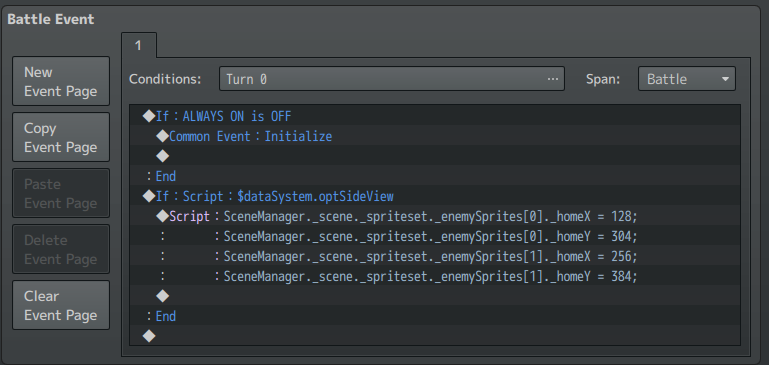
Next,  you will want to clear the Battle Events in the Enemy Troops. All of them have script calls are set to change the configuration if the Settings are in Side View. If you delete the Conditional that is asking for $dataSystem.optSideView that should do the trick.


For the second issue, if your project is using the PartyUI_A plugin, you can increase the width of the Status Window in the plugin parameters. This will allow the  name, resources and health to spread out more evenly. Right now it looks like the Micro Status Window width is really small which is causing issues. Try increasing it to 384 px or higher and see if that makes a difference.

If you are not using PartyUI_A plugin for your game project then you will need to use another plugin to modify the UI.

Hope this helps. Please let us to know if you run into any further issues and we can help you troubleshoot them here.

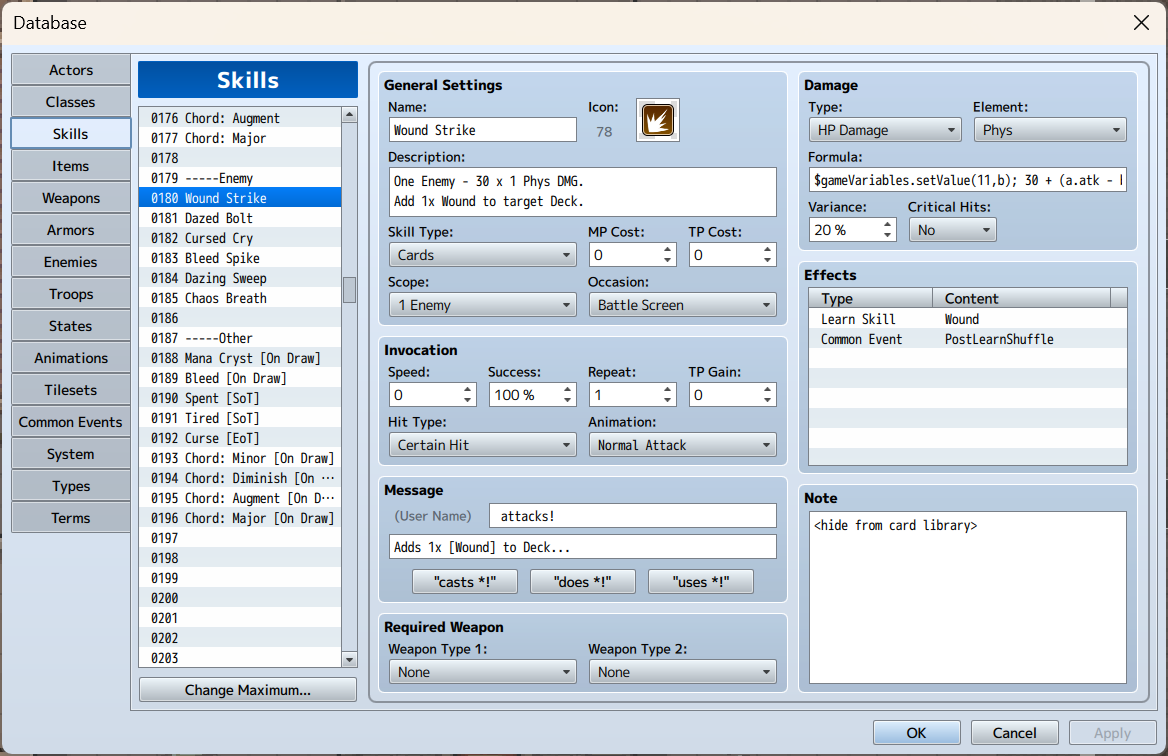
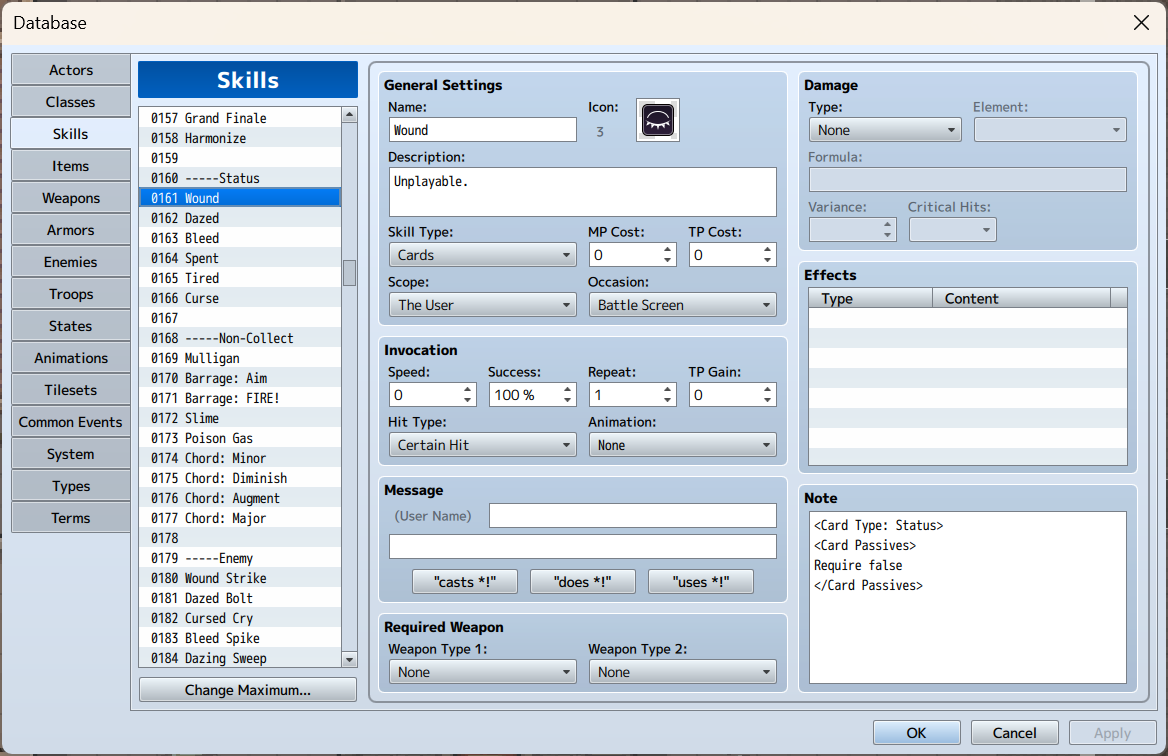
Whenever an enemy uses Wound Strike it says it adds a Wound Card to the deck but it never actually adds it while you're in battle or at any point. It just says it does and nothing actually happens. Why is this? Isn't everything set up correctly?

Developer

Wound Strike does work properly in the base Demo Project. However, if you are editing the Demo Project (as was the case with your previous post) there could be some changes that you have made which are preventing it from working as initially implemented.  Please post screencaps of the following from your project:

- Your project's Plugin Order

- Console after Wound Strike has been used (press F8 to open while in Battle)

- Screenshot of the PostLearnShuffle Common Event

If you can give us this information, we can certainly help you troubleshoot this issue further.

(+1)

I just sent an email. This is my 8th attempt at sending a reply, the last reply took me a full day because of the same issue. Itch.io's reply system is honestly garbage lol. Hopefully you don't mind replying via email since I literally cannot seem to send anything here. The moment I add any sort of pictures it just craps out on here.

Developer(+1)

Yeah, no worries, will follow up over email :)

(1 edit)

How would I make it so that a character's turn automatically ends when they run out of MP, then restore it at the beginning of their next turn?

(edited from original because the original mechanic wasn't very good)

Is there a way to make it so that the amount of cards drawn is determined by a characters AGI?

Developer (1 edit)

Thanks for the question! You will need to know a bit of Scripting to achieve this. You will need to edit the Battle Start Actions and Turn Start Actions plugin parameters in IsiahCardGameCombat. Both of these plugin parameters take in a series of instructions that determines what Card Actions are taken at each of those times.

We can edit Battle Start Actions to be:

Shuffle Deck, Eval BattleManager.actor().drawCards(Math.floor(BattleManager.actor().agi * 0.1))

And edit Turn Start Actions to be:

Discard Until 0, Eval BattleManager.actor().drawCards(Math.floor(BattleManager.actor().agi * 0.1))

The Eval Card Action allows us to process a script call to determine how many cards we draw. Here's what each part of the Eval does:

BattleManager.actor()This grabs the current Actor who is taking their turn.
drawCards()This is the function we call to tell the current Actor to draw Cards.
Math.floor(BattleManager.actor().agi * 0.1)This is the formula used to determine how many Cards are drawn. This divides the current Actor's Agility by 10 and then makes sure that value is floored to a whole number.

You can supply your own formula in between those braces of the drawCards() function. Just make sure that resolves to a whole number as you can't draw a fractional number of Cards (it won't break anything but just make sure to be safe).

Let us know if you need help troubleshooting this solution for your game project. We would be happy to help :)

So I got Everything working pretty well so far on mv, my only problem at the moment tho is that when the enemies attack are lack luster, they don't do any animations, is there a plugin recommendation or something I have overlooked for front view battle where I can make an enemies attack animation play when they attack? since the default settings of this plugin have the party stats at the top right, I don't need any fancy plugin, just for the animation to play on the screen.

Developer

So, for default Front View Battle the options are special animations are a little limited, but there are ways to use Sideview Battle and then change settings so that it matches the coordinates for Front View. If you are on MV, would recommend getting YEP Battle Engine Core, YEP Action Sequence Packs 1 - 3 and YEP Animated SV Enemies plugins into your project (all of which are compatible with Card Game Combat). Between those plugins you should be able to do pretty much everything you need to in terms of enemy animations.

Howdy!

I have been searching various Game Maker's and other engines out there as well as their plugins for a system very similar to this project(By the way, amazing work! :) ). I wanted to ask if the plugin would allow for Multiple Party members who have their own unique decks to be drawn in the same hand. For instance, there are 3 members in the battle, each have a deck of 5 cards. It takes a  set of random 5 cards between the 15 available, and by turn 3, the deck is reshuffled. This is inspired by Fate/Grand Order's battle system, but I wanted to know if this ruleset could be possible because I have ideas I've had for a long time and I feel this might be what I need to finally start working on something real with what I am able to do.

I read that the closest thing to this might be Party Type C,  if there are any updates on that I would be interested. Thank you for your time in answering questions :) .

Developer (2 edits) (+1)

Hey cragedus,

So we do have Multiple Party members with individual decks, however, currently each of their turns would need to be processed so they each have a hand. You are right that Party Type C would likely be the closest to what you are looking for. Once that plugin is done, we can modify it to better suit Fate G/O style card battles.

We will let you know once Party Type C is complete. Because that is dependent on Patron votes it could be a few months from now. If you would like more immediate updates, we would recommend keeping an eye on our community Discord as we directly post update announcements for the plugin there :)

Thanks,

MythAtelier Team

Hi there, is there a way to randomly discard a card from your hand zone?

like say an enemy has an ability that causes you on your next turn to discard / remove 1 card at random after you draw?
or maybe you use a card that discard or removes a card at random?

and what about an ability like scry that lets you look at 3 random cards from your deck then can put a card of the 3 on top of the deck?

Developer

Hey Kobaltblue, while we don't have Random Discard as a Card Action keyword, you can do this using a Card Action Eval.

<Card Action>
Eval SceneManager._scene._skillWindow.discardCard(Math.floor(Math.random() * (BattleManager.actor().handSize) + SceneManager._scene._skillWindow._itemsBeforeCards))
</Card Action>

This will discard a random card from your Hand. If you wanted to remove the card instead, you can use the following:

<Card Action>
Eval SceneManager._scene._skillWindow.removeCard(Math.floor(Math.random() * (BattleManager.actor().handSize) + SceneManager._scene._skillWindow._itemsBeforeCards))
</Card Action>

If you wanted to discard/remove multiple at random, using the Conditional Card Actions statements, you can create a Loop like so:

<Card Actions>
Eval $gameVariables.setValue(1, 3);
Label Start
If ($gameVariables.value(1) <= 0)
Jump to End
Eval SceneManager._scene._skillWindow.discardCard(Math.floor(Math.random() * (BattleManager.actor().handSize) + SceneManager._scene._skillWindow._itemsBeforeCards))
Wait 5
Eval $gameVariables.setValue(1, $gameVariables.value(1) - 1)
Jump to Start
Label End
</Card Actions>
This would Discard 3 Cards at Random from the hand of the current Actor.

As for Scry type effects, we have that working! You will need the new Card Action Pack 1 plugin that is available to supporters of our Patreon. We will eventually grandfather in the Patron plugin into CGC proper a few months down the line :)

(+1)

Oh thats really cool, thank you so much!

(1 edit)

Hello there! I really like this plugin and was messing around with it,

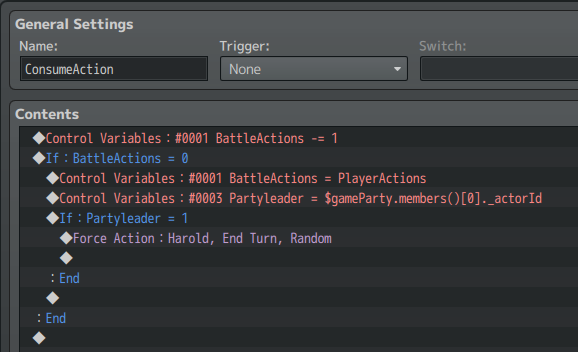
one thing I wanted to do was make it so that the player's turn automatically ends after they've used a certain amount of cards (by default it's 2 but I wanted to make it adjustable so I can add skills that grant more actions and such), the only issue is there didn't seem to be a way to do this with the plugin, so I attempted to do a makeshift action-count system in-game, by setting the number of actions  to the player's default action count at the start  of the battle. Then once the player uses a card it calls a "consume action" common event that does as follows


This works fine at first, but an issue arises upon reaching 0, for some reason, I cannot force the turn to the end with my end turn skill, instead the game softlocks as seemingly nothing happens forever.  After doing some tests I came to the conclusion that for some reason the game was stuck trying to use the end turn skill, but it couldn't (I did this by giving the end turn skill a common event which just put up a dialogue box with some text) I tried to fix this by using switches to make the force action part happen in a troop event with the "moment" condition but that just gave me the same result.

So with seemingly no other options left I come here to ask if there's a way I can get the effect I want here? or at the very least force the turn to end after a set amount of cards used if I can't make it dynamic/adjustable?

Developer

Hey D.R.G,

We would recommend using YEP Battle Engine Core and YEP Standard Turn Battle (STB) system plugins for this purpose. That will make it such that you can queue force action Turn Ends and that all the Turn End triggers happen after the Actor has completed their Action. Place these plugins above IsiahCardGameCombat for best compatibility. Once both of these are in, you should be able to use an Eval Card Action or an Action Sequence to fire a skill end the user's turn if their Action Count is reduced to 0.

If you are still having trouble implementing this system, we would be willing to troubleshoot it further with you on our community Discord. We have a dedicated forum by which we can help users with such implementation problems that may be easier than using the ones on itch.io. If however, you would prefer to continue the discussion here, we can do that as well :)

Thanks,

MythAtelier Team

(2 edits)

I think I would prefer to keep that discussion here, thank you for the offer though!

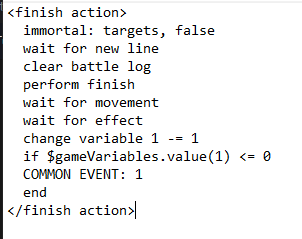
With that aside following your recommendations did provide some progress, where i was able to get the skill to successfully get the end turn skill to go off by using action sequences (common event 1 just forces the action since I couldn't find a way to do that in the action sequence itself) 

The only issue was that when the End Turn action was forced, it seemed to have just used the skill like any other card, and i could continue my turn without receiving new cards or experiencing the enemy attacks, but it would also have strange side effects like allowing me to pick a card/end my turn even when all the enemies die (though selecting anything seems to just crash the game in that state)

Hello everything is fine? I'm coming back here after a while with more questions... Is it possible, after selecting a card (card action pack 1), to modify its variables (using idenpendent card variables)? Something to simulate Yu-Gi-Oh equip cards?

Taking this opportunity to also ask if it is possible to modify a card variable depending on the number of specific cards and/or a type in a zone?

Sorry if it's confusing, I'm using a translator ^^'

Developer

Is it possible, after selecting a card (card action pack 1), to modify its variables (using idenpendent card variables)? Something to simulate Yu-Gi-Oh equip cards?
Yes, that is what one of the Card Actions in Independent Card Variables is set to do. You will want to use these to achieve it:

Selected Var(X) set Y 
Selected Var(X) mod [+/-]Y

Taking this opportunity to also ask if it is possible to modify a card variable depending on the number of specific cards and/or a type in a zone?

Yes, you would need to make use of Conditional Card Actions to check how many of a specific Cards or type there are in a Zone and then change those variables on a Selection of Cards.

Let us know in this thread or on the Discord if you need any help setting these up. We can troubleshoot it with you :)

(+1)
Sorry for the delay, it works!
And I have one more question, if you could answer: how do I make it so that when a card is discarded from the hand it goes back to the deck? Or be removed? Thank you again!
Developer

This is unfortunately a feature that is not available yet. But with the upcoming Card Game Combat v1.6.0 update, you should be able to make cards with these kinds of effects :)

Nice! Thank you ^^

I know this is probably an incredibly stupid question, but I can't figure out how to get the 'End Turn' button to work. I've tweaked the settings a bit, but it still doesn't work. Thanks!

Developer

Hey hibjgalaphor, thanks for the question. You can set up the End Turn button by setting its settings in the plugin parameter. The most important of these is the End Turn skill which corresponds to the ID of a Skill in the Database which is used by the Actor when the button is pressed in Battle.

https://cdn.discordapp.com/attachments/235557488794009600/1200614165488881706/image.png?ex=65c6d213&is=65b45d13&hm=40baba806ccb1dee67c9979398e1135955ff3e2fcb1a600795689d934c98b222&

In the Demo Project, we have set up the End Turn Skill to look like this in the Database. This Skill must use the <willEndTurn> notetag to indicate that it will end the Actor's turn once the Skill has been used so that it can move onto the turns of other Actors in the party or onto the Enemy Troop depending on the initiative order.

https://cdn.discordapp.com/attachments/235557488794009600/1200615104119590954/image.png?ex=65c6d2f3&is=65b45df3&hm=9ca2ea396072f8a4ca9b4e71667ab4f12ed2cddfc0f2d13234e7099d5ffbcdc2&

That should be all there is to it, but please follow up and let us know how this looks like in your project so we can help troubleshoot any issues you have been running into :)

Thanks,

MythAtelier Team

(+1)

Thank you so much, works flawlessly!

Hello, I have a stupid question:

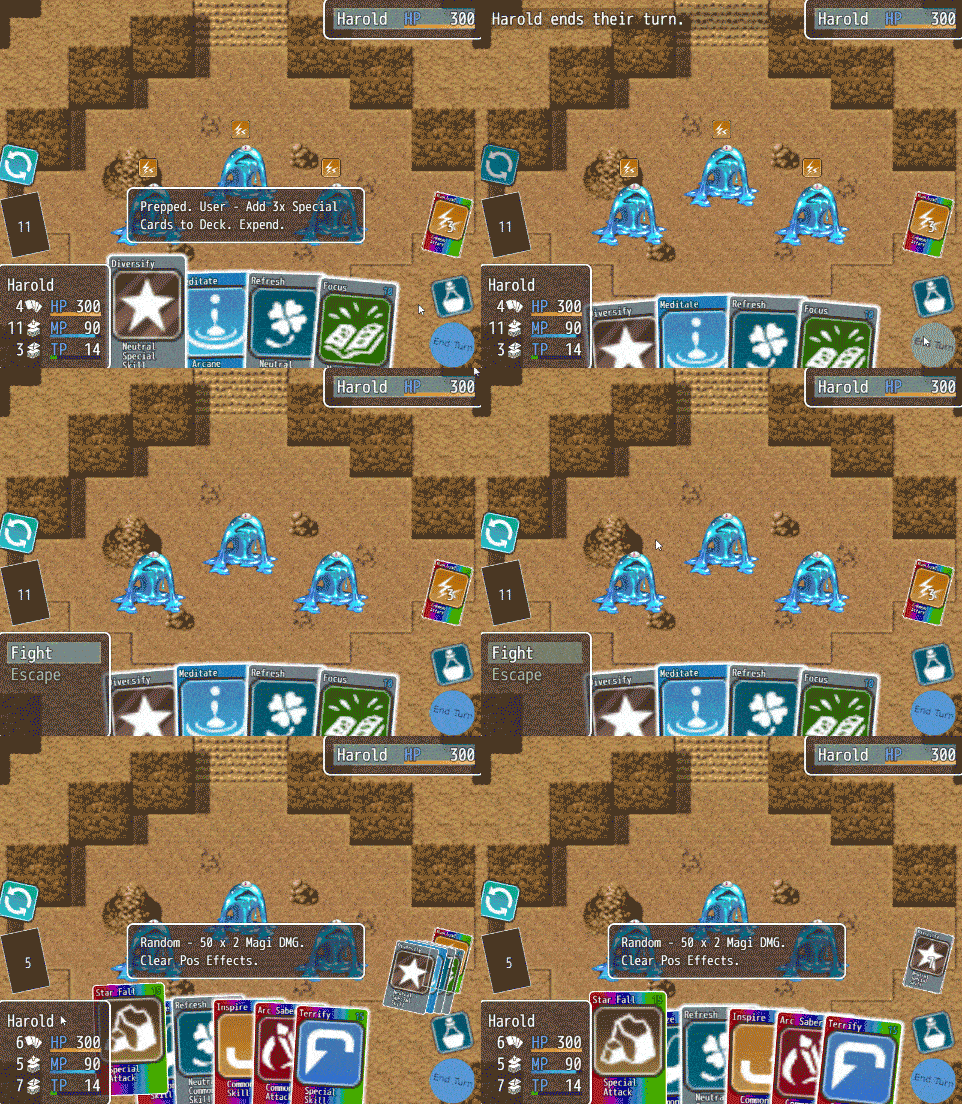
As you can see, old cards were discard at the same time when the new cards deal. But, is there have anyway I can immediately discard all hand cards when I click the "End Turn"? cause I want to set some images at there between the turn, but the old cards will in front of it. Thanks!

Developer

Hey MESA, thanks for your question! Don't worry, there are no stupid questions.

You can do this by adding Card Actions to your End Turn Skill. This is the Skill that is activated when you hit the End Turn button, you can set it in the End Turn Button Plugin parameters. For example, the following Notetag:

<willEndTurn>
<Card Actions> Discard Until 0 </Card Actions>


Will Discard all Cards in your Hand and then End your Turn. This makes it such that when you draw cards at the start of your next turn, you will have an empty Hand before cards are drawn. Hope that helps :)

Thanks, this works perfectly!

If I use this plugin, can't I reduce the screen itself?! Please let me know...

Developer

We do include a basic Window Resizer plugin in the plugin suite if you want to make a game in smaller resolutions. For advanced options, we would recommend using another plugin solution such as YEP or SRD Core Engine. Cards change their dimensions based on what image you provide for them so all you would need to do is adjust plugin parameters (such as Hand Width, Button Positions) to fit the new resolution.

Are there script calls we can use to check if a card is the library equipped or not?  I'd also like to know if we can check how many of a card we have in the library. 

I've looked through this thread and all the plugins I have from the suite and came up empty. 

Developer

Hey spiderbob,

To check if an individual card in the library is equipped or not, you will want to use:

[Game_Card].origin()

This is will access the origin value of a Game_Card object which will return "learned" if obtained will Initialization or Skill Learn, "equip" if it was added through Equipment and "state" if it was added through a State on the Actor. You can find a Game_Card by accessing any collection of Cards such as:

$gameParty.members()[0]._cardDeck._data[0]

This gives you the top Card of the Deck as a Game_Card object which you can access the origin of using the above function.

To check how many of a card you have in the library, the script call you are looking for is:

[Game_Cards].amountOf(skillId)

This will return the amount of cards matching the Skill ID you pass in of the Game_Cards object you are calling it from (which is just any collection of Cards). A couple that might be useful to you:

[Game_Actor]._skillCards

This will give you all the cards an individual Actor has including ones they have in their Library which are not in their Deck.

$gameParty._allCards

This will give you all the cards in a Party's shared library if you have that plugin parameter enabled.

Hope that helped. Let us know if you have any further questions. We would be happy to assist :)

Cheers,

MythAtelier Team

(+1)

Awesome! Thank you so much for the swift reply. 

I have a bit of a strange question. I want to make a game where riichi mahjong is the combat system, and have been looking into card battle plugins for a head start on basics (drawing, discarding, effects etc.). I looked at the documentation on the wiki and I think I more or less understand how it works, but I had some questions on how much I can tweak the plugin:

-Monsters don't seem to use the card system at all, is it possible to change that? Ideally, having both the player and enemy drawing from the same deck of cards?

-Are visible discards possible? In riichi, your discards are faceup and visible (and can be stolen in some situations), and are arranged in rows of six until a player wins or you exaust draws from the "deck". 

-Is there a param in the plugin that influences opening hands? LIke say, if you equipped a necklace that guarantees a specific card will be in your hand

Developer

Thanks for your question, it's not that strange at all. Here are some answers to each of those questions:

- Enemy Cards and Zones will be a major feature of the Card Game Combat v1.7.0 update which is scheduled for 2025. There are workarounds that allow enemies to use Card abilities but you can't make them draw/discard/remove Cards as they don't have those game objects. For Mahjong, you can set it up to be actions between a party of 4 Actors with a dummy enemy (that is non-interactable so the Battle scene does not end until one Actor has achieved the victory condition). Actors have individual Hands, Deck and Discard Zones which would be perfect if you want to simulate Mahjong gameplay in this manner.

- Visible Discards are not possible with Enemies as they do not have their own Hands yet but are possible with other Actors who have their own Hands. You can also enable peeking at the other Hands of Actors or turn it off as I believe that is usually not allowed in most Mahjong variants. It terms of stealing Cards/Tiles, this can be done by creating a Custom Zone that serves as a shared Discard and allowing each Actor a chance to steal a Tile and add it to their Hand when it is added to the Discard.

- Yes, you can manipulate the Opening Hands by using the Equip Cards and Turn Start Plus plugins. This would allow you to give an accessory  item Notetags that add a specific Card to your opening Hand without fail each match/battle.

Hope some of this helps. What you are trying to do is possible, it will just require a lot of smart scripting to circumvent core behavior of Card Game Combat in order to achieve it. We would be happy to help point you to where in the plugin you will need to make the necessary changes to build your system :)

Goodness you were quick to respond, thank you very much! If you're planning a big update, I think I'll wait for that, and in the meantime I'll look into using eventing and such to accomplish what I need. I'll definitely keep an eye out on this plugin, thank you

Developer(+1)

Sounds good! Hope to see you in a couple of months :)

Deleted 1 year ago
Developer

Thanks for the question. It is currently not possible to play cards vs cards in this system. Cards are played individually and then resolve their action before the next can be played. You will need to wait for the v1.7.0 update happening in a few months where we enable Enemies to have their own Cards and Decks as well. Once that is available, it will be possible to use Custom Zones in order to have Skill Cards beat other Skill Cards like you are envisioning (both cards go to the same Zone, they are compared against each other and one Card wins out and resolves). Hope that helps :)

Deleted 1 year ago

Multiple questions!

  1. Is it possible to pick the card then initiate it at the end of the turn like in Library of Ruina as your description speaks by itself?
  2. Is it possible to make exclusive card deck for the said character which cannot be swapped to other characters?
  3. Is it possible to have multiple attacks in one card?
  4. Is it possible to have some perks like On Use, On Hit just like in Library of Ruina?
  5. Is it possible to have enemy using their own card decks as well?
Developer(+1)

Multiple answers!

1. Yes, while the base gameplay has cards resolve instantly as you play them, you can use the Start of Turn / End of Turn Card Passives to queue Actions for a specific timing step. May require some additional Eval work to get working but this is possible.

2. Yes, you can use the Deck Editor expansion's new Immutable notetag and Actor Restrictions to make a Decklist exclusive to one Actor. You can also restrict an Actor's card pool used to build Decks by not making the Library shared across all party member.

3. Yes, you can make a card that is a combination of smaller Skill effects from other cards. These could be in the form of multiple attacks.

4. No, effects firing based on gameplay triggers is not yet supported. This will need be achieved with another plugin such as YEP Buff States Core. That plugin is more suited towards creating the windows for triggered effects. You can also conceivably do this via some clever Eval work in Card Actions but we recommend using the other plugin for this purpose.

5. Not yet. This features is coming soon with the CGC v1.7.0 update which is currently scheduled for sometime mid-next year. There is a lot of foundational work that needs to be set up in order to support this system.

Hope that helps :)

(+1)

Thank you for answering my question, at least I know that some of the LoR Feature could be replicated in this plugin. Can't wait to see 1.7.0 version would offer!

Hello. I'm sorry for using a translator.
When I go into battle, I want to resize the cards that under the screen. (The cards are too big now.)
How can I resize the cards?

Developer

Hello simple126, you can resize the Cards by providing a Base image with different dimensions. The Card will change size to match whatever the Base image you use.

Hi! This plugin is exactly what I was looking for, and I'm very excited to use it!

I have a question regarding the movement animation of the skill cards played from hand.

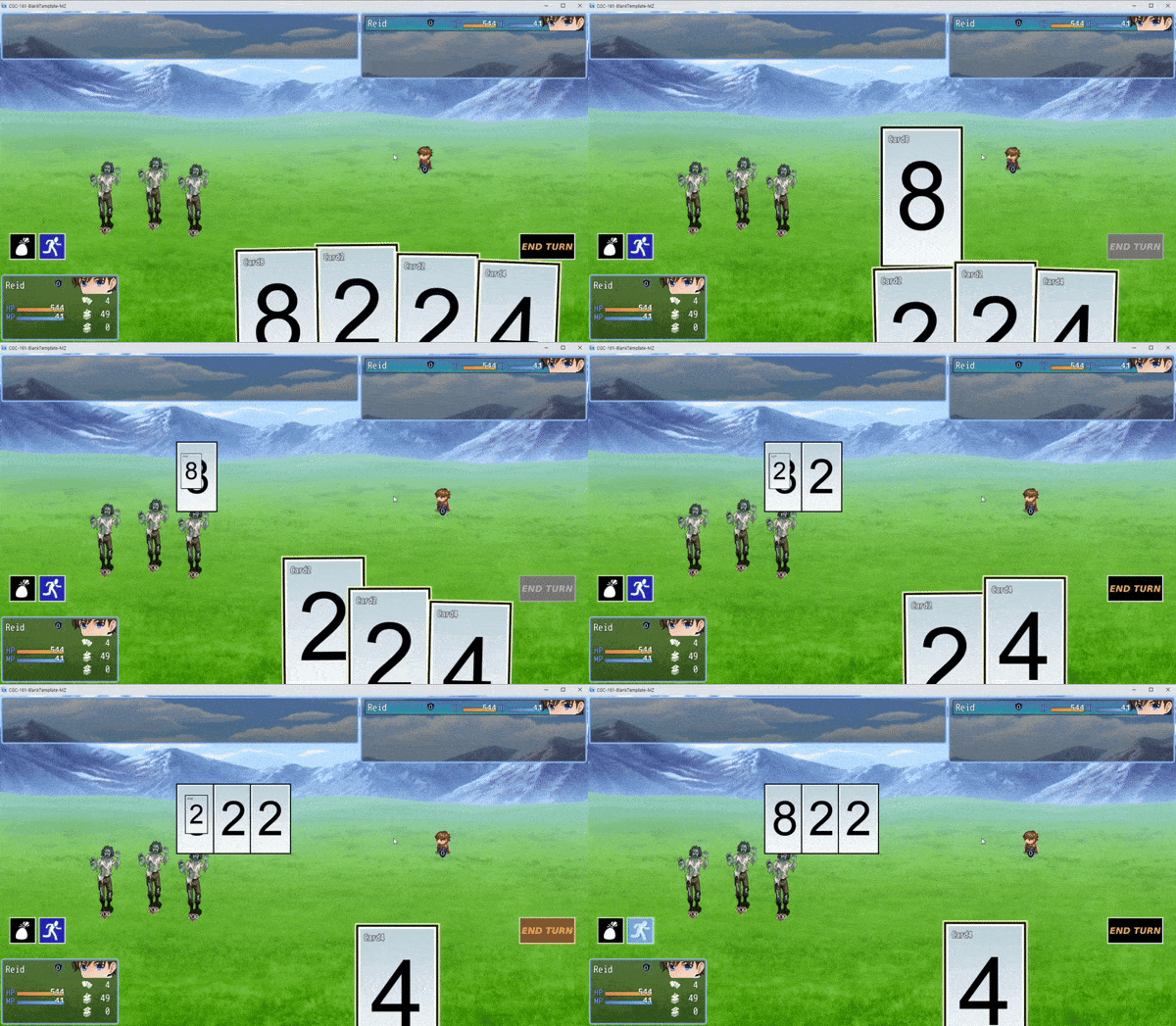
I’m trying to create a card combat system inspired by poker, and I’ve implemented common events to display the cards as pictures on the battle screen in the order they are played. (The 'Will End Turn' card passive inflicts damage equal to the sum of the numbers.)

Currently, it seems that the cards played from hand hover in the center of the screen (presumably waiting for their effects to execute) before flying to the discard zone. 

My questions are:

1. Is there a way to prevent the visual of the cards flying to the discard zone? Perhaps making them disappear right after they’re played?

2. If option 1 isn't possible, can the animation of the cards flying to the discard zone play underneath the pictures? I’d like to avoid any overlap with the card images.

I’m very new to RPG Maker, so any suggestions you can provide to achieve the desired effect would be greatly appreciated!

Developer

Hey SapphireSquid10,

Thanks for your questions! Here's a couple workarounds for each:

1. While there isn't a way to prevent the visual of the cards flying to the Discard Zone, you can try Removing cards on play via Card Actions which will ensure they don't move to the Discard Zone and instead are removed in Hand. You can Add the same Card to the Discard Zone as part of that set of Card Actions and players will be none the wiser. Make sure to change the coordinates of the Temp Zone which is where the Card moves to after it is played before it moves to any other Zone.

2. This part is a little bit harder and would require editing the plugin. We can offer an option in a future update that lets you choose the priority of Cards vs Pictures, but right now Cards will always appear above the Pictures layer (has to do with the fact that the Cards are on the Window layer).

Let us know if this workaround does the trick or if it is still insufficient. We can continue to troubleshoot until we find a solution.

Thanks,

MythAtelier Team

(+1)

Adding the 'Remove this' card actions did the trick! The animation now looks much better and aligns with my intention. Thank you so much!

Hello. I recently purchased this plugin and have a question.

How do I make a card a selection when I hover the mouse cursor over it?

Currently, if I move the cursor while clicking on a card, I can get a similar action, but I would like to be able to select a card by hovering the cursor over it without clicking.

Hello and SPECTACULAR plug in(s). Is there any way to modify the width and height of the windows that provide the card info on the battle screen. I am referring to the text box that appears on the top left of the screen and includes the description of the card's abilities when a card is selected. Thank you again in advance!

Developer

Hello IkariMan,

Yes, you can change these using the Help Box Control plugin. Should be in its plugin parameters as Width and Height.

Also we've seen your other post in the Bug Report thread! Just give us some time to give you the steps to solve that issue (it's the holidays, so bit of a skeleton crew right now).

Thanks,

MythAtelier Team

Bought this plugin suite via Steam (it's a very good suite), and seeking a Hard Mode inquiry.
How would one implement a skill cost of zero for one skill type? Like say "Nina" plays any Skill card for 0 MP.
Also, how would one make it so that for said specific actor, any cards that are exiled/removed return to the deck or the hand instead?

Developer(+1)

Hello KBGaming&&Music,

You can dynamically alter Skill Costs via either plugins like YEP Skill Core or our Independent Card Variables plugin.

If you are using YEP Skill Core, you can use the <Custom MP Cost> Notetag in order to have it such that a particular Actor gets to cast this Skill for free.

<Custom MP Cost>
if(user.actorId() == 2)
{
  cost = 0;
}
</Custom MP Cost>

If you would like this to work at the Skill Type level then you might need to use YEP Buff States Core and have a check similar to this on the State itself when the user goes to select the Skill in the menu (which is the CGC equivalent of hovering over the card in Hand).

If you are using Independent Card Variables, you can create a Variable for the card instance and set it to 0, then assign it to the MP Cost.

<Card Passives>
Var(0) init 0
</Card Passives>
<MP cost = var(0)>

The MP Cost will change if you change the value of the Variable via another Card Action, Damage Formula or Script Call.

The second request is a little easier but you'll have to include it in the Card Actions Notetag of each Card. You can check for the user's Actor ID in an if statement and if they match then have the Card move to the Deck/Hand after play and skip to a Label at the End. If not, then it will move to Discard/Exile as the Card normally does.

<Card Actions>
//Do Card Actions Here ...
If (user.actorId() == 2)
Move this to Deck
If (user.actorId() == 2)
Jump to End
Move this to Discard
Label End
</Card Actions>

There is currently no way to bind a Card Action like Discard or Remove to a Zone destination so it will need to be done manually. This will be a feature introduced in a future update.

Hope this helps. Let us know if there is more we can do.

Thanks,

MythAtelier Team

Very well. Thank you for your reply and hopefully this information is helpful.

Addendum:
Apparently, Visustella Core plugins (this is an MZ project(!)) cause a weird arse "cannot read property of undefined" (IsPressed); this occurs whenever attempting to go into any added menus. Only using VS Core and VS Skills States Core.
Could use YEP plugins; pretty sure FOSSIL holds those steady...(?)

Good day Myth, how can I have my card show the formula of my skill? 

Developer

Hey Arcanamoon, if you are using MV then YEP Message Eval Text is your best bet. Use the evalText<<>> Notetag in the Skill Description and you will be able to show formulas. You can have it pull the stats of the user and show the damage formula based on that :)

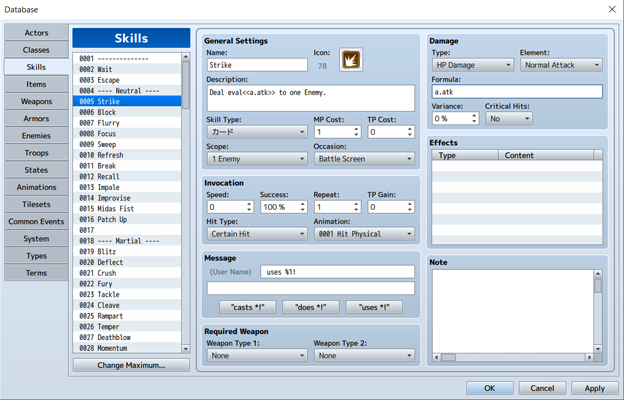
I just try it and it ain´t working for me, probably because I´m doing something terrible here, could you gime a practical example please? Here is how have the skill description: 
Deal eval<<a.atk>> to one Enemy.

Developer

Because you got the syntax wrong. Try

Deal \evalText<<$gameParty.leader().atk>> to one Enemy.

Once you have that working, we can get into more specific conditions.

Firs Myth, Happy New year! I hope your would be able to achive all your projects has you envision them! 
Second, I bought your Plug In via Steam, I do not if this could be relevant, Here is the link: https://store.steampowered.com/app/3243700/RPG_Maker_MV__Card_Game_Combat_Deckbu...
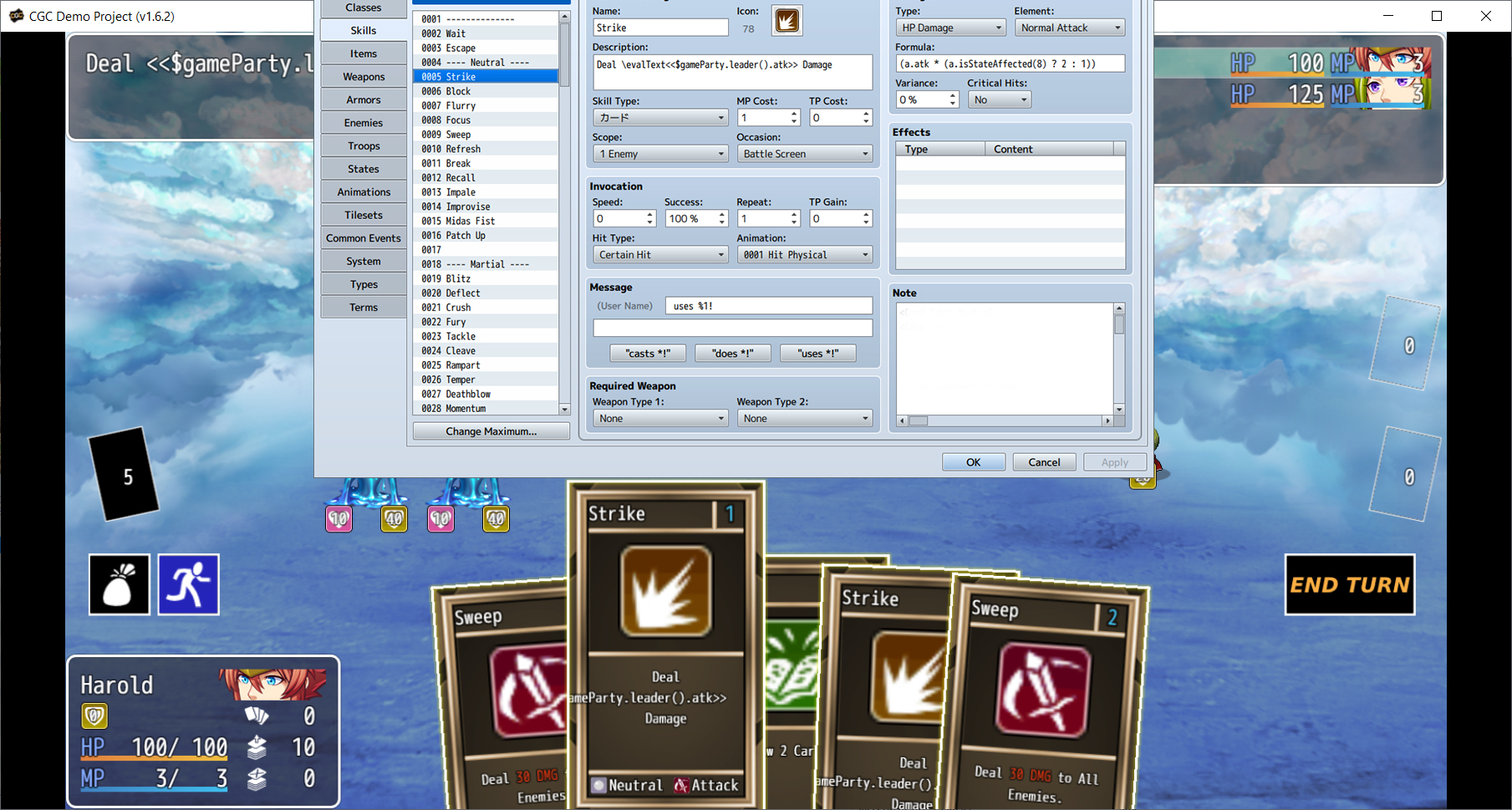
At last, sorry if the image is a bit to big, but is for quality for quality purpose. I copy/paste your text, and here is what happed. Is not displaying what it need to display

Developer

Hello Arcanamoon, 

It looks like you have either not included YEP Message Core or YEP Message Eval Text in the plugin order. Please post a screencap of your Plugin Manager list so that we can make it work. This solution has become standard practice for everyone using CGC in MV so we should be able to get it working.

Thanks,

MythAtelier Team

(3 edits)

I see, those are Yanfly plug in! In other words, I need to get those to do what I want, My guess those plug ins works with yours if that is what are you suggesting to use. 

Thanks for the help! I'll look into it. Just a suggestion if you do not mind, I think you should incorporate that option in your core engine, the one of using eval to display formulas results in the cards, insted of rellying on other creators plug-ins, that feature is both, important and core from these type of games.
Still, you plug-in amazing and I will make my dream of creating a card game come true, thanks for your support and hard work. If I have any other doubt, I´ll come again asking for help, till next time Myth :) 

Developer

Yes, Arcanamoon, that’s what we meant. YEP Message Core and YEP X Message Eval Text plugins are compatible with CGC for the specific purpose that you are requesting.

We will consider building the feature into CGC natively so you don’t have to use Yanfly Engine plugins if you don’t want (though we highly recommend them, especially Action Sequences and Buff States Core).


Looking forward to seeing your dream card game in action. Let us know if you have any other questions :)

Thanks,

MythAtelier Team

Oh! I might look into it, it has some features I kind like, I know his quite famous in the MV and RPG maker community in general. But, this is a feature It should be implemented in your Plugin in the future, after all, you already some of those features, like colored text in the cards. 

Anyways, happy new year and tille next time :)

Deleted 1 year ago
Developer (1 edit)

Hey Arcanamoon,

Please try placing this in the Skill Notetag and see if it works:

<Card Actions>
Select 1 Type Attack from Discard
Move Selected to Hand
Clear Selected
Wait 30
Select All from Discard
Eval var type = "Attack"; var win = SceneManager._scene._cardSelectionWindow; win._cardsSelected = win._cardsSelected.filter(card => Myth.CGC.getIDsOfType(type).includes(card._skillId));
Move Selected to Deck
Clear Selected
Wait 90
Shuffle Deck
</Card Actions>

The Select All Type X from zoneName Card Action is available in CGC v1.6.3 but that update has not launched yet so we are implementing it using an Eval method. You can replace  "Attack" with the specific Type Name  you want to use for your version of the card. You will need to replace it both in the first line and in the Eval. Finally, make sure there is a wait time between Moving the Cards and Shuffling the Deck. Shuffling while the Cards are in transit will cause a crash (this has also been fixed for CGC v1.6.3) so the Wait time is a safety measure to make sure they get there before the next Card Action.

<card actions="">Let us know if this works on your end. If you run into any issues, we can troubleshoot here until the solution works.</card>

<card actions="">Thanks,</card>

<card actions="">MythAtelier Team
</card>

Hello Myth, I have 2 questions about CGC.

1. How do I implement ‘if this is the first card used, deal an extra 50 damage’?  I "used If user._firstFlag == true   draw 1 "from the demo to try to draw 1 card but for some reason it doesn't work in my game project

2. How to achieve the effect ‘Deal ✖10 damage to the type of attacking card used this turn’ 

Thank you

Developer (1 edit)

Hello Gaji666,

1. You are on the right track. You need to make this check in the Damage Formula. It might look something like this:

var dmg = 10; if(!a._firstFlag){ dmg += 50; a._firstFlag == true;} ; dmg

In the above example, the Card's base DMG is 10, but if it is played first, it deals +50 DMG and then sets the first flag to true so no other cards can benefit from this effect this turn. Remember to set user._firstFlag to false in the End Turn Button Skill so that it can be available next turn.

2. Not sure I understand this effect. You are trying to deal Damage to the card itself (not currently possible in CGC) or are you trying to buff the DMG on the next type of Card played this turn?

Thanks,

MythAtelier Team

1.Thank you for your detailed response! I have understood! Also are there other useful flag words like lasttype, firstflag?

2.Sorry, my english is not very well. I apologize for any misunderstanding. I mean 10 times the number of card types used this turn on an enemy.

Developer

1. These are all local variables that we are declaring to keep track of a state. You can create as many as you want and call them whatever you want. In the Demo Project, we mostly use _firstFlag (for effects that trigger when the first Card is played) and _lethalFlag (for effects that trigger when an enemy dies). Just remember to reset these flags in the Notetags of the End Turn Skill.

2. This is a little tricky because you will need to keep track of the types of every card you play in a turn before this card is played. Luckily we are already tracking the primary Type of a Card with _lastType variable so this would just add onto that. Please add this Card Action directly under the Eval where user._lastType is set for EVERY card in your game.

Eval user._typesPlayed = user._typesPlayed || []; if(!user._typesPlayed.includes(user._lastType)) user._typesPlayed.push(user._lastType);

This creates a new array variable which contains a list of each type that has been played during a turn. It only records every new Type that is played, so if the same Type is played twice it is not added to the array. We can now use this in a damage formula like so:

var dmg = 10; user._typesPlayed = user._typesPlayed || []; dmg *= user._typesPlayed.length; dmg

This makes it such that the Damage a Card deals is equal to 10 x the number of types played before. This does not include the card itself only types played before this card is used. So, if this is the first card played then it will be 10 x 0 because no other Cards with Types have been played before this. If, however, 3 different Types have been played before this card, it will deal 10 x 3 = 30 DMG.

Lastly, we must clear out user._typesPlayed when the Turn ends so that next turn it can start over again. Please add this Eval to the Card Actions Notetag of your End Turn Skill.

Eval user._typesPlayed = undefined;

Note: this works if there is only one type per Card. If there are multiple Types, then the code will have to be a little different to track the total number of types. Let us know if you require that and we can provide that solution for you.

I'm sorry I'm bothering you again. 

The effect I'm trying to achieve is “Draw a card, if it's an attack card add an extra 10 blcok”

 I'd like to ask what's wrong with the way I'm writing this, it didnt work:

Select 1 of 1 from deck Top

If $dataSkills[SceneManager._scene._cardSelectionWindow.selectedCards()[0]._skillId]._cardTypes.includes("Attack")

Add Block +10

Move Selected to hand

Clear Selection

thanks to your demo. I solved this problem by replacing "Agility" with "agility"

Developer

Good to hear you were able to resolve this issue.

Thank you for your reply!! I am so love this system and I have too much question.. Is it possible to allow the person using the card to exchange a card in the deck or hand with the target (teammate)?

Developer

Yes, this is possible with some Evals. Can you give me an example of a card/ability you would like to implement? I can then give you the Card Action Notetags necessary to implement this feature on that basis.

For example, this is a card target to teammate:

<Card Actions>

Select 1 from hand

Add Selected to "Target's" hand

Clear Selection

</Card Actions>

<Card Target Actions>

Select 1 from hand

Add Selected to "User's hand"

Clear Selection

</Card Target Actions>

This is my aim. But I dont know how to express" target". And I aslo tried this:

"<Card Target Actions>

Select 1 from discard

Eval user.actorId(2).addCardToZone([SceneManager._scene._cardSelectionWindow.selectedCards()[0]._skillId],"hand")

Clear Selection

</Card Target Actions>"

But I dont know why 2nd actor did not add card to hand

(5 edits)

Hi, I'm Dagon_tako, Japanese. 

 We use DeepL translation. I purchased it on Steam. I am using version 1.6.2.

RPG Maker MZ. 


 After using a card, pressing the left mouse button without moving the mouse selects the leftmost card.

Players accustomed to quick manipulation are saddened when they use the wrong card.

I think it's because the selected script doesn't work unless I move the mouse, is there a solution?


Right-clicking in the Deck, Discard, Exile Zone selects the leftmost card in the hand.

Left-clicking in this state uses the left-most card.


In any case, can't the worst-case scenario be eliminated from the selection process?


Thank you for taking the time to share.

(1 edit)

I bought the Independant Card Variables add-on for this plug in and I am having some issue.

Bottom line question: How do I put the actor’s attack stat (or more) into the card description?

If I try to init a variable like:

<Card Passives>
Var(0) init 34
</Card Passives>

It works fine. However, I want the value to be equal to the actor’s attack stat. I cannot do Eval with passives, so I was hoping this would:

<Card Passives>
Var(0) init $gameActors.actor(1).atk
</Card Passives>

But it doesn’t.

I tried to do so in actions as so:

<Card Actions>
Eval $gameVariables.setValue(101, $gameActors.actor(1).atk)
Var(0) set $gameVariables.value(101)
</Card Actions>

This successfully sets the game variable 101, but not the card variable. So I also tried this:

<Card Actions>
Var(0) set $gameActors.actor(1).atk
</Card Actions>

This also doesn’t work.

For context, here is the Skill Description:

Basic Attack. Deals \Var[0] damage.

Bonus question: My game will only have 1 party member (unless I add summons), but can I also do this with multiple party members?

Can you tell me all terms of use (preferably more detailed than the one of the main page) and which type(s) of game that you do not allow to create using this? (e.g., gore or NSFW).

Developer

You can find our Terms of Use here on our Plugin Wiki: https://card-game-combat-help.alwaysdata.net/doku.php?id=terms-of-use

There are no content restrictions in terms of what you wish to do with our plugin, but team members reserve the right to decline assistance to any plugin user who is using the tool in a project they find objectionable (e.g., promoting discrimination or harmful practices).

Thank you for your reply!

Hello. Version 1.6.4 is incredible! I was wondering if there is a way to make the numbers that are displayed next to the heart, magic, and shield icons during the battle scene larger? They are a bit tiny and think they could be helped with some enlargement. Thank you and great work!!!

hey i just have quick question.

whenever  i hit cancel on the players turn it does the turn start action like draw a card. so essentially the player can get a whole hand just by pressing cancel. is there a way i can change it so the player cant press cancel to draw infinite cards?

Developer

Hey swoon spoon,

This doesn't seem to match the current behavior of the CGC plugins even if you set the Party and Actor Command parameter skips to false. Are you using any other plugins that may be altering how turns are taken? If so, could you share a screenshot of your Plugin Manager list so we can replicate your setup and see if we can find out what's causing this behavior.

Thanks,

MythAtelier Team

(+1)

OMG, yeah i had a plugin on that i was testing that i ended up not using so i deleted it and it works now haha

Thanks for the quick reply and help!!!!!!

Is there a way to make the numbers that are displayed next to the heart, magic, and shield icons during the battle scene larger?

Viewing posts 21 to 55 of 55 · Previous page · First page