Indie game storeFree gamesFun gamesHorror games
Game developmentAssetsComics
SalesBundles
Jobs
TagsGame Engines

RahiTuber

A lightweight yet highly customisable pngtuber app 路 By rahisaurus

Discussion Sticky

A topic by rahisaurus created Jul 31, 2024 Views: 4,938 Replies: 120
Viewing posts 21 to 37 of 37Previous pageFirst page

Hi, I'm not sure if this is the right place to ask but I don't really know where else to go..
I just started using rahituber recently and I'm setting up my states before doing any form of rigging. My model has versions of hand toggles with and without gloves. Is there an easy way to set up a state that can toggle the gloves on and off for all hand toggles? I realized how many states I'd have to make if I individually made a state with gloves and then another without gloves per hand toggle and it'd mean I need more key combos- 馃槶

(1 edit)

Folders!

There are many possible ways to do it using folders, but the way I would do it is by creating a folder for every hand toggle with the gloved and ungloved sprites inside (with the one I don't want by default set as hidden).

Then, for the "gloves" state, I'd make a single toggle state that hides all the default sprites (e.g. all gloved sprites) and shows all ungloved ones; and for the hand states (set as permanent, not toggles) each one would hide all "hands" folders except the one I want to switch to (that one should be set to "show", don't leave it as "no change"!).

I hope that made sense 馃槄

(1 edit) (+1)

I kind of brain lagged a bit trying to get it right but it worked great when I did it properly! Thank you so much for the help! that would probably be the only really difficult problem I'll have making my model, the rigging stuff has lots of great tutorials. :D

Hey, just wanted to say that this program is so fun to work with, thank you so much for making it! The smoothest it has ever been for me to make a PNG-tuber <3

Developer

I'm so glad! Thank you :D

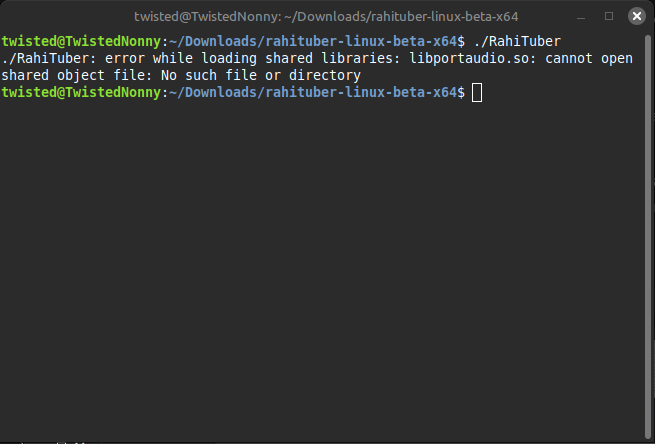
Hello I was wondering if I am doing something wrong, I downloaded the latest linux version and try to run it on the terminal but I get this error. And I've checked and see that libportaudio.so is in the lib folder so it isn't missing.

Developer

Hi there, sorry i keep forgetting to put this in the install instructions but hopefully it won't be necessary soon;

You need to do the following in the rahituber directory:

LD_LIBRARY_PATH=$(PWD)/lib && ./RahiTuber 

Might be useful to make a bash script for startup. I will add one to the current release package

Thanks for the reply, and I did do this instead, where I installed the Windows version and ran the RahiTuber_64.exe with wine and it works right off the bat, the only issue right now is that every time I open the program the program forgets the location for the art assets. But I'll try what yah sent real quick.

Okay so I get this now ./run.sh: line 2: PWD: command not found

Okay so I've search it up and PWD needs to be lowercase I believe but it still does this error after running it {./RahiTuber: error while loading shared libraries: libportaudio.so: cannot open shared object file: No such file or directory}

Developer

Ok. There will be a fix for this problem in the next Linux release, sorry about that!

(+1)

I was testing Nobara/Fedora 42 in a virtual machine recently and I only managed to run RahiTuber after installing these libraries:

  • portaudio
  • portaudio-dev
  • SFML
  • SFML-dev
Developer(+1)

Thanks - yeah, in the next release, those should be built into the executable

Would it be possible to make canvas presets triggerable as states? So I can change my PNGtuber's positioning on the spot without needing to worry about the breaking OBS transforms I've already set up.

Developer(+2)

Yeah, I'll try and add that in!

Sweet, thank you very much!

(1 edit)

Perhaps a request of minor importance, I'm partial to using push-to-talk on OBS and discord bc I tend to make a lot of sniffles and coughs while talking, would you consider adding a push-to-talk feature just so the model isn't in talking state while I might be muted in everything else? Really cool program though I'm having a TON of fun :) 

Developer

I'll put it on my todo list!

Thank you for your consideration !!!

Hi I love your program and I have a question!

Is there currently any way to assign hotkeys/toggles that can temporarily change the specific positioning/physics/mouse tracking settings on individual layers?

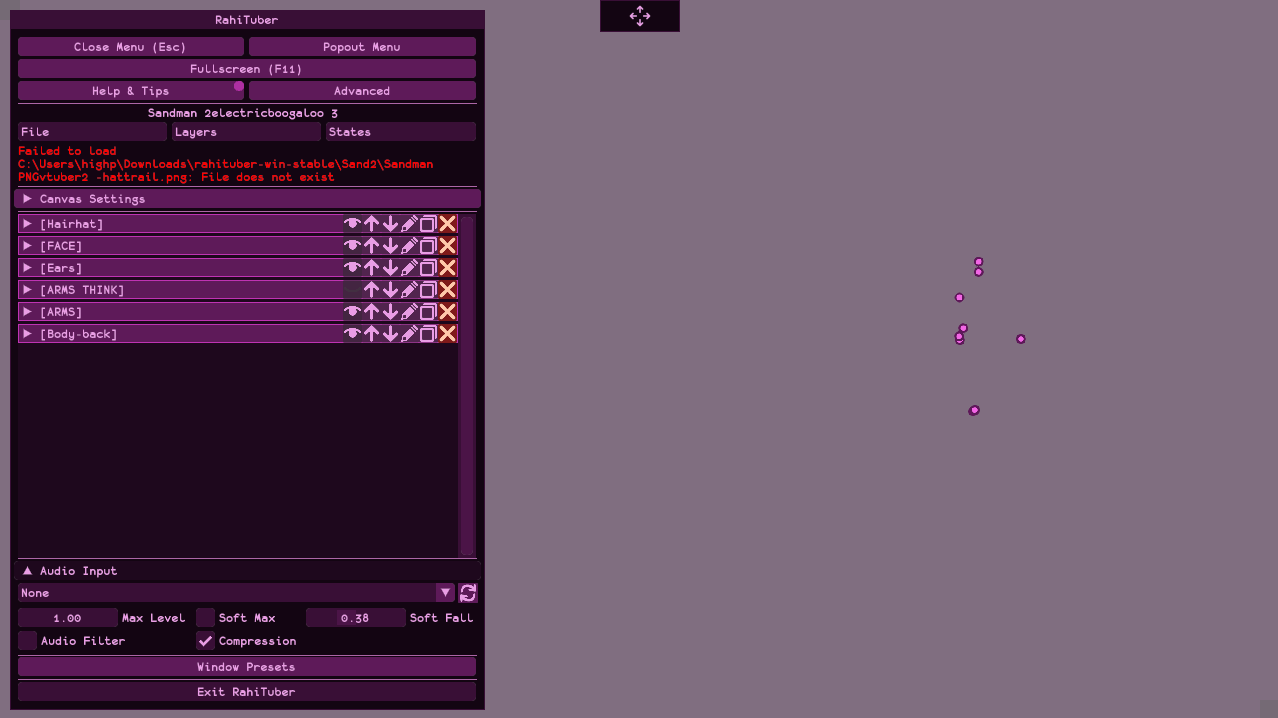
I want to create a toggle that allows my character to look down and decrease the eye and face mouse tracking, so it looks like they're drawing on a tablet. My character is rigged like this right now:

The only working way of doing this I could think of was cloning layers, moving them manually, then creating a toggle for them,, but that seems a bit convoluted T_T
Thanks in advance!

Developer(+1)

Currently it's not possible, but i am actually working on adding that feature soon (i hope!)

Currently, if you use an empty layer with mouse tracking as the motion parent for your eyes, you can show/hide that with a toggle to turn the tracking on and off.

Thanks so much! I will give this a go, and that's so exciting that it may be possible in the future :D

I just wanna say thanks for making this program, it's so fun and versatile!

Hey, so since you say RahiTuber will always be free, have you considered open-sourcing it as well?

Psst, let me tell you a secret... It already is open source, it always has been 馃槈

Hi! I'm about to ask a pretty dumb question due to dumb choices I made- but, is there an option to remove the default movement layers have when they are made without 'create minimal layers' on?  I just realized that the layers I put in and organized weren't made with 'create minimal layers' on, and I don't know how to remove the default movement of the layers 'breathing'? I don't know how else to call it- I would have simply redone putting in all the layers and organizing them but there are almost 200 layers and I'm not willing to redo all of that especially since I had also made the states/toggles I wanted to have because I left rigging the movement to the end 馃槶

I truly do love this program and how it can make such impressive and complex models- but I fear the complexity of it all is not good for my silly dumb brain, as well as my ambition blinding me from the fact that I am a beginner at making models.. I may have went too all out-

(5 edits)

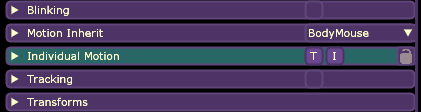
You can disable it per layer by using the T and I (talking and idle) buttons next to the Individual Motion sub-menu (breathing would be idle, by the way):


But if there are many layers that you want to fix, I'd suggest opening the .xml file of your model with a text editor and replacing (Ctrl+R in Notepad) all breathing="true" with breathing="false"

I hope that helps!

Edit: I've realized non-minimal layer also add a "talking" motion (the T button in the screenshot above), so if you want to get rid of that too with the text editor method, you'd have to replace motionStretch="2" with motionStretch="0"  bounceType="1" with bounceType="0"

Developer (1 edit) (+1)

To turn off talking, the flag is actually "bounceType" not "motionStretch". The default bounceType is 1 so you want to replace bounceType="1" with bounceType="0"

Thank you for the clarification, I got a bit dizzy while looking for the correct flags 馃槀

Developer

You just reminded me i wanted to add an option in the advanced menu to turn off idle/talking motion on all layers. I'll get on that. Hopefully notamu's answer was helpful though?

Hi, 

I love your program, I am really happy that you have made such an amazing tool. 

I was wondering if there is a way to have the pngtuber to take desktop audio as microphone input to react to. 

Developer

Glad you're happy with it! 

Depending on your sound card, there should be a microphone device that you can enable on your PC's sound settings.  Mine is called "Stereo Mix".

Just wanted to drop this in because I've been faffing about for a while and was getting increasingly frustrated with controller tracking stopping whenever RahiTuber wasn't the active window.

If you're using an XBox One controller over bluetooth, there is apparently some kind of known issue with the xinput driver where ONLY the active window can see the inputs - if you tab out to anything (even just desktop) it stops responding . I had tried manually specifying controllers on all layers, both APIs, and I got to the point of installing vJoy and Joystick Gremlin thinking it was some kind of edge case Rahi hadn't found. Joystick Gremlin would then only work when IT was the active window, so I did more digging...


Turns out, just plug your controller in and use it via USB, and it works perfectly fine.

You MAY be able to tinker with drivers per the last comment on this reddit post but my controller didn't seem to want to pair afterwards.

Developer

Thanks for sharing this! I don't personally have any Bluetooth controllers so I hadn't run into this.

Hello! I'm a bit at a loss of where to post a launch error because even the error report from the itch io app fails to send so... well.
Basically on windows when launching RahiTuber from itch io the app fails to find the .exe executable, when I checked the installation folder there is only the x64.exe and the program is able to launch if I open that file instead but I don麓t know if this behavior is intended when installing from itch io nor if the program will perform normally when directly opening the x64.exe, first time coming across this program and excited to get started btw, awesome project!

Developer

Whoops - I have probably missed a step when removing the old 32-bit Rahituber.exe file. Thanks for letting me know, I've fixed the manifest now. It shouldn't give you the option to launch the missing 32-bit version any more!

(+1)

Can confirm now is working normally from itch.io, thanks!

Hi there Linux user (CachyOS) here :)  Friend of mine is helping me with a model for my stream but we are having issues with the XML file since she is  on  windows. We for some reason cant get the model to appear on my linux pc and we really dont feel like adding all of the sprites 1 by 1.  We have tried multiple things to get it to appear even making a new portable but it still shows that it fails to load the files. any help would be very much appreciated o7 

Developer

Hi, sorry for the late reply, I hadn't seen this!
The issue is that the file paths are using backspaces. The "Make Portable" function is supposed to do this, but unfortunately there was a brief period where that function was broken. I have just discovered that it is STILL broken despite my effort to fix it last update... Will fix asap!

Developer

Should now be fixed!

I'm contemplating migrating to Linux and I was wondering if this library could be added as an alternative to SPOUT for the Linux build?

Developer(+1)

Yes, it could! I've actually been talking to Lina about it!

That's great to know! 馃槃

Hi Rahi! I really love the work you've done on the software and yours is one of the only ones that have phoneme detection! I was really excited to see it!

I noticed that in the talk phonemes, Open "A" often detects any "O" sounds. Will Phoneme Detection be expanded on later? If not, would it be possible to ask to add Open "O"? 

Developer

the mouth shapes are already quite hard to split as it is.

try saying "dog" and "chart" in the mirror and you may notice the mouth shapes are very similar anyway!

the 5 options are a good minimum to make it look convincing and i think adding more will only deter people from making the extra art for them 

that's totally fair!

Hey I'm having trouble with the scream state, whenever I try to go loud enough it goes back to the closed mouth but with the shaking effects, idk why its doing that instead of the png I have for screaming, I was wondering if it was a bug or if I was doing something incorrectly.

Developer

hi, please can you check that you have the latest version? there was a screaming bug fixed recently.

Loving this so far - it's a really good in between of "basic static" and "dear god I don't want to go through all that rigging with live2d for something I do as a hobby, not a job." LOL

Had a request - or a question in case I'm just. missing it? Could you add ... I guess a quick button like the canvas settings to adjust the neutral point on tracking for all layers? Obviously not turning it on (so layers that don't have tracking active won't actually change), but I have three monitors and depending on what I'm doing (art vs games) the software needs to run on different monitors to achieve the mouse tracking I'm doing. Since you have it relative to the main monitor, with how it works at the moment I have to go through and reset the neutral position for every tracking layer - which like, admittedly isn't a TON since most of it is just using inherited motion, but it's still a pain to need to do every other time I launch. (I'm using slight tracking on some inherited layers to get them to 'settle' into a neutral, gravity weighted hang rather than sitting at a "straight down relative to the parent" position after the parent rotation, basically.)

Developer(+1)

hi, thanks for the feedback. someone else has also asked for this and i keep prioritizing other things, but I'll bump this up the list.

in 14.2+ there is a checkbox to make the neutral point follow the window, so if you don't mind moving the window around, maybe that's an alternative for now?

Gonna be honest, I thought I HAD that ticked, but I just checked back while tinkering and went to look and I didn't. So that's-- that's on me. Relative to window once it's set is perfectly fine for what I'm doing, haha. Thank you for the fast response!

I figured out what the problem was, messing around again - I need my reference point on one window, and my actual application on another, and the reference point changes depending on what I'm doing. Right now, I'm just making different profiles for different activites, and I don't know how you'd change it in the context of how it works now apart from maybe just a visual popout (like the menu popout) that lets you manually place where you want the tracker. That'd be cool actually.

This is why you take notes on what's actually a problem, kids! 

(Context: I have a three window setup; I want rahituber to live on the top monitor just to be out of the way / around my other stream controls, while I do things on either the middle monitor or the right monitor. They're set up kind of like an L  - a 1080 on top, a 2k right below it, then my tablet (also 1080) to the right and slightly down from the 2k. I have to reset the neutral or the distance points when swapping between the 2K and the 1080 because, obvs, they are different, and it seems to act a lil weird sometimes if I don't manually reset the neutral point between the resolutions even with follow window, but, obviously, follow window won't work here anyway.)

Developer

thanks for the extra info. i will be trying to make the tracking setup a little nicer soon!

Developer(+1)

In v14.3 I've added a set of Global tracking settings in the preference menu, hopefully this eases the pain a little. I will probably expand this in future for more intuitive editing of the tracking center/area.

Hi there! Firstly, I absolutely love using RahiTuber, Thank you! :) 

I am just having a problem with the scream image that is not showing, though. I have checked my levels and can see the shake when I reach the threshold but for some reason, the image is not changing. 

I recently had to download and set everything up from scratch, and used the same layer set as last time so I am not sure if something has changed?

Thanks!

Developer

this is a known issue with thr 'stable' release, have you tried with version 14.21?

Ah! That worked, thank you! 

Viewing posts 21 to 37 of 37Previous pageFirst page