

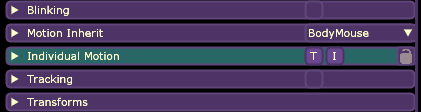
You can disable it per layer by using the T and I (talking and idle) buttons next to the Individual Motion sub-menu (breathing would be idle, by the way):
But if there are many layers that you want to fix, I'd suggest opening the .xml file of your model with a text editor and replacing (Ctrl+R in Notepad) all breathing="true" with breathing="false"
I hope that helps!
Edit: I've realized non-minimal layer also add a "talking" motion (the T button in the screenshot above), so if you want to get rid of that too with the text editor method, you'd have to replace motionStretch="2" with motionStretch="0" bounceType="1" with bounceType="0"