


So I know that & and | work like a boolean AND and OR but is there anything that works like an XOR?
Depending on what you're trying to do, either a combination of ! and = (for a scalar boolean value, logical XOR is the same as "not equal to") or possibly bits.xor[].
Ok forgive me, I didn’t follow your operation faithfully, I now see. Your method was to use a button to point at one field that itself pointed at another field (which contained the rt formatted text). I was skipping the middle-person field and apparently, by doing that, it doesn’t render the rt formatting. I’m leaving this post because it may come up in the future; perhaps IG (or someone else) could simply verify that this was indeed my problem and if anything maybe propose how I might’ve skipped the middle-person step and kept the RT formatting.
eval is a handy tool for making code snippets visible in the documentation, but it's not often needed while making projects with dialogizer. And it's probably working against you here.
This:
dd.open[deck]
dd.say[yourcoolfield.value]
dd.close[]
should be enough to play a scene written in a rich text field, with all of the formatting intact.
It's important that you point dd.say at the field's .value (which includes the rich text formatting) and not .text (which is plain text only)
If you strip it down and just put the above code snippet (with "yourcoolfield" renamed to be correct for your project) does it work?
to get ahead of “why are you doing this in fields”, the answer is, “I’m trying to teach myself how to code AND how to code in Decker and it’s a ton of friction having to click back and forth between widgets and interact, into the card script etc. and theoretically, it shouldn’t matter provided I do this correctly."
It's totally fine to be new and have questions! Decker is a pretty friendly environment to try things and figure them out. And I think most of the things that look like videos in the thread are actually gifs. I know I use a screen-to-gif recorder when I need to make a small example of something.
Okay, I think these are your main questions:
1) How can I make Decker use the whole list of widgets I defined earlier?
You just need a tiny change to how you're referencing them. You need two periods, instead of just one in this case.
fields..show:"none"
2) How can I make my !alert use my rich text formatting?
In-line commands run by dialogizer don't carry over any of the rich text features. I'm pretty sure they're just run as code.
However, you can point to another field's value inside of your !alert[] in the same way you point to source.value inside of dd.say[].
!alert[problem.value]
I know it's another step, and another thing to have to manage while you're editing but it should be pretty straightforward.
Another thing that I think might help you sometimes is the ScriptViewer contraption. You can have it display the card script and let your edit it from your card in interact mode instead of having to use a workaround with eval. And because the ScriptViewer only displays scripts that exist elsewhere you can safely delete the ScriptViewer contraption when you're done.
Just another possibility, in case it helps!
I’m just super appreciative of the work you put into helping me. I hope I can repay you or you vicariously through this community some day.
As a general rule, web applications are not allowed to start playing sound without user interaction. Web-Decker attempts to start its audio subsystem when the user first clicks or types on the keyboard. It's possible there's some additional inconsistency in behavior, but what you're describing sounds to me like normal webapp sandboxing constraints.
Lil doesn't have a per se list literal syntax. Your example is one straightforward way of making nested lists:
(list 0,1),(list 2,3)
Another fairly general way of declaring static data is to use "parse" on a string of JSON/LOVE:
"%J" parse "[[1,2,3],[4,5],[6,7,8,9]]"
# ((1,2,3),(4,5),(6,7,8,9))
Within Decker it's often a good idea to store lengthy static data in a Field widget (where it can be encoded/decoded to/from LOVE via the .data attribute), or as a table stored in a Grid widget, where it can be viewed and directly manipulated. Modules (Lil libraries for Decker) don't have direct access to a deck, so they have a dedicated mechanism called a KeyStore.
If the sublists are of equal size, you could turn a flat list into a nested one using a primitive like "window":
2 window range 6
# ((0,1),(2,3),(4,5))
You could also construct a nested list piecemeal by index in a named variable:
a[0]:1,2,3
a[1]:4,5
a
# ((1,2,3),(4,5))
This last approach is particularly handy for nested dictionaries; see the code examples in the reference manual entry for the Array Interface.
Does any of that help?
Thank you! Yes all of these help and are very interesting. I had noticed the JSON parsing style too (with which I would feel at home) and SQL-like tables but was interested to learn more about the other native options. I really like window! The other tips are very welcome as well!
Thanks again!
Hi! This isn't an answer yet, just some clarifying questions:
Are you working on using the "Make Magnet" example to make magnets that are created with scripts in them that use things like rect.overlaps and rect.constrain from the same example deck?
And did you want to make it so that only some of them do something when they're overlapping, and others don't? (based on some condition, or your mention of a whitelist).
Actually if you could give a specific description of what you're trying to do then I think we could help make sure you have all of the pieces of it that you need.
Yes, the example contraption, and I more specifically want to apply a general script to all of the canvases made with it to make them work with the Overlaps mechanic. It's the mechanic with a script applied to a draggable canvas -
on release do
if rect.overlaps[me target]
alert["You hit the target!"]
end
end
It would then execute an action if placed on the specifically named widget.
To make a project as a beginner, I'd just like to collate different contraptions to make games and potentially study the code and provided documentation.
The script on the “Make Magnet” button just creates a new Canvas widget and adds it to the card. You can set or retrieve the script of a widget with the .script attribute. So:
mycanvas.script:"on click do alert[\"boo\"] end"
Alternatively, when a widget doesn’t have a handler for a particular event, that event bubbles up to the card, then the deck. If you want a bunch of widgets that all have the same behaviour, you can put the on click ... end handler in the card, and not have to worry about adding it to each widget individually.
Thanks, I'll try the provided code with information considered. But, I'd like to ask what "bubbling up" is, if that is okay?
A deck contains cards, cards contain widgets.
When you click a button in the “interact” mode, or a script runs somebutton.event["click"], Decker looks inside the button’s script for an on click do ... handler.
If it can’t find one, the event “bubbles up” to the card, and Decker looks for an on click do ... handler there.
If it can’t find one, the event “bubbles up” to the deck, and Decker looks for an on click do ... handler there.
If it can’t find one, Decker has built-in default handlers for certain events (like dragging on a canvas to draw on it), but most events wind up being ignored.
The usual place I double-check how to write things in Lil is the Lil: A Scripting Language page.
So, what you need is an If statement.
on click do
    if checkbox.value
    play["sound" "loop"]
    end
end
(I called the audio tracking checkbox "checkbox" but please call it whatever your widget is called.)
If the button that's being clicked to play audio is the checkbox and you'd like music to turn off when it's unchecked you might write it like this:
on click do
    if me.value
    play["sound" "loop"]
    else
    play[0 "loop"]
    end
end
Does this work for what you needed? I'm happy to give a different example if you have it set up in a different way.
The simplest way to perform ciphering would be to use a dictionary. We can make a dictionary that maps characters to other characters like so:
rot13: "abcdefghijklmnopqrstuvwxyz" dict "nopqrstuvwxyzabcdefghijklm"
Given a string, we can use each character to index into our dictionary with the "@" operator:
rot13 @ "something else"
# ("f","b","z","r","g","u","v","a","t",nil,"r","y","f","r")
For characters like spaces, which aren't defined in the rot13 dictionary, we get a nil. As a catchall, we can use "fill" to substitute a generic replacement for all nils:
" " fill rot13 @ "something else"
# ("f","b","z","r","g","u","v","a","t"," ","r","y","f","r")
And if we wanted to collapse that sequence of characters into a flat string, we can use "fuse". Note that this step isn't necessary if we're stashing the result in a field's .text attribute; it implicitly fuses lists of strings as a convenience:
"" fuse " " fill rot13 @ "something else"
# "fbzrguvat ryfr"
Putting that all together, given fields "input" and "output", give "input" a change[] handler:
on change do
 rot13: "abcdefghijklmnopqrstuvwxyz" dict "nopqrstuvwxyzabcdefghijklm"
 output.text:" " fill rot13 @ input.text
end
And now we have a (crude) rot13 translator. It would probably be much more useful if we preserved all the non-alphabetic characters intact instead of turning them all into spaces. We can be a little fancier about how we construct the translation dictionary and address this:
on change do
 a1:"abcdefghijklmnopqrstuvwxyz"
 a2:"nopqrstuvwxyzabcdefghijklm"
 A1:"%u" format a1
 A2:"%u" format a2
 chars:"%a" format list range 256
 rot13:(chars dict chars),(a1 dict a2),(A1 dict A2)
 output.text:rot13 @ input.text
end
If you want to do a translation based on fixed-size bigrams or trigrams, or something along those lines, "window" might be useful:
2 window "SomeWords!"
#("So","me","Wo","rd","s!")
And you can use "drop" to exclude characters you wish to ignore (or conversely, "take" to retain only characters you care about):
(" ","!") drop "Some Words!"
# ("S","o","m","e","W","o","r","d","s")
For even fancier find-and-replace scenarios you could use RText.replace[]. Note that this returns a rich-text table and should be assigned to the .value attribute of a field, rather than .text, or converted into a string with rtext.string[].
rtext.replace["some text" ("me","ex") ("you","post")]
# +----------------+------+-----+-----+
# | text           | font | arg | pat |
# +----------------+------+-----+-----+
# | "soyou tpostt" | ""   | ""  | 1   |
# +----------------+------+-----+-----+
rtext.string[rtext.replace["some text" ("me","ex") ("you","post")]]
# "soyou tpostt"
Does any of that help?
Oh yeah! This really helps with single letter replacements and gives me something to play with for a good while.
If you give columns in a grid widget a format character of "L", "I", or "T", the column will not be user-editable. L displays cells in a column as plain strings (preformatted), I interprets cells as an icon index, and T displays cells as non-editable Rich Text.
Grids are containers for tables. To rearrange the rows of a table you probably want a query with an orderby clause. For example, sorting the contents of a grid "myGrid" by the "price" column, ascending, might require a button with a script like
on click do
 myGrid.value:select orderby price asc from myGrid.value
end
Note that the default order[] event handler for grids offers something like this out of the box; you could overload this on a grid-by-grid basis if you wanted more elaborate behavior:
on order col do
 if !me.locked
  me.value:select orderby me.value[col] asc from me.value
 end
end
If you have a column in a table, you can index it by name to get a list. The "fuse" operator can convert any list into a flat string:
myGrid.value.fruit
# ("cherry","banana","elderberry","apple","durian")
"" fuse myGrid.value.fruit
# "cherrybananaelderberryappledurian"
"|" fuse myGrid.value.fruit
# cherry|banana|elderberry|apple|durian
When the arrow keys are pressed, a navigate[] event is sent to the current card with an argument of "up", "down", "left", or "right". If you wanted to make these events move a canvas, you might have an event handler in the card-level script something like
on navigate dir do
 deltas:("up","down","left","right") dict ((list 0,-1),(list 0,1),(list -1,0),(list 1,0))
 myCanvas.pos:myCanvas.pos+deltas[dir]*32
end
If you wanted that canvas to trigger "exits" when it matches certain positions, you could mark them with buttons (perhaps set to "Show None") and then send them a "click" event on an overlap; the buttons could in turn go[] to other cards, trigger alert boxes, etc.
on navigate dir do
 deltas:("up","down","left","right") dict ((list 0,-1),(list 0,1),(list -1,0),(list 1,0))
 myBug.pos:myBug.pos+deltas[dir]*32
 each button in extract value where value..type="button" from card.widgets
  if button.pos~myBug.pos button.event["click"] end
 end
end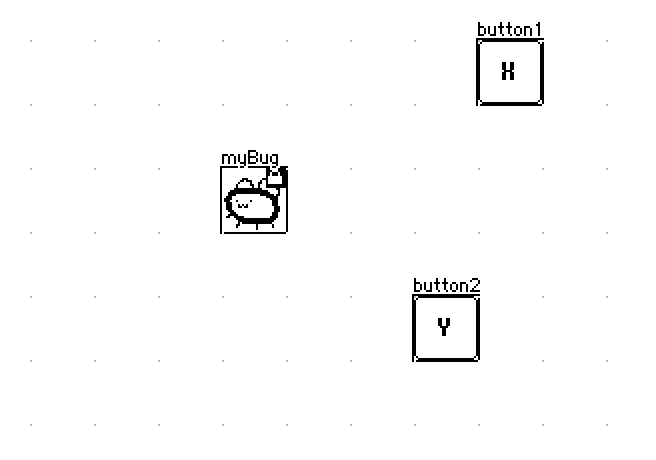
For a fully-worked example of a game that uses arrow keys for tile-based movement, you should take a look at Decker Sokoban.
Confirmed; Keystores were not properly serializing raw lists. I've patched the issue in the source repo.
Dictionaries, tables, and strings do not exhibit this problem, so any can be used as a workaround.
If you want to increment a local variable, like "t" in your example, you must use the assignment operator ":" (read aloud "becomes" or "gets") like so:
t:t+1
Local variables exist only within the lifespan of a single event.
Persistent state, like an inventory or a system for tracking a user's action, must reside in a widget somewhere. This has been discussed many times and places within this forum. I recommend starting with this thread: https://itch.io/t/2702720/how-to-have-interaction-between-cards
The "+" operator in Lil is exclusively for addition. It will coerce strings into numbers in a best-effort fashion, which is why you're getting zero:
"5"+3               # 8
" 2.3" + "1Hello"   # 3.3
0+"Hello"           # 0
The "fuse" operator is binary; it expects a left string argument to intercalate between elements of a right list argument:
":" fuse "A","B","C"   # "A:B:C"
"" fuse "A","B","C"    # "ABC"
Assigning a list to a field's ".text" attribute will implicitly concatenate the elements of a list together, as a convenience. The following are equivalent:
hellotext.text:"" fuse "Hi","There"
hellotext.text:        "Hi","There"
Cards are normally in scope by name, so you don't typically need a fully-qualified path to reach a widget on another card. The following will be equivalent from a card/widget level script:
deck.cards.A.widgets.name.text
           A.widgets.name.text
Does that help?
If you aren't already, I strongly recommend using The Listener to try expressions out piece-by-piece as you develop.
You left Decker running for 24.8 days?
EDIT: Wait, no, I see what’s going on.
Native Decker computes sys.ms as a float, Web Decker takes a float from the browser and truncates it into a 32-bit integer.
I guess it shouldn’t matter if you’re using sys.ms for performance timing (duration:sys.ms - start) but it does make problems if you’re trying to divide the clock with a modulus operator.
I was using it for frame timing for the bpm.
current time - last beat > bpm gap -> send a bang
so, i just hacked it by reoverflowing to positive by adding 2^31.
i just realized it’s still not 100% correct, because i’m not accounting for the timing gap (jitter) that is getting lost due to 60 Hz quantization.
update: oh, right. it wasn’t working because the “last frame” time was never initialized - so “current time” - “last frame” will always be negative, since it’s “current time” - nil (0). that’s the real reason.
so, anyways - i don’t know if negative sys.ms is supposed to be a thing, but it certainly wasn’t expected. it’s how i usually time gaps and don’t worry about initializing the first frame time for the possibility of negative time.
the random[] function can select from sequences, too:
random[]                 # random float [0,1)
random[5]                # random integer [0,4]
random[5 10]             # list of 10 random integers [0,4]
random["abc"]            # random character "a","b", or "c"
random["abc" 10]         # list of 10 random characters "a","b", or "c"
random[("apple","pear")] # random string "apple" or "pear"
random["abcdef" -3]      # list of 3 shuffled characters "a"-"f" without repeats
See the built-in functions section of the Decker Reference Manual.
It's a perfectly reasonable question!
The binary "in" operator can- among other things- check for the presence of a substring in a larger string:
"beef" in "ham & beef"      # 1
"apple" in "ham & beef"     # 0
If the left argument is a list of strings, you'll get back a list of 1s or 0s indicating whether each substring was found:
("beef","ham","apple") in "ham & beef" # (1,1,0)
If you're just asking whether "any" word is found, you can take the "max" (maximum) of the result:
max ("beef","ham","apple") in "ham & beef"   # 1
max ("bone","apple","tea") in "ham & beef"   # 0
Note that all these comparisons are case-sensitive! If you want a case-insensitive comparison, the easiest way is to lowercase the string you're searching and make sure all your substrings are already lowercase:
("beef","ham","apple") in "%l" format "Ham & BEEF" # (1,1,0)
Does that make sense?
For other kinds of string-searching you might want to consult the Lil reference manual on the "like" operator (which performs glob-matching with * wildcards) and the Decker reference manual on the "rtext.find[]" or "rtext.replace[]" utility functions, which retrieve the index of found words or perform substitutions, respectively. Everything in the "rtext" interface will work on a plain string, too.
Thank you so much! I was able to make exactly what I wanted to. I'll be sure to look over the manual again - it's a bit intimidating, but I hope to understand more as I go along.
I'm trying to rotate a square 360 degrees, and I currently have the following code attached to a slider:
on change val do
 r.rotate[(pi/4)*val]
end
But when it rotates 90 degrees, it looks slightly off compared to 180 and 270:
How would I go about fixing this? ^^;
Hmm. I can tinker with the internals of image.rotate[] to try to make it better behaved. When you need exact 90 degree rotation increments, image.transform[] is more efficient, and will always be precise. Here's a routine you could use as a workaround for now:
on rotated img steps do
 # modify 'img' in-place based on 45 degree steps:
 if     steps~0 # do nothing
 elseif steps~2 img.transform["right"]
 elseif steps~4 img.transform["right"].transform["right"]
 elseif steps~6 img.transform["left"]
 else           img.rotate[steps*pi/4]
 end
 img
end