
Indie game storeFree gamesFun gamesHorror games
Game developmentAssetsComics
SalesBundles
Jobs
TagsGame Engines

General Decker Question and Answer Thread Sticky

A topic by ahmwma created Aug 06, 2025 Views: 2,625 Replies: 112
Viewing posts 21 to 31 of 31 · Previous page · First page
(1 edit) (+1)

Hi how would i make it so a piece of text follows me throughout the whole deck. Like if i wanted a score to be tracked across the entire deck so it can get updated and is seen in all cards how would i do that? Like the score would be in the top right corner! thank you!
Developer(+1)

State in a deck, like a score counter, needs to live in a widget, on some card.

The straightforward way to have a global score counter would be to make a field (or slider) widget somewhere on a specific card; let's call the card "inventory" and the field "score". Scripts on another card can then refer to that field by one of its "fully-qualified" names:

deck.cards.inventory.widgets.score
inventory.widgets.score

For example, to add 100 points to the score, a button script might be

on click do
 inventory.widgets.score.data:100+inventory.widgets.score.data
end

Or, using a local variable to reduce repetition,

on click do
 s:inventory.widgets.score
 s.data:100+s.data
end

In fact, if you're referring to this widget constantly throughout your deck, you might consider setting up an alias in the deck-level script:

scoreCounter:deck.cards.inventory.widgets.score

After which point you could just use the name "scoreCounter" in any script, on any card.

Each card could have their own "score" field (perhaps volatile) that is drawn from the central source-of-truth score counter and updated when the card gets a view[] event:

on view do
 score.data:scoreCounter.data
end

(Note that when you change the score counter you will generally also want to call view[] to perform this update.)

Does that make sense?

If you're interested in making this even tidier- at the cost of some additional up-front complexity- I could describe how to use a contraption to build a "game HUD" that behaves like a single object shared across many cards.

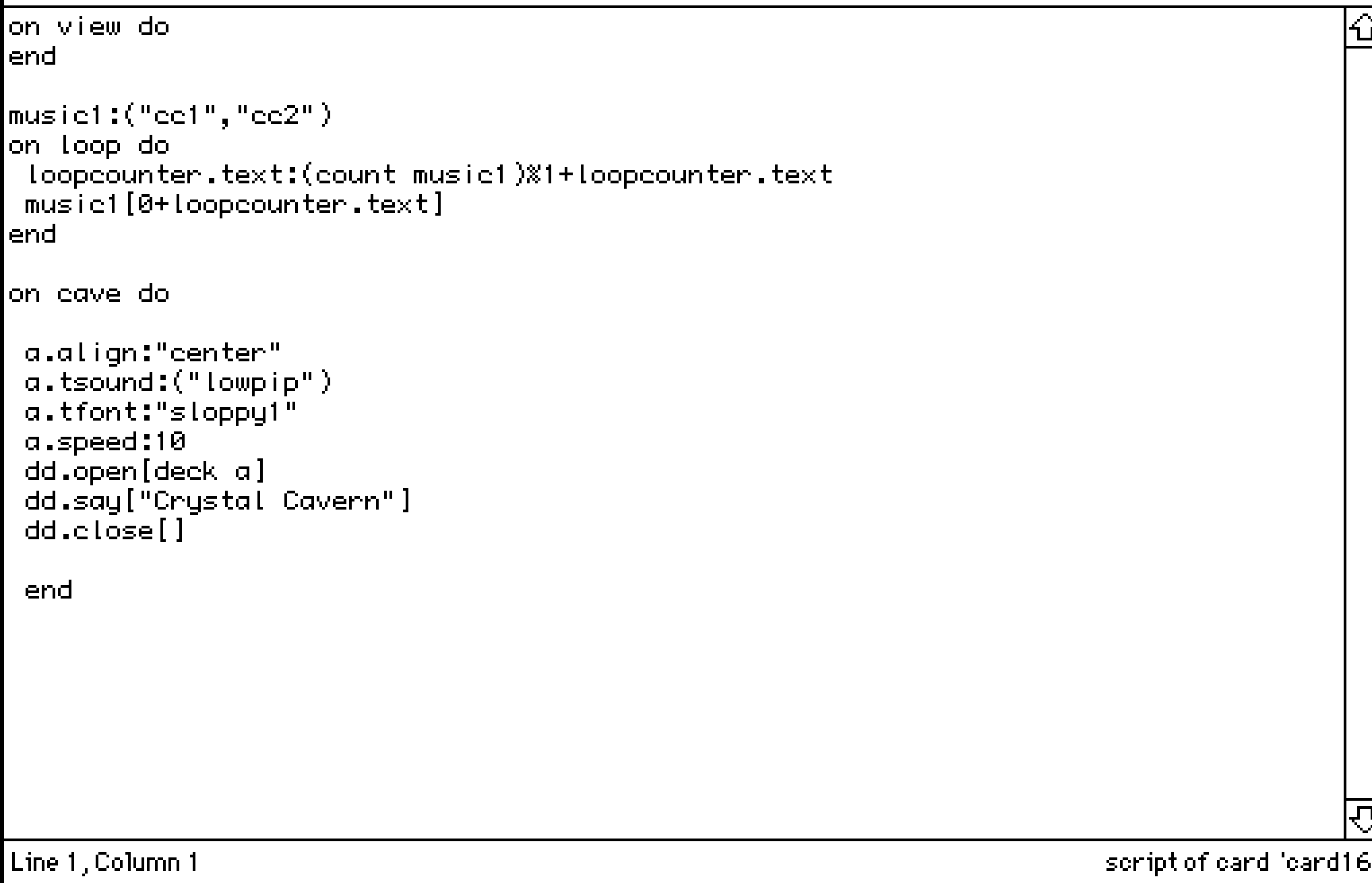
Hi! I am looping two pieces of audio, however it ONLY loops the second piece, rather than first -> second -> first -> second. How can I fix this? Does it have to be about my duration of audio? (cc1 is 10 seconds and cc2 is around 7 seconds)

(+3)

Your audio duration should be fine! 

After experimenting with a deck where I have a similar audio looping setup I think my best guess is that the script is expecting to find a Field that has the name "loopcounter" on the same card you're on and it's not finding it so it can't correctly loop through your clips. 
(Because nothing is loopcount-ing, y'know?)

It could be that it doesn't exist, or it has a typo in the name or it does exist by that name but it's on another card... something like that. 

(+2)

That was exactly the case, had the field in another card 😭 Thank you so much!

Is there a way to have a button pressed on another card, then have it checked by another button on a different card?

For instance, if I have a card/room called Pieces, and two other cards that are Puzzle Rooms, I want a button in each puzzle room to be pressed in order for the button in Pieces to do something. To make it sound simpler, I want the player to steal treasures from both rooms, before going into final room to leave.

This is what I have, however it keeps believing  that the buttons are not being pressed.

on click do
if puzzleroom.button1.pressed and puzzpleroom2.button2.pressed
 dd.open[deck]
 dd.say["You successfully stolen all treasures!"]
 dd.close[]
 go["end"]
else
  alert["You must collect all treasures to leave!."]
end
end

And then for my puzzle rooms buttons, I have the same thing:

on click do
pressed:true 
end

Am I doing it right? Forgive me if this is silly, I am still trying to wrap my around this...

(+1)

You’re almost there, but unfortunately Decker doesn’t allow you to add a pressed attribute to a button like that. If you want to keep track of a flag like “treasure taken”, the easiest thing would be to make a button in the puzzle-room called treasuretaken, configure it to be a checkbox, and “Show None”. Then the button that takes the treasure can do:

on click do
 treasuretaken.value:1
end

(note that you have to say 1, not true: Decker’s scripting language Lil does not recognise true and false specially, and treats them both as undefined variables)

…and the button that checks for taken treasures can do:

on click do
if puzzleroom1.treasuretaken.value & puzzleroom2.treasuretaken.value
 dd.open[deck]
 dd.say["You successfully stolen all treasures!"]
 dd.close[]
 go["end"]
else
 alert["You must collect all treasures to leave!"]
end
end

(note that the way to say “both these things must be true” is & not and - Lil does not recognise and either)

Thank you so much, this helped a ton! But weirdly, I don't know if it's just me, but when I make it checkbox + show none, I am unable to press it.

(+3)

Yes, if a checkbox is set to "show none" you can't interact with it. I think in the example given the idea is you have a hidden checkbox that stores whether the button is pressed, and then you have your normal visible button with code in it to set the value in the checkbox. I hope this makes sense?

I see! Thank you so much, was feeling kind of stupid LOL I will mess around with this!

(+2)

Hopping in too (Hello!)

There is a fun thing about buttons which is often overlooked -- All buttons can store a value, not just checkboxes.

So you don't need a second button to be a checkbox at all.

We often talk about checkboxes because the mark is visible and easier to understand but if you don't want to have a separate hidden checkbox you can change your button back to what it was originally and use this script in it:

on click do  
me.value:1 
end

When you use "me" like this in a script it refers to the widget the script is attached to... so the button (of any style you like and any name) will set it's own value to "1" when this script is inside of it and the button is clicked.

One more small correction, in the beginning of your progress checking script:

on click do  
if puzzleroom.widgets.button1.value & puzzleroom2.widgets.button2.value

Putting .widgets. between the card name and the widget name is an important part of telling Decker where to find your widget. 

Of course, use the correct names for your particular buttons and cards at this moment!

A side note about setting the value in a hidden or non-checkbox button:

Doing it this way has a side effect of being a little harder to uncheck the buttons when you want to reset the game while testing it.... but you could set these two particular buttons as 'Volatile' if you wanted to. 

That makes it so you can clear their .value anytime using [ File > Purge Volatiles ] in the menu. 

This would also remove their .value when the project is saved.

Volatile is dangerous to use on anything precious and irreplaceable -- but it's fine for temporary things like progress checkmarks.

If you feel comfortable using it you can select the widget you're using to store this progress .value and use [Widgets > Volatile] to make it Volatile.

(Again, this is not for anything precious like your art assets! Disposable .values only here!)

This whole project sounds lovely :D We're all rooting for you.

(+2)

You don't understand how much I appreciate the help! The .widgets helped a lot-- I was not understanding why it wasn't working until I realized. I cannot wait to show everyone what I was able to make during the last few weeks! It is very scuffed though!

(+2)

I tried to use unless operator with side-effects, and I was surprised that it doesn't short circuit.

potato_card: deck.add["card" "potato"] unless deck.cards["potato"]

The above creates a new card regardless of whether a "potato" card exists. I was hoping that the left term would not be evaluated  (a.k.a short-circuits) if the right term was not nil.

Is there a better (more idomatic) way to get this short circuit behavior? This is what I'm currently doing:

potato_card: if deck.cards["potato"] deck.cards["potato"] else deck.add["card" "potato"] end

Thank you!

Developer(+3)

"unless" does not short-circuit; No operators in Lil do.

In this specific case I would probably write

if !deck.cards.potato deck.add["card" "potato"] end

and then subsequently use "deck.cards.potato". Even if you then also assign it to a variable, the end result is slightly shorter.

(+2)

I'm working on a game in decker that includes a few doll-maker/dress up games. For the clothes I've pasted images into draggable canvases (i'm basing it on the layouts of games like dollzmania), and I was just wondering if there's an easy way to be able to have a button for players to reset the card so that the clothes are in their original spots. i saw in another thread someone asked a similar question and it was suggested that they use the listener to get the canvas position and set it so that the canvas returns to that spot when they go to the next card. however, that'd mean scripting in the position of each separate object, and for my project it would be really fiddly to do if there's like 15 items of clothing on the card. Any advice? I'm new to Decker so I'm still getting the hang of things, but i'm loving it so far! 

Developer(+1)

You could write a script to record the position of all the canvases automatically (rather than recording every coordinate by hand), stash those positions in a field somewhere, and then have another script re-apply them when appropriate.

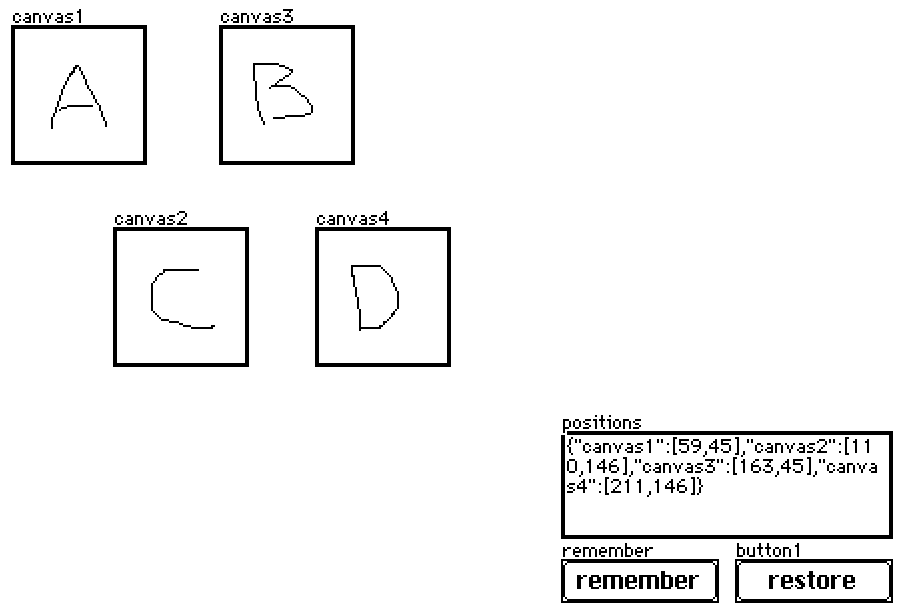
Let's say you have widgets something like this:

The "remember" script looks like:

on click do
 p:select key value..pos where value..type="canvas" from card.widgets
 positions.data:raze p
end

And the "restore" script looks like:

on click do
 each pos name in positions.data
  card.widgets[name].pos:pos
 end
end

In practice, this field and buttons will probably be hidden (set to "show none"). If you ever want to record the current state of the canvases without un-hiding the buttons you can simulate a click via the listener:

remember.event.click

Does that make sense?

(+1)

Is there any hotkey for swapping between widget and interact mode, and if not could add one? I'm aware of the option to click between in the toolbar, but would prefer to have bound key. Currently, it requires a lot of cursor travel for something need to do quite often when testing out a project. Thanks!

(1 edit) (+1)

The keyboard shortcuts that I know (In native Decker) for swapping between modes are F1 for Interact Mode, F2 for Widget Mode (And F3 - F12 are for the drawing tools). I hope this helps!

(+2)

Ah, that works with function modifier on mac, thanks! 

(+1)

Hi! I am a total newbie on Decker and English is not my native language so sorry for the mistakes :).
I am trying to make invisible cliking buttons or an « object button » , like when i click on a fish it takes me to another card. I am currently using the button widget and make it invisible but when i click on it it show the rectangle shape in white :( .  I was trying to use the canvas widget but i really don’t understand how it work…  I am begging for help 🙏

Developer(+3)

If you want a button to be clickable but have absolutely no visual effect when clicked, set the style to "Invisible" and then additionally apply "Show Transparent" (found in the Widgets menu).

I'm making a prototype, where I set a button's text based off a string attribute.

This works until I open the button's prototype, whereupon that attribute gets reset and the button's text resets to the prototype's default is. I don't observe this behavior for example when using field.text as the string persists between opening's of the prototype. 

I'm reading through the documentation but missing what the determining factor in whether a property gets reset between prototype openings. 

I can use a hidden field, but that complicates things as the button will still get reset when opening the prototype so needs a restore call etc.

Deck with an example of the behavior: https://munro.itch.io/decker-question

Developer(+1)

From the reference manual's description of the Prototype Interface,

when a definition is updated, the nameposshowlockedanimatedvolatilefontpattern, and script attributes of Contraptions will be preserved, as well the valuescrollrowcol, and image content of the widgets they contain (as applicable) if they have been modified from their original values in the prototype, but everything else will be regenerated from the definition. The state of contraptions is kept, and the behavior and appearance is changed.

Any other state that you wish to survive prototype modification should be stashed in internal widgets; I recommend refreshing these settings (alongside applying settings from the enclosing contraption instance like .font and .locked, where appropriate) in the view[] event handler in the prototype script.

(+1)

Ah, so because button's text is not the value it doesn't get kept, however a field's text is a value so field text does get kept? Thanks for clarification and the snippet!

Developer (1 edit) (+1)

Just to be clear, a field's .value attribute, which is represented as a rich text table, is the complete, underlying contents stored in the field. Fields have .text, .images, and .data attributes which can be read and written, but all three are alternate views/subsets of the same contents (as a plain-text string, as a list of inline images, and as encoded/decoded LOVE data, respectively), as scripting conveniences.

Buttons have a .value attribute as well, but it represents the boolean (1/0) value of checkboxes, and has no relationship to the .text attribute of the button, which controls the button's label.

Sliders have a .value attribute which corresponds to their numerical value, and Grids have a .value attribute which corresponds to the table data they contain.

Hellooo complete and utter noob here. I've used Macromedia Director back in the day which in tunr was very inspired by HyperCard so i was delighted to find this project :) However i have a small question: is there any way to get more colors working in a project? Again, i will admit i know next to nothing about the tool (yet) apart from a bit of tinkering but i think if we were able to at least use graphics with 256 colors the possibilities for retro adventure games would be endless :)


Thanks so much for creating it!

(+2)

Currently, no. 16 colors is the cap. Though the troublemaker in me might mention that it's 16 colors at a time, not per project.

The way I look at it is that 16 colors is definitely a creative constraint... but you can do a surprising amount with a well crafted palette.

Having fun tinkering! :D

(1 edit)

Is there a way to enable microphone recording in the downloaded version on mac? I get the prompt to allow microphone permissions in the browser version, but the desktop version I haven't gotten the prompt. I don't see it as an option in Privacy & Security settings. Tried reseting microphone permissions but no luck.

Viewing posts 21 to 31 of 31 · Previous page · First page