Nice!
kshlok
Creator of
Recent community posts
Suggestions:
for the 7-segment display, it would be nice if you add in a sign like v1. (Decimal point will also be helpful)
Maybe add in a 14-seg display with sign and decimal
In the chip customization feature, please add option for text to clear up things when using the chip.
Add 16-bit i/o and merge/split and bus since more and more people are building bigger chips. an idea Ive had is to automatically create chips for whatever n-bit i/o/merge/split/bus we can request in the app?
Add tabs so that users can switch between unsaved work.
Export it to the web ??
THIS IS THE STARTER PACK FOR DIGITAL LOGIC SIMULATOR.
If you do not feel like following and copying Sebastian's every move, this is for you.
This pack has all of Sebastians chips in the simulation. (ep 1-5).
LINK: CLICK ME
INSTRUCTIONS: (MAC)
In Terminal, enter this command:
open /Users/<username>/Library/Application\ Support/com.DefaultCompany.2DProject/Projects
Download the SebLagueTemp folder, unzip and drag it to Projects.
Run Digital Logic Sim, you will see SebLagueTemp as one of your projects. Feel free to edit!
Suggestions:
for the 7-segment display, it would be nice if you add in a sign like v1. (Decimal point will also be helpful)
In the chip customization feature, please add option for text to clear up things when using the chip.
Put the truth-table-to logic generator (episode 3) somewhere in the simulation, just so that users who want to either optimize or have no idea how to do things can use it.
Add 16-bit i/o and merge/split and bus since more and more people are building bigger chips.
Add tabs so that users can switch between unsaved work (and maybe the truth-table-logic gen)
Otherwise, very nice simulation! I would definitely recommend this.
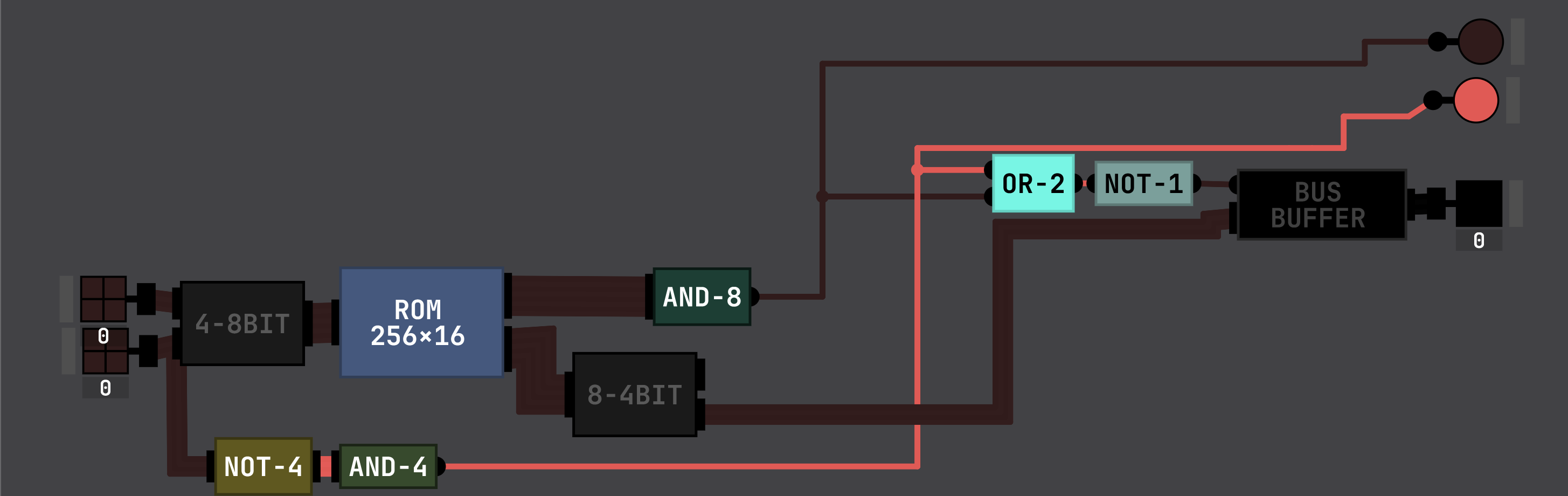
This is a 4-bit version of the thing. Each combination of 4-bit numbers (8-bit) gives you a different address in the ROM, last 4 digits give the answer. As you can see, if the first 8 digits are all 1, the answer is a fraction and is undefined.
I have the same problem as you(can't upgrade to 8-bit), but maybe a different mind can use this to create an 8-bit version of the thing.
Does anybody have a dot or rgb display program? If so, can you
1. go to terminal
2. navigate to
for windows: C:\Users\[USERNAME]\AppData\LocalLow\com.DefaultCompany.2D\ for mac: /Users/[USERNAME]/Library/Application\ Support/com.DefaultCompany.2DProject/
3. Go to projects and upload the folder with the name of your display project to google drive
4. make it for anyone with the link and paste that link here
Thanks to Neemek on GitHub (https://github.com/SebLague/Digital-Logic-Sim/issues/399) for finding the solution. It is located in /Users/<username>/Library/Application Support/com.DefaultCompany.2DProject/Projects.

This approach actually disables the randomization of the output at start! Let me know what you think @Sebastian Lague!