

Open the Plugin Manager settings. In the Terrain section, set the Connected Region ID for the wall, and check Allowed Weapons, this controls which weapons can mine it. Because in the new demo, I modified it to include all the features so I can show off every new plugin update.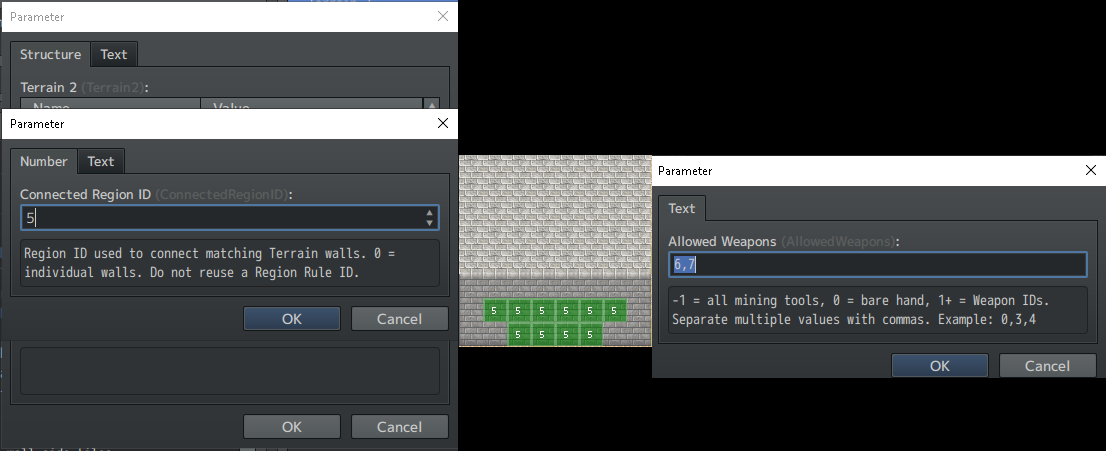
Viewing post in Update: Mineable Props + Advanced Mining Controls comments
Maybe the demo files got overwritten instead of completely clearing out the old demo first.
And yeah, wall auto-connecting is pretty tricky—it was a tough feature for me, and I almost gave up to only focus on multi-tile digging tools.
Simplest setup: if you're using regions for mineable walls, just place any wall tile (no terrain needed), set the region ID to match Plugin Manager, and turn 'Connecting Walls' to true. Terrain takes a bit more work: configure it in Plugin Manager, tag the terrain in the Database Tileset, paint the tagged wall, and mark the region on the map.
Hey again Vishi, I have an idea and would be lovely if you could add this: I wanted to create "ores" on walls, like I have diggable walls all over the map, and I want to spawn ores randomly on walls (looks like it prevents to spawn on walls now) and dig them while destroying the wall. Can you d that, please?
Thank you, but... I feel so bad that I must to say that T_T, but it's not exactly what I wanted ^^' So sorry if I was no clear enough (english isn't my first language, which not makes that easier). I tried to have walls with ores on it, like we draw the walls, then for example coal ore spawn on the wall (it's visible, not under the wall), and during digging on that wall we are destroying that ore too. Like...in Minecraft, I think?
I would be very grateful if this could be implemented, but I cannot demand it either. Thank you so much for your time!
Btw I think this can be useful too, though, so thank you! We could make something like hidden boxes or chests that can be broken for example - that's nice.