

Hey Vishi, your fan here. So cool! I think there is one big thing that would be an absolute game changer in this plugin: walls bigger than one tile, like in Stardew Valley for example. Any option to implement this? ^^
Here is the next update:https://vishi221.itch.io/rpg-maker-mz-map-wall-mining/devlog/1613982/update-conn...
23 days ago (+1)
Open the Plugin Manager settings. In the Terrain section, set the Connected Region ID for the wall, and check Allowed Weapons, this controls which weapons can mine it. Because in the new demo, I modified it to include all the features so I can show off every new plugin update.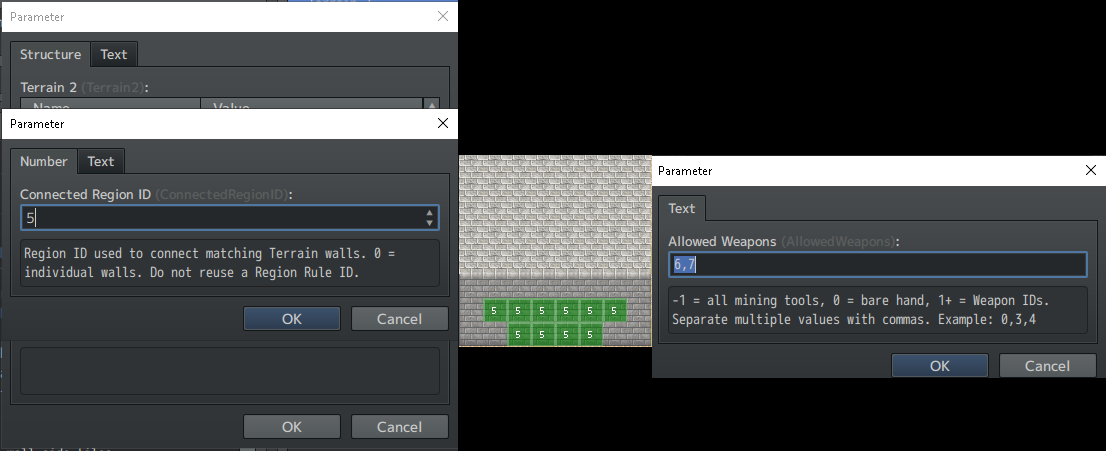
22 days ago (+1)
That's weird. Did you only test on the demo and run into this issue?
Can you mine bare-handed in the middle to get the chest, take out the pickaxe, and then use that pickaxe to mine 2 other walls?
I've re-uploaded the demo. Please try it again and let me know!
Maybe the demo files got overwritten instead of completely clearing out the old demo first.
And yeah, wall auto-connecting is pretty tricky—it was a tough feature for me, and I almost gave up to only focus on multi-tile digging tools.
Simplest setup: if you're using regions for mineable walls, just place any wall tile (no terrain needed), set the region ID to match Plugin Manager, and turn 'Connecting Walls' to true. Terrain takes a bit more work: configure it in Plugin Manager, tag the terrain in the Database Tileset, paint the tagged wall, and mark the region on the map.