
Indie game storeFree gamesFun gamesHorror games
Game developmentAssetsComics
SalesBundles
Jobs
TagsGame Engines

General Decker Question and Answer Thread Sticky

A topic by ahmwma created Aug 06, 2025 Views: 8,240 Replies: 248
Viewing posts 61 to 66 of 66 · Previous page · First page
(1 edit) (+3)

Hi!! i'm making a dolls house style game using these contraptions (the sticker ones) as 'objects' and i'd like to be able to share it with my friends who all would primarily use mobile devices to play, however due to the touch input if you 'pick up' a sticker and move it horizontally it automatically flips to the next card in the deck. i'm just wondering whether there's a way to turn off the auto flip if that makes sense?
Developer(+1)

Swipes that move between cards generate navigate[] events, just like pressing the left or right arrow keys. You can override the default behavior by defining an empty handler for the navigate[] event on the card- or deck-level script, like so:

on navigate do
 
end

Does that solve your problem?

(+1)

thank you so much, it works!!!! :))

(1 edit) (+1)

I've been implementing a simple visual novel game using the Dialogizer module. I wonder if I could render an animation in a canvas using the zazz.flibook while in the "dialog" mode? Let's say I have the following code

`on view do

 alarm.animated: 0

 alarm.show:"none"


 dd.open[deck]

 dd.say[deck.cards["intro_dialogs"].widgets["dialog"].value]

 dd.close[]

end

`

While in `intro_dialogs:dialog` I have something like

`

Phrase 1

Phrase 2

!play:track

Phrase 3

!alarm

`

There is a command handler in the card's script:

`

on command x do

 # alert["" fuse "intro:got command:", x]

 if x like "play:*"

  track:(":" split x)[1]

  if !(track = "stop")

   play[track "loop"] 

  else

   play[0 "loop"]

  end 

 end

 if x~"alarm"

  alarm.animated: 1

  alarm.show:"transparent"

 end

end

`

Where `alarm` is a canvas with the `on view` handler that runs a zazz.flibook. 

Upon reaching the `!alarm`, the alarm canvas becomes visible but no animation. And only after `dd.close[]`, the zazz kicks in. I read in the tutorial that `dd.say` is synchronous – it blocks the global event loop – while it would still call the `on animate` handler every now and then. But, I guess, I can't use zazz in this handler?

Developer(+2)

While Dialogizer is active, the view[] events requested by flagging a widget as .animated won't be produced naturally by Decker itself; all system events are "blocked" until the synchronous call to dd.say[] completes. Dialogizer sends a "synthetic" animate[] event to the current card every frame, and then you can in turn use that event to explicitly send a view[] event to other widgets that need to animate (or call the view[] function on the card, etc).

Perhaps your card script could have something like:

on animate do
 if alarm.animated
  alarm.event["view"]
 end
end

Or maybe you could do something a little more generic, querying the card to find any animated widgets and pump view[] events to them:

on animate do
 (extract value where value..animated from card.widgets)..event["view"]
end

This animate[] event is also how Puppeteer manages the animation for puppets. If you're using these libraries together, make sure your own animate[] event handler calls

pt.animate[deck]

at some point. You can also take a look at the card script for this part of the Dialogizer tutorial: http://beyondloom.com/decker/dialog.html#eventpumping

Does that help?

(+1)

Thank you!

alarm.event["view"] 

does exactly what I need. The event pumping is something I missed when I was looking through tutorials. Thanks again. 

(+2)

Hey there IJ,

Would you ever consider adding a feature that would let us sort Sounds/Resources/etc alphabetically when looking at the modals for each?

Developer(+1)

It would be reasonably straightforward to sort the sound, prototype, and font lists alphabetically when they are displayed.

Is there a specific workflow that you're having trouble with?

(1 edit)

For example, in my current project, I’m using a lot of sounds and prototypes. For the sounds especially, it is hard to identify what I’ve imported/used/can get rid of simply because I have to scroll up and down trying to find that particular filename.

This is mostly because I’m a fanatic and will re-edit sounds if they’re too loud or the loop isn’t quite right.. so even though I organize all my filenames before import, they still end up out of order if I delete/re-import a re-edited sound because they’re plopped back down to the bottom of the list. Does this make sense?

(3 edits) (+1)

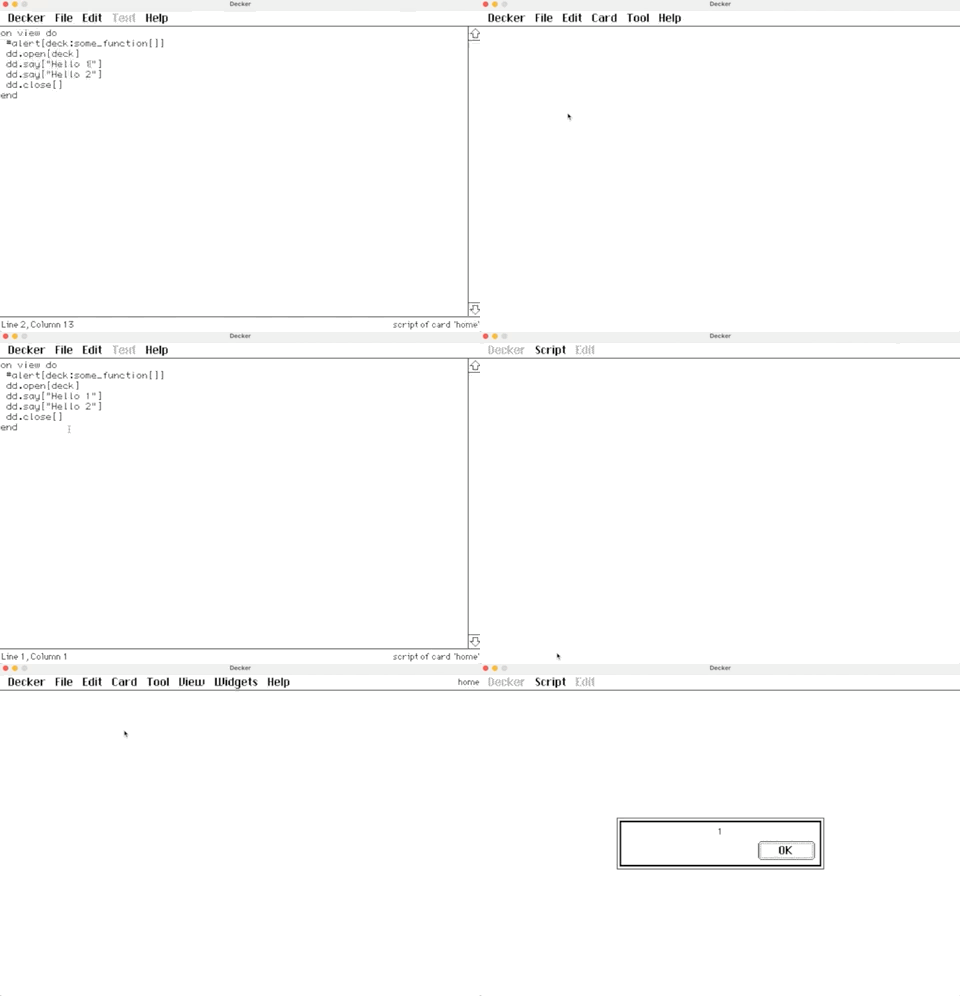
In my game, I moved some of the common logic to the deck-level script. However, when I make a call to one of the function from the deck (e.g., deck:set_progress[me 2]), it breaks the Dialogizer altogether.  The `dd.open[deck], dd.say[...], etc, dd.close[]` just stops working. So weird.

I created a very simple deck where I reproduce the behavior: 

I would appreciate any advice on this. 

Developer(+1)

The phrase

deck:some_function[]

calls a function named "some_function" with no arguments and then assigns the result of calling that function to a variable named "deck". If the result of that function isn't the deck (it appears to be the number "1" in your example), you will then be calling the dialogizer functions with an invalid "deck" argument, which prevents them from working correctly.

If you have defined a function in a deck-level script:

on some_function argument do
 argument+2
end

You can invoke it from any card- or widget- level script by calling it like any other function:

some_function[3]

Widget scripts exist in a scope nested inside card scripts, which in turn exist in a scope nested inside the deck level script which in turn is nested inside a special magical scope with the definitions of all the default event handlers. Every variable or function definition in an outer scope is visible to the scopes nested within it, unless one of those scopes "shadows" it with a local definition with the same name.

Widgets, Cards, and the Deck all expose a ".event" attribute which is a function you can call to send a synthetic event to that deck-part. You can thus also invoke that deck-level function from elsewhere like so:

deck.event["some_function" 3]

This latter method works even if the target is not in a scope surrounding the caller, and it sets up automatic variable bindings ("me", the widgets on a card by name, etc) from the perspective of the target. This is most useful when you want to communicate across cards or simulate user interaction, like sending a button widget a "click" event which appears from that button's perspective like a user-generated click.

Does that help clarify?

(+1)

Now it all makes sense. Thank you!

Hi!

I'm helping localize a Decker project into Russian, and I've run into an issue with Cyrillic characters. So the original deck works fine, but when I replace the English text with Russian using Visual Studio Code, the Cyrillic characters appear as question marks. I also tested editing the text directly inside Decker, and the result is the same.

Is Cyrillic currently supported in Decker? If not, is there a recommended way to localize Decker projects into languages that use Cyrillic?
BTW, I'm not a developer.I'm just trying to figure out how to translate Decker projects. This is my first time working with Decker, so I might be missing something obvious.

Thank you!

Developer

Unfortunately, Decker does not currently support Cyrillic.

Decker uses an internal byte encoding called DeckRoman, which supports a variety of diacritics and special letters for Latin-based alphabets, and provides a range of fonts with those characters.

It is possible to represent other alphabets using a custom font, but this does not automatically make Decker recognize natural text input in those alphabets.

For a more determined tinkerer, it is within the realm of possibility to fork Decker and modify the lookup tables it uses for converting between UTF-8 and DeckRoman, but this would require some programming experience.

(+3)

Hello! I'm making a contraption that allows for you to search data on a hidden grid in the contraption itself. I want the user to be able to configure the columns that are shown when the search is done, and also to configure the column that will be the target of the search (the one that is used in the query). I tried the following code:

on click do
 # Variables to shorten the query line
 srch:search_col_val.text
 show:show_col_val.text
 term:search_terms.text
 # Query
 result:select show where srch like term from internal_copy.value
 # Display results
 search_entries.value:result
end

Where "search_col_val", "show_col_val" and "search_terms" are fields (with only search_terms being visible), "search_entries" being the visible search results grid, and "internal_copy" being the grid that is being searched.

I expected the query to show the elements whose searched column matches the search terms, but instead I get the value of show_col_val. How can I make this query do what I want it to do?

Developer(+2)

Your "srch" and "show" variables contain strings. In the context of a query subexpression they will be interpreted as string values, not the contents of a column by name. You can, however, use the implicit "column" dictionary to perform this indirection, something like

result:select column[show] where column[srch] like term from internal_copy.value

(the "column" dictionary is also how you can reference columns whose names are not valid lil identifiers.)

You might want to take a look at the examples for the "_hideby" column in grids; it's designed to assist in searching and filtering grid contents without requiring an auxiliary source of truth. 

Viewing posts 61 to 66 of 66 · Previous page · First page