

Here's some contraptions I had lying around, plus some new ones to celebrate the existence of the 1.66 Decker Gamepad interface. :3
1. Sticker
I noticed that ahmwma's deck, "Phinxel's Field Notes" had these amazingly cute stickers I wanted to use in one of my own decks, so I turned them into contraptions with attributes to change their sprites and constrain the dragging region within another widget.
%%WGT0{"w":[{"name":"Sticker","type":"contraption","size":[23,29],"pos":[240,128],"script":"on drag do\n if me.constrain\n b:me.parent.widgets[me.constrain]\n # 'constrain' script written Internet Janitor, from the 'rect' module.\n me.pos:(b.pos+b.size-me.size)&b.pos|me.pos\n end\nend","show":"transparent","def":"Sticker","widgets":{"c":{"show":"transparent"},"is":{},"wc":{}}}],"d":{"Sticker":{"name":"Sticker","size":[23,29],"resizable":1,"margin":[1,1,1,1],"description":"Draggable, self-resizing contraption that toggles between two images when pressed.\n\nCan be constrained if a widget name is provided under the 'constrain' attribute.\n\nInspired by stickers seen in 'Phinxel's Field Notes' created by ahmwma","version":2,"script":"# Code for making stickers draggable was repurposed from the 'follower' contraption found in path.deck.\n\non get_sprites do is.value end\non set_sprites x do is.value:x end\non get_constrain do wc.text end\non set_constrain x do wc.text:x end\n\non click pos do\n update_view[1]\nend\n\non drag pos do\n if !card.locked\n card.pos:pointer.pos-c.size/2\n c.pos:0,0\n card.event[\"drag\"]\n end\nend\n\non release pos do\n update_view[]\n card.pos:card.pos+(0,1)\nend\n\non update_view x do\n if x then\n i:last is.images\n else\n i:first is.images\n end\n c.clear[]\n c.size:i.size\n c.paste[i]\n c.show:card.show\n card.size:c.size\nend\n\non view do\n update_view[]\nend","template":"on drag do\n if me.constrain\n b:me.parent.widgets[me.constrain]\n # 'constrain' script written Internet Janitor, from the 'rect' module.\n me.pos:(b.pos+b.size-me.size)&b.pos|me.pos\n end\nend","attributes":{"name":["sprites","constrain"],"label":["sprites","constrain"],"type":["rich","string"]},"widgets":{"c":{"type":"canvas","size":[23,29],"pos":[0,0],"locked":1,"volatile":1,"border":0,"draggable":1,"scale":1},"is":{"type":"field","size":[18,18],"pos":[-2,-25],"locked":1,"show":"none","value":{"text":["","i","i"],"font":["","",""],"arg":["","%%IMG3ABcAHQZAgFAIKg6PyCSgyFQ6iSCX1PhEFl2prMtIfV5TKFRqywRVv2Hxdmp2stDhsUpF9kbBcdWK3k2+72Apenx9VlFSWXtSbEpXc497j4SGLiojlyOPIpsik1CVmJiPl5uTjqQhIqGhpWSnI5yrrISvm7KzrlGWt7KduaC8q75lwMGkhCx/xcHDba/MyELKu7zNR8+90UPT1KLaR8qVknRkLG5Mi4tM5k9/ZWXsVcnvIMlVSMn58UlB","%%IMG3ABcAGwZAgFAIKg6PyCSgyFQ6iSCX1PhEFl2prMtIfV5TKFRqywRVv2Hxdmp2stDhsUpF9kbBcdWK3k2+72Apenx9VlFSWXtSbEpXc497j4SGLiojlyOPIpsik1CVmJiPl5uTjqQhIqGhpWSnI5yrrISvm7KzrlGWt7KduaC8q75lwMGkhCx/xcHDba/MyEJ/ZUW9nlDUTJjNLEcsLeDg2XNk3U7h4kzlVUjpRebsSMnJSUE="]}},"wc":{"type":"field","size":[12,12],"pos":[21,-25],"locked":1,"show":"none","border":0,"style":"plain","align":"right"}}}}}
Note: I referenced the "follower" script from the path.deck module to make this contraption draggable, but I could not reproduce the dragging behavior of the follower script without copy-pasting the exact canvas used. If you want to reproduce the steps to 'break' the follower contraption in a way that renders it undraggable, go to path.deck, specifically #followeranim, edit the follower contraption, then attempt to change the canvas script. At a glance, it doesn't look like the canvas has any scripts attached to it, so it will auto-fill with the default 'click' 'drag' 'release' functions, however, if you then save the canvas the contraption will not be draggable anymore. If you then go back and delete the entire script, it will still be permanently broken. I have found no way to fix this, other than copy-pasting the exact canvas used from path.deck.
2. Palette Storage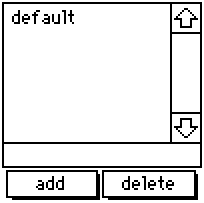
A resizable list to store and update color palettes, containing the default Decker palette when created. If you happen to change the colors in your deck manually or by importing a .hex file, you can give the new palette a name, add it to the list, then return to it any time using this contraption. If you click 'add' after specifying a name already listed, it will update that entry instead of making an entirely new one. By editing the contraption itself, you can specify more default palettes.
%%WGT0{"w":[{"name":"Palette Storage","type":"contraption","size":[100,100],"pos":[194,125],"def":"Palette Storage","widgets":{"s":{},"d":{},"t":{},"add":{},"delete":{}}}],"d":{"Palette Storage":{"name":"Palette Storage","size":[100,100],"resizable":1,"margin":[4,70,6,5],"description":"Adapted grid for storing and accessing color patterns sets.","version":1,"script":"on get_s do t.text end\non set_s x do \n t.text:x\n palz[x] \nend\n\np:32,33,34,35,36,37,38,39,40,41,42,43,44,45,46,47\n\non view do\n d.value:keys cols s.value\n w:add,delete,t,d\n w..show:card.show\nend\n\non palz x do\n if s.value[x]\n each v k i in s.value[x]\n patterns[p[i]]:v\n end\n end\n card.event[\"change\"]\nend\n\non addz x do\n a:cols s.value\n a[x]:()\n each v in p\n a[x]:a[x],patterns[v]\n end\n s.value:table a\n view[]\nend\n\non delz x do\n s.value:x drop s.value\n view[]\nend","attributes":{"name":["s"],"label":["selected"],"type":["string"]},"widgets":{"s":{"type":"grid","size":[100,22],"pos":[0,-31],"locked":1,"show":"none","value":{"default":[16777215,16776960,16737536,14417920,16711831,3539095,202,38911,43008,25856,6632960,9921846,12171705,8816262,4539717,0]}},"d":{"type":"grid","size":[100,71],"pos":[0,0],"locked":1,"volatile":1,"script":"on click row do\n v:me.rowvalue.value\n palz[v]\n t.text:v\nend","headers":0,"lines":1,"bycell":0},"t":{"type":"field","size":[100,13],"pos":[0,70],"volatile":1,"style":"plain"},"add":{"type":"button","size":[47,15],"pos":[2,84],"script":"on click do\n addz[t.text]\nend","font":"body","text":"add","style":"rect"},"delete":{"type":"button","size":[48,15],"pos":[50,84],"script":"on click do\n delz[t.text]\nend","font":"body","text":"delete","style":"rect"}}}}}
3. Gamepad Buttons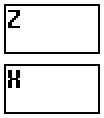
Scalable, vertical buttons that display the state of the action and cancel buttons introduced with the Decker 1.66 gamepad interface. They provide a visual interface for people without a keyboard or controller, and transmit the state of the buttons through boolean attributes 'action' and 'cancel'. By observing the attributes of this widget instead of the global gamepad interface, mobile users or people on touch-screen exclusive devices are able to interact with elements in a deck as if they were using a keyboard.
%%WGT0{"w":[{"name":"Gamepad Buttons","type":"contraption","size":[48,55],"pos":[96,128],"def":"Gamepad Buttons","widgets":{"b1":{"size":[48,25]},"b2":{"size":[48,25],"pos":[0,30]},"handler":{},"action":{"size":[48,25]},"cancel":{"size":[48,25],"pos":[0,30]},"t1":{"size":[48,25]},"t2":{"size":[48,25],"pos":[0,30]},"locka":{"pos":[0,58]},"lockc":{"pos":[14,58]}}}],"d":{"Gamepad Buttons":{"name":"Gamepad Buttons","size":[48,104],"resizable":1,"margin":[2,2,2,2],"description":"Minimalistic, resizable buttons to add gamepad button functionality.","version":1,"script":"on get_action do action.brush end\non get_cancel do cancel.brush end","attributes":{"name":["action","cancel"],"label":["action","cancel"],"type":["bool","bool"]},"widgets":{"b1":{"type":"field","size":[48,48],"pos":[0,0],"locked":1,"pattern":12,"show":"invert"},"b2":{"type":"field","size":[48,48],"pos":[0,56],"locked":1,"pattern":9,"show":"invert"},"handler":{"type":"canvas","size":[8,8],"pos":[0,-8],"locked":1,"animated":1,"script":"t:(\"solid\",\"transparent\")\non view do\n if !locka.value\n g1:gamepad.held[\"action\"]\n action.brush:g1\n end\n if !lockc.value\n g2:gamepad.held[\"cancel\"]\n cancel.brush:g2\n end\n action.show:t[action.brush]\n cancel.show:t[cancel.brush]\nend","show":"none","scale":1},"action":{"type":"canvas","size":[48,48],"pos":[0,0],"locked":1,"script":"on click pos do\n locka.value:1\n me.brush:pointer.held\nend\n\non release pos do\n me.brush:pointer.held\n locka.value:0\nend","scale":1},"cancel":{"type":"canvas","size":[48,48],"pos":[0,56],"locked":1,"script":"on click pos do\n lockc.value:1\n me.brush:pointer.held\nend\n\non release pos do\n me.brush:pointer.held\n lockc.value:0\nend","scale":1},"t1":{"type":"field","size":[48,48],"pos":[0,0],"locked":1,"script":"on change val do\n \nend","font":"menu","show":"transparent","border":0,"style":"plain","value":"Z"},"t2":{"type":"field","size":[48,48],"pos":[0,56],"locked":1,"font":"menu","show":"transparent","border":0,"style":"plain","value":"X"},"locka":{"type":"slider","size":[8,8],"pos":[0,107],"locked":1,"show":"none","interval":[0,1]},"lockc":{"type":"slider","size":[8,8],"pos":[14,107],"locked":1,"show":"none","interval":[0,1]}}}}}
4. Gamepad Joystick
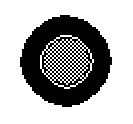
Similar to the previous contraption - except this one is meant to simulate a physical joystick. Exposes the attributes 'x' and 'y' for external scripts, observing both gamepad.dir and mouse inputs simultaneously.
%%WGT0{"w":[{"name":"Gamepad Joystick","type":"contraption","size":[100,100],"pos":[206,121],"def":"Gamepad Joystick","widgets":{"handler":{},"cir":{},"stick":{},"x":{},"y":{},"lock":{}}}],"d":{"Gamepad Joystick":{"name":"Gamepad Joystick","size":[100,100],"resizable":1,"margin":[0,0,0,0],"description":"Minimalistic, resizable joystick to add gamepad joystick functionality.","version":2,"script":"on get_x do x.value end\non get_y do y.value end\n\n# Circle drawing script provided on the Lil Playground\non view do\n card.show:\"transparent\"\n cir.clear[]\n cir.pattern:1\n c:cir.size/2 # center of canvas\n r:.7*c # radius of the pattern\n a:(pi/0.5*16)*range 16 # angle per wedge\n p:flip c+r*flip unit a # points around a circle\n each x i in p\n cir.line[x p[(count p)%1+i]]\n end\n cir.pattern:34\n cir.paste[cir.fill[0,0].copy[].map[(34,0) dict (0,1)]]\n stick.size:cir.size/2\n stick.paste[cir.copy[].scale[.5].outline[(35,32)].map[(1,35) dict (13,47)]]\n center[]\nend\n\non center do stick.pos:cir.pos+(stick.size/2) end\non stickz input do\n cntr:cir.pos+(stick.size/2)\n diff:(cir.size/2)-(stick.size/2)\n if input=\"gp\"\n x.value:gamepad.dir[0]\n y.value:gamepad.dir[1]\n stick.pos:(cntr[0]+(diff[0]*x.value)),(cntr[1]+(diff[1]*y.value))\n else\n x.value:(stick.pos[0]/diff[0])-1\n y.value:(stick.pos[1]/diff[1])-1\n end\nend","attributes":{"name":["x","y"],"label":["x","y"],"type":["number","number"]},"widgets":{"handler":{"type":"canvas","size":[8,8],"pos":[0,-16],"locked":1,"animated":1,"script":"on view do\n if !lock.value\n stickz[\"gp\"]\n end\nend","show":"none","scale":1},"cir":{"type":"canvas","size":[100,100],"pos":[0,0],"locked":1,"pattern":34,"show":"transparent","border":0,"image":"%%IMG3AGQAZAKEj6nL7Q+jnLTai7PevPsPhuJIluaJpurKtu4Lx/JM1/aN5/quBP4f4I2AxCJReDEql0AkhAmFOhnR6nKasGqNWMD2y0WCx0ce+fzToddpG/sdpMHh8jl7ZqfD8vMX3+7y18ciCKhSmJeCyIeymGjiyFgS+UhCaWh5OSiiiRnSufkJ+pY5esdpeiqaijbE2rr6SoYqexZbC3aLu6W7a9XrGwUcfEVLLGx8zOSqLJXcXFQKHfY83cZs3SSdHbedDcl97Q3dGK74fTjdQr7e7HccQ4y3W4dbY+/2qjYqBOqk2cVRlwOIBiIQZLBHqIQKZzGkUOUhhzISK1q8iDGjxo0cO3r8CDKkyJEkS0osAA==","scale":1},"stick":{"type":"canvas","size":[50,50],"pos":[25,25],"script":"on click pos do\n lock.value:1\nend\n\non drag pos do\n mx:(cir.size+cir.pos)-me.size\n if me.pos[0]<mn[0] me.pos:mn[0],me.pos[1]="" end\n="" if="" me.pos[1]<mn[1]="" me.pos:me.pos[0],mn[1]="" me.pos[0]="">mx[0] me.pos:mx[0],me.pos[1] end\n if me.pos[1]>mx[1] me.pos:me.pos[0],mx[1] end\n stickz[]\nend\n\non release pos do\n center[]\n lock.value:0\nend","show":"transparent","border":0,"image":"%%IMG3ADIAMgZAgHBILBqPyKRyyWw6n9CodEqtWq9YKmjL7WaZ3Jd4TOZ+j6BxY81uj0FnYrpNrzde2/P2Ze+zxXBYaXx+hXeBVXOGi3iJhIuMiFGKkJFSlJWWT5iZho1OnJ2ekkqhooWfS6anfalJq6x2rkiwsXSzaI+2o6q6u364RbW/a8FyvsR1xkPDxMtCzb/PANG709Wx09DIycWktNzd2tThzt+v5dbn6N1/6+zt40bYvFrpmfLg1vnwp3jvk8SI4tdkTyVAcY6pUQYIoKAwZBo6TNjFTMKLGDNq3Mixo5Ig","draggable":1,"scale":1},"x":{"type":"slider","size":[8,8],"pos":[25,-16],"locked":1,"show":"none","interval":[-1,1],"step":0.01},"y":{"type":"slider","size":[8,8],"pos":[39,-16],"locked":1,"show":"none","interval":[-1,1],"step":0.01},"lock":{"type":"slider","size":[8,8],"pos":[0,112],"locked":1,"script":"on change val do\n \nend","show":"none","interval":[0,1]}}}}}</mn[0]>