Indie game storeFree gamesFun gamesHorror games
Game developmentAssetsComics
SalesBundles
Jobs
TagsGame Engines

Template Project Troubleshooting Sticky

A topic by Far Away Times created 55 days ago Views: 324 Replies: 11
Viewing posts 1 to 5
HostSubmitted(+2)

Hi all! I've been doing some troubleshooting in our discord to help folks get the template project running in their version RPGMaker 2003. Usually it's something simple. If you run into any issues, please feel free to post them in here and I'll do my best to help!
Submitted

Has anyone had any luck getting music to work in Linux under Proton? I can't hear previews in the editor and no music seems to play during playtesting or the desktop version of EasyRPG. I'm guessing I just need to install something for MIDI support but I don't know what.

Also I tried following the instructions to set up the EasyRPG web player and I get stuck running the gencache tool they provide, it says I need GLIBC version 2.38. I'm on Debian 12, but it seems like even if I upgrade to 13, the latest supported version is still 2.36. Am I just hosed? I don't know why it needs a brand new C library to generate a JSON... Does anyone know if there's an older version of the gencache tool I can use? 

Thanks!

Submitted (1 edit) (+2)

hi there! for me,  the audio issue indeed turned out to be a lack of a built-in midi engine on linux. I installed the flatpak for Qsynth, went into Setup->Audio->Driver=Alsa and added the default windows soundfont I downloaded somewhere, and MIDI works everywhere on my machine now. someone else on discord didn't have this work for them though, so let me know how it goes for you. 

for EasyRPG at least, it has a built-in MIDI engine but might need a soundfont. you can try running it through terminal and see what errors it spits at you, as a different option from installing the general-purpose MIDI engine. 

good luck!!

Submitted(+1)

This worked perfectly, thank you!

Submitted(+1)

I'm so glad to hear that! happy RPG Making!

Submitted(+3)

About gencache: a quick search suggests that it's not really viable to get a different version of glibc on your system, since a lot of other stuff depends on it. (And that it's apparently very weird to require a specific version of it?)

Fortunately the gencache code seems really simple, so I've written a Python replacement for it. I haven't tested it much, but it seems to do fine with my own project. Hopefully it helps?

Barring that, you can always try to build gencache yourself, I guess!

Submitted(+1)

The python script worked perfectly, thanks so much!

Submitted(+1)

Might anyone be able to explain how exactly uploading the web version of EasyRPG to itch works? I try but it keeps saying it doesn't detect the JSON? I probably just have the files out of order!

HostSubmitted(+1)

The web stuff is tricky! Did you use Gencache to generate the index.json? They run over the steps for that here.

Submitted

Hey, sorry for the late response, I was focused on finishing the game and I forgot how I got it to work. D'oh.

  1. Click the button in RM2k3 to generate the installer disk. Make sure you check the box that says to include the runtimes. This is what tripped me up the most, those runtimes aren't needed when you're using the desktop version but for whatever reason you need them for the web version.
  2. Extract the my-game.lzh or whatever file into a folder
  3. Optional: If you're going to include a custom soundfont, now's the time to do it. I find the default web soundfont doesn't work well with these tunes. Rename whatever soundfont you want to use to "easyrpg.soundfont" and put it in the main folder with all the RPG_RT.* files
  4. Put the gencache program in the same folder
  5. Run it. You should now have an index.json file alongside all your game files
  6. Rename the folder with all your game files "default"
  7. Copy the "default" folder into /player-js/games
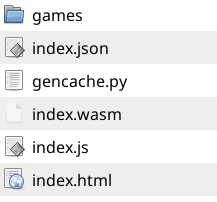
  8. Copy the gencache program to the /player-js folder and run it again. You should now have a a folder with files that look like this:

And remember that the "games" folder contains the "default" folder from earlier.

Zip up the /player-js folder. This will be the zip file you upload to itch. Sorry if this is hard to understand, let me know if you have any questions

HostSubmitted(+1)

Thanks for writing this out in detail! For the record, I think the Windows version of your game only runs without the run-time package because you have RPGMaker 2003 (and therefore the RTP) installed. If you want it to run on any machine, you should include the RTP with that initial export.

Submitted

Ah that makes sense, thanks!