

Hey, sorry for the late response, I was focused on finishing the game and I forgot how I got it to work. D'oh.
- Click the button in RM2k3 to generate the installer disk. Make sure you check the box that says to include the runtimes. This is what tripped me up the most, those runtimes aren't needed when you're using the desktop version but for whatever reason you need them for the web version.
- Extract the my-game.lzh or whatever file into a folder
- Optional: If you're going to include a custom soundfont, now's the time to do it. I find the default web soundfont doesn't work well with these tunes. Rename whatever soundfont you want to use to "easyrpg.soundfont" and put it in the main folder with all the RPG_RT.* files
- Put the gencache program in the same folder
- Run it. You should now have an index.json file alongside all your game files
- Rename the folder with all your game files "default"
- Copy the "default" folder into /player-js/games
- Copy the gencache program to the /player-js folder and run it again. You should now have a a folder with files that look like this:
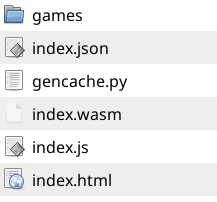
And remember that the "games" folder contains the "default" folder from earlier.
Zip up the /player-js folder. This will be the zip file you upload to itch. Sorry if this is hard to understand, let me know if you have any questions