
Indie game storeFree gamesFun gamesHorror games
Game developmentAssetsComics
SalesBundles
Jobs
TagsGame Engines
(2 edits) (+1)

Ugh, I feared that.

Hold that thought, let us try other courses of action before it comes to that because I know how things like to break after an update. Let me run a debug version of the app on another emulated Mac and see if I can find anything weird going on.
(+1)

That's okay, I was due for an update anyways. I have the latest Xcode version now and it's still freezing on launch if that narrows it down more.

(1 edit) (+1)

My mate, I believe I fixed the issue. It was probably related to path building while under certain versions of mac - instead of throwing the usual error for files not being found it was just freezing. I am uploading a hot fix right now - not sure if it will be a permanent fix since I would like a more elegant solution.

Nonetheless, you will notice that your asset folders will be inside the app, so right click on the .app, select Show Package Contents, navigate to /Contents/MacOS, there is your assets folder. If you ever want to add new stuff or edit what is already in there, that is the path. Whenever you update something, just reload the tool since the textures are saved on the RAM.

If you have any other issues, please, don’t refrain from reaching out and let me know. I am now worried that a few MacOS versions might have performance issues. If that is your case, please, give me some info on your OS version. Thank you so much for your patience! Uploading the hot fix in a few.

EDIT: Hot fix is now online.

Done mate! The hot fix is online. Give it a try whenever you can and let me know how it went.

Thank you once again for your patience!

(+1)

Thanks for such a fast turnaround on the bugfix! Really appreciate it, I'll give it a try and let you know how it goes

(+1)

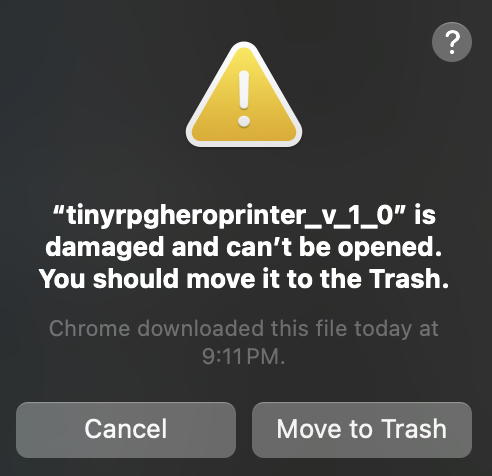
Hmm I'm running into a new issue that says the app is damaged. Not sure if I'm doing something wrong with the download sorry to trouble you further. 

(3 edits) (+1)

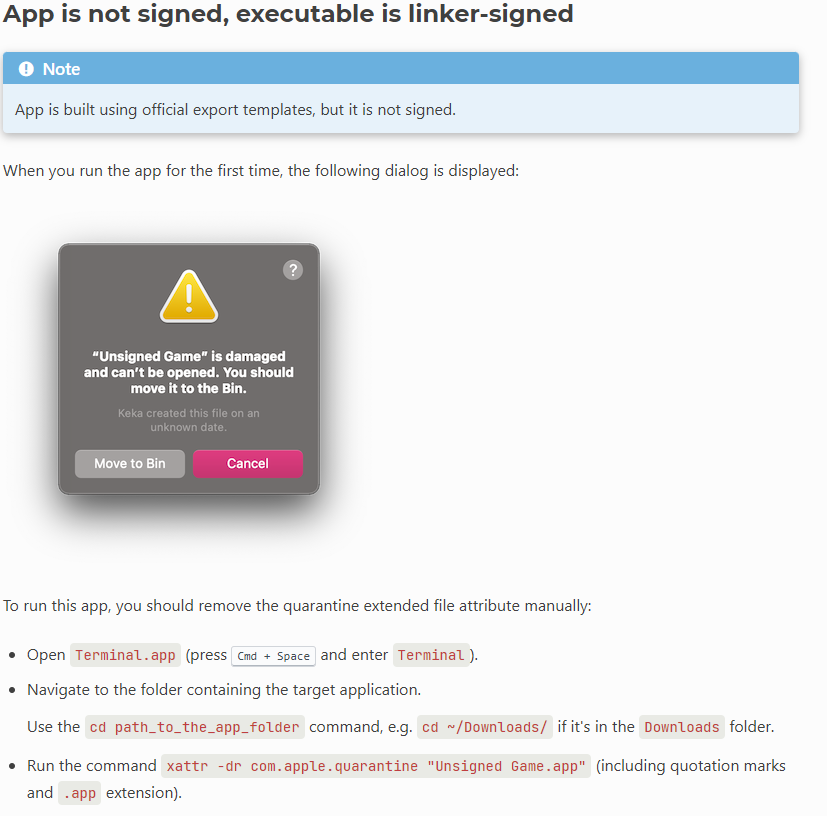
Oh okay, that is a known behavior on Godot. Try the fix shown below and let me know if it works :)

image.png

And no need to apologize, mate! Since I don’t have a running Mac, I have to test on emulated environments, which is not ideal, to say the least, so I ought to run on those issues every now and then. I am glad you are having the patience to go through the whole process instead of just scrapping it all.

EDIT: Hopefully in the near future I can get into apple’s developers program and get a second hand Mac Book Air. This will let me deploy straight from Mac, which will prevent a lot of headache for the end user since the app will be signed and notarized. It even might make the path thing less of a problem because on a proper Mac I can deploy a .dmg instead of an .app

Ohhh  I was unaware of that Godot issue, I followed those instructions and its working now! I'll update you on performance after I try it for a bit!

Awesome, mate, glad that we have managed to find the solution together! Thank you for all your patience and good will towards me and my work.

Please, let me know about the performance. It seems like since Godot 4.3 the shaders on Godot while running on Mac have been not that great. I do not use that many shaders, but the outline one might drop the performance. If that is the case, I will have to find an alternative to using the shader pipeline for stacking outline effects.

Nonetheless, thank you once again, mate! I will add further instructions for Mac users on the Mac zip now that I am more aware of what can go wrong. :) Your feedback was essential.

(+1)

Thanks again and your passion is clear and awesome to see :) I'll get back to you on the performance

I've used the tool for about an hour or two and I don't see any real problems with performance, just to give an update