


Play game
Wind-Up Escape's itch.io pageResults
| Criteria | Rank | Score* | Raw Score |
| Creativity | #509 | 3.150 | 3.571 |
| Overall | #671 | 2.604 | 2.952 |
| Fun | #674 | 2.394 | 2.714 |
| Presentation | #781 | 2.268 | 2.571 |
Ranked from 7 ratings. Score is adjusted from raw score by the median number of ratings per game in the jam.
Preferred Name
Jerrylikesgreen
0dotzip
Fae
vysl
Newbie?
Experienced
Nope - I've completed at least one game jam before.
How does your game fit the theme?
We took the jam’s call-to-action literally: every meaningful interaction begins with a physical “starter” motion – a short wind-up.
Leave a comment
Log in with itch.io to leave a comment.
Comments
The idea is really cool
The way we need to not just get to a door but also have enough time to open doors, charge our equipment can be used in some really clever ways!
I loved the artstyle where it was implemented and also the music, the games atmosphere was pretty cool!
Also I liked how the gadget options and key options menus were handled, but still the need to press Q repeatedly to switch between the 2 got a bit . The key rotating mechanic did get a bit annoying as death was pretty frequent so maybe (atleast the jetpacks power) should be restored.
The key powering mechanic was interesting for sure, but I didnt see its reason other than the door opening part. for the jetpack, it was more of a chore to do. But maybe it could be used differently like u can power the jetpack midair to have prolonged flights or maybe charging its key can be used to activate it and set it off without a pilot. Like you wanna blow up a ceiling door, so you just set the jetpack below it, key/charge it and release the key to let it fly and break the door (Basically like those old toys which when keyed would move or do something when keyed)
Also, in this part
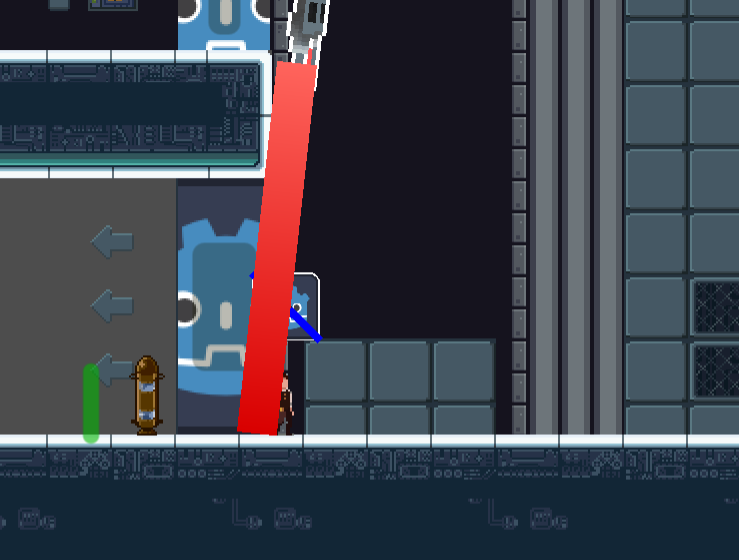
U can both rush INTO the laser to be safe or walk in the door here. But even after that, I just couldnt get this door opened, however I tried.
The game was a bit hard to grasp, especially due to the small tutorial leaving some stuff to the player to figure out.
Ovreall, I liked the idea, the art where it was and also the music! You guys did a pretty good job with the atmosphere and also the Items-key menu stuff. I wasnt the biggest fan of the controls like how we had space for getting on jetpack instead of jumping or how we had to go to the items menu, spawn the rocket and then come back to the key menu to power it back up. That constant back and forth got a bit frustrating.
Still a very cool idea! You guys did some good work!
The wind-up mechanic was cool, as well the jetpack ride. Tutorial was a bit too hard (the laser part), but it was okay I guess.
Fun game overall! Great.
Thank you for the feedback!
We agree, onboarding needs some tlc.
Best part was the wind-up mechanic, it really fits the theme, but the sense of unpolishness wasn't great. (e.g. the godot icons everywhere)
With more polish and clever puzzle design, you'd have something pretty neat!
Thank you so much for the feedback!!!!!
I didnt really understand why the godot symbol was everywhere but other that that the artstyle is really cool!!
Thank you!
The artist did amazing! Unfortunately, due to time constraints, we were unable to get all assets working.
I was unsure what to do after i got up a floor and the lazar just rolled me. The key turning was a bit annoying. I liked moving around with the jetpack side to side though felt fast.
Thank you!!!
Yes, we are realizing we made the Tutorial a bit too hard.
Any particular reason you were having issues with that portion of the game?
The key turning mechanic was kinda hard on track pad, and the upwards movement of the jetpack was preventing me from getting past the lazar.
Thank you for the feedback!
The controls were fine, but having the godot icon everywhere isn't. I also didn't really know what to do, I opened the door with the key but when I got to the the jetpack, I had no idea what to do. I read the text and did what it said but eventually, the jetpack just dissapeared and I didn't know what to do. Aside from that, I did like the art but the shadow looked a bit weird when you were in the air.
Thank you for the feedback!! Really appreciate you taking the time to play and share your thoughts.
Glad to hear the controls felt fine — that’s reassuring to us. And yeah… the Godot icon being everywhere is definitely a fair callout. Time was not kind to us on the polish pass 😅
You’re absolutely right about the onboarding. We realize now that our guidance around the jetpack was lacking — if it disappeared or left you unsure what to do, that’s totally on us. We’re curious: what kind of cues or tutorials would’ve helped you feel more confident at that point? We’d love to improve that part for future players.
Also appreciate the kind words on the art! We noticed the shadow issue too — probably a side effect of our fast layering solution for flight. Definitely something we’ll revisit.
Thanks again for playing — means a lot!
For the jetpack, you could maybe show the keys you need to press in the background or some extra text for people who (accidentally) skipped the dialog before they had a chance to read it.
I also get that time was an issue, I also just have a solid color as a door in my game (it's a feature now) and that is, to me atleast, a very fun part of game jams. The game can't be perfect in only 10 days and with your game, there at least was a texture.
But could you maybe tell me what I actually have to do with the jetpack, I am kinda curious now XD
Ahh, yes! Sorry! >.<;
To ride the Jetpack, you need to press the Space bar when you’re near it.
To power it up, you will need to toggle to the keys by pressing Q. You will see a (Godot Feature texture lol) on top of the PC head. Use your mouse to turn the wheel to power up the Jetpack, just like you opened the door.
Ahh, I forgot to mention. You must hold down the space bar to hold on and use WASD to move.
Also, you mentioned the Jetpack disappeared. You might have picked it up. By pressing E you can pick up the Jetpack. Toggle the Keys/Tools button (Q) to get to the tools options. You should see the jetpack available for deployment by pressing 1.