Indie game storeFree gamesFun gamesHorror games
Game developmentAssetsComics
SalesBundles
Jobs
TagsGame Engines

GameTranslate

Immersive real-time translator at your disposal · By Godnoken

JSONPath problem

A topic by plusnet created 10 days ago Views: 152 Replies: 22
Viewing posts 1 to 7

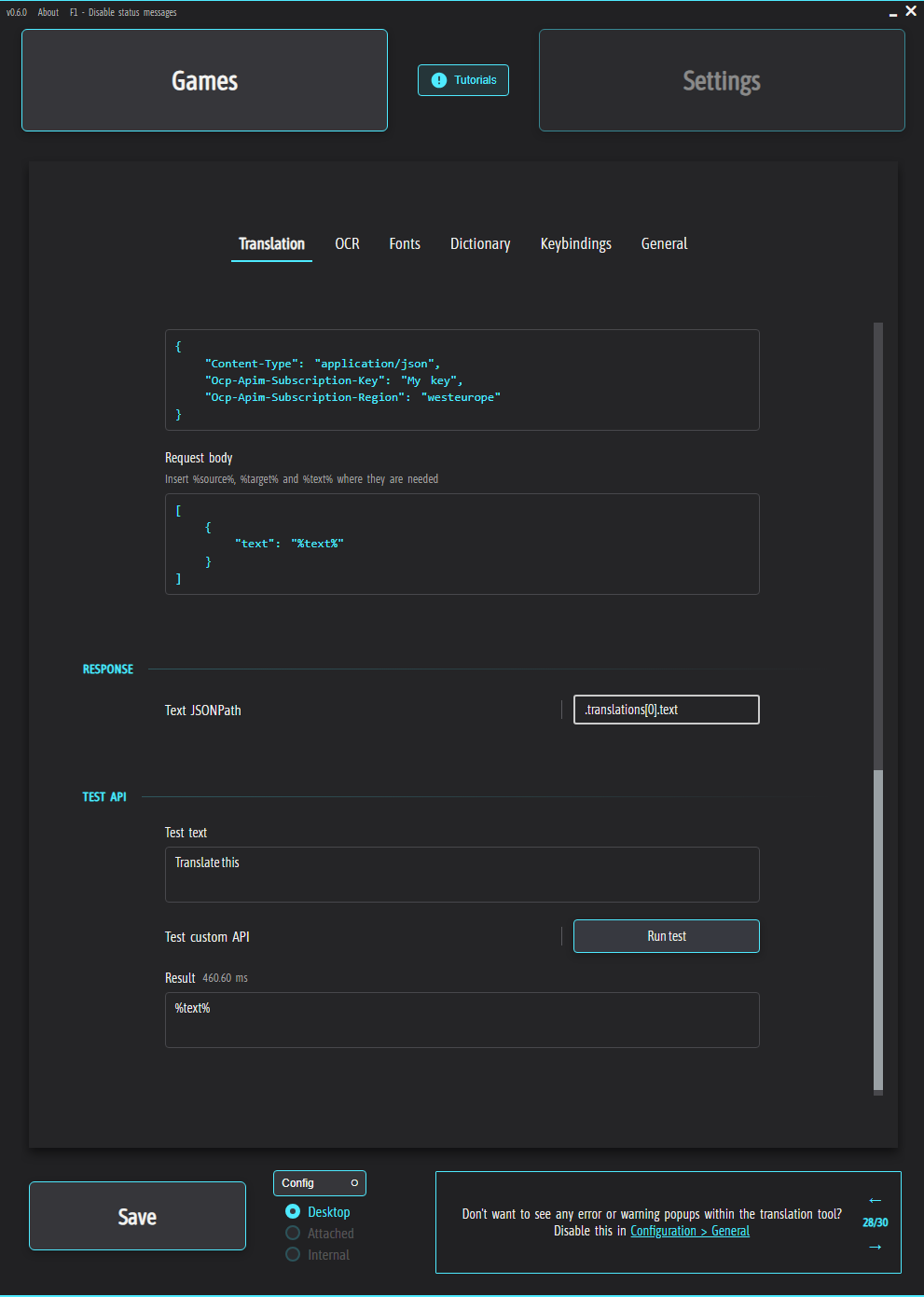
Hello, I made a rather silly mistake. After downloading the new version, I tried the community presets, but then decided to go back to my own, and it started translating everything to %text%. I used the Azure AI Translator API. Does anyone know how to solve this problem?
(1 edit)

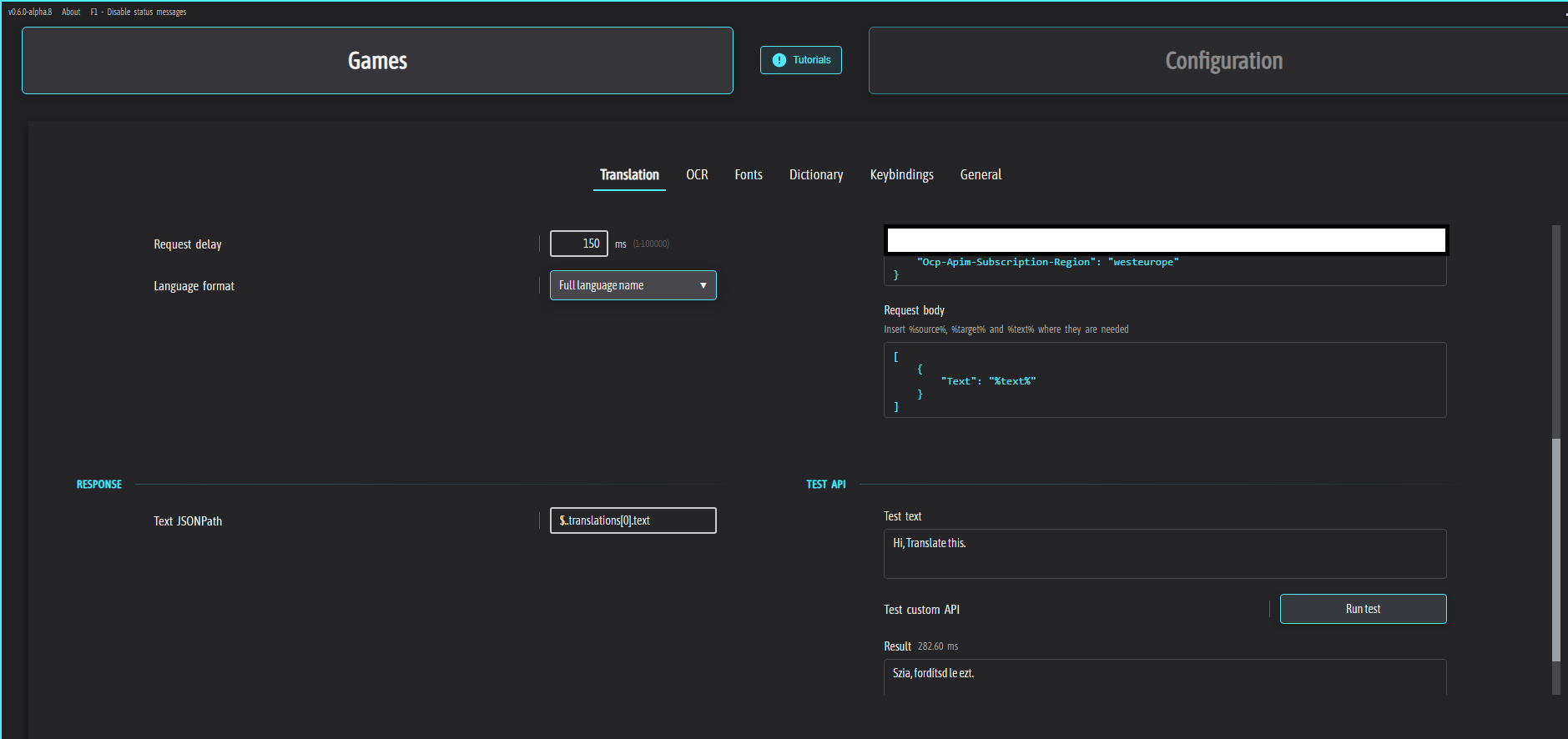
Hi! It looks like there's some kind of bug in the new version. I just ran some tests and it’s not working on my end either. Azure still works fine on Alpha 8, for instance, but it's broken in the latest release.

*Edit: I just double-checked, and it looks like this has been happening since Alpha 12. It was working perfectly in Alpha 11, but Alpha 12 is where the problems started.

Developer

Crap. I don't remember making any changes to this apart from fixing an API key bug when using the quick apply dropdown..

I'll have a look today, sorry for the inconvenience.

Developer

I'm not home yet for another few hours. Is this only happening with Azure?

(2 edits)

I haven't had time to check everything yet, but it looks like the issue isn't just with that specific one. I went through a bunch and many are broken. I'm running into the same issues where it either just shows "%text%" or outputs something completely unrelated, which I’m seeing with the Gemini, Gemma models.

Developer

🫩🫩

Thank you! If I remember correctly now, before 0.12, I had missed to commit some changes in a shared library, accidentally discarded it and then had to rewrite it and I must have broken it. I did this at some point anyways, but sounds like it must have been before 0.12. I'll fix this and reupload 0.6.0 everywhere in a few hours.

Developer

Oh my god... I put {} as the placeholder identifier instead of %%.

If you put {api_key}, {text} etcetera it should work. I'm reverting it back to %api_key% now, will be uploading 0.6.0 again shortly.

It’s working for me now. Thanks for the fix! :)

Developer (2 edits)

No worries, sorry that I created an unnecessary bug hah.

By the way - I fixed the $.. being formatted to $. in the JSONPath in 0.6.1-alpha.1, so I'd recommend updating your Azure presets now to use $.. instead of $. since the latter is an invalid path for the translation results for Azure. :)

And oh, I finally managed to create an Azure account. Seems pretty good!

(5 edits)

No worries, it happens! :) But like I mentioned earlier, DeepL is enough for me at the moment. I only checked because Plusnet mentioned it wasn't working. Either way, glad it’s good now. :)

Got it, all updated.

Happy to hear that! :)

Also, I have to correct myself on the Gemini Pro models. Somehow my account was on Tier 1 (Pay-as-you-go), (I might have triggered it while messing with Google Translate) which is why the Pro models were working for me. I just switched back to the Tier 0 Free tier and now I’m seeing the limits too. So yeah, the Pro models definitely aren't available on the standard API for free. Sorry about the mix-up! I can delete those presets if you want since there's no free version for the standard API right now.

*Edit: I actually found a workaround using Gemini CLI + Cloudflare Workers+OpenAI API PROXY, so I got the Pro models to work through that. The RPD is still kind of low, and it’s a bit slow, but at least it works. Even Flash was kind of slow in the beginning, but I somehow got it to be fast enough, and it’s great now. At least according to my current tests. :) I’d already burned through the Pro version limit by that point, so I don't know if the Pro model would be fast with the current settings yet, but I’ll definitely check. Also, from what I’ve gathered, the Flash models have a higher RPD in the CLI version than the basic API ones, and the quotas are separate. I might try to put together a preset for this if I have the time, although it might be a bit complicated for some users.

Developer

Very much appreciated by you, good to see people using the app helping each other out! :)

Thank you! I fixed a bug in the latest version that didn't let other users download updates to the presets they had already downloaded. Must have broken it when I structured everything up a bit after deciding which style I was going for.

Ah, no worries! There's definitely value in leaving them up, just try to make sure they're not tagged as a free and it's perfect! :)

That's interesting. I haven't heard or seen this CLI tool. How fast was the Flash model through that method?
Yeah it sounds like a bit of a setup, probably something the more advanced users could appreciate though. I wish I had more time to try out all sorts of APIs and LLM models.. lots of interesting stuff out there.

(1 edit)

You’re welcome! I’m happy to help when I have the time. :)

Okay, I've updated the tags to "paid."

It seems mostly the same as the regular one, maybe a split second slower at times, but they seemed equally fast during testing. The Pro models are definitely "hit and miss." Sometimes they're fine, other times they're slow or just get stuck. I assume it’s a reasoning issue, but even with that off, it doesn't improve much. They’re probably still fine for anyone who really needs the translation, though.

I also found a Qwen CLI recently. I managed to get it working via Cloudflare and a local Python file. Only one model is free for now, but it’s fast, similar to the Gemini Flash models. The current limit is 1,000 free requests per day through their OAuth system.

Developer

0.6.0 is now re-released with the fix :)

Thank you very much

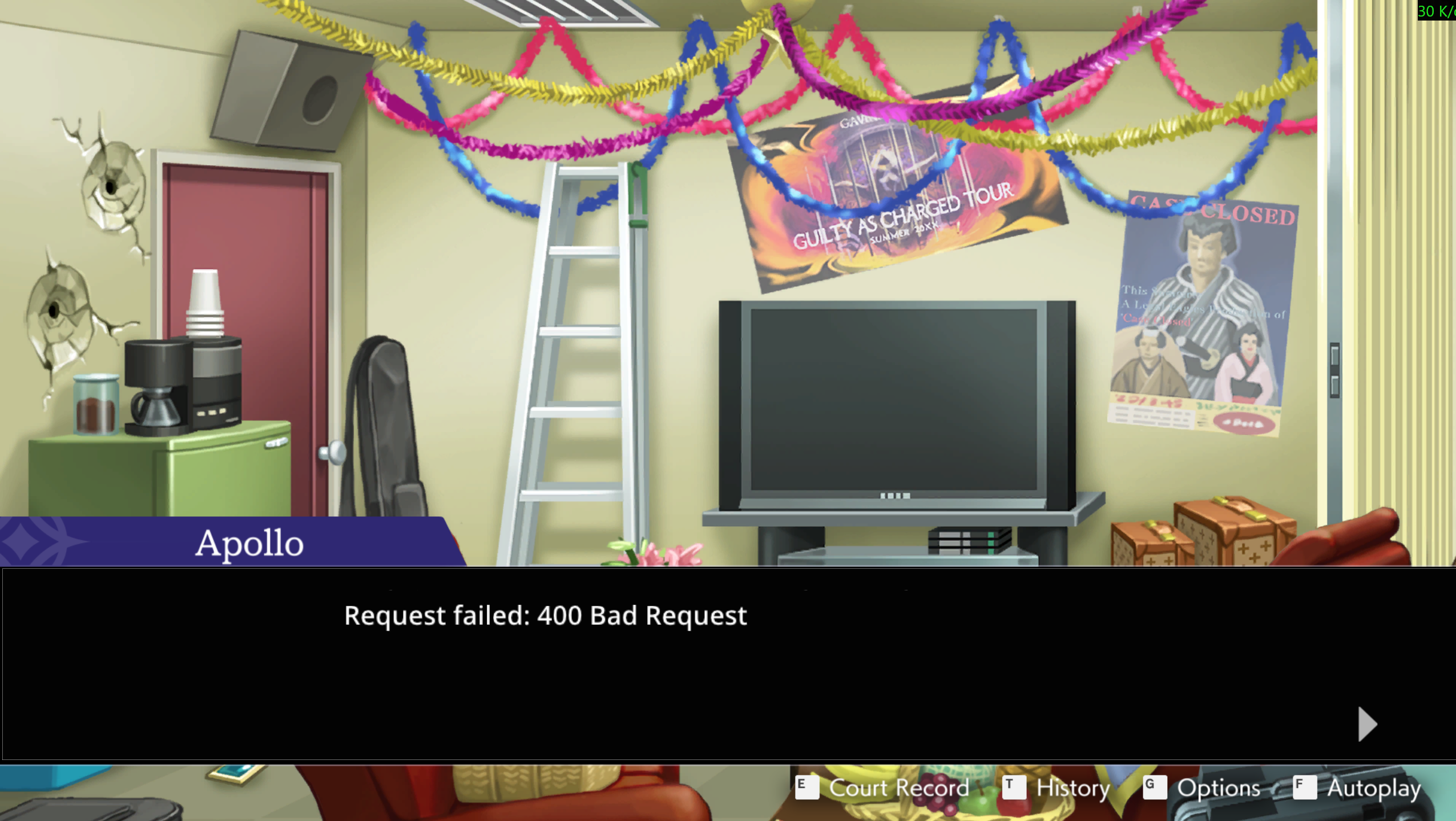
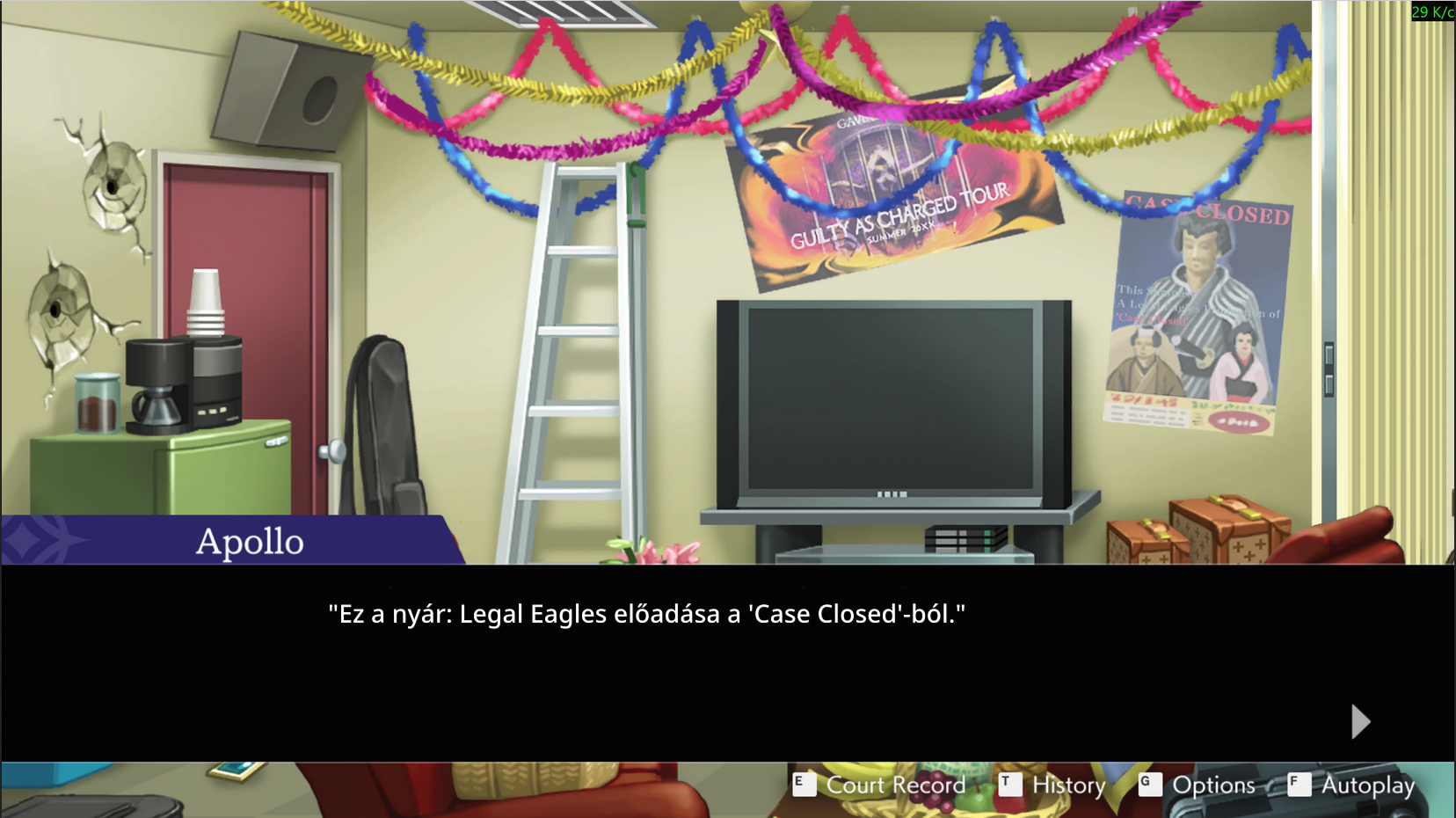
I also wanted to mention that when using the same Azure API, it does not want to translate text where quotation marks appear. It displays the message Request failed: 400 Bad request. Also, in the new version, Attached no longer works.

Developer

Hi,

Thank you for reporting these issues.

I had not noticed the issue with quotation marks. I thought that bug was squashed months ago, but it is possible I reintroduced it while making changes to related code.

Does Attached not work at all for any game? I made some changes earlier to make testing easier for myself, that is likely the cause of it. However, I haven't had any issues with Attached mode myself since I made the change. I'll investigate it further tomorrow.

I have also noticed that the 'fix' to always make the JSONPath start with $. (only one dot) is breaking the path for Azure. I didn't realize some APIs are setup like $..

I'll get that fixed too. :)

Developer

Hi pal,

The quotation mark bug should be fixed in the new 0.6.1-alpha.1 version. I also reverted how architecture is identified for the release build (the change I made for development testing), so Attached mode will now work just like before. If it still doesn't work for you, let me know, because then it was unrelated to that change.

Attached mode is working again. But the problem with quotation marks still exists.

(2 edits)

It’s weird because there are two Azure versions, and the "2025-10-01-preview" one actually works. If you're determined to use Azure, you should switch to "Azure Translator 2025-10-01-preview" in the community presets for now, until the other one is fixed. It worked when I tested it.

Developer

Thanks! Was a headscratcher for me when I saw this haha.

Developer

Shoot, sorry, my bad, I must have done the testing on the Preview version like Norby suggested.. I have fixed it now, I should be uploading a new version tonight. :)

Thank you, everything is working properly now.

Developer

╰(*°▽°*)╯