Hi pal,
This is planned. No ETA on when it would be added though. Haven't done enough research to know how much work it involves to implement it.
I believe the issue with setting the correct keybinding should be fixed in 0.5.9. It isn't mentioned in the changelogs because it is a bug that came with the changes made in the alpha versions. :)
Thank you for providing context about the Pause/One Shot. Most helpful as always. Appreciate ya! ( ( •_•)>⌐■-■
I can confirm that I can reproduce the keybinding issue. Thank you very much for that, I'll have to wire it differently from the frontend.
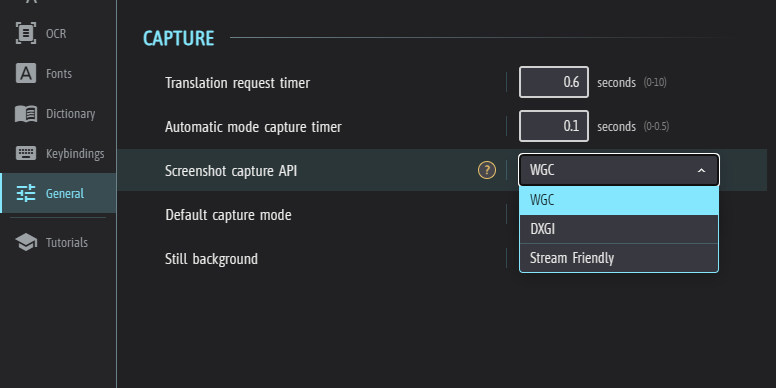
The second issue could very well have something to do with the modifications I made to run Stream Friendly completely async (It was done to ensure minimum 60fps rendering at all times). I'll have a look at it eventually. Is there any particular reason you pause/unpause instead of using the 'One shot' key?
Thank you! :)
The tutorial only works with Spanish because I haven't had any time to localize the tutorial content. You cannot download the model because it is already included with the installation, and I do not provide a delete button because that would break the tutorial. :)
The default keybinding for closing windows is 'Escape'. If you hover a specific window, it will close that individual window, otherwise it will close all windows.
Let me know if you have any other questions/feedback, thank you!
Yep, the image recognition part is definitely the trickiest to perfect. I'm actually working on a complete test-bed behind the scenes, which should over time improve the OCR across the board, and potentially push forward a fullscreen solution! :)
Yep, that's on me, haha. I had an unintuitive and bad setup. I hope the recent update made it easier for you to test things out. The next update will make it possible to change these values from the dashboard in the tool too, and more improvements like that are on its way.
Hi bud! :)
Genshin Impact uses a kernel-level anti-cheat. It is likely blocking GameTranslate from accessing its Window. Another user had a similar problem with 'Wuthering Waves'. Try to launch both GameTranslate & Genshin Impact in administrator mode.
In case this isn't the problem - Which mode are you trying to use with Genshin Impact? Desktop, Attached or Internal?
Thank you!
Ahh! I would love to make the switch over to Linux too.
GameTranslate is currently heavily integrated to Windows and it would likely take quite a lot of effort to convert much of the code to Linux or MacOS. I'd very much like GameTranslate to stabilize somewhat in features & style & structure before starting a conversion type of effort.
It's coming one day though, that's a certainty! :)
Haha, no worries, I'm very glad you provide very clear pictures for me for reference & testing.
As far as I have tested, if you now enable "Centre text" in General config, it should now centre properly every time. Make sure you keep Comic mode disabled for this as it takes precedence over Centre text.
Thanks, will do!
Thank you, I really do appreciate that very much! :)
I'm glad to hear that it has been very useful for you; that's what keeps the light on for me to keep working.
That would for sure be a cool thing to implement for more advanced uses like yours - So what you're suggesting is to provide each window's ID and/or message ID as a custom entry in the JSON body, or just in the prompt message itself?
Like:
{
"prompt": "<|begin_of_text|><|start_header_id|>system<|end_header_id|>\nYou are a highly skilled professional translator.<|eot_id|><|start_header_id|>user<|end_header_id|>\n\n### Instruction:\nTranslate %source% to %target%.\n\n### Input:\\n%text%。\n\n### Response\n<|eot_id|><|start_header_id|>assistant<|end_header_id|>\n",
"max_new_tokens": 256,
"temperature": 0,
"top_p": 1,
"do_sample": false,
"window_id": "%window_id%"
}
or
{
"prompt": "<|begin_of_text|><|start_header_id|>system<|end_header_id|>\nYou are a highly skilled professional translator.<|eot_id|><|start_header_id|>user<|end_header_id|>\n\nWindow: %window_id% ### Instruction:\nTranslate %source% to %target%.\n\n### Input:\\n%text%。\n\n### Response\n<|eot_id|><|start_header_id|>assistant<|end_header_id|>\n",
"max_new_tokens": 256,
"temperature": 0,
"top_p": 1,
"do_sample": false
}
Not sure if the first option is even possible, but it'd be a bit cleaner maybe.
I do agree with the whole idea of a separate panel though, I think it is something that should exist in the app, especially since the text removal algorithm isn't always reliable (and uses extra processing power..!).
Sorry for the very slow reply, I've been extremely busy. Thank you for your valuable feedback! :)
Hey bud! :)
The first issue is not related to the newer versions; it's just the text removal algos not being able to handle that case. I think is being filtered out early on in the process and is discarded. Thank you for reporting it eitherway, it's good to have something to works towards, either by creating a different algorithm or by improving the existing ones to handle it.
The second & third are most likely related. I made an effort to normalize line height/vertical spacing between text, for all fonts, which was to be expected to bring out some bugs. 'Attempt text centering' was never actually meant as a real feature toggleable feature, it is a remnant of an algorithm that I figured didn't really work properly, so I made it optional for edge cases when people absolutely want to try to centre text. I'll definitely have a look at it though, I think I know of a way to make it centre properly, without having to guess if it should or not, which is the current implementation.
Thank you very much as always! :)
Thank you for your patience! :)
Good to hear, I really hope to be able to make everything work as you wish to use the app soon enough!
Aha! No worries, I fully understand and sympathize with that. It's definitely not a great tutorial anyways, so I'm not surprised it can be confusing 😅
Yep! I really would love to add a proper fullscreen mode, it is just that it adds yet another mode to maintain when I release new features. And the biggest two problems are performance and actually making the OCR good enough so that it isn't constantly finding text that doesn't exist and thus ruins the experience.
Oh don't worry, the Manual mode is going nowhere. It is here to stay! :)
To make Automatic mode less destructive, go to the General tab and lower the "Text Removal Expansion" to the lowest possible value. Also, keep in mind that when you change settings, you need to restart the tool (not the main app) to put these changes into effect :)
Didn't actually expect a reply! Glad you're still around :)
I just reread the entire thread and now remember what you sought exactly. What I've added (in v0.5.8-alpha.1) is the possibility to use either/both the Manual and Automatic mode to have several windows (max 3 for performance reasons) running at the same time. The Automatic mode works just like before, so it will stay in place, remove the text and then display the text in-place.
I do understand, from reading this thread completely, that what you ideally would want is a completely separate panel where the translations show up automatically after selecting an area to translate. This does unfortunately still not exist. However, despite my negative outlook on this type of feature several months prior, I'd say I'm convinced and have changed my mind about it. There are indeed use cases for this, and I would like to add this type of translation window as well. I promise I will have a look at it, but I'm in the middle of prepping for a Steam release so it may not come within the next few weeks. We'll see.
Until then - I recommend you to go to the 'General' tab;
1. Disable "Show automatic border"
2. Enable "Locked window"
3. Enable "Click through"
These settings should help make the "Automatic" mode less disturbing to the gameplay experience.
Do have a look in the Keybindings section a well, as there are several keys there to make things more modular when in-game.
We're a tiny country, but we get around!
Yep, indeed it does! Exactly yeah, that was one of two main reasons I changed it, the other being that the 'Automatic' mode didn't work in Desktop/Attached mode without making these changes.
I see. Well, there could potentially be a solution for this, but it sounds like a very niched issue and not something I have time to spend on right now. The idea anyways is to make the Desktop/Attached window not allowed to take any mouse input whatsoever (potentially controlled by a hotkey), as that may solve your problem.
That's pretty cool, with the chroma stuff, never realised streaming applications had that feature (quite obvious now that I think about it..). Thank you for the example!
I can tell someone skipped the capture tutorial..! 😉
I understand that the naming can be confusing. I haven't really spent any time trying to come up with a less confusing way to name the two modes.
Eitherway, the 'Automatic' mode is as you found out executed the same way, just constantly capturing and immersively rendered into the background. It is not a 'Fullscreen' capture mode, this option is planned but not added yet. Thus, what you should use it for is just to capture specific areas that only render text, to avoid it from interfering with the background and gameplay intensive areas.
Manual mode is meant more as a 'translate-on-the-go' alternative.
There has been a previous request to basically mix the two, to be able to select an area to continuously capture & translate, but then render the translated text in a 'Manual' style window. The more examples I see of how people want to use the app, the more I understand the request. I think it is something I will implement soon enough.
Btw, there's some configs to modify to make the 'Automatic' mode less destructive that may work in your favour!
Thank you for your examples and input. Sorry about the late reply! :)
I tried another model, the 'llama-translate" found here; https://huggingface.co/dahara1/llama-translate-gguf
It actually seems to handle singular words and paragraphs just fine. However, it is pretty excruciatingly slow on my PC, but then again I only have a 980 ti. Give it a try with this JSON body:
{
"prompt": "<|begin_of_text|><|start_header_id|>system<|end_header_id|>\nYou are a highly skilled professional translator.<|eot_id|><|start_header_id|>user<|end_header_id|>\n\n### Instruction:\nTranslate %source% to %target%.\n\n### Input:\\n%text%。\n\n### Response\n<|eot_id|><|start_header_id|>assistant<|end_header_id|>\n",
"max_new_tokens": 256,
"temperature": 0,
"top_p": 1,
"do_sample": false
}
Hey pal,
Sorry, I forgot about this. I tried the Croissant model as well as Tower Instruct Mistral, and after some tinkering.. I believe that there isn't any EN-FR LLM out there today that realistically can work in a game format. They'll hallucinate and break often when translating singular words or questions. They seem to work fine for any paragraph type of translations, which is great, but it falls completely flat if you want to use it for anything more than that.
If your main use case is to translate longer sentences or paragraphs and can't get it to work, let me know.
As for the one-shot-fits-all solution, it is a work in progress.. haha. I find it hard to know exactly what to put there and what not to.
The Q4_K_M model should be faster and lower quality, so these results are very surprising! Must be something wrong with it.
I'm glad the model is proving good enough for your use case, that's excellent news. Quality offline translation for the privacy-concerned is great :)
For this specific model, you could try the F32 (1.42GB) and F16 (711MB). I think both likely will be too slow for you, but seeing as the Q8_M model seems broken, I'd try F16 first. Maybe even try the Q6_K.
There are other models out there, but I haven't had time to try any other EN-JP models. Not sure if there are any better ones.
Thank you for testing it out, much appreciated feedback!
Aha! Xsplit must be breaking how the Desktop/Attached mode works. How I achieve transparency is basically through 'Chroma keying'.
I used to have a different implementation entirely, but it used quite a bit more power to run. I wonder if that solution would work differently in this case.
1. If you mean the background colour of the translation window, this is planned! :)
2. Also planned.
3. Definitely something I'd like to have.
4. Ditto!
Yeah, your example clearly demonstrates how important customization is. Cheers for that!
Thank you for all that testing, this is very interesting. I'm not sure how the chroma-key is set in Xsplit, but the 'transparent' parts are all set to exactly pitch black 0.0, 0.0, 0.0.
By the way - is there a reason you are using the 'Manual' translation window instead of the 'Automatic' one? If so, for your use case, why? It's good for me to understand how users want to use the application and the 'Manual' translation mode has been quite neglected to favour the development of more immersive translations.
Xsplit! Yeah, most people only use OBS these days don't they.
That's interesting, are you definitely using the 'Stream friendly' capture API found in the General configuration tab? It may be that Xsplit is trying to filter it out in some way.
My native language is Swedish! :)
I did not give any attention to school whatsoever and dropped out very early, so my English is more or less all the way self-taught through gaming experiences & later moving to England for a while. Yes, languages are very interesting in many ways. Always a fun discussion about each language's quirks as you say.
Oh yeah, that's pretty old PC indeed! Good enough to stream what you want still, so that's nice. Yeah, a comfortable living space is definitely more important.
Cool! I'll try to respond to your tests asap!
Hi,
I launched a Discord server yesterday to try to centralise discussions & give and receive more immediate feedback.
Join at https://discord.gg/g2s5vwVmdc ༼ つ ◕_◕ ༽つ
I am sorry to hear that mate. Yes, self-care is super important, and I think one of the most important things that makes all the difference is to not beat yourself up about not being able to cope for the day. Definitely always struggled with that.
I do wish you the best of luck in the apartment hunting, and hope your depression is not long-lasting!
Glad to hear about your reason for using the app! I've had a few content creators asking about the app, so I'm stoked that I was able to add a stream-friendly Capture API. There are for sure a whole other world out there of games that is cut off by language obstacles, which is the main reason I created the application to begin with. Many games, especially indie games, do not have translations for even all the major languages. There are hundreds of millions of people out there who play games by trial and error.. which is how I learned English.
What is your CPU & GPU?
I did upload a guide for Japanese - English yesterday, let me know if you try it and how it works for you. Many thanks! :)
https://itch.io/t/5522705/guide-japanese-english-llama
Since the demand for Japanese translations is massive in comparison to other languages, I figured it is due time that I provide a short guide on how to translate offline with a better (but slower) translation model using LLAMA.
1. Download a model from the right-hand side of this model board or directly download the Q4_K_M model (229mb) or the Q8_O model (379MB)
2. Select LLAMA translator in the GameTranslate app
3. Import the downloaded .gguf model file
4. Put Japanese or English for source and vice versa for target, and select Full language name box
5. Tick the 'Custom Body' box
6. Copy this JSON block and paste it straight into the body
{
"prompt": "<|startoftext|><|im_start|>system\nTranslate to %target%.<|im_end|>\n<|im_start|>user\n%text%<|im_end|>\n<|im_start|>assistant\n",
"max_gen_len": 64,
"temperature": 0.5,
"top_p": 1,
"min_p": 0.1,
"repetition_penalty": 1.05
}
7. You're done! Feel free to try it out in the translation test
To adapt the application for reading Japanese Manga, you will want to change a few more settings;
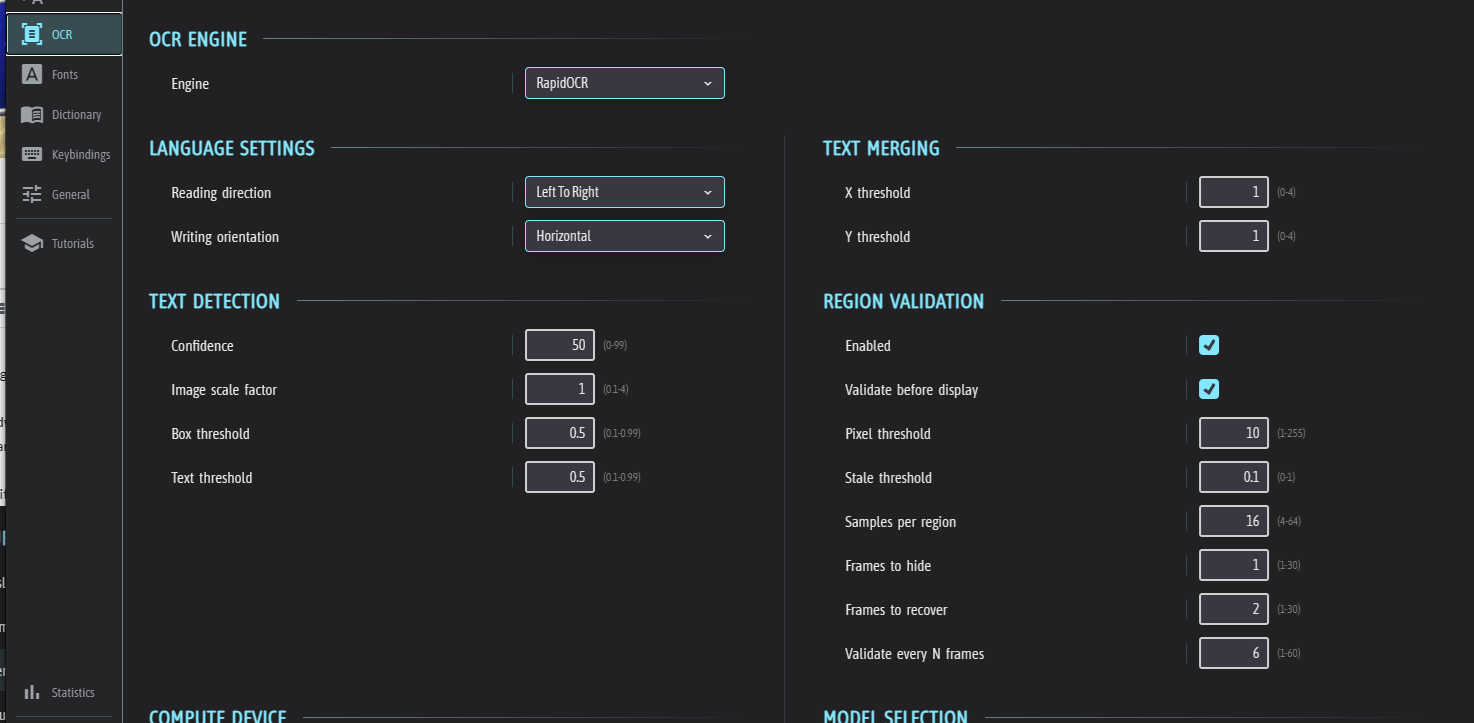
1. Select Right to left reading direction & Vertical Writing orientation in the OCR tab
2. Check the 'Comic mode' and 'Scroll reset behaviour' checkboxes in the General tab
For this guide to work pain-free, please make sure you do not have any 'Manual selection' checkbox checked
That's it for this short guide. Please let me know if you have any issues using the LLAMA model in any way, and do not be shy to request guides for other languages! Enjoy! :)
Great to hear that! I've tried my best to update weekly, but this year has been quite difficult personally. I really do hope things settle soon; it has been wearing on my passion and motivation quite a bit.
Yes, how do navigate and use the models hosted on Huggingface isn't exactly super straightforward. LLM's do indeed need quite powerful PCs, which is very unfortunate, but within a few years, most PCs should be able to handle them quite efficiently.
Yep, for sure! There is actually some fairly new models specifically for JPN-ENG and vice versa. They seem to be of rather high quality, but I believe they can only be used with shorter text. I am going to write up a guide to set it up soonish since (I swear to god) 80% of all GameTranslate users only download the Japanese-English offline model, haha.