
Indie game storeFree gamesFun gamesHorror games
Game developmentAssetsComics
SalesBundles
Jobs
TagsGame Engines

GameTranslate

Immersive real-time translator at your disposal · By Godnoken

[Feedback] Using GPT API + GameTranslate for Switch VN translation Sticky

A topic by bentleys created 83 days ago Views: 586 Replies: 22
Viewing posts 1 to 5
(5 edits)

I just want to thank Godnoken for this amazing app that works perfectly with the new visual novel The Quintessential Quintuplets. I’m so happy I found something that works this well ! At the same time, I want to share my experience using the ChatGPT API for AI-powered translation from Japanese to English (I personally use French for myself), so maybe it will help people who wants to do the same. At first, even with the AI I was making mistakes, but here are the options I found to work best.

Here’s the key info: you need to spend at least $5 to access the API (which is enough for a full run of a game, imo). I use GPT-5 mini. It’s more expensive than GPT-5 nano, but I find the nano doesn’t translate as well. I also limit tokens and reasoning effort so I don’t pay for unnecessary processing (you should really do so). Here’s what I put in the app:


Endpoint URL: https://api.openai.com/v1/chat/completions

Headers (JSON): 

{
    "Content-Type": "application/json",
    "Authorization": "Bearer [YOUR KEY HERE]"
}


Body (JSON): adjust the context for your game, but don’t include too many details or it will cost more. You can also change the model if you want so:

{
    "model": "gpt-5-mini",
    "reasoning_effort": "minimal",
    "max_completion_tokens": 150,
    "messages": [
        {
            "role": "system",
            "content": "Translate from Japanese to clear, natural English, like a real conversation. Context: The Quintessential Quintuplets in a magical universe. Correct any OCR mistakes, and only provide the final English dialogue."
        },
        {
            "role": "user",
            "content": "%text%"
        }
    ]
}

Text Output Path: choices[0].message.content

So with this phrase for example : うう…また呪文が失敗した…どうしていつも君がいるときに薬が爆発するの、五月? I got in 2 or 3 seconds : Ugh… the spell failed again. Why does the potion always explode whenever you're around, Itsuki?

It’s great because in the game settings I make the text appear immediately, so by the time the character finishes speaking in Japanese, I already have the translation! I also recommend you to use the automatic mode and pause it, then use the OneShot button each time. For me, it’s a Switch game, so I capture it with a capture card and put the translation on OBS (and the game itself is on my second screen).

GameTranslate on OBS

After a solid hour of gameplay, I’ve only spent €0.04 out of the €5 in my account.
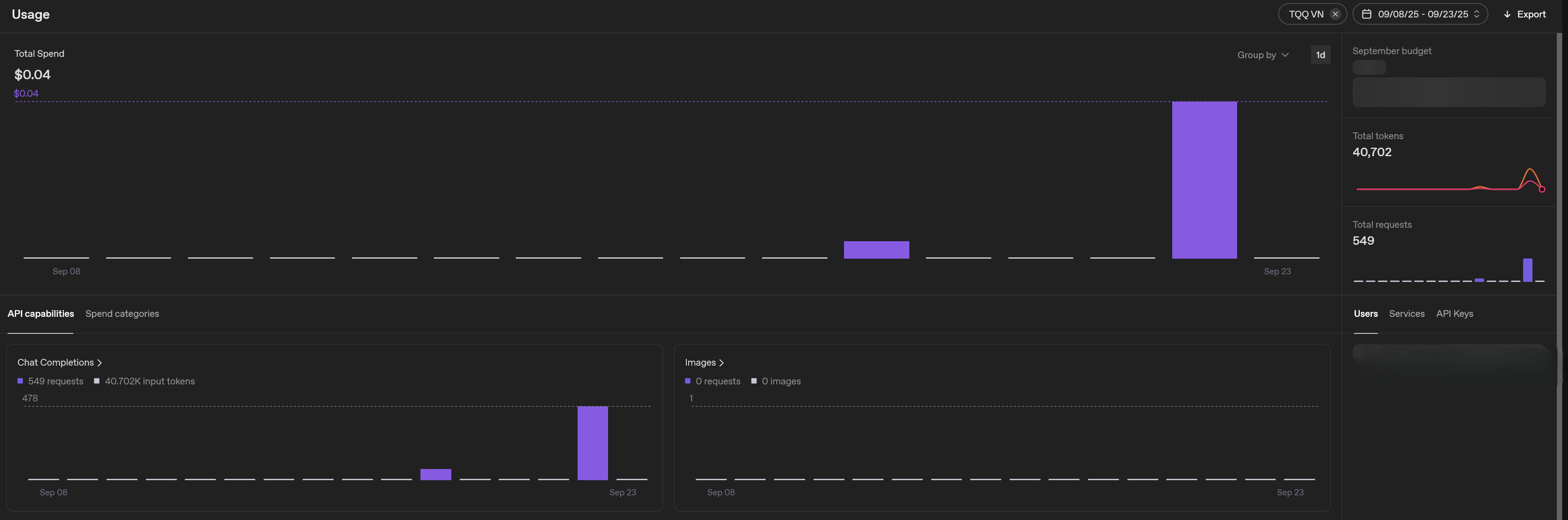
After around 500 requests, 0.04$ was spent

Anyway, that’s it for my feedback on using the GPT API. Thanks again, Godnoken! Hope it will help people who are not too familiar with the API :)

Developer

Hey bentleys!

Thank you so much for the great feedback and guide! I'm very glad and proud that you're enjoying using my application.

I should have made at least a basic guide for the Custom API and Llama weeks ago, I'm sorry I haven't gotten to it.. I will pin this thread for now.

Cheers! 💙

(1 edit)

Very smart.
• The “activate immediate text display in your game to account for any processing latency”
• and the prompt formatting of “natural English, like a real conversation” + “Correct any OCR mistakes”
should be in the official tutorial for GameTranslate.

This will help everyone have as good results as you have found straight out of the box.
Thank you for your time and research.
🙏

Developer

Agreed. My whole tutorial system is terrible at the moment. I just want to spend a few days setting it up in a better way so it is way easier to add to/modify the tutorial, before I add anything new to it.
I'm thinking a global tooltip style tutorial, taking the user across the app, explaining in broader terms, then each section should have an (optional) tutorial explaining things on a deeper level.

I’ll be honest, the app has gotten a bit daunting to set up now.

The fact that in the settings there are so many knobs to tweak makes you think that you should tweak them all. And then I remember that I never had to tweak most of those as the app does still work fine on defaults.
I completely understand that since some people use it for games, others for mangas, and others for Visual Novels the app has to be flexible but I feel there indeed should be at least a tutorial of what each option does (just like you did in your original one) in a “if you have this kind of text [screenshot] then tweaking this option will help”.
And in the future, when the app config export sharing has more traction, you could cross reference what are the most common settings for Game Translation / Manga Translation / VN Translation and have the first time tutorial set them up for you.
This way, people who dont want to RTFM will still find themselves with an app tailored to their needs.

On the more advanced side of things, I also tried to set up a working translation flow by importing a .gguf model but after 2.5 hours of trial and error I could not get a good one. So I’m waiting for someone to have figured out a good setup and shared it here.

Developer

Agreed mate! Thank you for your honesty.

When I started building this application, I wanted it to be as user-friendly and simple to use as possible. Unfortunately I have deviated greatly from that, partly due to bringing in a lot of new features, and partly due to realizing that there is no one-shoe-fits-all scenario in this very complex work of OCR + translation of multiple languages, formats, styles etcetera. It's necessary to have this many knobs, to support all cases. However, to solve both issues in one, my intention for the future is to keep many of these behind "Advanced" feature gates. Hopefully I can squeeze some of that in next week too.

I have actually had an idea for an UX friendly first time setup that will try to be a one-shot-fits-all scenario as much as possible, by asking the user a few questions and then setting the application up to adhere to those answers. I think that alone would do wonders for user retention.

I could try to help you with the LLAMA setup if you'd like. Is there a specific language pair you'd like to use, and what problems are you having exactly? Completely incomprehensible results, or just bad translation output?

(4 edits)

” I have actually had an idea for an UX friendly first time setup that will try to be a one-shot-fits-all scenario as much as possible, by asking the user a few questions and then setting the application up to adhere to those answers. I think that alone would do wonders for user retention. “

Yes, I agree. You know the app best. If you can translate the technical know-how into plain questions, it will help users navigate around the inherent complexity have a best-fit setup immediately.

 
” I could try to help you with the LLAMA setup if you’d like. Is there a specific language pair you’d like to use, and what problems are you having exactly? Completely incomprehensible results, or just bad translation output? “

Would appreciate it!

  • I’m working with an English → French setup.
  • I downloaded a LLM called “croissant” I believe (https://huggingface.co/croissantllm/CroissantLLMBase-GGUF), as it touted as being tailor made, but after some prompting it just hallucinated a whole story or repeated stuff infinitely.
  • I then tried the Google Emma (or Gemma?), and it just ran for a minute and errored out.

Just a known working configuration (What model, What parameters to set in GameTranslate) would be great. doesn’t need to be fast. As I could see what a working setup would look like and figure out stuff from there. 👍

Developer

Hey pal,

Sorry, I forgot about this. I tried the Croissant model as well as Tower Instruct Mistral, and after some tinkering.. I believe that there isn't any EN-FR LLM out there today that realistically can work in a game format. They'll hallucinate and break often when translating singular words or questions. They seem to work fine for any paragraph type of translations, which is great, but it falls completely flat if you want to use it for anything more than that.

If your main use case is to translate longer sentences or paragraphs and can't get it to work, let me know.

As for the one-shot-fits-all solution, it is a work in progress.. haha. I find it hard to know exactly what to put there and what not to.

Developer

I tried another model, the 'llama-translate" found here; https://huggingface.co/dahara1/llama-translate-gguf

It actually seems to handle singular words and paragraphs just fine. However, it is pretty excruciatingly slow on my PC, but then again I only have a 980 ti. Give it a try with this JSON body:

{

    "prompt": "<|begin_of_text|><|start_header_id|>system<|end_header_id|>\nYou are a highly skilled professional translator.<|eot_id|><|start_header_id|>user<|end_header_id|>\n\n### Instruction:\nTranslate %source% to %target%.\n\n### Input:\\n%text%。\n\n### Response\n<|eot_id|><|start_header_id|>assistant<|end_header_id|>\n",

    "max_new_tokens": 256,

    "temperature": 0,

    "top_p": 1,

    "do_sample": false

}

Salut/Hi,
Thanks for this, it works well, especially compared to DeepL Free API.

To add my two cents, this specific set up also required me to verify my identity (ID + Photo upload) with Open AI (in Canada, FWIW), as the use of the gpt-5-mini model is restricted to "Verified Organizations." Took me a while to figure this out, as all I was getting was an HTTP error setting it up. Once that was done, everything worked with the settings you outlined.

Developer

Thank you for providing information mate :)

I may be having a similar issue. Do you remember if this is the error message "HTTP request returned error status" you were receiving?

Hey there,

That was the error I encountered in the app, correct. Verifying my identity on OpenAI fixed it in my situation, but considering HTTP errors can be almost anything, I can’t say for sure your issue is the same. I’d make sure you have your account verified to eliminate that possibility.

Hope this helps

(1 edit)

I created an account and added funds to my account. Followed your layout, however when I click test custom Api I receive an error message. Specifically, "HTTP request returned error status", any ideas for a potential solution?

Developer

Hi AlexIV,

Sorry about the delayed reply here

The fact that the error message is extremely unhelpful is entirely my fault. When I added telemetry a while back, I had to ensure no sensitive information could be sent back to my database, and I simply forgot to re-add so the user can see these API requests themselves locally.

I will release a 0.5.6-alpha.1 later today, which will give you more information about why your request fails.

Sorry for the inconvenience.

Developer

Hi again Alex,

Sorry about the delay. The new version that will be able to give you more information about the error is coming out within the next 10 minutes. Please let me know if you can't get it solved. :)

Thank you. But one more thing where can I find the download for the alpha build?

Developer

Hey Alex,

Sorry, I had it uploaded for a week but took it down a few days ago because it had a very breaking bug in the tutorial. I can upload it to a dropbox for you tomorrow when I am back home :)

Developer

Hi mate,

Could you email gametranslate.ojefors@gmail.com and I'll drop you a link to download this version. Thanks! :)

Developer

Hey Alex,

I forgot to notify you, but the 0.5.6 version released here on Itch.io has this implemented.

Hope you're able to figure it out, and if not, please do let me know!

Sorry for the delayed response. With the new version I was able to identify my issue and get it functioning properly. 

Developer

Nice! That's great :)

I had the same problem. After installing the new version 0.5.6-alpha.2, I was able to see what the specific issue was when testing the API. For me, it was because I forgot to include my API key in the JSON header