
Indie game storeFree gamesFun gamesHorror games
Game developmentAssetsComics
SalesBundles
Jobs
TagsGame Engines

pyro944

42
Posts
3
Topics
6
Following
A member registered Mar 23, 2025

Recent community posts

This is *probably* fixed in the latest version (1.1.6). I haven't encountered it again since I put in some safeguards.

I'm tracking an issue where sometimes the prompts generate for the wrong character. If you encounter it, the workaround is simple: just switch to another character's info screen and switch back.

Try the latest version of the mod. It has two changes that may help in cases where ComfyUI seems to be communicating inconsistently.

  1. I'm using a different event to signal the end of the workflow. This may be more reliable, but I can't prove it without more data.
  2. There's a new "Fetch last" button that will allow you to manually fetch the output of the last prompt if you know ComfyUI has actually finished.

That's a great question!

When I tried to do that in the past, I almost always ended up with very skimpy clothing. For example, if I had explicitly prompted for sleeves, I wasn't able to get sleeves without really pumping up the weight of that part of the prompt.

You can still see this in reverse today. If you have a character with most of their skin covered, some of your nude generations will often have little bits of clothing covering them.

Facing these tradeoffs, I opted for giving the best support to the image that players would most likely see the most: the clothed body.

I've released 1.1.4, which contains an alternate portrait workflow for those having trouble with Face Analysis.

To use the new workflow, you will need to download new dependencies using the manager:

Node packs: ComfyUI Impact Pack, ComfyUI Impact Subpack
Models: face_yolov8m (bbox)

That stack trace looks similar to one I saw yesterday. See the troubleshooting section in the README and try the last thing mentioned:

I'm seeing an error that looks like "[Errno 22] Invalid argument

This usually indicates a problem with ComfyUI's configuration. As discussed in this issue, try changing the port that ComfyUI is using (in the Server-Config settings).

If you can dump the entire error into pastebin and link it here, I might be able to tell you what's going wrong. That "large string of text" is probably a stack trace that'll tell us what's crashing.

Is that using a default workflow? Are there any errors in the ComfyUI console?

I'm glad you got it working, but manually installing packages into Comfy's venv is not ideal.

I'm looking into other options for face detection and cropping so people will potentially have alternate options.

Yeah, that'll do it. I assumed the node would ship with all its dependencies (it did for me), but it seems like that might not always be the case. What platform are you running ComfyUI on?

I would recommend checking the console within ComfyUI to see if it has any additional information.

I can also see about including more debugging information in the next release (which I'm preparing now).

I've overhauled the mod. You can now generate portraits right in-game if you have ComfyUI installed!

I've uploaded an update that ought to fix the problem. Make sure you have my mod loading after the Exposure mod, otherwise it'll do nothing.

(2 edits)

Thanks for the report. I'll see if I can find a way to correct it. I see it happening in my game, too.


Edit: Yeah, the Exposure mod doesn't account for unique characters. I'll try to patch on top of it to add support.

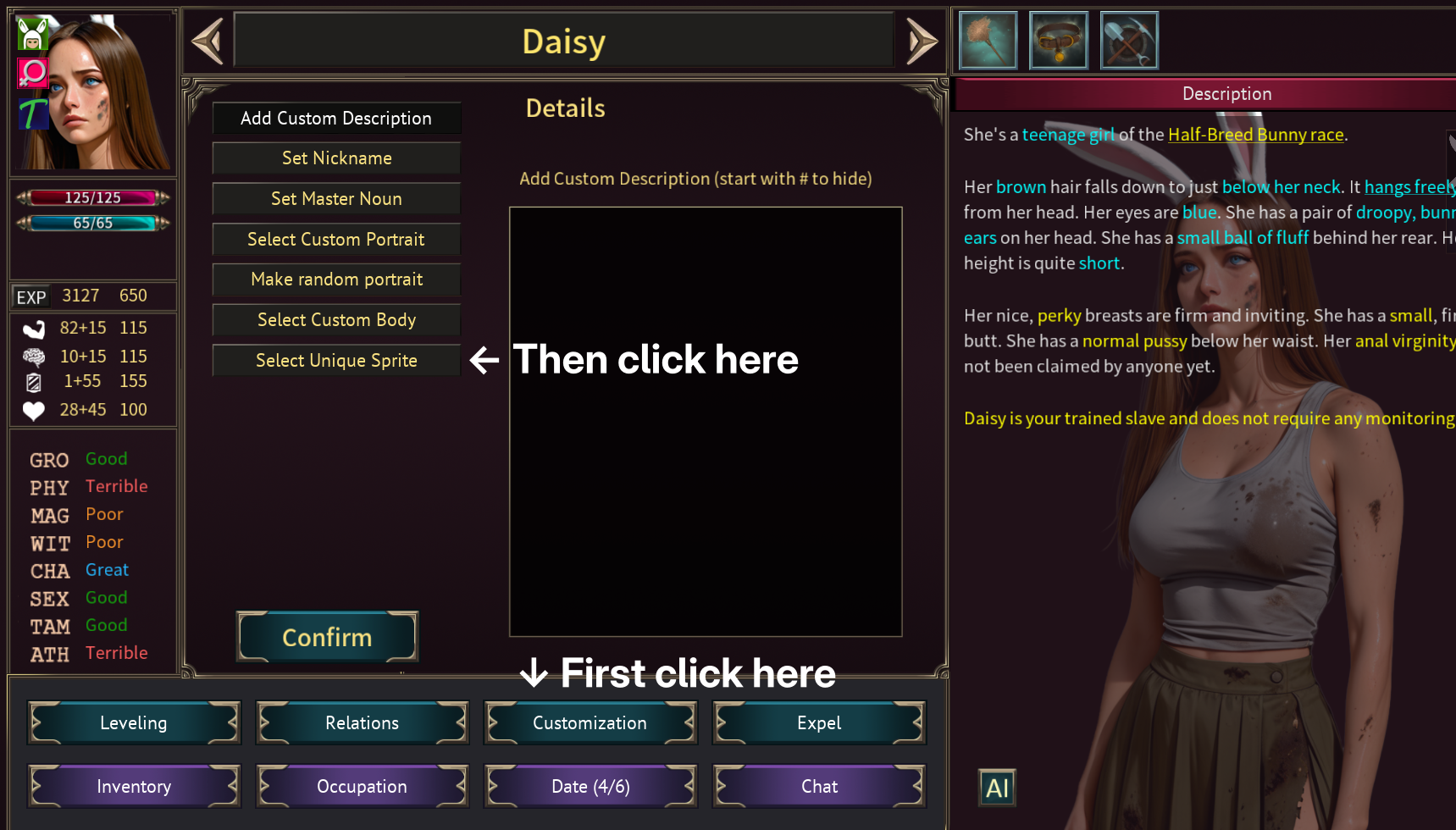
I think I've seen that issue before. Basically, when Daisy gets a new outfit, the game is assigning her portrait and body by loading directly from the original game assets instead of using the image constants that were set up previously.


You ought to be able to work around it by going into her portrait customization settings and manually selecting  one of her unique sprites. This will replace the defaults that the game set up.


Due to a bug in the game, though, I think the regular maid outfit will be missing. :(


Also added a bunch of green-haired elves to each pack because I just realized that's a standard hair color for them.

(1 edit)

Added a handful of female portraits to each race* with more "main character energy":

- More consistent faces.
- More interesting outfits.
- Some more interesting hair colors.

*No new Kobolds in this update. My workflow can't detect Kobold faces right now.

There are two questions here:

1. How do I support custom races in the Portrait Pack Editor tool?

Look for the settings.json file that's in the same directory as the Portrait Pack Editor jar. You should be able to find an array of races. You can add any race you like there.

2. How do I get custom races to use custom portraits automatically?

As far as I can tell, this would require an update to the SfCArics mod to modify how randomized portraits are selected.

As far as I can tell, this is a problem with the game, not the pack. I will report the bug.

Interesting, I'll take a look and make sure I named everything appropriately.

Updated for 0.13.3.

Uploaded version 2, which is much larger in scope!

The new character UI changed substantially in 0.13.3. I'll need to move this button somewhere else when I get the chance.

No LoRAs. I will probably need one when I redo Beastkin, though. I've been unhappy with the results so far.

(1 edit)

I think if you want compatibility with squariarch's mod, you can just rename the folder:

  • bodiesnaked -> exposed

The next version of this pack will use a directory structure compatible with squariarch's mod, but it'll be quite some time before I finish it.

Can you clarify? Is the issue with:

  1. Built-in NPCs using the wrong sprites during bedroom scenes?
  2. Slaves/servants using the wrong sprites during bedroom scenes?
  3. Both?

All of these are technically outside the scope of the mod, but for (2) you might need an appropriate mod to switch images. The one I have installed right now is the Body image auto switcher, but I think some other mods also do the job of swapping sprites. Let me know if you're using any other mods and maybe I can help address the problem. For instance, I know at least one mod expects a different directory structure.

The game is built on Godot 3.5, so you'll run into trouble using Godot 4.5.

I have used this script in the past to extract PNGs from Godot STEX files: https://github.com/ClementineAccount/godot-stex-to-png

(1 edit)

Updates:

  • The copy issue should be fixed.
  • All default framing and style directives should be completely overwritten if you provide anything at all in the prompts (even just a space).
  • Added support for SFC Aric's races, based on their text descriptions.

Thanks for the feedback! I'll take a look at the copying issue.

I don't have SFCAric's installed so I'll need to investigate those races. Shouldn't be terribly difficult to support them.

(1 edit)

> the results of such a prompt may vary a lot

Absolutely. Maybe I'll strip it down to just the tags based on the character stats and let the user input any extra tags they care about.

(28 edits)

This mod hooks up to a local ComfyUI installation to let you generate AI portraits in-game!

It requires a fair amount of setup, so please read the README carefully.
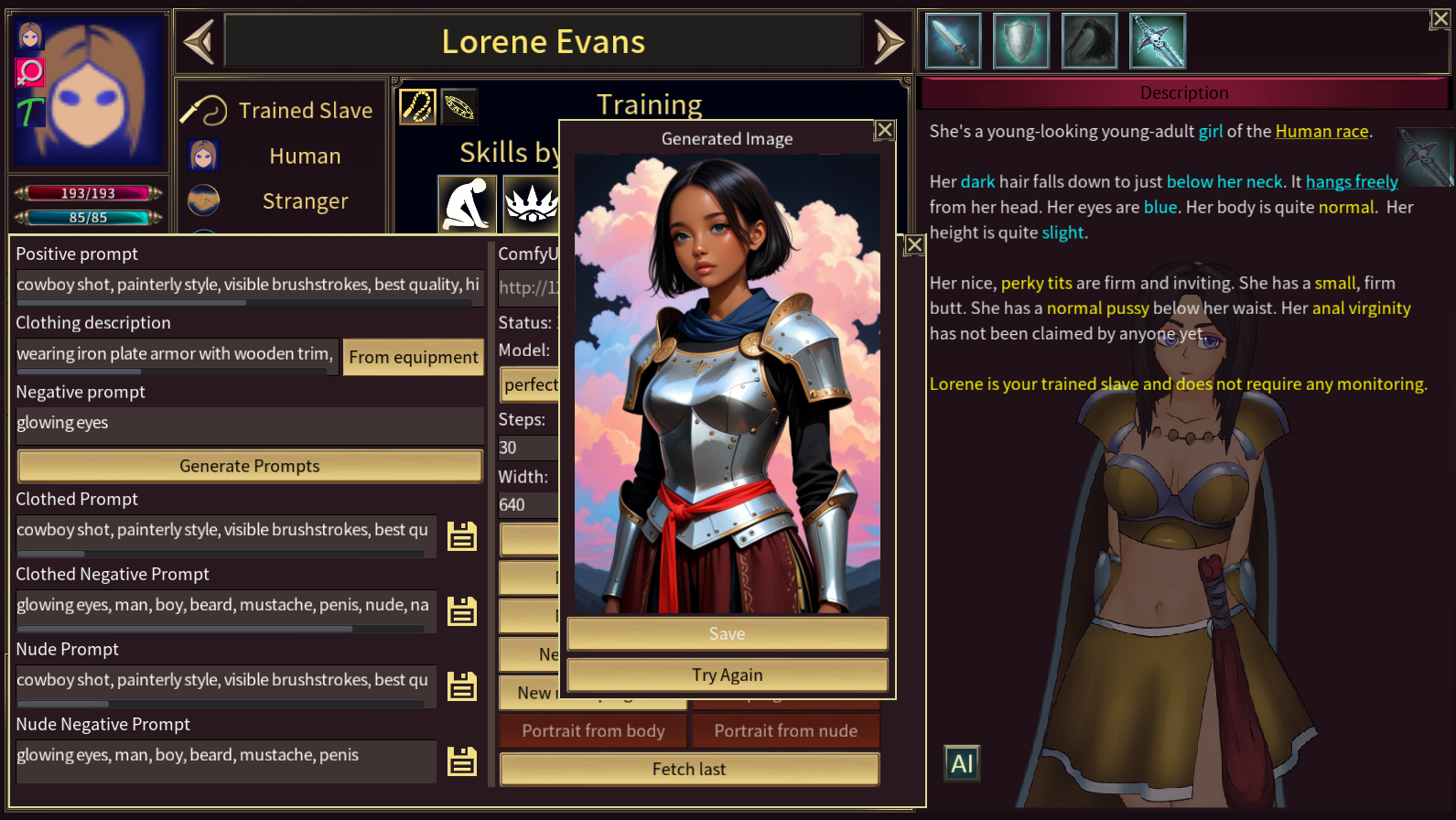

Basic features:

  • Generate prompts based on your character's appearance and equipment.
  • Produce body and face-crop images and save them to the character.
  • Use whatever checkpoint model you like.
For advanced users:
  • Import your own ComfyUI workflow for more advanced image generation.
  • Select LoRAs to use for race and sex, or to apply to every image generation.

You may have used the previous version of this mod, which just generates prompts. That functionality still exists, but has been augmented with ComfyUI integration.

The prompts are opinionated based on what I've found to work decently in the models I've tested. Your results may vary.

Download on GitHub
(Updated 14 Apr 2026)

FAQ:

Q: How do I find the AI image popup menu?
Open a character's info page and find the "AI" button in the bottom left of their full-body portrait.

Q: I have pretty modest hardware. Can I use this?
Probably not! Generating images takes a fairly beefy GPU.

Q: Can I farm out image generation to a cloud service (like Comfy Cloud)?
No. Introducing cloud services is a whole extra layer of complexity that I'm not going to tackle at this time

Q: What are some good LoRAs for fantasy races?
Try these:

Changelog:

1.1.7

  • Fix: Support the new interface for CropByBBoxes in ComfyUI 0.19.0.
  • Adjust human skin tone prompts.

1.1.6

  • Support generating clothed body from nude. Note that due to the way the game looks up alternate portraits, you will only be able to do this if the character already has a body image.
  • Clean up input control colors for better readability.
  • Small tweaks to prompt wording and weights.
  • Bug fixes: LoRA dropdown could be too small, main panel was overlapping character portrait and body somewhat, skin color could be incorrect for characters with scales (like Dragonkin).

1.1.5

  • Add img2img workflow that tries to maintain the character's face (`preserve-face`).
  • Fix various behavior issues with the expandable prompt inputs.
  • Add a "Fetch last" button to the UI to help when ComfyUI doesn't return images properly.

1.1.4

  • Add Ultralytics portrait workflow for those who are having trouble with the default.
  • The new workflow requires new dependencies. See the Workflow Dependencies section of the README for details.
  • Add another safeguard for filenames which may contain forbidden characters.

1.1.3

  • Refine prompts.
  • Support more advanced portrait workflows.
  • Support workflows that return multiple images.
  • Better debugging output for error cases.
  • Various small fixes.

1.1.2

  • Fix failure when saving a character with a nickname.
  • Add filtering for LoRA selection.
  • Add more item descriptions
  • Update documentation

1.1.1

  • Fix an error when parsing fur that prevented generation of beastkin.
  • Update various race and item prompts.

1.1.0

  • Add support for LoRAs.
  • Add support for custom workflows.
  • Add settings persistence.
  • Refine the UI.

1.0.0

  • Add ComfyUI integration.

The model I'm using can only do human male anatomy. It didn't look right with certain races.

(1 edit)

I skipped Beastkin, Arachna, Centaur, and Scylla for sure. Possibly some others. Most races are supported.

I've added futa support for most races where human anatomy makes sense.

No, but I know someone else is working on a pack that will support them and should be out soon.

(22 edits)

VERSION 2
What's new?

  • Complete overhaul.
  • Skin/scale/hair/eye colors should match what's actually available for each race in the game.
  • All female and futa characters have pregnant sprites.
  • All races/sexes supported.

What is it?

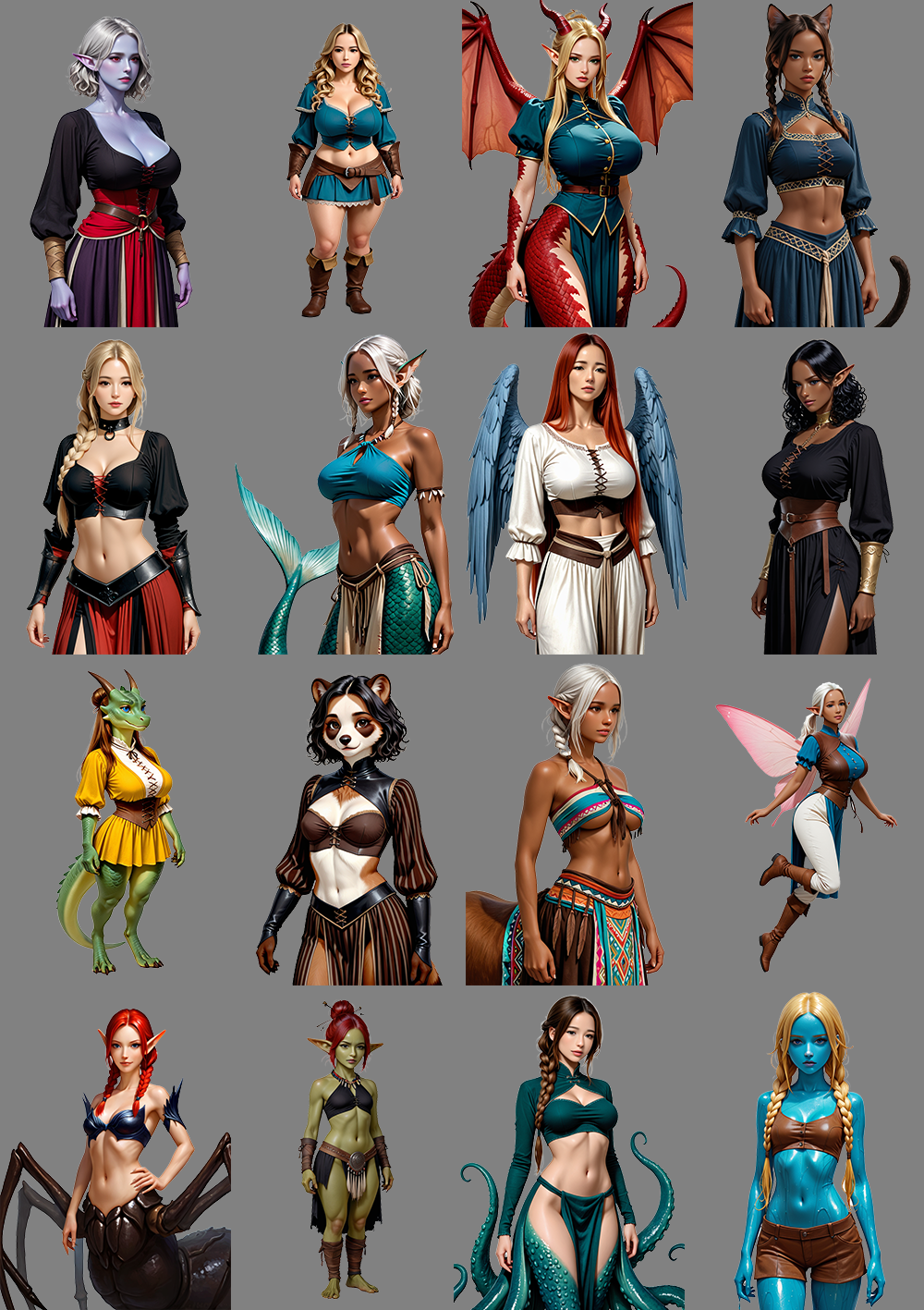
This is a portrait pack for your characters. See the screenshots for examples.

What's included?

All races, all sexes, clothed, nude, and pregnant. 1587 characters included.

How do I see the nude and pregnant sprites?

You'll need the Exposure mod, which is included over on this post.

These don't match the NPC style at all

Correct. If you'd like the NPCs to match, also install the NPC replacements mod (listed below). These NPCs obviously won't have all the lovely character Maverik put into them, but they'll at least match the semi-realistic style.

Why?

The paper doll system is great, I just don't like the aesthetic.

How did you produce these?

I used a model called PerfectDeliberate v4.0 and used Invoke AI locally.

LoRAs:

My Invoke workflow (stripped of custom nodes): download here.

I have another question

I don't check Itch very often, but you can find me in the Strive Discord.

Download links

Females (last updated: 30 Jan 2026)

Males (last updated: 13 Feb 2026)

Futas (last updated: 6 Feb 2026)

NPC Replacements (last updated: 29 Mar 2026)
Make sure this loads after the Exposure mod linked above.

V1 Download (no male or pregnant sprites, crazy colors):
Semi-realistic Portrait Pack


It just needed a minor change. Here's a patch: https://pastebin.com/SUsNdKn6

The only important change is to GUIFactory. The other changes were just necessary to let me build and run the project in IntelliJ.

This should be compatible with all platforms, but I suggest you give it a quick spin on Windows, particularly paying attention to the save path when you press Apply.

The new logic seems to be treating the `/` as a kind of tag.

Exception in thread "AWT-EventQueue-0" java.lang.NullPointerException: Cannot invoke "java.util.List.iterator()" because the return value of "java.util.Map.get(Object)" is null

    at com.CyanCorn.portrait.main.PortraitObject.doesThisCategoryHaveThisString(PortraitObject.java:355)

    at com.CyanCorn.portrait.main.PortraitObject.getMyTagsFromThisCategory(PortraitObject.java:347)

    at com.CyanCorn.portrait.main.PortraitObject.apply(PortraitObject.java:322)

    at com.CyanCorn.portrait.main.PortraitObject.setMetaData(PortraitObject.java:399)

    at com.CyanCorn.portrait.GUI.GUIFactory.applyButtonClicked(GUIFactory.java:1343)

Specifically, that line is looking for a key named `/` instead of one of the actual tag names (like `Races`). It's likely that PortraitObject.apply needs to be updated to handle `/` instead of `\\`. It also wouldn't hurt to throw a little null safety in there.

This bug might also affect Windows, now that I think about it.

(1 edit)

Wow you're quick!

There is still  a problem. You may have just missed a spot, because I'm getting filenames that look like this:

Human\Female\Mature+Adult+Teen\auburn+fairSkin+TitsF+AssT+Shoulder+Straight+eyeBlue+germaine.png


That's the whole filename, not the path.

The presence of the backslashes suggests there's still a hardcoded backslash in there somewhere.

(1 edit)

This doesn't work on Linux (and I'm surprised if it works on Mac). I believe the problem is that it has a bunch of Windows path separators hardcoded. For instance, when constructing the paths where portraits are held, it has logic like this:

String bodies = packDirectory + "\\bodies\\";

Java is smart enough to convert forward slashes to system-specific separators, but it doesn't convert backslashes in the same way. This can be fixed by just using forward slashes or by intentionally using File.separator.

If this application is on source control somewhere, I'd consider submitting a patch.