Just checked, every mesh has an uniform scale, thank you!
diomonogatari
Creator of
Recent community posts
I tested the updated GLB in a completely fresh Godot 4 project. The issue is still present.
The GLB itself still contains non-unit scales on mesh nodes. For example, the Stairs node is exported with:
"scale": [0.149999991, 0.085000001, 0.344688237]
Godot is importing the file correctly; these values are already present in the GLB.
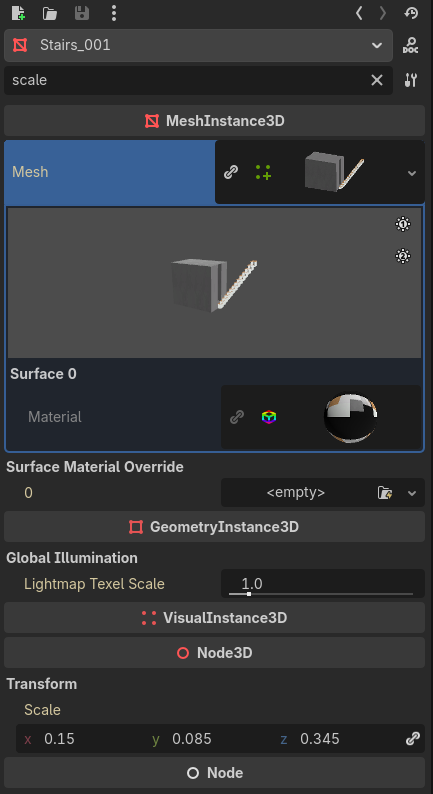
Could you check why the exporter is writing non-unit node scales instead of baking the transforms into the mesh geometry? Ideally, each exported mesh node should have a local scale of (1,1,1).
Thank you for having a look!
The exported .glb contains non-uniform scales on many MeshInstance3D nodes (for example, the Stairs object imports with a scale of approximately 0.15, 0.085, 0.345 instead of 1,1,1).
This becomes problematic when creating gameplay collision in Godot. If a StaticBody3D/CollisionShape3D is added as a child of one of these imported meshes (or generated automatically using Godot's Mesh → Create Collision tools), the collision inherits the non-uniform scale. In my case this caused incorrect physics behaviour, including a CharacterBody3D being unable to walk up a stair ramp that should have been perfectly walkable.
The workaround is to keep all collision objects outside the imported mesh hierarchy and create a separate collision scene, but that makes the workflow much more cumbersome, especially for large environments.
If possible, it would be very helpful if the asset could be exported with mesh transforms baked so that the imported nodes have a scale of (1, 1, 1). That makes the asset much easier to use in Godot and other game engines where gameplay collision is authored separately from the visual meshes.
Yup, the spin is measured as the cursor's angle around the center of the screen, so the radius of your circle quietly matters. If you spiral inward without realizing it, the cursor drifts toward the middle, the angle stops changing much, and there's a small dead-zone right at the center, so the spin can die on you with no obvious feedback. That center-dependence is exactly the bias you're feeling.
Thank you for the feedback and for playing!
Good luck with your voting :)
This was a very positive surprise!
There are many things that could be better but there's also a lot being done here well that made me stick to the game for almost 30min to try get all endings, specially the ending 4/4
Game loop is extremely simple and there's sufficient juice to make you keep going.
The game could use some clarity in terms of info, how much money I've got, at which spin am I at from the 5 spins, etc. Those two are the ones I noticed the most, as at some point it was just "click the button until it shows 'You can shop now' text"
Good job on your first game and good luck with the rest of the voting!
Thank you for giving it a shot :)
Yup, spinning around with the mouse is not something we do everyday and will hurt after a while.
Besides mobile, what one playtester commented was that it would be an amazing game to play in a Nintendo DS to which made me nostalgic of games like Pokemon Ranger
Thank you for the feedback and good luck with your voting!
Hey thank you for playing!
I'm no artist at all, so the concept that I tried to do was "grab all characters I can find asset packs for" and ended up calling it the "interdimensional" as a worldbuilding excuse for I have characters with no artistic cohesion.
I did think that the player character could have different characteristics, as I had the possibility to set individual resources to each character, but then to make it feel polished I would also have to expand onto "character unlocking mechanics". This would be a great addition to drive player engagement, as I think the game is worth about the 2-5minutes it gets someone to reach the final, but alas time! This whole idea surged around 16h until submission and I felt the priority had to be in playtesting, bugfixing and ensuring that mouse sensitivity would dictate if the game was playable only for some.
Again, thank you for playing and good luck with your own voting!
I'll skip piling onto the art and audio praise, you've clearly earned a hundred of those already, and leave something hopefully more useful.
The thing I kept circling back to is the wheel. I expected it to be this unpredictable, do-or-die thing, but it always runs you through the same three challenges in the same order, so it ends up feeling more like a menu than a gamble. The premise is a deal with the devil, yet a predictable wheel makes him feel oddly fair and safe, when he should feel rigged and capricious...
Two smaller notes. The first maze is so large that I braced for every challenge being a long navigation slog, so I went into the second one anxious rather than curious. And in the boss finale, the boss looked so much like my own character that I genuinely couldn't tell if I was damaging it or myself for the first few rounds. A clearer visual contrast, or a hit indicator on the boss, would erase that doubt instantly.
Genuinely impressive that 80+ people shipped something this cohesive. The individual craft is peak, it's the connective design between the pieces that I'd most love to see tightened in a post-jam cut.
Good luck with the rest of voting!
Hey there, thank you for playing!
The "error" sound is an indication that you've entered the redline and you will start getting dizzy. One thing I've experienced during playtesting was that in some conditions it would trigger too often and became confusing as to what was actually indicating.
I think I would need to improve the UX and add some visual juice, as the sound by itself can be tricky.
You can try adjusting the sensitivity setting in case you run with a lower sens mouse. You should be able to get by the first one with that. Unless you're playing in a trackpad then... yea 😅
Thank you for the feedback and good luck with your own votes!
Thanks! It's actually simpler than it looks. Instead of thinking about tracking the mouse's movement direction, track the angle of the cursor around the center of the screen.
Every frame I do three things:
- Find the cursor's position relative to screen center; that gives me a little arrow pointing from the middle of the screen out to the cursor.
- Measure that arrow's angle (one
atan2; in Godot it's justoffset.angle()). - Compare it to last frame's angle. The difference is how far you swept around the center this frame; the sign of that difference tells me clockwise vs. counter-clockwise.
I tried to understand how Osu did it and apply it as best I could for my use case.
No gesture recognition, no recording the path, just "what angle is the cursor at, and how fast is that angle changing."
Thank you for playing and good luck with the voting!
Good point! I can see how that can become confusing.
I couldn't really find the ideal design to convey to the players that "you spin around the center" and ended up going late stage with the game without shifting to the "spin around the character".
The main visual point is that the character should be the axis, but never went back and programmed the re-centering when competing :P
Really appreciate you taking the time to play and comment. Wishing you lots of ratings on yours!
I've been seeing you on my twitter feed for 2 or 3 months now and you made an excellent pivot with what you were experimenting before ahaha
Excellent game feel, lot's of juice on your incremental.
Sometimes, the text in the HUD would become all cramped up.
I guess you could also try explore some sort of story, do some worldbuilding and put a thought on why is the character breaking blocks or something?
Cheers, and good luck with the rest of the jam!
Thank you so much! Really glad the visuals and music landed for you, and haha, the wrist casualty is real, mine didn't survive playtesting either.
The spin area being too small or hard to stay inside is fair, and it might actually be something you can ease on your end. There's a setting to increase gameplay sensitivity, which means less movement to keep the spin going, so it helps a lot on lower-sens setups (and it's gentler on the wrist too). Did you happen to find it? This concept has been really hard to balance as one experience for everyone, since it's so tied to each person's mouse and hardware config. I did add some dead zones to take the edge off, but there's still room to make the zone more forgiving in a post-jam build.
Really appreciate you taking the time to play and comment. Good luck with your own submission!
There is a setting to increase the sensitivity of your gameplay, it might help you if you have a lower sens configuration. Did you happen to find it?
I've found that this concept is very hard to balance as an experience for everyone as it is very tied to each individual hardware configuration :P
Really appreciate you taking the time to play and comment. Wishing you lots of ratings on yours!
Yea my wrist took a hit during all this playtesting ahahaha.
The first build I was using angular momentum to understand how much spinning was going on but I ended up having a well designed experience for my mouse sensitivity and low sensitivity people just could play the game. As for high sens people, it would be too easy.
Eventually researched and tried to implement the same logic as Osu! for the spinner and introduced dead zones to ease on the pain. Low sens is still challenging but more manageable.
As for the dizziness, there was a setting to minimize the shader vfx, did you happen to find it?
Thank you a lot for the feedback and for playing! Good luck with your own submission