
Indie game storeFree gamesFun gamesHorror games
Game developmentAssetsComics
SalesBundles
Jobs
TagsGame Engines

Thanks to this tool, I’ve made the very first game of my life!

A topic by L'alpha Lara created 46 days ago Views: 345 Replies: 13
Viewing posts 1 to 5
(+4)

I’m only skilled at writing and know very little about coding. Even so, I managed to create my first visual novel from scratch with its help, putting every thought and idea I wanted to express into this work.

Though my game is still not indexed in the itch.io search results to this day, it is still an enormous breakthrough for me.

Thank you all for your support!But one question still lingers, though: my game is quite a massive project, with over 560 narrative cards in total. That’s why players always experience lag when playing it either in the browser or the downloaded version — even though I never had any stuttering issues when running it directly from the software myself.

I know there’s still so much room for improvement, especially with the underlying code. There are still a lot of issues I haven’t managed to fix yet, but I’ve truly done the best I could with what I had.

Would you mind me posting the link to my own game?

(+1)

Yes, please share your game! As far as I'm aware it's absolutely OK to share your own works here!

Decker can lag a bit with larger file sizes, but there may be some ways to bring it down. A recent Decker update added better image compression, that can help if you've got a lot of images. I did peek into your profile and found your game, and I noticed it's made with an older version, so updating could help. Another thing that can help is keeping in mind that each card will have a separate copy of an image, even if they're mostly the same. So if you've got two cards with the same or similar images and just different scripts, maybe they can be combined. But it may be tricky to do that with a project that's already pretty large.

Developer (1 edit) (+1)

Congratulations, L'alpha Lara!

You're very welcome to share links to your Decker projects in this forum. (That goes for everyone!)

I do second Millie's advice to upgrade Decker to the latest version. Skimming the release notes for intervening versions is a good idea; sometimes new revisions will require tweaks to old projects for compatibility reasons. If you're using any modules or contraptions in your project, you may need to upgrade those to their latest releases as well.

In general Web-Decker is somewhat slower than Native-Decker, especially when running on older computers. If you can be more specific about what you mean by "lagging" we might have some suggestions.

(+4)

Thanks everyone! Here's my game link, and I'm also working on an English version right now! →

https://lalpha-lara.itch.io/gense

I’m struggling to put this "lag" into words, but I did notice something: all the normal scene changes are totally smooth, but as soon as a VN-style popup shows up, the game starts to stutter. I’ll definitely take your tips and update Decker to the newest version to see if that helps. It’s probably just my huge number of cards being a problem lol

Developer (2 edits) (+3)

Just at a glance, it seems like the latest version of Decker will meaningfully reduce the size of the deck, and thus improve loading time. (Don't forget to update all the modules you're using along with Decker itself!)

I have some theories about incidental performance overhead caused by the large number of cards in this deck that I might be able to fix- or at least improve- in the next Decker release; I'll investigate.

EDIT: I've identified and addressed an internal bottleneck; having 500+ cards was causing event dispatch to take longer than usual, exacerbated by the fact that Dialogizer emits animate[] events at 60hz. Decker now handles binding local card and widget names for event scripts more efficiently.  I think this tweak should significantly improve the performance of your deck in both web- and native-Decker. These improvements are available now if you build Decker from source and will be included in the v1.66 release, probably available on Friday.

(+1)

BRAVO!

(+2)

Hi everyone, I’ve finished the English version of my game! It now has around 1,000 cards in total. To maintain stable frame rates, I’ve been making them separately using individual software tools, which has still been quite a massive undertaking.
Now I’ve run into a new issue. When I export the game, the top toolbar disappears as intended, but it leaves an unremovable white blank box in its place. One of my fans who’s played the game noticed this problem and sent me a fix, but unfortunately I can’t locate the corresponding buttons at all.

I tried looking for the "draw" setting and pressing the M key to hide the box, yet nothing changed. I’ve pretty much forgotten how to resolve this. Does anyone have a detailed step‑by‑step guide with screenshots? I feel like I need someone to walk me through this process step by step…

(+2)

Decker cards are 512×342 pixels, but by default (in “unlocked” mode) the top 16 pixels are covered by the menu bar.

When you save deck as “locked”, that menu-bar no longer appears, and you get to see the pixels that were under it instead.

Obviously it’s not great to have pixels that will be visible in the final product that you can’t see while working on it, so if you’re using one of the drawing tools (selection, pencil, lasso, line, etc.) and you press the “m” key, the menu bar will be hidden so you can draw underneath it. You can get the menu back by pressing “m” again, or by switching to the “interact” or “widget” tools - by pressing the F1 or F2 keys, or by clicking on them in the toolbar if you have that visible.

(+2)

Got it, I’ll give it a try 💪🏼

Developer(+2)

If you're looking for a quick and easy fix on a large deck that has 16 pixels of unwanted empty space above every card, you could use The Listener to fill the rectangle of every card covered by the menu with solid black like so:

each c in deck.cards
 c.image.paste[image[c.size[0],16].map[0 dict 1]]
end

The Listener is a very powerful tool for doing things that would otherwise be extremely tedious and repetitive.

I  strongly recommend experimenting with this sort of thing in a backup copy of your deck to ensure you don't accidentally lose work!

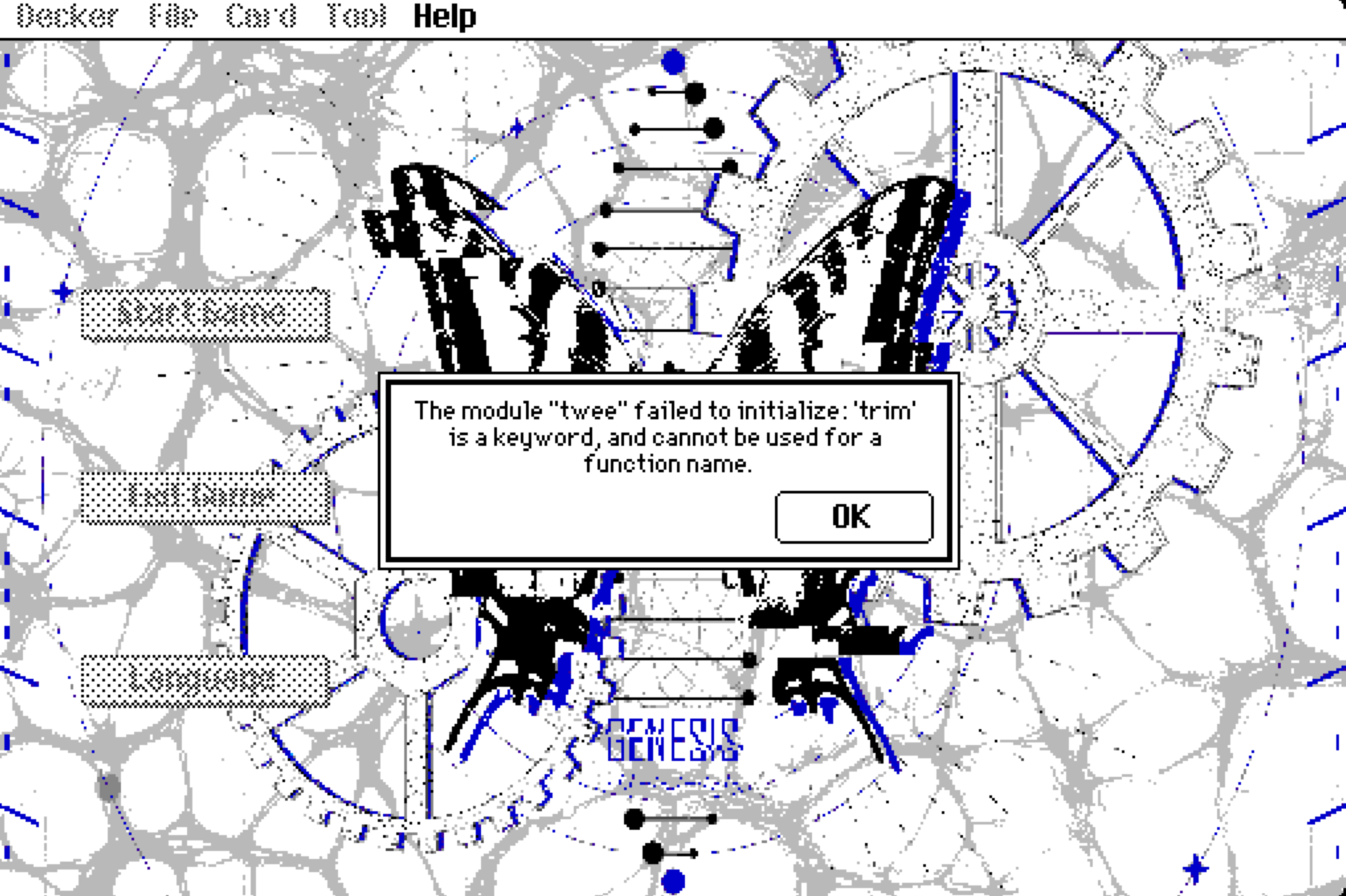
Now I’ve run into another problem. I’m using the new version of Decker, but when I tried to export the HTML file, this error window suddenly popped up. I also noticed that the taskbar from my previous build is still there, so it seems to be related to one of the plugins. I tried searching for anything with the word "trim" in Notepad, but unfortunately, I have no idea how to fix it.I recall that the top‑level taskbar was hidden in previous exports. Now I’m trying to get it hidden again, so perhaps I need to look for an alternative fix?现在我又遇到了另一个问题。我正在使用新版Decker,但当我尝试导出HTML文件时,突然弹出了这个错误窗口。我还注意到,我之前版本的任务栏仍然存在,看来这似乎与某个插件有关。我试着在记事本中搜索包含“trim”一词的任何内容,但遗憾的是,我完全不知道该如何修复它。我记得在之前的导出文件中,顶级任务栏是隐藏的。现在我正试图再次将其隐藏起来,所以也许我需要寻找一种替代的解决方法?

(+2)

This error will be from the new version of Decker making some changes that necessitated some updates to some of the modules. You'll need to update the "twee" module using the newer version in the Decker examples folder - you should be able to just import it over the top of the old one.

(+1)

I’ve just updated the plugin! I also went through the Phinxel documentation and found the program with the lock feature — thanks so much for the manual!

However, the new version of Decker seems different from the original one. I’d still like to keep my old setting: have the page permanently pinned to the taskbar right after exporting it as HTML. But I have no idea how to do that now 😇. I feel like I asked about this before. Also, I can’t even remember the keyboard shortcut for “Save As”.T-T

(+4)

Please ignore my previous questions! I’ve gone through the manual carefully again and realized that I keep missing key details because I’m reading too quickly. (Yes, exporting via the Protect option is the solution, not using Save As). I’ve fixed the issues now. Thank you all so much!XD