

Seems fine, mechanics look good, but can't change the language to English...
Hi,
Thanks for your feedback. If you're referring to the application itself, it's normally set to English by default. Otherwise, you need to click the button to change the language in the menu at the top right.

If you're referring to the visual novel preview on the right, it's possible that the preview was displayed in French.
In that case, click on "Config." This will display the visual novel's start screen. There, click on "Options" in the preview screen and select English. This should fix the problem and save your preference locally in your browser. So, every time you log back in, it will be in English.
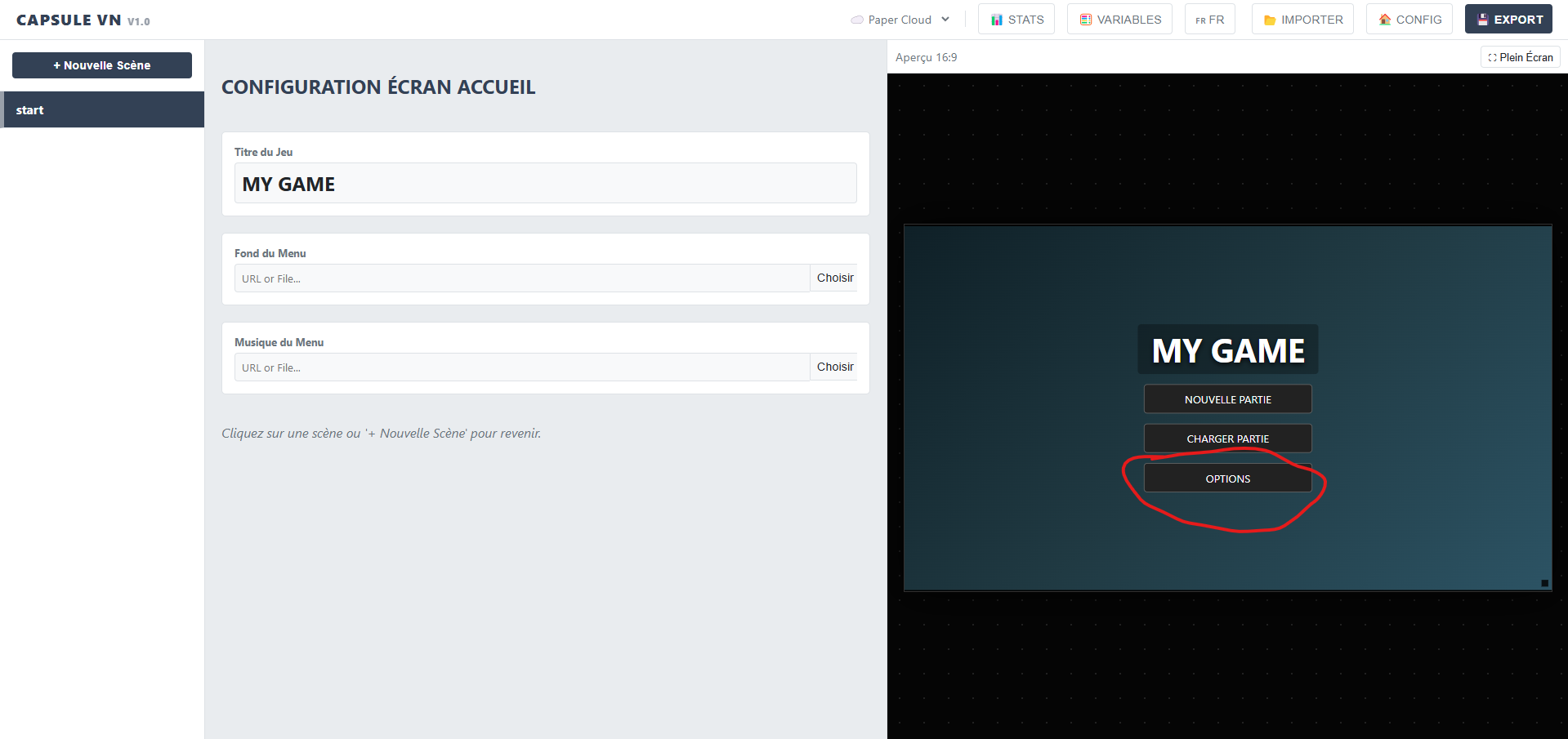
Let me know if this resolved the issue.
Thanks!
Hi Goliard,
Can you add a screenshot please? I just tried with Edge, Opera and Chrome and it's working.
EDIT: I've been working on a new multilingual model; now the application appears in English by default, both the application itself and the preview. This should have resolved your issue.
To add other languages, you need to click the "CONFIG" button. If you change the interface language and have added the language via "CONFIG", the preview will change dynamically.
180 days ago(+1)
Now it works fine! I really like the UX -- very friendly and intuitive. Hope to use it for a project soon.
180 days ago(+1)
Thanks for your feedback, I'm glad you like the app. The next step is to allow users to edit scene names and also move them around, in case they accidentally switch scenes.
I think the update will be live soon (probably today).
I'll be launching a Jam soon to invite developers to test the app, and I hope you'll be among the participants :)
Hi Goliard,
Yes, you can send me the file so I can tell you where the problem is coming from; it would be a pleasure :)
In the meantime, here's some advice for developers, because this is often what can cause bugs:
Keep in mind that an HTML file shouldn't exceed 100MB for what I would call a decent display, and 50MB for older browsers and systems. That's why the chaptering system with tracking to a separate HTML file was implemented.
Base64 encoding greatly increases the file size; a 1MB image then weighs around 6 or 7MB. That's why you should use .webp for images, which reduces image size by more than 90%. The same goes for videos and music... Really be careful, the file size increases rapidly; it's the technical limitation of encapsulation.
For easy and free compression, use Google's application:
But rest assured, with proper compression of images, videos, and audio, you can have around fifty images, background music, and a few videos for animations for a single chapter.
176 days ago (+2)
Hi Capsule Team,
I think the easiest method is uploading the test to my itch.io account so you can download it from there:
https://goliard.itch.io/capsule-vn-test
Regards,
goliard
[UPDATE]
I substituted a webp background image instead of the original jpg and it worked fine... Something to think about...?! It would also be useful to duplicate a scene, or allow a background to run across several scenes - that would be efficient.
Hello goliard,
I'm glad the webp works !
As I mentioned above, compressing your images is essential; it's THE technical limitation of encapsulation. Furthermore, what's the point of using 4K or 2K for a visual novel? 720p displays perfectly well on a large computer screen. I even recommend, when compressing to WebP, keeping only 75% of the quality; that's more than enough.
Regarding repeating a background across multiple scenes, it's a good idea, but there's a technical issue: In the architecture (JSON), each scene is independent. If we allow an "empty" background to "keep the previous one," it creates a major problem for loading save files.
For example: The player saves at Scene B. If they load that save, the engine won't know what the background was in Scene A, and the player will get a black screen.
However, the "Duplicate Scene" feature partially solves this problem! By duplicating Scene A to create Scene B, the background image link is copied. This is transparent for the player, efficient for the creator, and safe for the code.
It's a good idea, I'll add it, thank you very much :)
EDIT: i've just added it in v1.1.4, enjoy :)