Indie game storeFree gamesFun gamesHorror games
Game developmentAssetsComics
SalesBundles
Jobs
TagsGame Engines
(1 edit)

Why isn’t this AMAZING Tool being touted on the Bitsy Forum […]?

Because it’s mean? 😅 But if you think it is okay, please do spread the word!

Is there a better Control Scheme? When playing WT Games in Browser or even using the Editor, the Up and Down Arrows Move the Screen instead of the Hero!

I did catch this and other issues recently and a fix for them will arrive shortly; you can use WASD, arrow keys, or on-screen controls. On touch devices you can press the screen and drag your finger for a joystick-like control. (This had its issues with accidental page refreshes tho, but I have a fix for it in the upcoming update as well.)

Is there a way for you to make the Blocks screen (fashioned after Twine’s Passages) a bit easier to manage?

You can hold Shift key to box-select several blocks or Ctrl to select/deselect them by clicking. If you meant something else, please tell me.

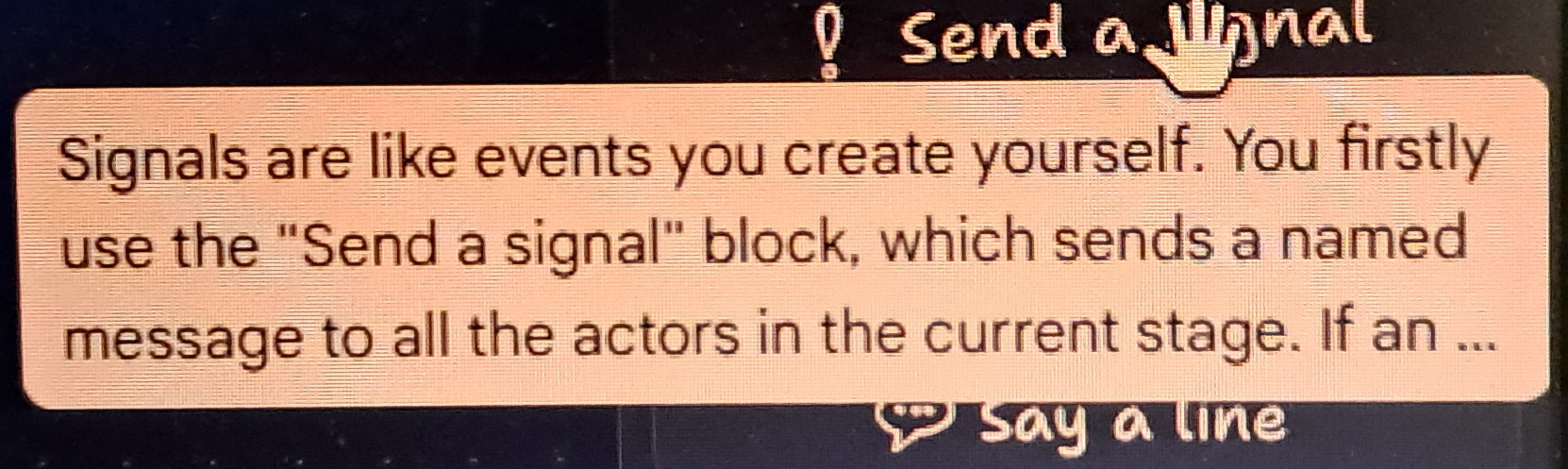
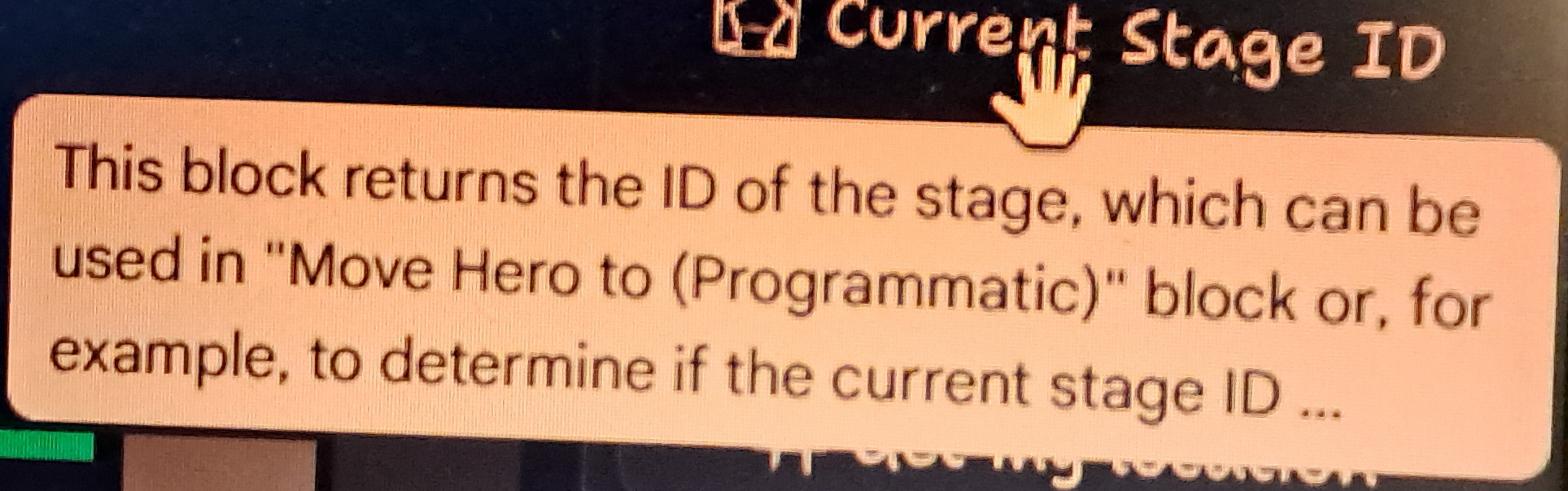
Why are the “?” Icons’ and Blocks’ Information CUT-OFF when you Hover Over ’em?

They’re positioned relatively to the blocks themselves, you usually can pan around so the tooltips fit.

I’ll try to make them exceed the boundaries of the scripting area, but can’t guarantee results as I’m using a 3rd-party framework for most of the scripting UI. And if the tooltip is larger than the scripting area for you, please send a screenshot.

Do you have plans to implement Hero Walking Speed (Movement) in the future?

There is actually a hidden speed limiter that I can expose; with the default values, I tried to balance keyspam prevention and being able to navigate through stages quickly enough to not be annoying. You haven’t seen the very first prototypes where the hero moved like a bullet…🤣

I’ll add it to my backlog and perhaps add a setting and blocks to dynamically tweak this currently hidden value.

Thank you SO MUCH for Making and Improving on this INCREDIBLE Tool, sir!

And thank you for sharing your thoughts and detailed suggestions!
Thanks for the replies, man.

1. So far, two of us have spread the word on the Bitsy Forum, so thanks for the permission! (He got ahead of me two days ago, darn.)

2. Looking forward to the controls update!

5. That'd be great, man! (It reminds me of the OHRRPGCE engine back when I used Desktop PCs, had so much fun editing and making demo games in that [especially editing Grapnes 2 Demo!] even more than the RPG Maker series!)

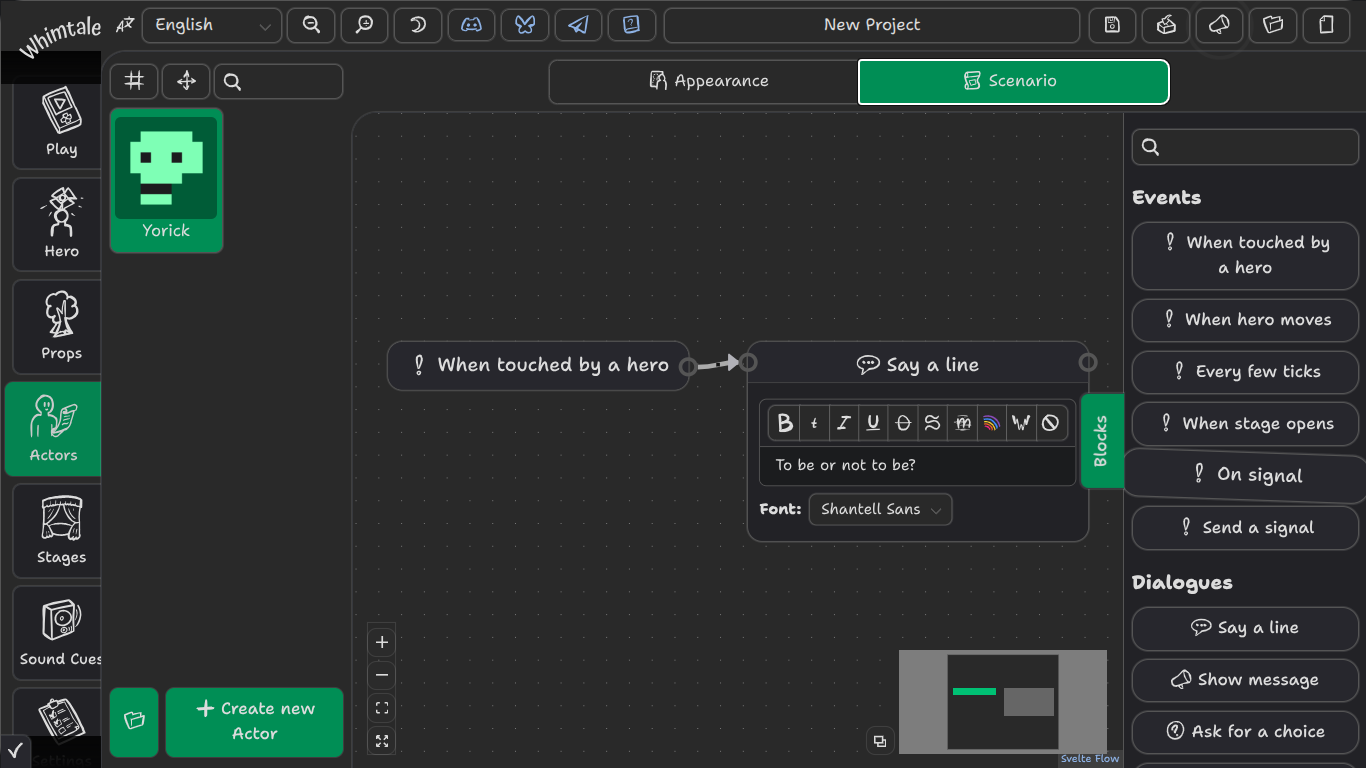
3. Thanks for that info, tho I actually meant if you could somehow make the Blocks  map screen less huge? (After doing and making your 2 Tutorials for myself the other night, I was actually able to code my own stuff in for the Fetch-Quest, so it didn't take me too long to catch-on to the once-overwhelming blocks setup; what a treat! Still gonna be awhile figuring-out what all the other command blocks do tho!)

Also, if you could make a better setup for the Blocks' Fit Screen option, like maybe Resize a bit better for a Set/Fixed Position, as I found the Fit option actually made my Boxes so small that there was NO Text in 'em once I'd made a fair-sized tree of code, and then Zooming wouldn't keep/save my bigger, Resized Boxes, as it kept defaulting back to the small boxes when I went to a different actor!

4. Whatever change you can make to the CUT-OFF Icons and Blocks info would be so appreciated, because I'd love to know what the rest of the info for all those says!

Thanks for that info, tho I actually meant if you could somehow make the Blocks map screen less huge?

I feel like there is a communication gap here. Blocks are sized to their content, and I can’t throw anything willy-nilly from them. I assume you are aware about zoom buttons and scroll-to-zoom/pinch-to-zoom gestures. It would be cool if you captured a video/sent photos of you using Whimtale’s Scenario editor on your device — maybe your issues come from weird UI scaling or something like that. Rn I don’t even know whether you’re using Whimtale on a PC, a tablet, or something else, and all they have settings for UI and font scaling that do affect web apps.

the Fit option actually made my Boxes so small that there was NO Text in ‘em once I’d made a fair-sized tree of code

Content of blocks gets hidden when zoomed out for performance reasons; I will experiment with large icons to visually communicate which block is which later, maybe also introduce performance settings to the scenario editor, but simply showing everything all the time does tank FPS on larger scenarios. (I added this simplification when I was working on a 100+ block scenario, and oh boy it was needed.) Current performance methods are not permanent, too; unfortunately, the devs of SvelteFlow (the framework for node-based interfaces) are not currently interested in improving their renderer, and writing one of my own will be beneficial for Whimtale and my future projects but will also take so much time that it is definitely happening after v1.0 release. Development is hard ¯\_(ツ)_/¯

(2 edits)

Here's a Screeny of the issue, but note that there's NO pop-ups of text showing cut-off text, as I'm on a Chromebook and my page zoom is set to 80% in order to see all of a webpage's things, etc, and I can't SS the popup due to press-holding the SS shortcut keys (and there's no right-click menu to take a SS with the trackpad). I'm gonna post the rest of my replies after this pic (couldn't find how to put more AFTER my pic below!).

(1 edit)

I understand that programming's hard (most I ever did was alter monster stats in Luanti [formerly Minetest], but that was just editing existing code for the most part, and some coding in OHR), so just take your time.

As for the rest of your replies, thanks for more details once again, but I'm quite sure you'll get what I was asking when I tell you this: I simply meant, is there a way you can make the infinite space of Blocks (in Actor Scenarios) less-huge? I realize you wanna give us an ever-growing/expanding area to put our code blocks into, but shouldn't you limit the size that it can get rather than make it an infinite space?

Lastly, now that you know that I wasn't asking for just a way to avoid cut-off text, but also limiting the infinite space (which I'd guess'd also have Performance issues if someone were to fill a big enough area with too much code?! [like what happens in Bitsy if your game has too many exits, code, or is too long!]), I'm all about Performance (hell, I used to play PS2 games in an emulator and I'd ALWAYS set it so that it was playable; who cares about pretty gfx!), so don't get swamped with trying to fix stuff in Blocks that don't need fixing (eg. leave the: zoom-out makes boxes lose their text :alone!).

Thanks for such a fast reply, I appreciate it. :)

shouldn’t you limit the size that it can get rather than make it an infinite space?

Sounds like a bad idea to me and a strange thing to ask, to forcibly restrict the scripting area and thus the maximum amount of blocks you can manage in one actor. Especially for me after making such horrors as this “simple” battle system:

spaghetti

In Unreal Engine’s Blueprints language, there is an option to collapse a set of blocks into one, to preserve space and also group blocks — essentially a scenario inside a scenario. There’re also ways to declare reusable functions in a similar fashion in UE. I would like to implement something like that one day.

(8 edits)

Well, I'm just thinking of Performance issues, that's all.

I've 2 final questions and 1 important SECURITY Alert for you.

     Security Alert (if I try to just even save an image on here):

Security Warning: Recently, scammers have been posting comments sharing fake update and download links for the game. These links lead to malware. Official game updates are always on the game's itch.io page, never from external links in comments.

1. Hollow Woods: I saw the banner of this on one of your posts below (115 Days Ago). Is it an actual game you're making?

2. How do I access your default TileSet within WT? I've found no button about it, yet your v0.6.0 Update clearly shows it (under Import Tiles), along with Asset Browser, which is where??? I re-made your 2 Tutorials via drawing your 'granny' and other assets in WT, since I couldn't find your default TS.

PS: Do you plan to release the source code for your Battle System? (Since you can't see any text from your pic.) As you may know, someone made an RPG System awhile back for Bitsy, which is very simple compared to yours for Whimtale. 

PPS: Thanks for the v1.0.0 Update! (I read the page for it, but the only 2 things I noticed that mattered to me were: Up-Down Arrows BUG Fixed, and do I see that you slowed-down Player Movement Speed somewhat? Yes! But SADLY, I still have the Actor Scenario Blocks' ToolTips Text being Cut-Off issue!)

Thanks again for your time, as always, and have a great day. :)

Though you've explained about the WT engine and its limits with ToolTips, here's what I could glean from a brave search (FWIW):

In general software or web-based interfaces, tooltip cutoffs are often caused by CSS properties such as overflow: hidden on parent containers, which clips content that extends beyond the element's boundaries. Adjusting the overflow property to visible or ensuring the tooltip container dynamically resizes to fit its content can resolve this. For instance, in a CSS tooltip, if the parent element restricts overflow, the tooltip text may be cut off unless the overflow is explicitly set to visible.

Additionally, in some cases, specific characters like commas or semicolons in the tooltip text can cause truncation in certain editors, such as the Buff Editor in Warcraft III, where text is cut at the first comma or semicolon. This behavior may be due to how the engine parses the string, and the workaround is to avoid using such punctuation or restructure the text.

In summary, tooltip cutoffs are typically due to either hard limits in the engine, CSS overflow settings, or parsing issues with special characters. Solutions involve adjusting the content structure, modifying CSS rules, or using engine-specific configuration options.

PS: Do you have a list hidden within WT itself of all the ToolTips?

(2 edits)

a brave search

Ew
Not like I don’t consult with AI sometimes myself, but in-search AIs are stupid and definitely lack the required context.

SADLY, I still have the Actor Scenario Blocks’ ToolTips Text being Cut-Off issue!

Busy with other stuff atm.

  1. Hollow Woods: I saw the banner of this on one of your posts below (115 Days Ago). Is it an actual game you’re making?

It was before I nuked it like an idiot.

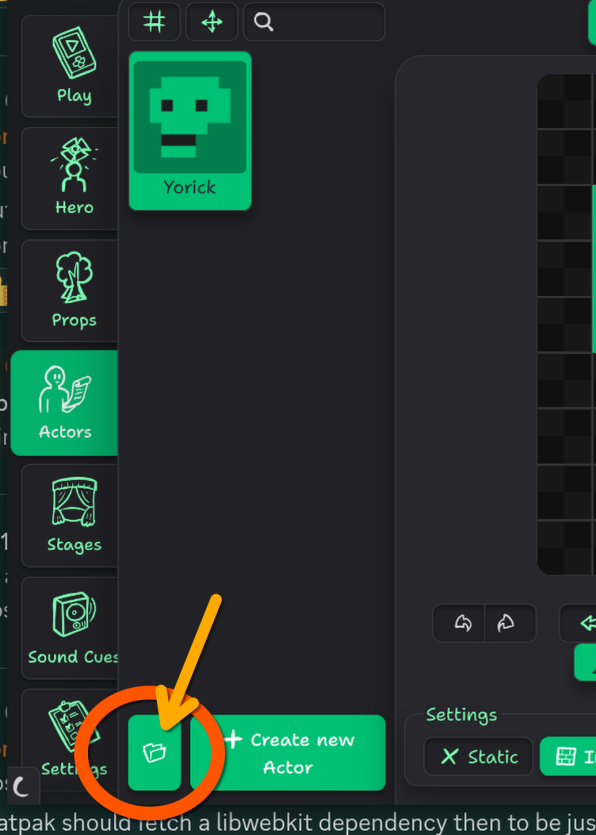
  1. How do I access your default TileSet within WT?

Through the 📂 button on Hero, Actors, or Props tabs:

do I see that you slowed-down Player Movement Speed somewhat?

Nope, you’re hallucinating 😛