Indie game storeFree gamesFun gamesHorror games
Game developmentAssetsComics
SalesBundles
Jobs
TagsGame Engines

"Voices Of The Void" Alpha

Gather unknown signals from deep, silent space · By mrdrnose

Voices of the Void 0.8.2 Bug Reports Locked

A topic by mrdrnose created Jan 20, 2025 Views: 117,504 Replies: 823
This topic was locked by mrdrnose 1 day ago
Viewing posts 401 to 460 of 460 · Previous page · First page

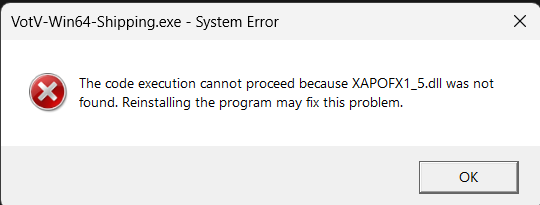
I can't start the game due to this error help pls

(2 edits) (-1)

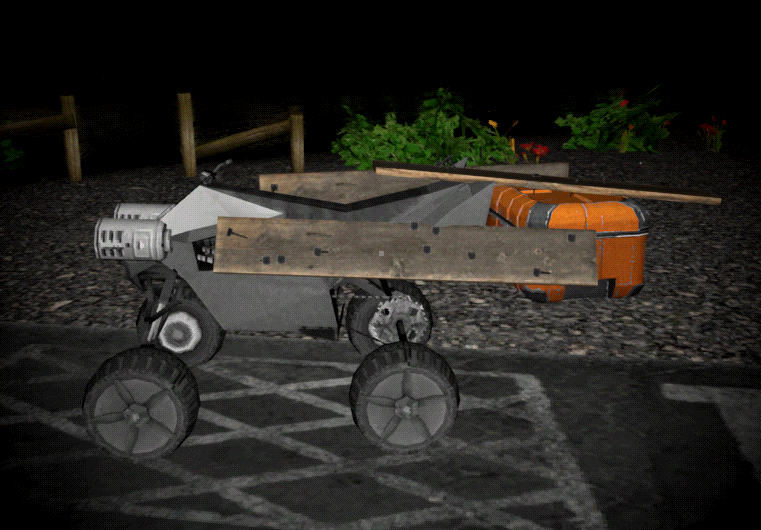
This might be a bit esoteric but I have found that you can "upgrade" the ATV with storage by nailing a crate to it with planks.

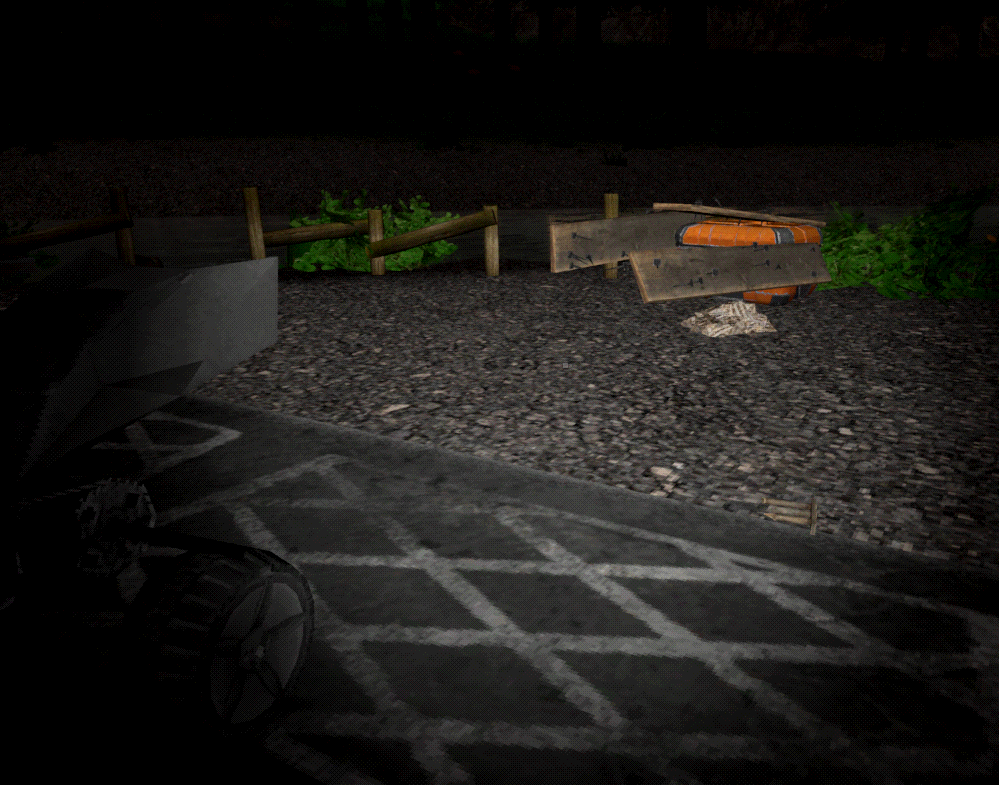
However upon a game save and load, it becomes detached.  If you drive the ATV, it will pull away and leave the crate and planks hovering in the air.

I dunno, maybe fixing this on a game load is out-of-scope for the game.  Personally I'd love it...  it feels fair, a reward for clever use of in-game tools, and also isn't overpowered (it can become detached easily on a crash).  But in particular, if it can't be fixed, it might be better to prevent it from working in the first place.  Someone might think this is a viable strategy, and later get caught with their pants down loading their game far away from home, and struggle to bring their stuff home.

i put the large and small plates stacked on top of each other away in the lower cupboards to store them, upon quitting and loading my save all the plates were clipping into the floor and being very loud, i assume this is a bug with open containers because storing the plates upside down hasnt had this issue

Error 0xc00007b when i launch the game. All my games work perfectly except this one.

I downloaded the game earlier today, played for a while then saved and quit while i went to make food, i've come back and now the alt + R doesn't work.

Please help, i'm enjoying this game T_T

(+2)

Might be a conflict with your pc hotkeys, I think nvidia uses Alt+R for something so that or something else on your pc might be conflicting with it.

In version 0.8.2c, walking mannequins do not get up after falling for an unknown reason. If they are put back on their feet, they will chase the player until they fall again

(1 edit)

Almost every time I save and exit the game, when I come back I get rolled back for some period of time. (0.8.2с)

If you're past a certain day, i think like 50- ish then the game doesn't progress past that point.

?

I haven't reached day 50 yet. This happens even on day 5.

Did you  run into a wisp? One of them makes the time go in reverse until you reset which can make it seem like your time is not progressing.

(1 edit)

У меня пробле и она заключается в том что события с ариралами которые должны происходить не происходят, если это баг то как его пофиксить? 
I have a problem and it is that events with arirals that should happen do not happen. If this is a bug, how can I fix it?

I added about 40 Gb worth of videos to the TV folder, most of them are short so its like 1500+ videos, and the game is normal, but as soon as I open the video browser on any tv, the game will function as normal, but all of the building and terrain textures become very low quality, to the point where the walls on alpha base only have around 8 pixels worth of details spread the entire wall (bad way of explaining but it almost looks like the textures if they were seen from a very very low render distance).

Also keyboard control module only works for drone, not either of the kerf

Upon firing up the game, it immediately crashes. Same with Thunderstore but it gives two error messages, a mildly long one on the first and a short error on the second one.

how do i play thre game


every tiem i download an exctract all (0.8.2C) 

it always says there is missing files 

how do i play this game, it keeps saying its missing files but i downloaded it from the link here and extracted all files but keeps saying its missing files


I'm on 0.8.2c, brand new install literally an hour ago or so. I can't seem to place held items down either with precision place or the regular place.

Disregard entirely, it's because I have a Nvidia GPU and Alt+R opens up a statistics display in the corner, this has to be disabled for placing to work.

I literally can't complete my daily tasks, calling the drone doesn't work at all, but it arrives on its own just fine

(1 edit)

Custom content doesn't actually use the real %LOCALAPPDATA% but rather what seems to be a hardcoded path using the systems PC Name?

%LOCALAPPDATA% has all the expected save game data etc you'd expect, so it it does use this for save data.
However when we activate custom content and it says that we should add our content to the %LOCALAPPDATA%/Votv/Assets/tv you might not be able to get the assets folder at all.
Instead what the game did, is create a "fake" Appdata using the pc name. In my case it created a new folder path under Users:  (PcName)/Appdata/Local/VotV/Assets/tv

(1 edit) (-1)

That's weird my save data and custom content folders are all located in the same folder which is "C:\Users\"myname"\AppData\Local\VotV". It has always been this way as well at least as long as i have played the game which is about a year. I think you can set your own custom content file path in-game in the settings.

(-1)

I'm glad that it works for you, but that's not the point of a bug report.
The default settings, aka blank asset path, leads to the game creating and searching for a false Appdata path.
Meaning there is some bug or discrepancy in how the game gets Appdata while accessing custom content, vs how the game gets Appdata while accessing save data etc.

(1 edit)

One time I got a bug, my Kerfur/Kerfus got stuck underneath the base, yknow the place where the secre note is?

so anyway it took me FOREVER to find the entrance to the underground. and  I'm not sure if this happens often with others but, I think you should look into it.

hello, the Google form won't open for some reason, so i decided to leave the report here. i'm not completely sure if this is a bug or intentional, but i found a way under the map.  it's on the entrance to the base, and i stumbled on it by accident, even couldn't get out at first. i got it recorded so that you would be able to find it easily, take a look, pls

I don't remember where I read it (possibly the wiki, but I can't find it now), but this is supposedly intentional. I believe it's so you can retrieve things that have clipped through the floor. If it was a bug, it would have been fixed by now, as it's been known about across several builds.

trying to get more info about it but for some reason on certain saves of the game my mouse will disappear when starting the server repair minigame getting me stuck in the screen and having to close the game. 

Hello everyone, I don't know if I'm the only one, but I'm encountering a very frustrating bug. I can no longer put any items in any box. I've tried deleting and reinstalling the game (with and without my save file), and the bug persists. Has anyone else experienced and resolved this bug?

This also counts towards v.9 if im correct but oh well

For some reason in one of my save files (specifically, im on a file with an drone hooked onto a camera) it will never move, I think the cause of this issue is you know you can hook anything to the main drone? I tried to hook a camera to it, the camera got stuck on the barrier and now the drone is inactive, and to prevent this from happening in the future, is it possible to make the main drone not be able to be hooked onto?

Please fix or tell me whats wrong

im having issues with sitting on chairs / benches and then clipping through the map its annoying cuz then i end up in a maze thing and my menu doesn't work so i have to force the game closed through task manager

For whenever reason, Whenever the 'escape' entity appears, I can easily get rid of it by jumping off an not very ledge or going up the radio tower, is this intentional, And for some reason it also sometimes doesnt even show the 'escape' message when it spawns, leading me to just suddenly get murdered out of nowhere if i don't notice it

(1 edit)

Opening up the radio menu and clicking on a song/pressing the skip button instantly crashes my game. I had this problem before and fixed it temporarily by re-copying the .mp3 files back into the /assets/radio folder and reloading it using the button in the settings. This doesn't work anymore and now I have this problem every single time I try to use the radio, no matter which song I click on.

This is probably due to an unsupported character in one of the song titles, but given how often such characters get used this can be a problem.

Here's the error message I get:

LowLevelFatalError [File:Unknown] [Line: 902] 

Rendering thread exception:

LowLevelFatalError [File:Unknown] [Line: 258] 

Result failed 

 at D:/Build/++UE4/Sync/Engine/Source/Runtime/Windows/D3D11RHI/Private/D3D11Query.cpp:360 

 with error DXGI_ERROR_INVALID_CALL

0x00006fffffc0d137 kernelbase.dll!UnknownFunction []

0x0000000141229eb6 VotV-Win64-Shipping.exe!UnknownFunction []

0x00000001411eae6d VotV-Win64-Shipping.exe!UnknownFunction []

0x00000001416b558b VotV-Win64-Shipping.exe!UnknownFunction []

0x000000014169e549 VotV-Win64-Shipping.exe!UnknownFunction []

0x00000001416ac84d VotV-Win64-Shipping.exe!UnknownFunction []

0x0000000141b1522b VotV-Win64-Shipping.exe!UnknownFunction []

0x0000000141b30f48 VotV-Win64-Shipping.exe!UnknownFunction []

0x0000000141b37654 VotV-Win64-Shipping.exe!UnknownFunction []

0x0000000141b285e2 VotV-Win64-Shipping.exe!UnknownFunction []

0x0000000141b3522d VotV-Win64-Shipping.exe!UnknownFunction []

0x00000001417b725a VotV-Win64-Shipping.exe!UnknownFunction []

0x0000000141b0681f VotV-Win64-Shipping.exe!UnknownFunction []

0x0000000141af4e9e VotV-Win64-Shipping.exe!UnknownFunction []

0x0000000141afd819 VotV-Win64-Shipping.exe!UnknownFunction []

0x00000001410ebe5b VotV-Win64-Shipping.exe!UnknownFunction []

(+1)

Hi! I'm getting really confues on a bug with keybindings that doesn't go away after restarting the game. The precision placing (left shift + alt, then R) isn't working anymore, and I have changed no settings at all (apart from the "ragdoll" key at the start of my run, many hours before this bug happened): I can still press left shift and alt and have the green placeholder for the object, but when I press "R", it says in the left "Precision angle 0.0", and doesn't place the object at all. I tried goin in the tutorial, just in case I had forgotten the shortcut, but no, it says the same keys and it doesn't work in the tutorial too, but it doesn't stay the precison angle popup, it just doesn't place the object. It's getting pretty annoying because I can just drop or throw objects now, which is really slow compared to that shortcut. Am I doing something wrong?

I go to repair the oven, and I start unscrewing the screws in random orders, then all of a sudden a loud shock sfx happens, which assumes that I've been shocked. But I'm still in the repair UI, and I have no way of exiting it.

Not sure if anyone else has this problem but, Im trying to build big Kerfur however the limb joints that I need just dont exist - I know you can find them around the  transformers but they just arent there - neither in my 3 day old save nor on a new one (literally started a new file and immidiatly drove to all 3 transformers, theres nothing)

i just found the kerfur omega recipe but it doesnt show me any of the material to craft it. it just says "recipe:" and nothing else. what should i do?

There are two items in the bunker to build Kerfur omega - the recipie and the manual book.

Not sure if this is a bug or if I'm just being heavily misinformed by multiple sources, but some content might be missing from the shop? I've seen from some sources that I should be able to buy things like the hacksaw and the AI module in the shop, but they simply don't exist there for me?

AI module is only available after you have gotten it in game from the safe in the lake. And i think the hacksaw is in tools, you could also use the search bar to find it.

How can I get a pickaxe from the bottom of a frozen lake

I believe that you can't. Lake must not be frozen.

The Airslapper Event, prevents you from sleeping which is fine, but even after multiple days, and even after the event is apparently no longer active (as per server command debug events) I still cant sleep, issue resolved via Debug scrape, at which point Airslapper was apparently scraped

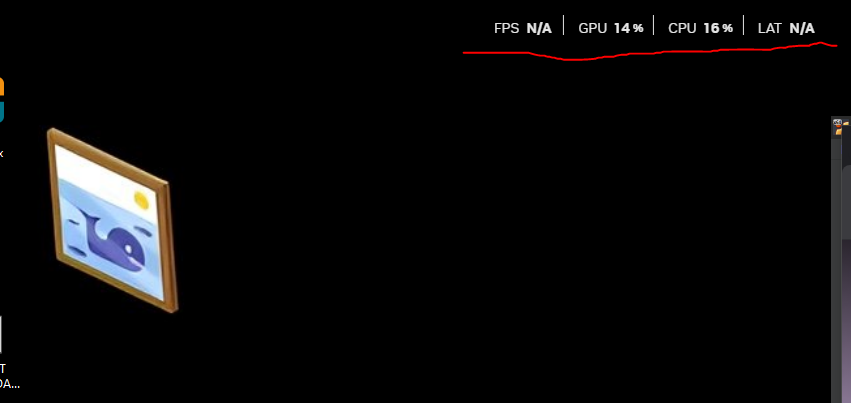
since the first time i started the game this thing won t go off my screen. i also restarted the pc and it stays there what do i do, is it on task manager somewere? (awesome game btw)

(+1)

I believe that is the nvidia overlay, you can get rid of it by pressing alt+r also try pressing alt+z and messing with settings. you can change the hotkeys so that way you don't accidently push it again.

I can't drop items!

The button simply doesn't work.

This can only be done through the menu option.

(1 edit)

Same problem, In the tutorial, for some reason the "R" doesn't work, I don't know how it will be in the game, I'll check.

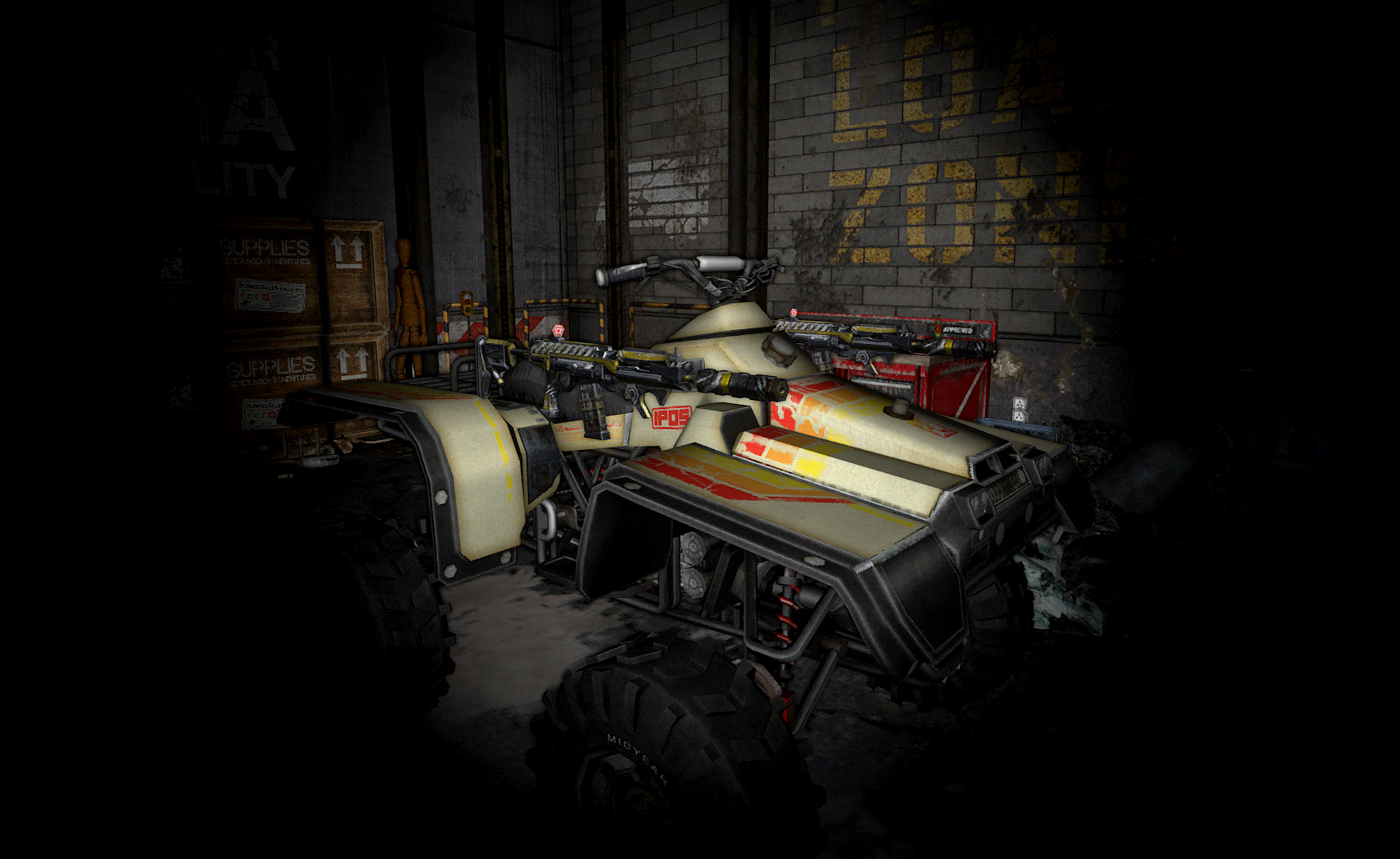
Just started new game, i dont think that these rifles should be here floating in garage.
They are not attached to the ATV, just floating in the air.
(2 edits)

Since I bought some wall lamps (small ones) I get crashes with autosaves that happen inside the base or in a near area where the base is rendered (I usually have high render distances). It doesn't happen everytime if I'm honest.

I'm just supposing and I'm not even sure about this, but every time I get two variants of a fatal error and this is the most common one!

Now everytime I get an autosave I have to pray... I'm on Pre-Alpha 0.8.2c [0011] and RTX 4090, is there something I can do?

EDIT: The wall lamps might be totally unrelated, maybe it's related to objects inside the base or at none of this at all. I really hope this gets solved because I can't play properly without the fear of crashing every 2-5 minutes :(
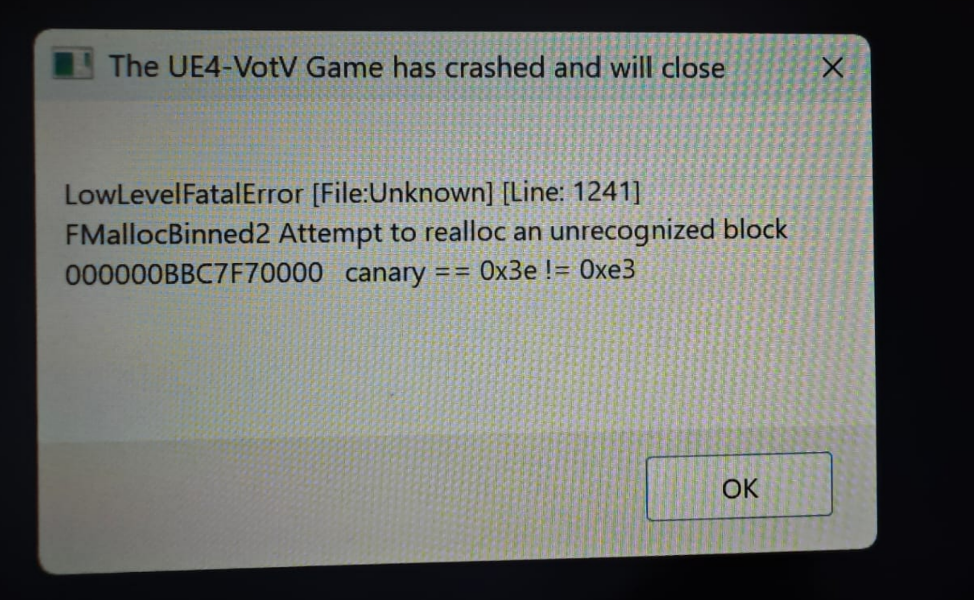
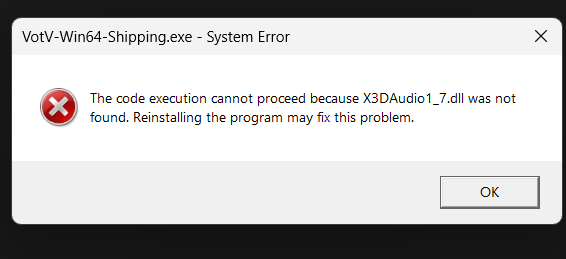
Crash UE4

Achievements are completed on their own (so far, only the two related to the Hole location). I'm just HORRIFIED, but I don't think this should work like this...

Form's broken. Thankfully the link on votv.dev still works.

For some reason the "R" doesn't work, I cant drop item with "R"

(1 edit)

Help. Bug with custom settings.

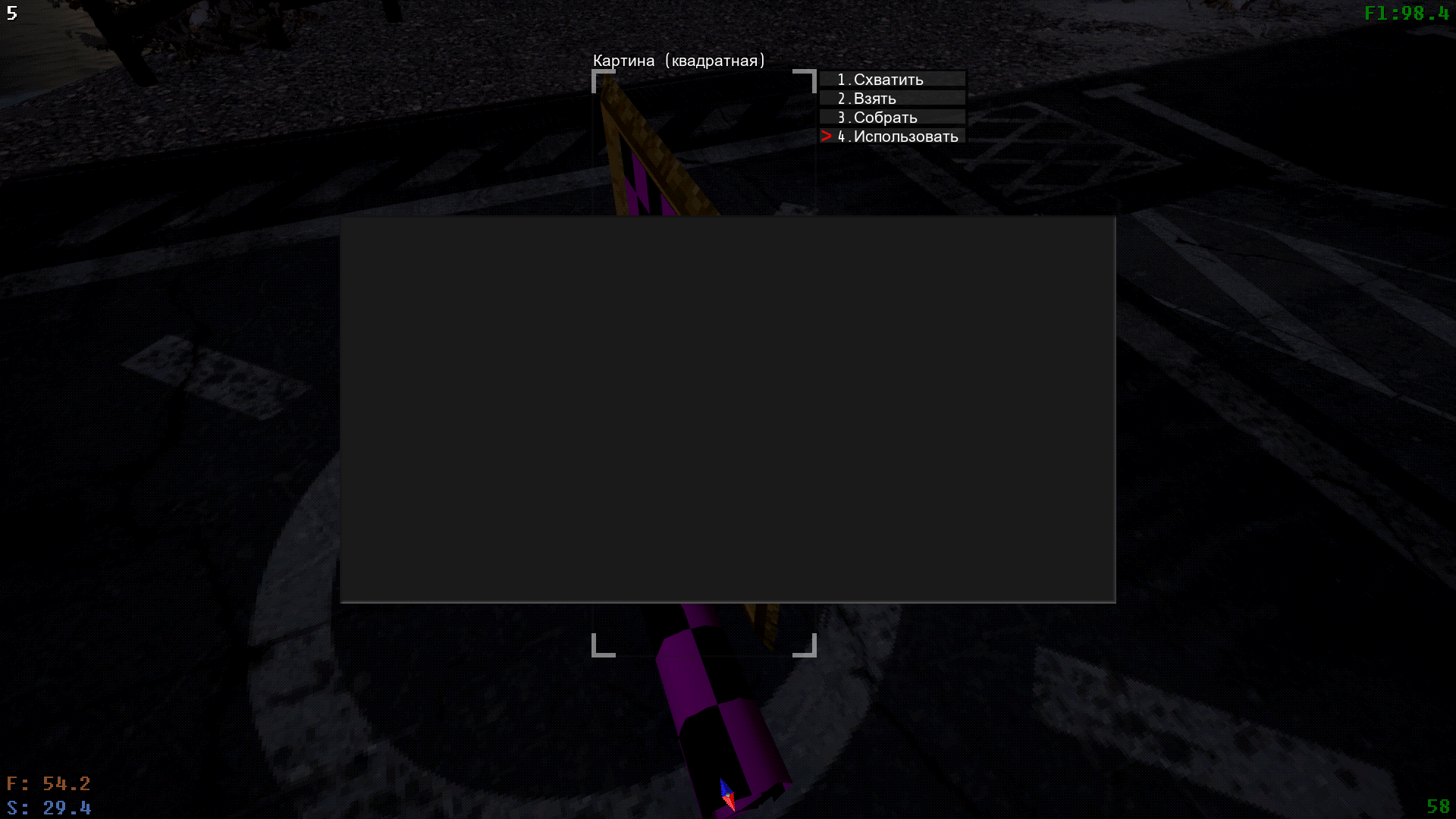
I'm playing on 0.8.2b version and  when i buy custom paintings and want to change image, just opens grey screen and i can't even change anything. Help please

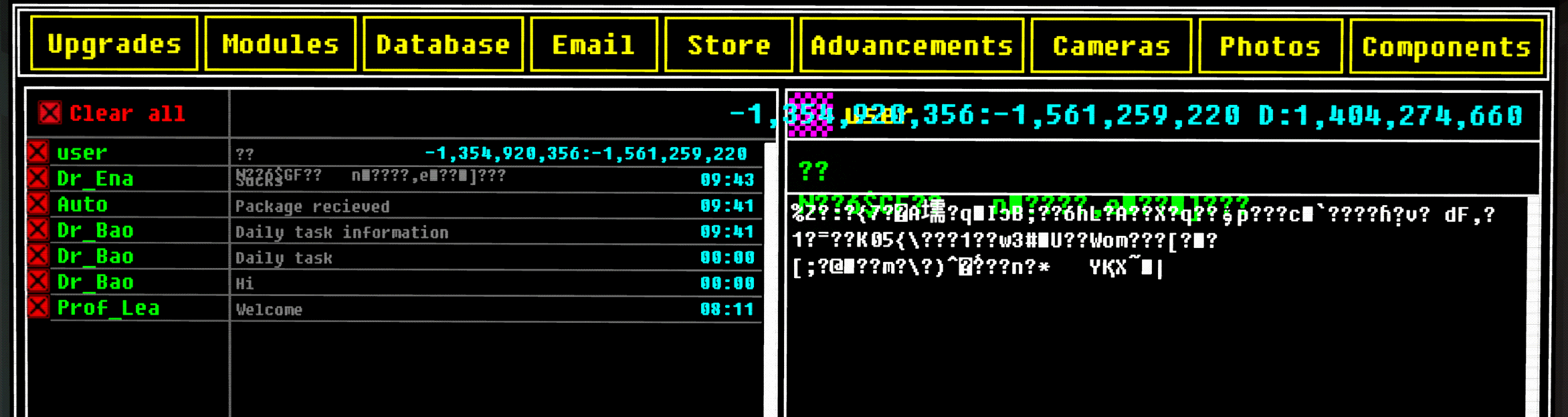
Hey, I just started playing, and I'm enjoying it so far. Whenever I click on an email profile picture, I get a cool nifty email like this

(+1)

If you get hit(krampus) while getting on the atv, you will get softlocked to driving the atv with a locked camera. Even esc doesnt work.

Deleted 67 days ago
(+1)

nevermind, I found em dead on top of romeo. no wonder it wasn't showing up on radar.

(1 edit) (+1)

The rozital scouts can step on the skybox, causing puffs of dust to be in the sky where they step. Also I'm not 100% sure if this is the case but the meta paranoia is supposed to be on when kerfus is sent to the meat realm. My game managed to somehow save during this kidnapping event and I was also sent to the backrooms so I reloaded the game and now my omega kerfus is stuck in the meat realm. I'm trying to see if this is permanent or if my other omega kerfus can be sent there at the same time. I have looked at every window in my base and its been 4 days atm. edit. It took 12 days for my omega kerfus to come back and it came back during the grey corpse event so, correlation? Idk. The kidnapping event did not happen again while she was stuck in the meat realm.

(1 edit) (+1)

Just came back from a smoke break and saw the game print the error message that it cant save mid air, IN THE MAIN MENU. Guessing that ain't supposed to happen? This was after a long session and not exiting the game.

(1 edit)

Hi there, no idea what i did but the game is borked. I cannot use the ping function in the Coordinates panel, i could use it when i first loaded the game but now it does not work no matter what I try. It's not an issue with the controls, I've tried changing it to a different key but it still doesn't work. I've replaced the game files with the original ones, nope. 

If you need a bug report video or a copy of the game files let me know because i'd love to help solve this

EDIT: I've also tried this in alpha a09c_0003. It is still broken sadge

Sleeping with the hazmat suit equipped doesn't remove the overlay during sleeping.

During the event when omega Kerfur gets abducted and his camera shows that he is in the "bowels" - player has to find him. During my playthrough - when I found him, he had two options available to select: deactivate and unequip (he was wearing a Jacket). When I clicked on "deactivate"  Kerfur disappeared completely and his Jacket dropped to the ground.  There was no glitching sounds or anything to indicate where did he go. When I checked the computer, Kerfur camera was no longer available, radar didn't showed his location either. After some time main menu glitching stopped and saving became available but Kerfur was gone.

Found a bug today, happened randomly and I don’t know if its reproducible.

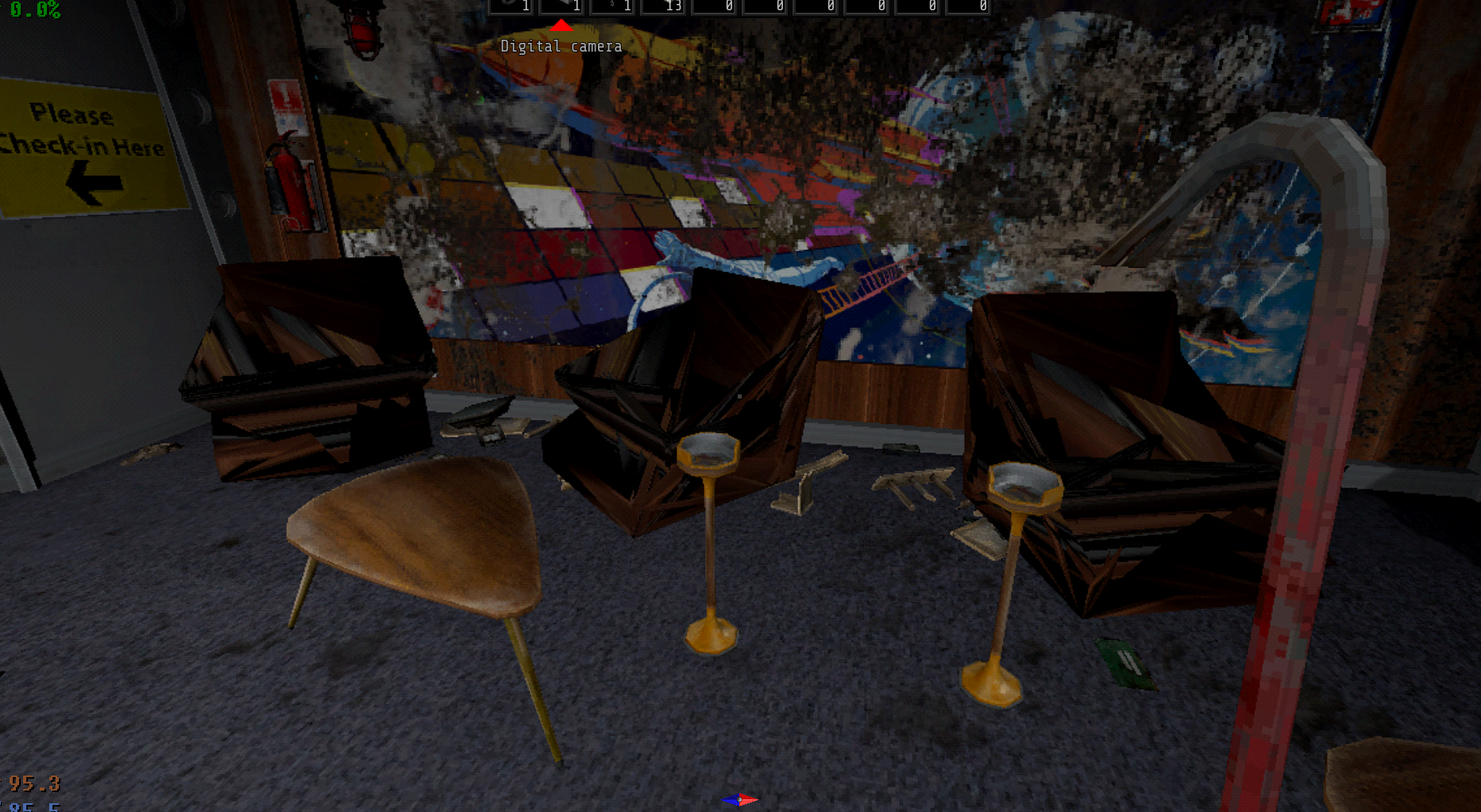
I came out to my lobby to see this. what the hell happened?

No model in the entire game has ever did this if that helps.

I'm getting a video resolution error of some kind. 

Playing on a 7600x CPU/B650 MOBO, 32 GB RAM, but on an older 1060 6gb Nvidia card lol 

Opening some menu's (viewing contents of cans, opening notebook, reading paper) seem to just make monitor go black and cut my HDMI signal - I'm guessing some random rendering issue of somekind. I'm able to alt-tab out of the game and then go right back in, but it's happened 3 times now in a single play through 

Resolution is full and on 1360x768, I believe I'd left every other setting on whatever it defaults too (unless it auto-detects specs for graphics etc?) It looks like scaling related things like V Sync are off, etc 

And like I said, it has only happened reading paper/notebook or just now looking in a trash can. Obviously not a major issue, but 3 times in like 30 mins of play is kind of annoying. I'd wonder if playing on some kind of windowed mode or different resolution might fix, but it's kind of too late tonight for me to toy around checking 

My card too is 13 yrs old, so could just be it failing in general :p For example, my display rate is 59.540 Hz because at 60 I was starting to get a noticeable screen tear doing simple things like browsing internet etc

I can come back tomorrow and actually list 3D settings etc, tongiht I gotta kinda get to bed :p 

Hello
Version of game: Pre-Alpha 0.8.2c [0011]
Windows 11
I've found a bug when only one radio is working. I bought 2 radios, and only the first one can play music. Second, I can use as a remote control for the first one, but it can't play any music at all.

When changing settings I hit restore to default and it set resolution to 1080p on my 1440p monitor. It rearranged all my desktop icons as expected, but what wasn't expected is when after I correctly arranged them and restarted my computer they were compacted into a 1080p equivalent space again. I spent 2 hours trouble shooting and deleting hidden desktop config files but nothing was working. Eventually I found a post explaining how it was caused by icons on the desktop that were not shortcuts. Creating shortcuts of non shortcut items (excluding folders) did the trick and now all my icons stay put. This sort of error has never occurred before and relevant to the game I believe the button to restore all settings effects settings outside of the game as well

my main menu interface's clickbox moved down from buttons. it's making impossible to play the game. what should i do with it?

(1 edit)

I had the Bad Sun event and a power outage on a transformer at the same time. During the event, your camera is forced to look at the black box over the sun, which I assume is intentional. The problem/bug is that when I was trying to access the panel on the transformer, the black box was still showing through the gaps in the walls of the transformer building. So every time I'd hit E on the panel, my camera would start turning towards the sun and it would lock my view on the panel but leave me unable to see the 3 lights on the left of the light puzzle.

I was able to eventually complete the puzzle by angling myself so that I'd have a split second of time to move the mouse to the left side of the screen and click quickly while the camera locked onto the panel.

This was 0.9d unstable btw, sorry if this is the wrong place to report it.

(1 edit)

I have a bug where my pc basically crashed after or during a game save. screen black, unresponsive keyboard, still hearing audio, I only experience this with VOTV, and I've fixed every other possible issue with my pc so far. I'm 99% certain its VOTV.

the "the sky is falling" event crashes the game in some cases. This is triggered in my case by running inside from the bedroom balcony when the world starts to illuminate

If you click on continue in the warning screen and press anywhere except the buttons, the transition restarts

If you give a plugged in tv to kerfus o, the cable will remain retracted

(1 edit)

In the middle of digging up some stuff by Romeo, couldn't fit more, got on the ATV, headed for base, crashed and died. When I reloaded the autosave, my shovel (which I was holding in hand during the autosave) was gone. I heard some clanking so it kind of sounded like it had become a physics object and glitched out, but couldn't find it.

After hooking the hook on the wall, I tried to attach it to Omega Kurfur, but the hook removed it self

Developer locked this topic
Viewing posts 401 to 460 of 460 · Previous page · First page