


Crashed?
Game froze?
Got stuck and couldn't resume?
Something isn't quite working that feels like it should be working?
Please let me know here what you were doing when the issue occurred!
Just letting you know hotfix is out, unstuck button now drops you off on the lowest floor of the lighthouse!
Hey, I just got back from getting the apple tree card (It works now :D) but along the way I found a bug where the door to the lighthouse is missing:
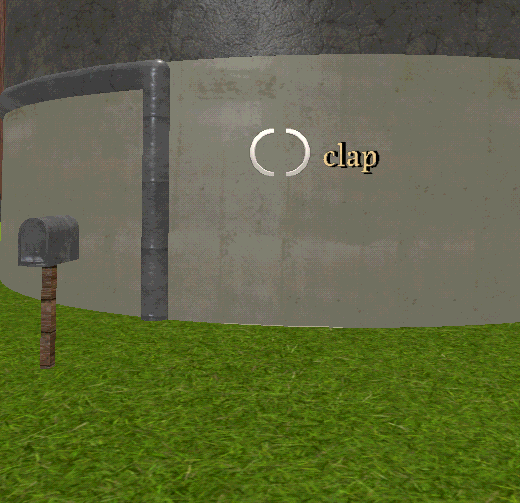
I think the reason why it's missing is because I completely skipped over opening the door and immediately head to the top of the lighthouse so I could look for the apple tree and jump down, because of that the door never got loaded on the outside leaving me stranded. thankfully the unstuck button was able to teleport me inside but this is a really funny bug to find as I circle around the entire lighthouse wondering where the door is XD
Oh wow I can't believe I didn't think of that, thanks a lot for letting me know!
I'll have to fix that, but that also gives me a devious idea for a random event system I was planning to add soon!
It's made in Godot 4. But I'm not really 100% sure what you mean honestly, I do some times feels like certain actions kinda feel more stuttery than the FPS indicates, but since it's very mild for me I've kind of forgotten about it. I'll try to check against some older versions to see if I can maybe figure this out.
Did you try enabling vsync or capping FPS or fiddling with some other settings like disabling movement wobble?
If you have any other details that might help, like if disabling any settings improves it, or if it's better/worse in certain situations, please let me know!
edit - also, I do have very limited FPS cap options right now, is it possible you have a different monitor refresh rate than any of the available options or something?
I am running at 162 FPS (165hz monitor). Project Gorgon had the issue of the objects being rendered at 50 FPS while the camera/client is infinite, so if you went above 50 FPS and the further up you went, the more noticeable the "jitter" was. Sadly their patch notes didn't provide any info on how they fixed it. Apparently it's a mismatch between the physics update frequency and the monitor's rendering frame rate.
No idea if this helps or if its true: "In Godot, character and object movements are calculated inside the fixed physics loop (_physics_process), which defaults to 60Hz (or 50Hz if tweaked). If a player has a high refresh rate monitor (e.g., 144Hz) or the game's rendering frame rate fluctuates independently, the objects update on one cadence while the camera renders on another. This makes objects appear to "stutter," jitter, or judder past the camera."
It doesn't render it unplayable for me, it's just a bit off-putting at times. Sorry to bother you with this.
I haven't fiddled with the physics speeds and stuff, but that does sound like it could be a sorta uncommon problem.
No promises I'll be able to fix it, but I'll definitely look into it if there's some sorta stuff I can tweak or presets I can make for different systems to reduce that sorta issues.
And no need to be sorry at all, thanks for letting me know about this issue, since I'm sure you're not the only one affected as well.
I haven't seen anyone have this issue before on Windows 11 with Windows Security, my game executables aren't signed cause it costs annually to get the certificates for them, so some sort of a "are you sure you want to run this?" warning is expected, but it shouldn't block it entirely.
I found a reddit thread that seemed to have a solution for the same sounding issue however, from that it sounds like something called Windows Security Smart App Control might be flagging Wender (cause of the lack of trust certificate), and then Windows Security blocks it.
Solution in the thread is to add the game as an exclusion in Windows Security and the thread lists steps for it as well. So either exclude the Wender folder, the 2 files (Wender.exe and Wender.pck) or the process (Wender.exe), and that should work. If you're OK with that then I'd say give that a try.
If not, the web version should work as well, but the performance is a bit worse, and there are some one-time freezes as the game loads up some shaders and particles for the first time.
I just tested it out on the latest version and it worked for me, but...
The middle card might be a bit tricky to find. Spend some time in the fog, and keep looking for the invisible walkers. Some of them are not like the others.
Let me know if you still need help!
I'll also see if I can work in some ingame hints/tips for each card to make collecting a bit easier, for the next update!
