I did not think the instructions would be needed, but I can see now that two people mentioned it that it is mostly me already being used to rpg maker speaking.
I enjoyed this. It does wears its Celeste inspiration in its sleeve, but in a good way.
I however have a couple suggestion for the future.
1- make pressing the confirmation key show the full text, THEN a press with the full text on-screen progresses. I ended up accidentally skipping dialogue many times because of this. Also, a way to skip the story when replaying the level would be nice too.
2- rework your keyboard controls. yes, you advised to use a controller, but even so. If I may make a suggestion, you set either spacebar or enter to be progressing the text. make it be Jump too. and set grip to Ctrl, Shift or another key that gives most keyboard a space between them and the jump so we can more comfortably switch between them. Dash, I don't have a valid suggestion, sorry.
I was honestly confused at first, but I soon understood the idea.
A physics game, where you destroy or hit things to cause chain reactions for your objective: deliver a tomato to the dragoon.
Could not finish the last level, though. Not smart enough, I guess.
A personal complaint: the screen, at least playing on the browser, is too big. My notebook's monitor is not 1080p, and even using a tv, which is, it would need to be played fullscreen. Thankfully it does not need its whole screen visible to play properly.
I really enjoyed the game - after I understood how it is meant to play. Although I admit I played it mostly one step at a time, instead of pre-programming most actions like it was clearly the intent.
As others said, the main issue is the lack of music or sound effects.
However, I got an error at level 9, after exploding a barrel.
I honestly struggled to play this on my computer at first because the resolution is too big, my computer itself is not 1080p, had to use a tv as monitor and even then it was a bit too big to show everything at once (maybe due to be playing on the browser and not fullscreen)
I only noticed that the pieces at the bottom can be hit on the second level, when there are targets near them... and that and the third level are when the theme really starts applying.
I really liked the sound effects when the targets are hit though, I found them funny. And the background music was nice.
The idea was first screen should have shown what you can do without needing a tutorial, but I did notice that sometimes the egg grab doesn't happen. But it does others, so... And I guess Doki just pulling herself to a bystander may not be as clear as I thought?
You have two basic things you can do: hookshot to the long-necked dragoons, allowing you to reach other places, or grab and lift to throw the chick and egg dragoons. the egg ones explode and make non-eggs passable (other eggs explode too)
Ah, I heard france uses azelf keyboards instead of the qwerty most of the world does (as far as I know). Learned recently on a design dock on why a game has a and e as the back and forward buttons on the menu.
As the creator likely used a qwerty board, the game uses wasd. OR the arrow keys.
I will take all the bugs and messy audio as part of the chain reaction, as in the longer you keep playing the messier everything gets. It makes everything funnier.
I liked the creativity of using warioware microgames as inspiration too.
Maybe I did not get the idea of the game, but I did not get what the theme fits in here much. It does makes sense based on the description, but it did not seem to translate much on the game itself - the numbers each turn seemed to be mostly random, save that to step into an 1 was you die next turn. Which to me kinda killed a bit of the brain-tease it seemed to be aiming for.
But I will assume this is a bug, or that I did not get the main idea properly. I can see how it was supposed to fit, and that to me matters too.
This seems very interesting, especially if used in combination with MV/Z3D.
While I doubt it already has a function to let the battle take place in the same map as MV3D, for example, is it possible to make the battles have more than one image per direction of the skybox, and/or ve layered? If so, I can imagine using something like SRD's pre-battle common events to change them right before the start of the battle.
Hey, I was pointed out your plugin as a possibility to use with MV3D, and noticed you have... a switch the user has to change to check if the person is using MV or MZ?
Is there an issue I don't know about when you just check for
ops, sorry, seems like I did not get an email about your reply this time. weird, I am not set to not get messages, I think? many times I got of people I don't even know... what is your discord?
Well, this charmaker seems to be the same as CCEx, just made right for MZ and still in development.
That said, that seems to be the right plugin command too... So my testing should have given me the same error?
I posted my discord in a previous comment, do you mind sending me a copy of your project so I can try to see it happening? Doesn't need to be it all, or have any media resources outside the rtp and a few character creator pieces, none of the plugins that are not in it when the error happens need to be there either, just one map with one event where it still gives the error. As long as the error still happens in it so I can try to figure it out.
Sorry, but I just used the same plugins as you did - save visustella ones and that charmaker (what is that, by the way?), in the same order, and still got no error...
And without being able to reproduce it, it is hard to fix it.
Whas it in a new game, loading a saved one? What was the plugin command you used?
That's weird, when did the message appear? I tested as much as I could think, but there is always a chance of missing something... And are you using MV or MZ?
I can see a bit of the console on the bottom, but that's the "Elements" tab, the console is the second one at the top. It is easier to check problems there
Hey there. New buyer here, so sorry if anything I mention was explained elsewhere.
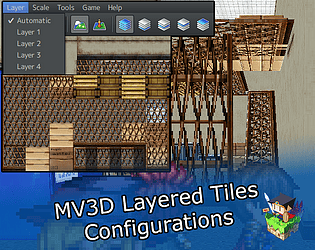
I'm using MZ3D, and thus tiles are not exactly how they appear in the editor. Is there a way to set it to use an image instead in Picture Mode?
Speaking of Picture Mode, I noticed that sometimes the upper layers do not appear in picture mode, other times just some of them... If I reload the map it does appear fully. Seems like it takes a bit longer to load when I use MZ3D and thus is only loads a few layers at a time?
Pixel/Terrain Mode is giving an error so I was not able to try it (happens even with this as the only plugin active and even before the title screen opens, by the way, so probably caused by a recent MZ update):
TypeError: Cannot read property 'length' of null
    at PopulateTilesetColors (KoTC%20Advanced%20Minimap.js:1574)
    at KoTCMinimapStart (KoTC%20Advanced%20Minimap.js:862)
    at Scene_Boot.initialize (KoTC%20Advanced%20Minimap.js:562)
    at new Scene_Boot (rmmz_scenes.js:256)
    at Function.SceneManager.goto (rmmz_managers.js:2160)
    at Function.SceneManager.run (rmmz_managers.js:1871)
    at Main.onEffekseerLoad (js/main.js:141)
    at _onRuntimeInitialized (effekseer.min.js:33)
    at effekseer.min.js:33
    at Object.Module.onRuntimeInitialized (effekseer.min.js:15)
And Collision Mode... it is probably my fault because I use height differences instead of actual collision, so can't really complain it shows everything as passable (although, for some reason Picture Mode sets the walls as darker as if to show non-passable).
And to finish, sorry if it sounds unreasonable but is there a way to set that minimap size to only affect the bigger map dimension and resize the other proportionally, instead of as it is right now where at least on my test map, everything is shrunk to it and so a long/tall map still becomes a square, in this case of 150px of both width and heigth? A way to start the game/map without a minimap, or have a check for if it would appear or not (if the player got a map item for example), would also be pretty nice.
you can set the map to have it disabled with a disable() notetag on the mv3d notebox. but if you use the same map, I think it would be better for you to use ortographic camera instead. because 2d and 3d mapping kinda needs to be made differently, while the ortographic camera will just flatten the image, letting you, for example, make an isometric game.
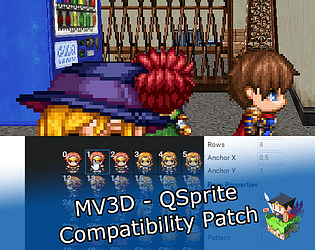
I have to admit it was made mostly for myself, as I am a fan of QSprite and thing it would be great to use in mv3d, or mz3d as I started a new project in it.
sorry, but I should have made it clearer... the console window has many tabs, and that tab you put there seems to be the "elements" tab. The one I need is the "console" tab.
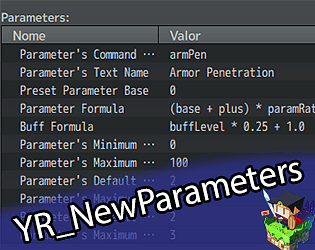
that said, I think I did find the cause of the problem through Yanfly's error message, seems like I forgot to initialize the buffs of the new parameters with the new characters, somehow in my tests it skipped any checks without it being initialized before being checked... but that's ok, that's what tests are for, I think it may be fixed now. Would you mind testing for me? A new save file may be needed for that, sorry.
Sorry, but I won't work on a status menu plugin of my own. I could to be sure but it would be kinda limited to what I would think it should be... and I don't like limiting the users that much to my own tastes. Mainly because I am aware I'm not a great visual designer.
Instead, my plan is to give you options to show on the current status screen, and add functions to make it easier to get the information you need for adding them in your own custom menus. Maybe some status screens will even already take the changes from the default one, would save the users lots of work.
Hmm, what exactly is the error? I used to use them myself, and never had any problems. I usually put my plugins under all Yanfly ones, but to be honest I don't think it should cause a problem no matter the position it is put on. Or well, didn't until you said you got an error. If you could show me a screenshot of the console (some projects open it with F8, others with F12, no idea why, a project I made myself always opens with F8 but some people sent me only open with F12), the default error screen doesn't give barely any info save that an erro happened. Yanfly's makes it give some extra info, but it is not as easy to read as in the console itself and there may be more relevant info the error screen doesn't show.
Sorry, but for now my plugin is limited to parameters. You can, of course, make one for maxPp to change with equip and the like, and one for currentPp that you could set its base to always be maxPp but lower at each use with its plus/flat and set those back to 0 with script calls.
Displaying, however, you would need another plugin to draw the gauge. Even my normal parameters are not shown by my plugin without an outside plugin, even on the status screen.
Right now, I'm in the works on a new version of this one with new features including changing the default parameters too, and adding the new parameters you make to the status menu if you so wish. I guess making new resources instead of just parameters could be a good addition.
If I may suggest a small improvement.. or rather two... 1- As you said, this prevents me from having to create many different attack formulas for different weapons. But the formula can only be used for weapons... what about adding a way to set formulas for enemies too? So I can have an enemy with a different formula that still uses the default attack skill? (a way to set the attack animation too would be nice too, but not really that big a deal) 2- Is there a way for me to use the weapon formula only as a value in a skill instead of using the whole damage? For example, a skill that attacks three times with 75% hit chance, but that deals 3/4ths of the default attack as damage... how would I make it still do it with the weapon formula instead of exchanging the whole old formula for it? (already bought it, by the way)
It works for every other scene, but SceneBattle seems to be an exception, because when I start a battle I get this error:
TypeError: Cannot read property 'offset' of undefined
    at Window_EnemyVisualSelect.e.updateWindowPosition (js/plugins/LunaEngine.js:14)
    at Window_EnemyVisualSelect.updateWindowAspects (js/plugins/YEP_BattleEngineCore.js:5160)
    at Window_EnemyVisualSelect.update (js/plugins/YEP_BattleEngineCore.js:5154)
    at rpg_core.js:4068
    at Array.forEach (<anonymous>)
    at e.Sprite.update (rpg_core.js:4066)
    at e.Sprite.update (js/plugins/Olivia_HorrorEffects.js:983)
    at e.value (js/plugins/LunaEngine.js:14)
    at rpg_scenes.js:262
    at Array.forEach (<anonymous>)
Well, ok then... The reason for my wanting empty files is... I don't want to change all the gui yet - specifically, I don't know how I want to do the battle gui yet. The thing is, I tried just not adding it... and it worked for the other scenes, but going to a battle without the battle scene file gives an error. And I don't know yet what of the bttle file I can remove to keep the default look and still keep it useable.