Indie game storeFree gamesFun gamesHorror games
Game developmentAssetsComics
SalesBundles
Jobs
TagsGame Engines

sumrando8177

33
Posts
2
Topics
1
Following
A member registered Dec 22, 2024

Recent community posts

Fixed it by turning off normals when exporting because normals split vertices.

I have tried without overwriting it, but still no luck

I have disabled animations and shapekeys; everything else is default. I'm not sure why it keeps reverting back to 300000 vert

I have gone into Blender and found something weird, so I merged the vertices by distance, and it worked, but when I would export it to a GLB or gltf file, it would go back to 30000 verts when it was at an acceptable 61000 verts, but when I export as an FBX, it keeps the 61000 verts

(2 edits)

For some reason, the model has like 366,812 verts, so that's why.

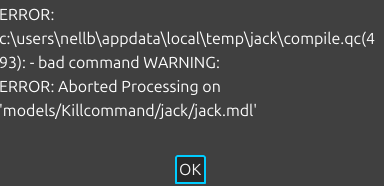
WARNING: Model bodygroup_0_mesh_0.smd has too many verts, model probably won't compile. Consider using $maxverts!

(1 edit)

I don't think the QC file was made. I think it usually gets deleted when it fails. unless im looking in the wrong place

version 1

nodes

0 "blender_implicit" -1

1 "Spine" -1

2 "Chest" 1

3 "Neck" 2

4 "Head" 3

5 "Ear_L" 4

6 "Ear_R" 4

7 "LeftEye" 4

8 "RealLeftEye" 4

9 "RealRightEye" 4

10 "RightEye" 4

11 "Shoulder_L" 2

12 "UpperArm_L" 11

13 "LowerArm_L" 12

14 "Hand_L" 13

15 "Index_L" 14

16 "IndexMid_L" 15

17 "IndexTip_L" 16

18 "Middle_L" 14

19 "MiddleMid_L" 18

20 "MiddleTip_L" 19

21 "Pinkie_L" 14

22 "PinkieMid_L" 21

23 "PinkieTip_L" 22

24 "Ring_L" 14

25 "RingMid_L" 24

26 "RingTip_L" 25

27 "Thumb_L" 14

28 "ThumbMid_L" 27

29 "ThumbTip_L" 28

30 "Shoulder_R" 2

31 "UpperArm_R" 30

32 "LowerArm_R" 31

33 "Hand_R" 32

34 "Index_R" 33

35 "IndexMid_R" 34

36 "IndexTip_R" 35

37 "Middle_R" 33

38 "MiddleMid_R" 37

39 "MiddleTip_R" 38

40 "Pinkie_R" 33

41 "PinkieMid_R" 40

42 "PinkieTip_R" 41

43 "Ring_R" 33

44 "RingMid_R" 43

45 "RingTip_R" 44

46 "Thumb_R" 33

47 "ThumbMid_R" 46

48 "ThumbTip_R" 47

49 "Tail_001" -1

50 "Tail_002" 49

51 "Tail_003" 50

52 "Tail_004" 51

53 "Tail_005" 52

54 "Tail_006" 53

55 "Tail_007" 54

56 "Tail_008" 55

57 "UpperLeg_L" -1

58 "LowerLeg_L" 57

59 "Foot_L" 58

60 "Toes_L" 59

61 "UpperLeg_R" -1

62 "LowerLeg_R" 61

63 "Foot_R" 62

64 "Toes_R" 63

end

skeleton

time 0

time 1 # vrcblinkleft

time 2 # vrcblinkright

time 3 # vrclowerlidleft

time 4 # vrclowerlidright

time 5 # vrcvaa

time 6 # vrcvch

time 7 # vrcvdd

time 8 # vrcvee

time 9 # vrcvff

time 10 # vrcvih

time 11 # vrcvkk

time 12 # vrcvnn

time 13 # vrcvoh

time 14 # vrcvou

time 15 # vrcvpp

time 16 # vrcvrr

time 17 # vrcvsil

time 18 # vrcvss

time 19 # vrcvth

time 20 # ClosedEyes

time 21 # Shocked

time 22 # Angry

time 23 # Annoyed

time 24 # Happy

time 25 # Sad

time 26 # Disgusted

time 27 # Blep

time 28 # Grin

time 29 # Confused

time 30 # Upset

end

vertexanimation

time 0

0 0.053906 0.011971 1.755987 0.888436 -0.115400 0.444258

1 0.065291 -0.004314 1.732370 0.676051 -0.366616 0.639177

These numbers keep going on, but this is what a VTA file looks like, in case you need a reference

Exporting with blenders source add-on gives me a vta file which is for face flexes I'm not sure if you can just use a gltf file without a vta file and still have face flexes

I use the latest version of Blender and Crowbar_2023-02-16_0.74. I have tried exporting as a GLTF file and then using the source add-on for Blender, I make sure flexes are ticked when exporting

(1 edit)

My main problem is trying to set up face posing like I have it set up, but when I use a gltf file, the flex info gets removed, and trying to do flexes after causes the position of the flexes to be wrong, like instead of it being in the face, it's controlling the legs

Do you know how I could add face flexes and then use this to do the other stuff?

not the same model and In game after I made it an edited the textures from alpha to transparent the transparent world but in the program it looked invisible

GMod PM+ community · Created a new topic Bugs

Translucent and alpha cause the whole material to go invisible when it should be selected setting

(1 edit)

I had used some of the internet too because I didn't feel like testing it over and over until it was ok. I fixed the jitter with some angle constraints, I think it fixed anyway, and also got some toon lightwarptexture shaders on it too. The materials were a part of Blender's fault because when I put the model in Blender, it created a second set of materials that were auto-applied. I never go to the face posing to work, but that's ok

(1 edit)

ya it is also known as flex. Also, do you know why my materials are messed up? They did work, but then I added weight paint in Blender to try to fix my character's tail from jitter, which didn't work

(1 edit)

Are there plans for face posing, like shapekeys?

how would you do jigglebones that have more than one boen like if it had 8 would i go from bone 1 to bone 8 or 1 and 2 and just make lots of the bone?

(1 edit)

I did rename the bones, and just the left leg and spine have errors,s but still won't work, so I did it manually, and I noticed when going to turn off relative rotations the xyz are off, like one controls the y when it's supposed to be the x

(1 edit)

works great now and the model loads in the correct position and with everything working, but just can't pose automatically

(1 edit)

ok sounds good

Importing GLTF files causes a crash

Sweet, I will let you know if I find any other issues.

ya it is .gltf and changing the.GLTFto.GLB works

Yes, at least when I run it with CMD

C:\Users\nellb>Godot Engine v4.5.1.stable.mono.official.f62fdbde1 - https://godotengine.org

Vulkan 1.4.329 - Forward+ - Using Device #0: NVIDIA - NVIDIA GeForce RTX 5060

ERROR: Condition "-1 == p_task->root_bone" is true. Returning: false

   at: build_chain (scene/3d/skeleton_ik_3d.cpp:52)

Model press: 0

reinstalled and still not working

it doesn’t import into the editor I can try doing a full reinstall to see

Hunk - Download Free 3D model by photon (that one larry) (@Professor_E12) [cd5f4f6]

ya its a GLTF file. I have checked the troubleshooting and have installed all of the things needed, but it just won't work

tried importing my model, and it did nothing. Can't wait for this to be fixed

shadow optimizations and when leaving the game while downloading it resets pls fix and add a option to never lock the pause menu pls

I had 14 MRE's and now they are all gone