
Indie game storeFree gamesFun gamesHorror games
Game developmentAssetsComics
SalesBundles
Jobs
TagsGame Engines

GMod PM+

Port character models to Garry's Mod the easy* way · By Amaxivermis

Bugs

A topic by sumrando8177 created 12 days ago Views: 141 Replies: 28
Viewing posts 1 to 4

Translucent and alpha cause the whole material to go invisible when it should be selected setting

Developer

I'm not sure if this is a thing with the base texture's alpha as if I remember correctly that's how the alpha works, if not then I'll look into this some more tomorrow, a screenshot with the parameters and result could help. In addition is the same model you sent to me before being used as well?

not the same model and In game after I made it an edited the textures from alpha to transparent the transparent world but in the program it looked invisible

Developer

That seems odd and it doesn't happen with every model as far as I know, you can link to the model if it's public so I can test it on my end and see the problem

Do you know how I could add face flexes and then use this to do the other stuff?

Developer (2 edits)

If this process was easy to automate I would, but it's not as easy as doing that with the other features as you would need to make shape keys for many of the flex poses (ex. eyes looking up, smiling, and much more) individually, if I do add flex to the program I wouldn't be able to do this process automatically, most likely the shape keys that will be used for flex will have a menu with some configuration, and at the very best I will only be able to partly automate this process on certain player models

As for how to do the shape keys for FLEX, I do have a segment from a video on a tutorial on making a player model (well, not mine, normally), skip to 14:38 as I tried to make the link skip to that part but it didn't seem to work:  

(1 edit)

My main problem is trying to set up face posing like I have it set up, but when I use a gltf file, the flex info gets removed, and trying to do flexes after causes the position of the flexes to be wrong, like instead of it being in the face, it's controlling the legs

Developer

Try to see if you're able to show me some of the settings used to export the file with a screenshot (like when you export for blender), you can also tell me the versions of the programs you're using as well so I can try to find out why this is happening, it hasn't happened with my own models (with the shape keys at least) like this manner

I use the latest version of Blender and Crowbar_2023-02-16_0.74. I have tried exporting as a GLTF file and then using the source add-on for Blender, I make sure flexes are ticked when exporting

Developer

This seems odd and I don't know why GLTF is causing the shape key info to be lost, does exporting as SMD keep the flex poses in different frames? SMD should export the poses in different frames based on the qc compilation

Exporting with blenders source add-on gives me a vta file which is for face flexes I'm not sure if you can just use a gltf file without a vta file and still have face flexes

Developer

It looks like I'll need to take that into mind when adding FLEX support to the software, the program just generates SMD files in the temp folder to be compiled so I can look into that

version 1

nodes

0 "blender_implicit" -1

1 "Spine" -1

2 "Chest" 1

3 "Neck" 2

4 "Head" 3

5 "Ear_L" 4

6 "Ear_R" 4

7 "LeftEye" 4

8 "RealLeftEye" 4

9 "RealRightEye" 4

10 "RightEye" 4

11 "Shoulder_L" 2

12 "UpperArm_L" 11

13 "LowerArm_L" 12

14 "Hand_L" 13

15 "Index_L" 14

16 "IndexMid_L" 15

17 "IndexTip_L" 16

18 "Middle_L" 14

19 "MiddleMid_L" 18

20 "MiddleTip_L" 19

21 "Pinkie_L" 14

22 "PinkieMid_L" 21

23 "PinkieTip_L" 22

24 "Ring_L" 14

25 "RingMid_L" 24

26 "RingTip_L" 25

27 "Thumb_L" 14

28 "ThumbMid_L" 27

29 "ThumbTip_L" 28

30 "Shoulder_R" 2

31 "UpperArm_R" 30

32 "LowerArm_R" 31

33 "Hand_R" 32

34 "Index_R" 33

35 "IndexMid_R" 34

36 "IndexTip_R" 35

37 "Middle_R" 33

38 "MiddleMid_R" 37

39 "MiddleTip_R" 38

40 "Pinkie_R" 33

41 "PinkieMid_R" 40

42 "PinkieTip_R" 41

43 "Ring_R" 33

44 "RingMid_R" 43

45 "RingTip_R" 44

46 "Thumb_R" 33

47 "ThumbMid_R" 46

48 "ThumbTip_R" 47

49 "Tail_001" -1

50 "Tail_002" 49

51 "Tail_003" 50

52 "Tail_004" 51

53 "Tail_005" 52

54 "Tail_006" 53

55 "Tail_007" 54

56 "Tail_008" 55

57 "UpperLeg_L" -1

58 "LowerLeg_L" 57

59 "Foot_L" 58

60 "Toes_L" 59

61 "UpperLeg_R" -1

62 "LowerLeg_R" 61

63 "Foot_R" 62

64 "Toes_R" 63

end

skeleton

time 0

time 1 # vrcblinkleft

time 2 # vrcblinkright

time 3 # vrclowerlidleft

time 4 # vrclowerlidright

time 5 # vrcvaa

time 6 # vrcvch

time 7 # vrcvdd

time 8 # vrcvee

time 9 # vrcvff

time 10 # vrcvih

time 11 # vrcvkk

time 12 # vrcvnn

time 13 # vrcvoh

time 14 # vrcvou

time 15 # vrcvpp

time 16 # vrcvrr

time 17 # vrcvsil

time 18 # vrcvss

time 19 # vrcvth

time 20 # ClosedEyes

time 21 # Shocked

time 22 # Angry

time 23 # Annoyed

time 24 # Happy

time 25 # Sad

time 26 # Disgusted

time 27 # Blep

time 28 # Grin

time 29 # Confused

time 30 # Upset

end

vertexanimation

time 0

0 0.053906 0.011971 1.755987 0.888436 -0.115400 0.444258

1 0.065291 -0.004314 1.732370 0.676051 -0.366616 0.639177

These numbers keep going on, but this is what a VTA file looks like, in case you need a reference

Developer

I'll likely do flex for the next update when I start working on it, in addition to a few other features though I want to focus on flex so I'll look at it and see how it goes

Developer

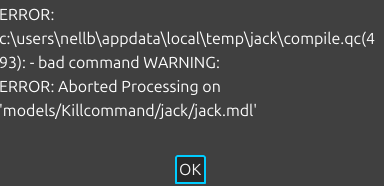
The compile qc does point to a line it looks like, though this error I've never seen. you can check the QC and show what it has if it has any info about what went wrong

(1 edit)

I don't think the QC file was made. I think it usually gets deleted when it fails. unless im looking in the wrong place

Developer

It's in the temp folders so that's likely why, you can do the same steps and look at the folder again and it should be there

(2 edits)

For some reason, the model has like 366,812 verts, so that's why.

WARNING: Model bodygroup_0_mesh_0.smd has too many verts, model probably won't compile. Consider using $maxverts!

Developer

I'll probably improve the logging since the error window doesn't display all the information, the app doesn't generate any logs when compiling which I should add in for 1.2 so it's easier to troubleshoot issues

While vertex issue isn't a bug with the application as you'd know, I could probably try to find a way to allow models like these to be compiled by adding in more files, though I'd need to check the docs again
I have gone into Blender and found something weird, so I merged the vertices by distance, and it worked, but when I would export it to a GLB or gltf file, it would go back to 30000 verts when it was at an acceptable 61000 verts, but when I export as an FBX, it keeps the 61000 verts

Developer

You might want to check if the topology for the gltf export to see if it changed anything, that is definitely a weird thing I haven't encounted

I have disabled animations and shapekeys; everything else is default. I'm not sure why it keeps reverting back to 300000 vert

Developer

Are you trying to overwrite a file? This issue seems odd, but maybe try deleting it, and make sure the file is correct real quick