On Sale: GamesAssetsToolsTabletopComics
Indie game storeFree gamesFun gamesHorror games
Game developmentAssetsComics
SalesBundles
Jobs
TagsGame Engines

poppy ribbon

258
Posts
12
Topics
9
Followers
16
Following
A member registered May 20, 2021 · View creator page →

Creator of

Recent community posts
I’m quite confused by this game’s business model:

The first time i found this game, it did not cost money. Then it cost 2 dollars for a while. Now it’s gratis again.

¿Why did that happen?

(1 edit)

names of interactables must be shown because their looks are misleading.

  • the Cheese Wheel looks like a Cake
  • the Luigi Board looks like a Travel Suitcase
  • the Furnace looks like a Lighthouse (this one isn’t so bad because O’Hare immediately says it is a furnace after interacting, but i was still looking for another furnace on the ground floor before i stumbled on this)

with the Game Boy visual limitations, there is no real way to make the things look more like what they are, so showing their names is important.

this game has a huge technical issue in Firefox: changing the size of the browser window immediately makes the graphics disappear for the rest of the game

will you publish Öoo full version on itch, please?

i strongly suggest you should change the price from “pay what you want” to “free”, to avoid copy rice takedown.

once you make a game without stuff that has copyright belong to someone else, you can safely set that to “pay what you want” or “paid”

(1 edit)

i wish the options menu had words so people without so much understanding of technology can change the options. having only icons may look cute but many people will be frustrated by how obtuse it is.

minimalist communication is appropriate for the game itself — like the intro for the controls and the timer at the end — but not for the accessibility options, which the people who need to change them cannot change them if they don’t understand them.

on desktop, you can make the comments not spin: Inspect Element on the comments section and turn off Keyframe spin

on desktop, you can Inspect Element on the comments section and turn off Keyframe spin

on desktop, you can Inspect Element on the comments section and turn off Keyframe spin

the comments rotate because of Keyframe spin. you can temporarily turn it off with Inspect Element

my own first steps are

  1. use Godot Engine for development
  2. publish my software as free and open‑source on itch and sometimes also Codeberg

you have to be on Desktop for this. Inspect Element at the comments section and turn off Keyframe spin

the Godot game engine will be a very important tool for the creation of today’s highly individualistic software, and weapon against corporate stagnation.

it is already used to develop game‑like indie software

please add a Linux executable, as the love version of the Debian repository (11.4) is too new to run the game and i would rather play other games than finding an old version of love

sorry, i couldn’t find where to ask this. i have a question for future Low‑Res Jams: ¿can i trade one line of pixels for 64 segments of 7‑segment‑display?

(this comment is for a not numbered version of the game)

i played loops 0 through 4. i would love loops 0 through 5 to be a bit different, approximately like this:

  • loops 0 and 1: as-is
  • loop 2: the player character always stays in the middle of the screen
  • loop 3: like loop 2 is now
  • loop 4: like proposed loop 2 but also the screen moves
  • loop 5: like proposed loop 4 but faster

in short, i would like to play loops where the player character is stuck to a certain screen position

licensing information is just as important as the description. it’s a shame that many open‑source projects are entered as proprietary software on the itch database because they missed the licensing page on the game page settings

the novelty of shooting on a train delayed this a bit but sooner rather than later i found the easiest way to win and the game became boring

i get stuck on the grass too easily: often, i can’t keep going in the direction when it looks like i should can. and once i found out how to win, the game became boring

i stopped right before i would press “delet project”

(1 edit)

the big issue is that the game does not always detect when i have entered the correct guess.

most glaringly, i have to spell it with exactly the right uppercase and lowercase letters. this can be easily fixed by spelling all correct guesses in all‑lowercase and using the String function to_lower() to convert my entered guess into all‑lowercase before checking it.

combined with the game knowing too few words, like detecting the “█████████████████████” as a “███████” but not as a “█████████████████████”, this makes the game too broken and frustrating

it must be a bug because it lasts too long and it does not happen when i combo. only after all text particles (which spell $3 or -$13) disappear, the game stutters when the first one reappears.

to fix this, instead of spawning and despawning the text particles completely, the text just gets changed to “$3” when earning money and to “” when the text should disappear. this way, the text particle does not despawn but it just becomes invisible, which is much more performance-friendly.

no, it’s just gratis. you can download the cartrige on the game’s Lexaloffle page and edit it in Pico‑8 but the game does not have an open‑source license

Inkscape is a free and open-source program as suppose to Affinity Photo and Affinity Designer, which are proprietary software. i would strongly prefer to open the source files in an open program rather than a closed program.

yes, it can still be used. it being made with closed‑source tools just puts it at a bigger risk to disappear in the future.

i just noticed the Metadata tab (and every other tab besides Edit game) only shows up when editing a saved game, not when creating a new game. no wonder so many people miss the Metadata tab.

for tabletop games, leaving the Input methods field empty is best. setting the game as a physical game should be done in Edit game > Classification.

you can still set all the other metadata, so it’s actually just as useful for tabletop games as for video games.

although it would be great if they listed input methods for physical games:

  • tabletop
  • cards
  • dice

if itch lists virtual reality as an input method, i don’t see why they couldn’t list tabletop, since both input methods alter your environment for playing the game.

(2 edits)

this game is too difficult in the wrong ways:

  • most of the keys — like ‘Hook Button’ — are not named, so i have to try every key to know which is which
  • there is no way to change which key is which button, so i have to play with an uncomfortable layout
  • sometimes some actions don’t work and i don’t know why — example: sometimes pressing [up] and [jump] makes wallrun and sometimes it doesn’t
  • this is a lot of buttons to keep track of. ¿maybe add a button that is either [dash] or [hook] depending what’s best in each situation?. and [pick up box] and [throw box] should always be the same button because i can always do only 1 of these things.
(2 edits)

i will not need to make a real itch page for this:
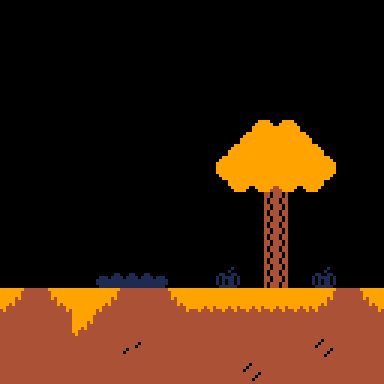
if you still want to use this:

Autumn Tileset by sosasees is licensed under CC0 1.0 Universal

this tileset is usable with PICO-8

i am sorry to disturb but ¿would you mind spreading this info?: Metadata encouragement

the GIF format is no longer used because the WebP format is used instead. so i would like to not put GIF files in my submission.

i plan to put my assets in these 2 common image formats:

  1. WebP, the most modern format that’s supported by most widely-used programs today
  2. PNG, for use with some older but still widely-used programs

¡thanks! 🙂

(2 edits)

this sounds good, but i need to read the jam page before i can decide if to join.

please reply with a link to the asset jam’s page.

https://sosasees.itch.io/dars-generator

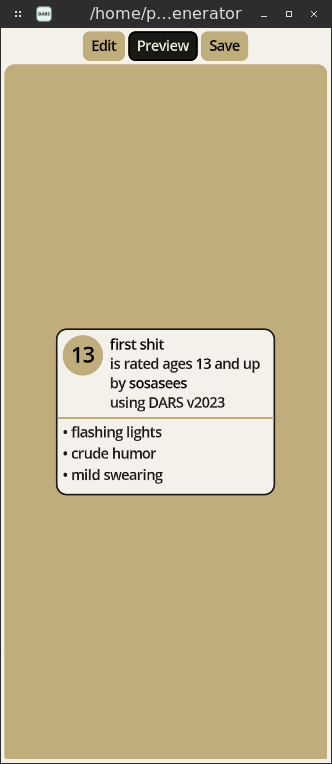
create video game age ratings using the Developers’ age rating system (DARS).

pick the age rating criteria that apply to your game and get your DARS age rating — really useful for platforms like Itch, which don’t support official age ratings like from ESRB and PEGI.

screenshots:
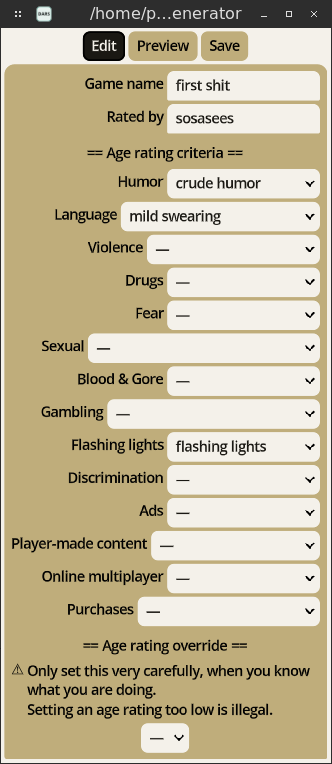
edit page

DARS badge preview

website i recommend about choosing a license: https://choosealicense.com/

(1 edit)

i liked and commented on this post by the time i could read this reply.

it took me a while to create the comment.

i will see how i can share this with other itch users without disturbing too much.

i found the metadata because i am the kind of people who explores the Windows settings after i install Windows. but most people don’t even touch the Windows settings, so i understand how — without encouragement — they would not want to change any game page settings beyond the first page.

thank you for announcing me this post 🙂

yes. TheGates will not replace the internet — it will co-exist.