Now upload HotFixes V2 that should sort out problems people have been having in Mission 14 for the homes; the issue was caused by the combat triggers lagging – after apply the fix, retrace your steps to near the start of the mission and those should start trigging instantly now. If it’s specifically the City Flat Apartment one you picked, a clickable sparkly will appear in the last room to trigger this once clicked on, thanks.
RFG
Creator of
Recent community posts
That part was bugged but should now be fixed in the newly uploaded HotFixes V2 – however it may have locked you into that area as a result of going there before the fix. If you can re-load back before then do so and it will now work as it should, otherwise I can upload a slightly modified version of this mission to fix this issue for you specifically – so please let me know thanks.
There’s a delay on event triggers caused by a conflict I’ll be fixing – this means all events (such as ambush fights etc) that should trigger instantly instead lag for a few seconds. Once you’ve found your 4 items here (which are all in there somewhere!) you’ll get the message saying to leave. To trigger this event, wait on where the bloodstain is by the door and that should allow you to progress before the fix at least.
Thanks for that – ah yes, that’s the City Apartment, I see where the code’s problem is, so adding it to the hot fix coming very shortly.
Strangely enough part of this issue was caused by the earlier implemented black screen conflicting with this and lagging the fight triggers which should be instant. If you want the XP in the meantime, have a slow little walk around near the cactus/waste bin area to trigger those last 3 fights! I’ll add a redundancy trigger too (it’ll be represented by a “sparkly” clickable) after all the fighting’s done to continue the mission, as I can see you cleared the top bedroom zone too which was meant to be the last one. The same issue affects The Projects map too for anyone else who encounters it.
Hello there – will take a look into this sure – which of the 4 choices did you go for? The Projects / IMP City House / City Flats / or The Suburbs? Just a screenshot will do if you’re unsure which one it's happening on, then I’ll get on it, thanks!
Edit: May now see the problem you're talking about actually, but if you could just confirm first where you're getting it I'll know!
Hi – as this is a side quest, this can be started by reading the email on your PC in the office “Handyman Needed” and picking “Select Mission”. You’ll then be given a brief summary as normal and can chose the option “YES (Play)” to start this.
Currently re-working the side quests system to make it a little easier to navigate/play, but this only affects playing this one and Azure's missions at current, so it’s not a bug thankfully.
Congratulations on finding all the “Things” too, those are something else entirely – maybe you can find some people willing to buy them off you – or just give them away as you’ve now got so many! And yes, there are a lot of objects in the room that become relevant later in the game.
Okay: a new full upload on the game V1.1 with the hot fixes is now up – I’ve tested this one by downloading it as a new, unpacked it, then moved my own old save files into the save folder – and everything is working again as normal. As you likely just want to play the game – this is the way to do it.
In truth, I’ve no idea why that happened (yet) but clearly I gone and did a great big dumb with the hot fixes somewhere. Again, truly sorry for the waste of time – the mistakes are 100% on me alone, but I never rest until they’re fixed on the plus side.
Okay: a new full upload on the game V1.1 with the hot fixes is now up – I’ve tested this one by downloading it as a new, unpacked it, then moved my own old save files into the save folder – and everything is working again as normal. As you likely just want to play the game – this is the way to do it.
In truth, I’ve no idea why that happened (yet) but clearly I gone and did a great big dumb with the hot fixes somewhere. Again, truly sorry for the waste of time – the mistakes are 100% on me alone, but I never rest until they’re fixed on the plus side.
Edit: I deleted my own reply instead of editing it for anyone wondering as I'm being very dumb today...
The new uploaded update should fix the issue and allow you to play as normal, but if does continue then may have to re-download the game then apply this new update with the hot fixes sorry. Your save games will be fine however, but if in doubt you can first back them up within the “save” folder within the game to be safe. So long as the save game files are placed within the save folder, they’ll play from any working version of the game however, thanks!
Hi; may need a little more information to know what’s happening there. Is this for the PC version and has it got the latest updates? Does the computer meet the minimum spec requirements? Are you running anti-virus software? (this can interfere with games like these that rely on Javascript code). Is there a particular point in the game where you always crash or is it random? As I say, without more info this will be very difficult to solve.
If I had to guess, I would say something on your computer is causing a conflict when running the game: try running it on administrator settings and make sure your firewall isn’t blocking it: and you have the latest game updates/hot fixes installed thanks.
And that's another bug added to the list: now found what caused that and thankfully it’s an easy fix, so will be included in the next hot fix patch.
A lot of the game’s code was built on top of other parts, so when something changes/moves/gets fixed it can affect other parts of the game that relied upon it to work correctly – which is what happened here with the map transfer going wrong. Thankfully it’s an easy fix, so will be included in the next hot fix patch. Thanks again for the bug report!
Thanks for the report, sorry about that. Found the problem causing this; same route-cause as the report above you – so will hot fix both problems and check for anymore coming up now I’ve seen what’s caused this and check ahead to make sure all instances of this problem are removed. Will work to get the fix uploaded by the weekend.
Also added it to the known-bugs list for anyone else encountering this.
Ah yes, sorry; I see where this happening now – looks to be caused by a knock-on effect from fixing-up those earlier buggy missions. Will start work on this – shouldn’t take long to get a hot fix out for this problem; will aim to have it up by the weekend. Thanks for the report and your English seems fine to me!
Well, glad to hear this isn’t a bug – just a challenge! All right, we’ll be nice and give a little guide!
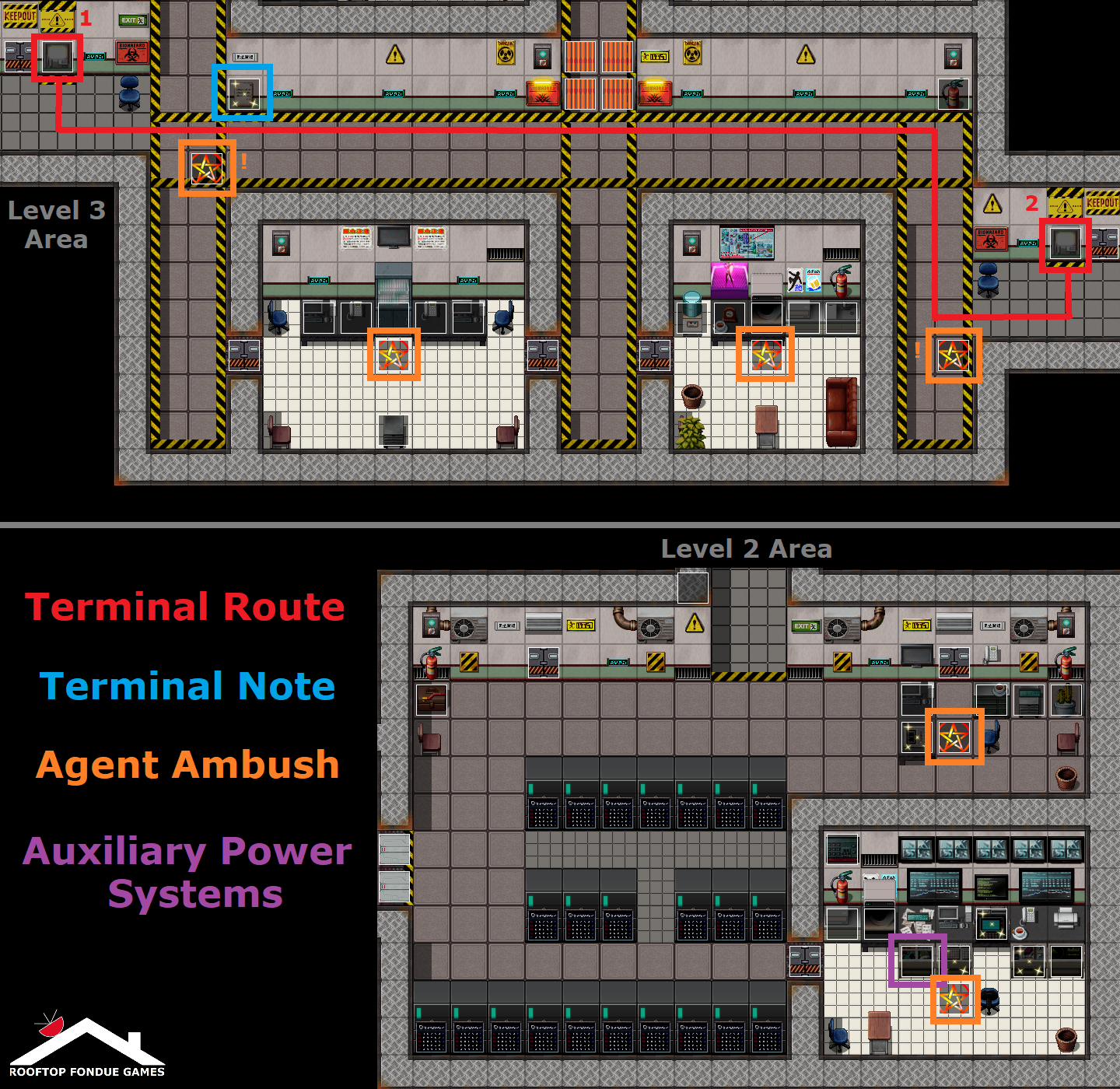
There’s two different ways to do this part. So a ‘sparkly’ note on the nearby wall to the laser grid states “BOTH terminals must be pressed within 5-Seconds to open”. You need to deactivate these lasers in order to continue the mission.
The 2 terminals are located both sides of this area by the blue chairs, so press either one, then you must sprint (by holding Shift/clicking on the map to sprint) over to the other one to press it within the 5-second time – although the agents will ambush you the very first time unless you cleared them in advance! It can be done, but you'll have to sprint very quickly – you can get more time on the countdown:
Back in the previous area with the Security Control Room, you can access the ‘Auxiliary Power Systems’ to divert power. This doubles the countdown time to 10-seconds, making reaching both terminals in time much easier, plus you gain a little XP. After that the laser grids falls and you’re almost there to save the boys! You saw the episode too, right? Well, there may a few be more agents waiting, just saying...
We did consider making a play-through video series to help people out; think that would be useful for parts like these?
Hi – first essential update is going up over this weekend – and yes, it has been long overdue. All these problems, which everyone is also getting, developed from completing Mission 3 in a certain and correct order which begun to miscalculate the game progression. The identity discovery information shouldn’t occur till Mission 15, for example. Some people got lucky and avoided all these – but most didn’t.
Really am very sorry the game released with these bugs; hope it’s obvious that’s not what we wanted to happen – real life got in the way of releasing an update unfortunately, but now we’re back and ready to squash these bugs. Thanks for the kind words; we made this game first and foremost to be fun and so we won’t rest with fixes until that is achieved.
The first essential update/patch is going up this weekend to fix all these annoying game-breaking bugs: currently making double-sure they are all properly resolved first – but can confirm those two problems are part of the fixes. Almost all these kinds of bugs all came from completing the heavily bugged Mission 3 in a certain (and correct) order which was incorrectly calculating game progression: will explain why that all happened once the update is up. So sorry about this; but thanks for bearing with us!
Huh, well that's a new one for sure – very sorry about that! Pretty sure how and why that happened to you based on the helpful screenshot: this is caused by a major known game-breaking bug that we're aware of and we’re about to release an essential fix to patch this, coming this weekend. Will test to see how this happened and fix it, thank you!
Edit: found the issue - this was caused by attempting to go through the Office Doors during Mission 15's dialogue - the player shouldn't have been able to move around during that to go through those, so now fixed both issues - thanks!
Hi there – thanks for the kind words – yup, this is our first-ever game a mere two of us wrote and designed over a few years and we’re still very much learning: so we’re now just about to release our first essential (and very much overdue) patch that fixes a few game-breaking bugs, so please make sure to grab that before getting too invested, as it gets pretty buggy after Story Mission 3 otherwise!
Seeing as you mentioned it – we can actually confirm that yes: you will indeed be able to change your player character in some big and meaningful ways! We may have mentioned this before during development updates posts somewhere on Youtube a while ago, but we didn’t on itch.io – so here it is:
Planned as part of a major future update, the player will be able to transform themselves to specialise in one of the 7-Deadly-Sins. This will change the "Class" of the player into their dedicated Deadly Sin, by adding new unique skills and abilities, and changing their appearance to match it! And if you’re looking for a more feminine version of our blue-zombie-dude, you’ll get that by picking the Lust Deadly Sin! The I.M.P. team will react to your changes but will accept you as you are – after all their insults, of course.
On one last note, if you too like Robots specifically, perhaps consider checking-out that large metal crate found in the Storage Room that is the player’s home...? Oh and make sure to bring a Crowbar!
Hi – no problem, thanks for letting us know always – just sorry you’re encountering this!
Yes: it’s a major known game-breaking problem (all technically starting from the bugged Mission 3) that will go onto affect everyone eventually – even if they avoided it – we’ve since discovered: so it has to be properly fixed, which is taking a while. Working on fixing that literally right now, so not too much longer!
Long story short: this vital patch has been delayed as Teresa and I were away on holidays and also I (Leo) decided to get unexpectedly hospitalised so only just gotten back into this; so thanks to everyone’s continued patience for bearing with us as we fix-up our first-ever game!
So glad to hear you are getting some enjoyment out of this too; we really do appreciate the kind words a lot – still got a lot more planned to add-in and all of it will continue to make Hell a "nicer" place to play!
Hi there; it’s definitely something we’ve considered yes – we run android’s too but sadly our phone’s are little better than old bricks in effect, so testing the game put us off the idea at time of release to be honest; despite the large amount of mobile gamers!
Currently working on a major patch to fix in-game problems and will be releasing a MAC version too, so converting it to also run on android shouldn’t be too difficult to make happen (in theory!) but testing everything works in advance may not be guaranteed. We will take another look into this, sure.
Sorry you’ve had such a rough start; it wasn’t our intent to release a game that’d become impossible to play properly – it’s not just happening to you.
Having looked into this, doing the choices in certain orders during mission 3 can spiral the game out of control which later impacts everything else; and is why you’ve been bounced around all over the place. That mission was one of the first ones we made at a time when we only first began learning how to make the game and needs vast improving to bring it up to standard to the rest – as this buggy mission is ruining things sadly – but thanks to you telling us about it, we can work on fixing it before everyone gets into the same state.
It remains our intent to get everything fixed properly, so rather than patching with a quick fixes, it’ll need a proper update to prevent this happening again.
Sounds like the issue began before that; that earlier fix only applied to mission 15 onwards, so not sure how you got to that point not being able to see the screen after mission 3 as you said earlier, but clearly this is still a persistent problem we’ll need to thoroughly track down.
In the meantime: please see the new updated v1_HOTFIX_BlackScreen file upload – this is a universal and cheap temporary fix, but should work regardless of where you are and/or what you’re doing.
It works by fading back in the screen after 5-seconds of the player character doing nothing, i.e. no movement/button presses etc. That should allow you to continue the game from any point a black screen occurs as the game is still running in the background. Hope this finally helps!
Updating this in the development blog too as it is persistent amongst players, thanks.
Understandable; this game thankfully was created in RPG Maker MZ so everything the game uses is kept inside the folder itself and nowhere else – so delete the game folder and everything is gone. The only new files that are ever created are save games, which are stored within the game folder itself – so it’s all kept nice and tidy in one place! It doesn’t use any kind of app data either.
Hi EveFysh!
Thanks for taking the time to share this very helpful feedback with us.
Basically it is just as you said: we’re earnestly new to both itch.io and game development being a team of two creative amateurs and so made the choice to err on the side of caution uploading a game that took us over 2-years to make! That and other potential game hosts we looked into were far stricter on what was considered adult-content. It was also the main reason we came exclusively here in the end.
Yes, we were aware that by adding the adult-tags that to our game this would limit visibility, especially regarding search, but we honestly were simply trying to adhere to site policy more than other reason. Having now had time to look over others content, our game does not fall under adult/porn definitions.
So! We’ll now go over our tags again starting by removing the adult tags as they aren’t relevant: this game is primarily a JRPG with storyboard elements; it’s just based on an adult cartoon with a lot of strong sexual content which we don’t shy away from in the game is all.
Ironically, we did actually make an earlier alpha version of this game with a lot of true XXX rated scenes too, but after finishing making everything else in the game it just no longer fitted right with the rest of overall theme to include. This idea started off as just a browser pick-your-own-adventure for context: we didn’t originally plan for it to turn into a fully released RPG, but here we are!
@ WilliamBite: thank you for the information, this should now be corrected with the "HOTFIX_Mission15_BlackScreen" file we’ve uploaded – just add it into your game folder and overwrite the existing "Map071" file. This problem like ones similar to it was simply caused by us not coding in the fade back in command used during map transfers. Sorry about that! Let us know if you find anymore and we’ll fix those too thanks!
@ Maximouh: sorry, was unable to replicate where your black screen bug is occurring after mission 3; but we do believe you – so we’ll continue to look for that to find out where it’s happening and fix it thanks.
Yes there is several ways to check your relationship with Loona! Firstly her dialogue options will develop as you get to know her better from being cold and standoffish to warm and friendly etc which allows you to have longer and better conversations with her if you’re doing well. Secondly you can get an item in the game which will allow you to get an overall “guess” on how well your relationship is going with her. The more advanced relationship system we’re still developing, but in this early game version it’s difficult to badly mess up the relationship early on unless you’re trying to luckily!
Hi Deadxak! Late into the game there are very strong language sexual conversations between the characters after building a relationship with Loona. We’ve added the various adult marks due to itch.io’s requirements as our game contains multiple different sexual topics.
Edit: We've listened to multiple feedback and come to agree with you all - the game does not fall under the assumed "adult" (i.e. x-rated) tag, so we've now removed it!
Hi Mausakrobat28! By sharp image do you mean the game’s resolution size? The game is presented in RPG Maker MZ’s default resolution scale of 816x624 for optimization reasons: however the game’s window can be freely maximized larger; we play-tested it full screen on a 1980x1080 screen resolution and it seemed to scale-up and looks just as sharp as the smaller scale.
Run into a problem with the game? Let us know about it!
We’re dedicated to fixing any and all bugs we all find, as we want our game to look and play nice. Please bear in mind however we’re not professional game designers, but do have enough knowledge of our own game to fix bugs where we find given time and patience – so if we add it to the list, it will be fixed.
---
Please first check the Known Bugs List below to see if the bug has already been reported and added to the list! If not then please post here and include the following information (along with any other information you think may be helpful) when submitting a bug report to us:
- Is this happening during a Story Mission, if yes and known, which one?
- The map location in game, if known (e.g. The I.M.P. Car Park)
- Does the bug prevent you from continuing playing the main game properly?
- Provide details about what specifically is happening with the bug
---
We’ll then give priority to fixing the bug in the following order:
- Game-breaking: top priority that requires an immediate Hot Fix patch
- Nuisance bug: allows normal game play, but prevents important features
- Non-critical: allows continued game play, so will be fixed in a future update
We’ll update the following list upon reports and fixes via patches and/or update notes. Hot Fixes will be released as a priority.
---
Known Bugs List (Last Updated 19th September 2025):
Game-breaking:
- -
Nuisance:
- Incorrect fading/dark screens that remain until the game-day is reset by sleeping (Current in-game fix = sleep at night-time to reset)
Non-Critical:
- General images box display/text box alignments
---
Critical Game-Breaking Issues Fixed as of Update V1.1 + Hot Fixes V2 (19th September 2025):
Please see HLB:TG v.1.1 updated full game and the latest HOT FIXES V2 update
- Mission 14 City Flats/The Projects progression frozen (Fixed in Hot Fixes V2 Update 19/09/2025)
- "Handyman Needed" side quest not ending correctly (Fixed in Hot Fixes V2 Update 19/09/2025)
- Looping dialogue bug affecting Mission 7/8/9 and Azure's Side Mission (Fixed in V1.1 Update with HotFixes)
- Map transfer loop between IMP Carpark and Outside Grounds (Fixed in V1.1 Update with HotFixes)
- Bugged missions (from mission 3 onwards) that incorrectly teleports the player into the end-game
- Black screen fadeouts hiding game interface
- Combat Trainer chat loop after defeating Bucky The Corroder