That's impressive for a 250 draws game, congrats on the score!
Valdis Gunn
Creator of
Recent community posts
Hi, the original idea for the game came to me way before Balatro got released, the gameplay loop is actually inspired by another game on Steam called ROLL, while the concept of cards used as sequences to create equations that score points is something I've never seen, which is why I decided to implement it myself.
Despite the fact that Balatro had little to do with the inspiration for the game, I am planning on adding a game mode that is structured like a classic Balatro run in the full version of the game on Steam, given people enjoyed Balatro a lot, I'll see if players like it or not :)
My bad I misinterpreted your message: for the points plot, I like your log of log idea, though I think it may make the scaling of the chart a bit confusing for some players. For the full version of the game, I was planning on adding a filter view where you can choose to filter out a portion of the lowest values in the graph to focus on the highest points only, but I may end up implementing your "log of log" solution too, it's a very nice idea I hadn't thought about :)
Hi, I'm not the developer of ROLL but yes, this prototype was inspired by ROLL, which as you can tell is a game I enjoyed a lot.
The core concept of Card Draw, however, is having cards in a deck with mathematical symbols that you can use to you create equations that generate points: this concept is widely explored in various different game modes in the full version of the game (still in development), with some already available in the Steam demo, which I recommend you check out if you liked this prototype version of the game (here's a link: https://store.steampowered.com/app/3409750).
In the other game modes, the similarities with ROLL, being mostly a clicker game, fade away: in STRATEGIC mode for example (already playable in the demo on Steam) you can actively choose where to place the cards you draw to optimize the equation you create and thus get the highest points possible from each draw, which transforms the gameplay loop of the default RELAXING mode (playable in this prototype on itch), based instead on a simple "clicker" mechanic. Other game modes in the future won't even have an in-game shop to get new carda and abilities, thus basically removing the similarities with ROLL altogether (apart maybe from the particles animation, which isn't even something inspired by ROLL but rather by another game I love, and that you probably also know, called "Luck Be A Landlord").
Also, just to clarify, I've been in touch with ROLL's dev and he is happy about Card Draw being inspired by ROLL. He also gave me tips and suggestions on how to improve some aspects of the game based on his experience with ROLL. He is a very nice guy.
Hope this clears everything out, and thank you for playing :)
Hi, thank you for the feedback.
A log scale, as well as other options for stats to plot, are already implemented in the full steam demo (still free if you want to try it). This version of the game is only a prototype, like a demo for the Steam demo.
The Steam demo also has a lot more content in general if you are enjoying the game, like new game modes, cards, abilities and features.
Here it is if you want to check it out: https://store.steampowered.com/app/3409750
The original plans include a macOS release for the full game version too, but Apple makes it very very hard to release games for their platform, and makes it tedious (and costly) to also maintain the game there once you have gone through all the necessary steps to publish it. The only certain platforms for the full version of the game, for now, are Windows and Linux, I'll try to get the full game on Apple too but, unfortunately, I can't promise it as of today.
Hey, thank you for the feedback!
In the full version of the game there should be a cards collection that will show all the versions of the cards, but I may also add a way of seeing all the variants of cards of a certain type directly while in a run as you are suggesting.
I'm also planning on adding a detailed turns history view that will show your cards for past draws so that you can see which cards combination made the most points in previous draws.
Lastly, I'm not sure why you are not getting in the leaderboards with your score in IDLE mode, you should indeed have gotten there with your score... I suspect other players may be having the same problem so I'll investigate, thank you for reporting.
Hi, Valdis here )/
I recently released a demo for my game Card Draw on Steam!
Card Draw is a relaxing roguelike deckbuilder where you create equations with your cards to score points.
A playable browser version of the game was already released here some weeks ago, but the demo introduces lots of fresh new content (like a new game mode and online leaderboards).
If you have time to try it out, please let me know if you have any feedback :)
Steam Demo link:
https://store.steampowered.com/app/3261300
Browser version (itch.io):
https://oddeyes.itch.io/carddraw
- Valdis
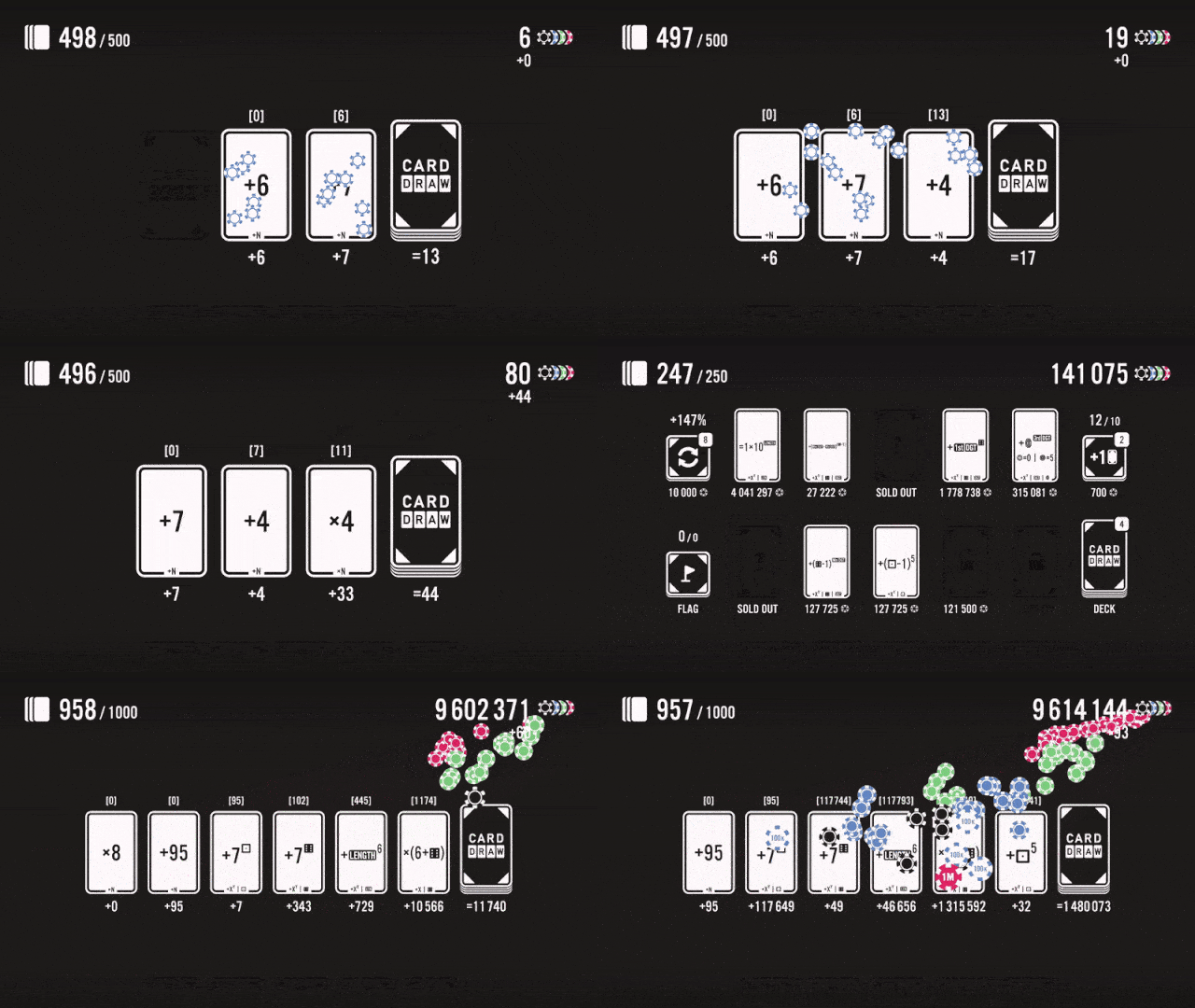

CARD DRAW is a relaxing roguelike deck builder where you build equations with your cards to earn points.
Draw cards to create equations and earn points for your final score.
Spend points in the shop to expand your deck with new cards and abilities.
Beware: the points you spend in the shop are detracted from your score.
Know when it's time to stop buying cards and start accumulating points.
- Valdis
itch.io page link:
https://oddeyes.itch.io/carddraw
Steam page link (demo & full version coming soon):
https://store.steampowered.com/app/3261300
Unfortunately, I've never heard about that error before... It works fine for me on every device (even on mobile) and every browser...
What browser are you using? Could you try deleting your cookies and browser history? Just to check, try to open the game in icognito mode (if it works there, cookies may be the problem). Maybe also try to open the game with another browser too.
Nice! I think this might actually be (or have been?) the best strategy for the highest possible single draw points.
Now I wonder if this is still the case with the latest content update though 🤔.
I genuinely don't know the best strategy as of now yet (since I can't possibly test all the myriads cards and abilities combinations), there might be some better ones I never thought of with the newly added cards/abilities... We'll see...
That's a good approach too!
The way mobile controls work now is that an invisible mouse cursor snaps to wherever you touch the screen and stays there until you touch or drag again: this is not something I implemented, but rather something that is natively supported on mobile, while scrolling, instead, isn't.
As I mentioned, even for the latest version which just came out, I'm currently focused on working towards a full game release on Steam before implementing mobile support (which would require significant changes to the game's systems).
Thank you!
The game was definitely not made to be played on mobile, but here's a little tip for playing there: to see the tooltip of cards and abilities in the shop without buying the item, you can first click the flag option, then click on an item to flag it, then wait for the tooltip to appear (and ultimately unflag the item if you don't like it).
Maybe you already figured out this trick, but it may still be worth sharing for other players who may want to play on mobile (in this extremely sub-optimal way), waiting for a fully supported mobile release.
Sure! I'll add the feature as an option in the next update (or directly on a Steam demo for the game which will have more content too, or maybe both at the same time, I still have to decide the next steps).
For the "add card slot" function, the game already redirects you to the shop when a new card slot is available for you and you have enough cards in your deck and points to buy it, but I may allow you to flag it too so that you will be redirected there even if you don't have enough cards in your deck (but have enough points) so that you remember to buy it. You can also already flag the next shop slot you want to unlock, but that's about it for now, soon you'll be able to flag the "shop refresh", "add card slot" and "burn card" buttons (last one will work by flagging the "inspect deck" button on the shop).
Thank you for playing btw :)
That's impressive!
But you know, as the dev, I know the highest possible points you can get in a turn is not this one ;)
First of all, it hurts to see the empty "diamonds" ability slot, which could increase your final points even more. Then also, for example, why use "Astronaut"? It multiplies the final turn points by at most x4x10 (where 10 should be the number of cards with a "LENGTH" symbol on the table, which is actually 9, not even 10 in your case), so at most by x40, which is a lot, but not the best you can do... What about, for example, using "Plumber" or "Bellboy" instead? I won't spoil what those abilities do here so I won't ruin the fun and joy of discovering it by yourself, but I can tell you they are better than "Astronaut" in this case... Getting rid of the "Astronaut" would also eliminate the constraint of having to use the 3 "x[LENGTH]" cards at the start of your equation if you get rid of the "FLASK" ability too, freeing both 3 card slots and the "clubs" ability slot, in favor of better cards and abilities maybe, just saying...
So, in the end, I'd say the quest for the highest possible turn score is not over (not even for this limited prototype version of the game).
You want the high score? You can have it! I left everything I gathered together in one place, now you just have to find it!
Btw thank you for playing :)
At the moment, there's no way to burn ability cards unless you replace them with a new one of the same type. The idea behind this "mechanic" was to encourage players to be more thoughtful when buying abilities in the shop (knowing they can't be easily removed later), but since others might run into the same issue you ran into, I'm still trying to figure out whether to keep this as it is or not...
Oh wow, 96 trillion in your first run is very good!
As for the Steam and Android release, the answer is yes. A lot of people are enjoying the game, so a Steam release feels like the most natural thing to do so that I can add achievements and leaderboards to the game, with also obviously more content and game modes to play. After that, I'd love to release the game for Android too, with the possibility to start a game on PC and continue it on mobile, or vice versa.
Unfortunately, I'm not doing game development full time, so I have just a few hours a day to dedicate to the game, but more news and updates will be coming as soon as possible.
And by the way, thank you for playing the game!
Oh ok got it, "best" sorts cards by the highest amount of points each card has ever produced for you in a single turn, hence the "best turn points" part. I should probably change the text of the tooltip to make it clearer, and in general I should definitely work on making the game more "beginner friendly" in this sense, thank you for letting me know!
Thank you!
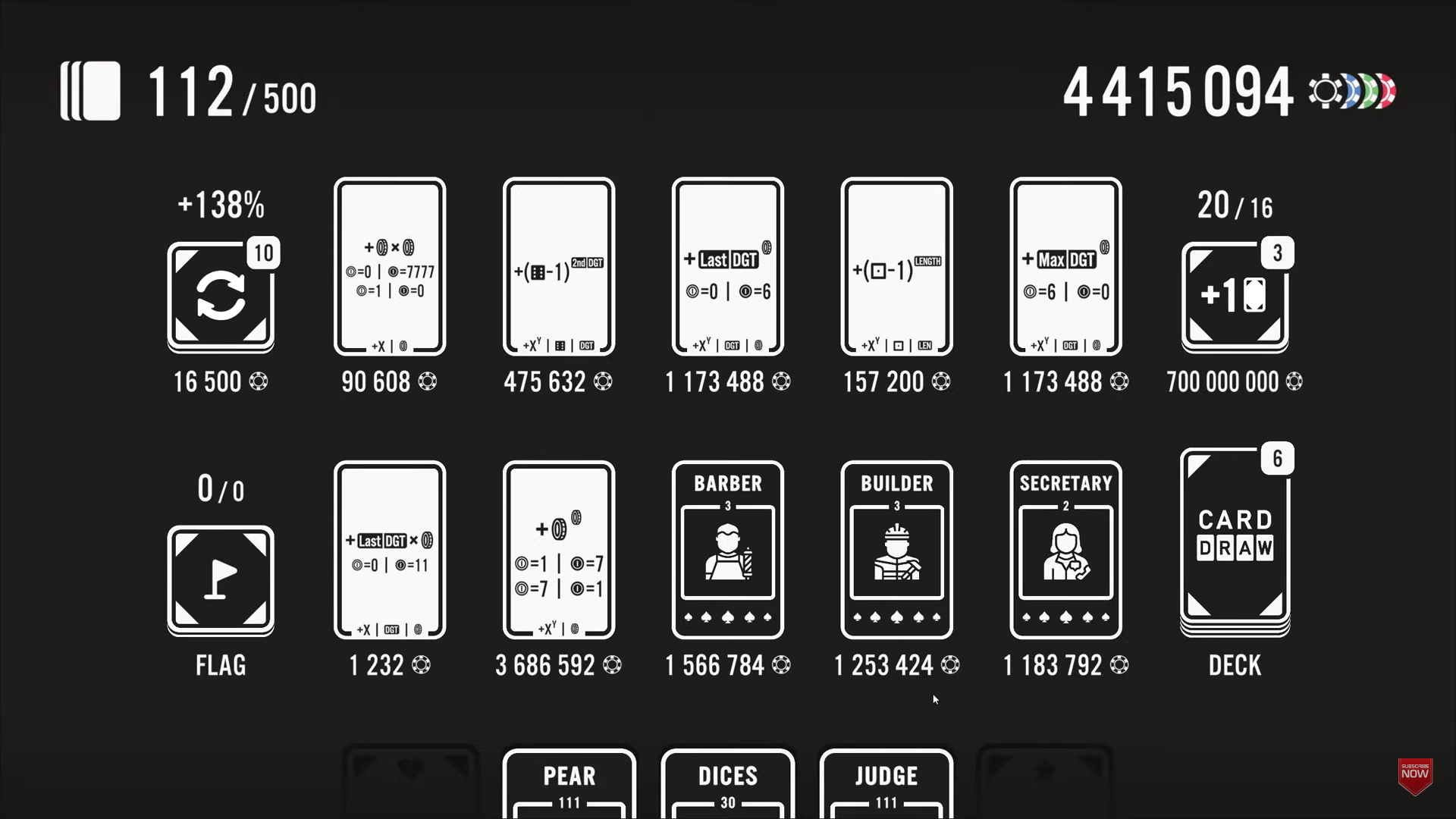
The goal is to get the highest score possible with a limited number of draws (which you see on the top left corner), it should explain this at the beginning in a little tutorial, maybe it didn't trigger for you. The next step, the key to do this, is upgrading the shop level (refreshing the shop), so that you can get to cards (and also abilities) that are much more complex (as it says in the in-game tooltip of the shop refresh function) and that synergize with other cards and abilities to create strategies that can lead you to some crazy high scores (like the ones other players posted in the game page's comment). After upgrading the shop to higher levels, you get more powerful cards that open up the door to more strategies and synergies, for example these cards and abilities:
Another key point is also to "expand" the board other than only expanding your deck, by adding card slots, which ensure you'll produce more points for each turn, because cards stay on the ground for longer and thus help you craft longer equations which in turn lead to more points for your final score.
As for the sorting by "value", I'm not quite sure what you mean, these are the available sorting types for cards in your deck:
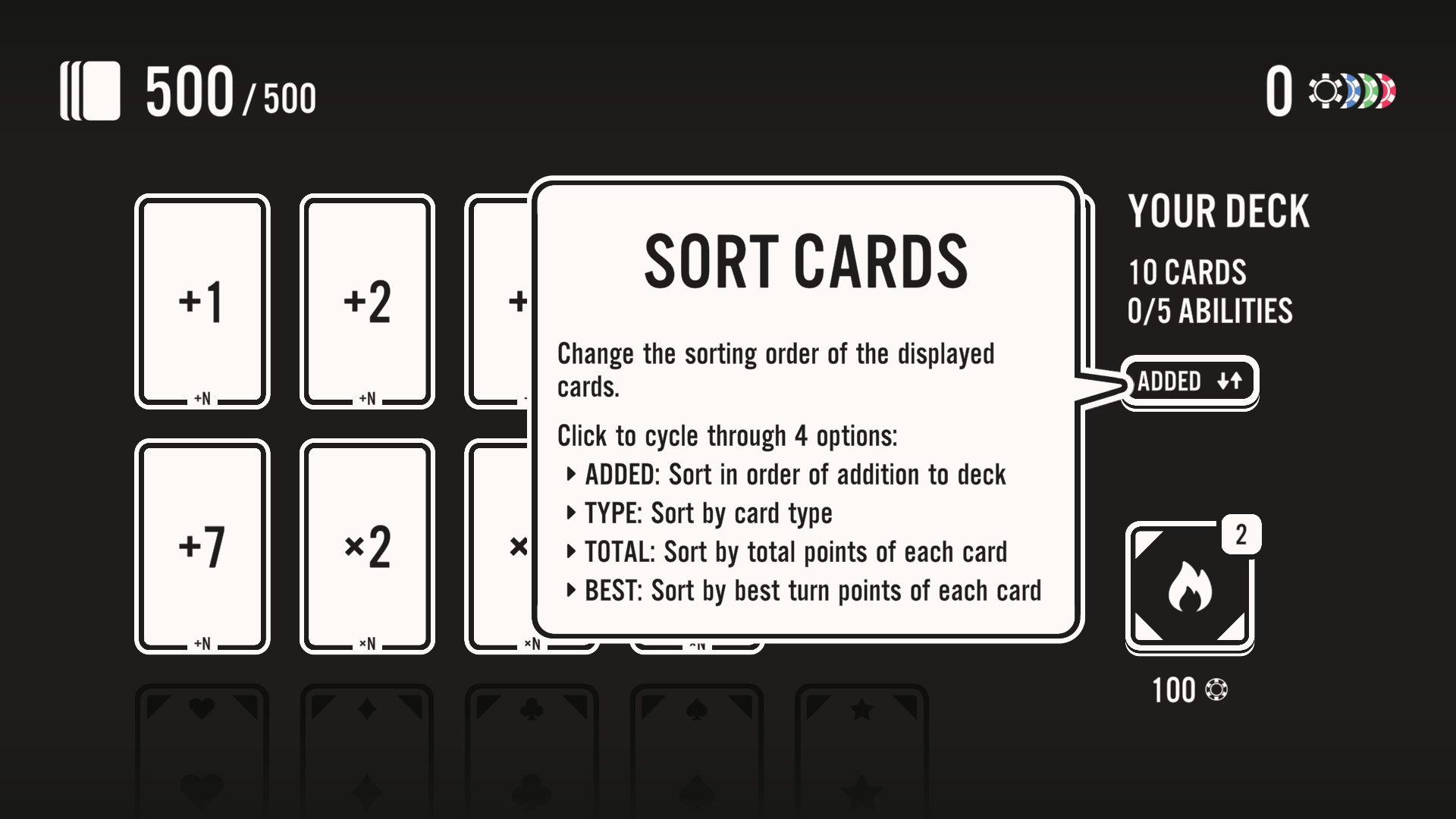
Maybe you meant "type", in this case cards are first sorted by their type (first +N cards, then ×N, then for example [dice] cards, then [coin] cards, ecc...), and then by descending value (if the type is the same), so in your case it would be "×3", "×4", "×6".
By the way, thank you for playing, I'm happy you enjoyed the game!