
Indie game storeFree gamesFun gamesHorror games
Game developmentAssetsComics
SalesBundles
Jobs
TagsGame Engines

neb.txt is gamermaxxing

8
Posts
1
Topics
5
Followers
A member registered Aug 20, 2024 · View creator page →

Recent community posts

(1 edit)

My gosh, this is such a helpful guide. I was able to make my own font, which is a cool achievement for me. I thought it would be much harder, but to my pleasure, it really wasn’t. Here is what it looks like in my project:
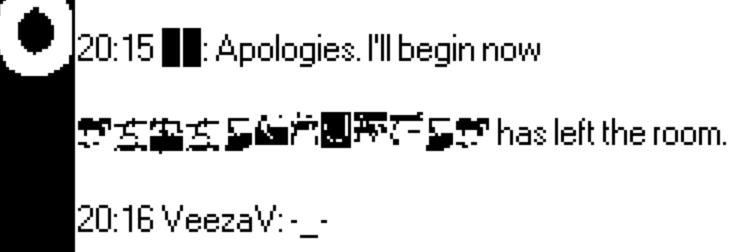
Of course, it doesn’t look perfect, but it is a promising start. I was not able to get a plain black-on-white pixel version of my original bitmap, likely because my starting image was too small. I tried converting it to plain black and white in clip studio, but that didn’t get rid of the semi-transparent pixels fully and only made the image blurrier. Importing directly into Decker and inverting made the problem worse in that I kept losing clarity/details of each character. Either way, now that I know what I’m doing, I hope this should be a quick fix to get those details back and make the font look much better. Thank you so much.

EDIT: Oh, and yes, I believe you are correct that I got the Font Importer from Coral Nulla’s pack.
(1 edit)

Hmm, I did try adding the aforementioned script to try and have the button appear when the field has scrolled down all the way instead, but could not get that to work as it was not targeting the field inside the contraption (I presume). Ultimately, with this I’m mainly trying to have a link that caps off the end of the field when scrolled down that links to the next card—and based on your advice it seems that a link in the rich text field is most hassle free way to accomplish that.

However, while linking some text at the end to the next card works, I’m still trying to parse out how to use the link feature to call an alert[] when some text is linked in the field. From what I understand, I canwrite alert[] or go[] into the scripting area to fire the event directly. Where the confusion stems is regarding if I can link to an alert that displays on the same card, then click Okay and be redirected to the next one.

Sorry, when I refer to the Font Importer, yes I’m talking about that post. I can’t for the life of me remember where I got it from, but I’m using a deck of it someone packaged up alongside a set of fonts. A quick test with (what I believe were) 1-bit black-on-white versions of my bitmap images resulted in black and/or missing boxes in place of characters in the importer—so I’m guessing the Font Editor will be my best bet.

Oh, I think I see. Let me see if I have it correct: with “sheet” mode and grid, can I import my image, draw/move/adjust the placement of characters to align with the DeckRoman ones, and then export that image to the Font Importer tool? Or do I select apply on the Font Editor once I have the characters in place? In that case, once my characters have replace the template model, can I just drop the deck onto my project to import the font? I feel like I’m making it sound a lot easier than it must be, but that is my understanding so far.

(1 edit)

Hey again. I’ve made a ton of progress, much more than expected, but am now running into two separate problems.

The first: While trying to use the Mac Windows Contraption, I’m unable to figure out how to embed a button into the rich text field as the original comment posits. My goal is to have it such that a player scrolls, reading the field, and finds the button at the end—within the field, and not like this post. I don’t want to break the contraption by fiddling around with it too much as I already have a copy adjusted for center aligned text (ie. MacFieldWindow.center). If this is not possible, I believe I can just change the font to a smaller size and add the button on top so it just looks like it’s embedded in the window.

The second: I’m struggling with how to get the bitmap I extracted of the fonts I want to convert into a usable format for Decker:

When I try importing through Font Importer, all I get is an empty box and an inability to actually change anything. Please let me know if I’m missing something, but as far as I can tell, all you need to create a font is the bitmap image, no?

To make sure I understand what you mean: I can edit my font in the Font Editor and important that .deck into my project to get the edited font the same way one imports any other Resource? If so, I believe I understand how to move forward.

Thank you for guiding me towards the Interior Contraption. I intended for this game to be a desktop exploration type of experience where the player goes through redacted files; however, after taking a look at that contraption, I have an idea, though I’m unsure about its feasibility.

Is it necessary for the card being revealed by the contraption to be inverted? My project’s backgrounds are currently all black, so I was wondering if I’d need even to make the revealed card a different background. The idea your suggestion gave me was to create a sort of magnifying glass effect where the card revealed is the same, just with the unredacted/unhidden text.

  1. After some slight experimentation, I was able to figure out how to edit character 255 to be an all black blank character; however, I’m a tad lost on what to do next. How do I exported my edited version of the font I want to use into my Decker project? Do I have to add the font editor as a resource in order to edit in my .deck? Additionally, I theorized that because Decker fonts are bitmap, I would be able to export my glitched fonts to bitmap (pngs?) and then import using the FontImporter tool. Unfortunately, this poses another pair of problems: 1) When I imported my sheet, it came up blank, and 2) I am unsure if I need to add the FontImporter as a resource to my .deck in order to add fonts to the project.

  2. Thank you for the recommendation, but contraptions are very much beyond my ability to understand right now. However, based on ahmwma’s tip about the Interior Contraptions, an idea came to mind. By using me.toggle[“solid”], I presume I’ll be able to have it so that if a player clicks on the field it can switch out with a version of the same field that has the text “highlighted” (ie. white text with black background)?

(1 edit)

Hey! So I’m looking to do several text-related things for a project I’m porting into Decker. The original text of the story, written in Libre Writer, makes use of custom fonts that appear to pose a problem.

  1. These characters (████) are used in lots of places to form redacted text; however, upon pasting into a field widget, they look like this (��). Is there a font I can use, or method of rending the blank space characters that does not turn them into the little error diamonds? As they occur a lot in the story, I would really like to find a way to include them

  2. I believe I know the answer already, but the only fonts that can be loaded into Decker must be made in the Decker format—correct? I ask because this story makes use of two glitch fonts (Example A, Example B) in order to hide text that can still be highlighted, thus hiding the contents in “plain sight.” I would love to find a way to replicate this in Decker as much as possible due to the fact that this interactive/exploratory element is key to the original story

  3. Is there a way to lock a field from input, while still allowing players to highlight the text within? There are portions of text I would like to colour white so it appears a field is empty—until the player tries highlighting it to reveal (another) hidden secret. I know I can use this contraption to colour the text, but will it still be visible when highlighted?

Apologies for all the hidden text. Turns out it’s much easier to write a story that does weird text stuff than it is to convert it into a game. These are all my questions for now; but if any more come up in the process of making this game, I hope it will be alright to continue posting in this topic. Many thanks.