

Have you ever heard of Minilyrics? Little program that downloads .lrc files (aka timestamped text files) and displays them in sync with the song like it's karaoke, compatible with most music players (...or at least it was a decade and a half ago). Plenty mp3 and mp4 players were compatible with the .lrc files themselves if you loaded them in alongside the music files, made long bus rides a bit less boring, actually being able to read the lyrics (...assuming no particular line was too long for that teensy little LCD screen, some .lrc files required a bit of fine tuning in that regard, heh). Any way point is, what you're talking about is tech that actually exists, and has existed for a long time. It wouldn't be that hard to re-dress it as an in-game thing, beyond game-specific logic (such as getting expies to stop singing if they drop the mp3 player or are being mauled to death). I've also found https://lrclib.net/docs as an alternative to Minilyric's own database. Bit more modern it seems, might be easier to work with.
jollov
Recent community posts
Ah yes, "terrified of changing your controls", as if it wasn't what I've already settled on doing every so often when I'm faced with a collect-heavy task in the game again.
The very point I was trying to make in my reply is that things are not as clear cut as one may think from your reply to Draglorr. For one, if you are to swap press and hold, it won't necessarily be a one time thing; and two, you'll have to rebuild your muscle memory, so be judicious about when to swap.
And do try to imply whatever you may about my skill or attention span or whatever your point about a quarter second delay is, but I'm old and tired and I did not come to VotV to play a rythm game and test my timings and reaction speed every other interaction.
I believe you're already aware I've already said my piece before on why hold-based modifiers are bad, so if you do wish to discuss that in depth (and I would hope you'd be doing so in good faith) I suggest you do give this chain of comments https://itch.io/post/14684652 a full read and continue the discussion there.
"Figure out which thing you try to do most and make that the press action"
Well, do help me decide then: I do a lot of collecting the first couple weeks, picking up trash and cleaning the base. Once that's over, holding becomes the main thing to do, usually. And next time I have to start a new save (eg: 0.9.0c, 0.9.1...) I'll go back to collecting being the main thing.
So... Should I be switching, never getting to enjoy the fruits of a fully developed muscle memory? Should I have to "tough it up" and suffer through the first 10-20 hours or so of the early game being R-hold heavy, when I'm already struggling settle in, for the sake of a smoother experience later on? Or should I stick to R-press being collect for the sake of an easier early game, at the cost of a more annoying rest-of-the-game experience?
Besides, far as I'm aware you can only swap press and hold for R, not E.
After some more fiddling, seems to me the issue here is the old "Interaction menu reset" setting, which I had disabled. For all I know I may have had it that way since 0.6, if it was there back then still. And indeed after enabling it I get the behavior you describe, where every new object you DO have to scroll to whatever option. So, I can understand now where you're really coming from, it would have driven me nuts to play like this too. Probably why I had that setting off.
And likewise, I do hope you can understand where I'm coming from now, having now seen how easy it used to be for me to scoop up trash and drives out a table and what it must have been like going from that to 0.9 and having to deal with a choice of either constant delays or purposefully signing myself up to re-relearning how to use R later in the game.
And I have to punctuate the part about me not liking having to relearn controls. Which, hey it is true, you're not really wrong there, and I doubt anyone likes going through that process. But I'm not so naïve as to base my views of the new controls on having to go through the 0.8 to 0.9 relearning process, an once in 2-3 years event. I'm basing my views of the new controls on the possibility I may have to go through the process of re-relearning how to use R every time I want to start a new save.
Moving on, I've also been practicing your workflow and there's something I'd like to know: how low have you set the delay, exactly? I'm at 0.18, from the 0.2 default. I am literally incapable of lower, I've already had to keep increasing it to stop accidents. And 0.18 speed still doesn't feel as fast as it looks in your video.
And on the subject of possible differences: what's your mouse's mousewheel like? Every mouse I've owned over the past two decades had the wheel move at granular increments and stop, which you can feel slightly click under your finger, and only a couple have had a button to let the wheel rotate freely. So as result I very rarely overshoot, usually just undershoot. Is your mouse different in that regard? Your habits, maybe, preferring to let the wheel rotate freely? I've noticed which mouses that let me unlock the wheels rotation, I usually need to unlock it to achieve the same max scrolling speeds as mouses that don't, so I can understand if you prefer to leave it unlocked 24/7.
And listen: I spent the weekend learning the new controls and giving them a chance before posting, precisely to ensure it wouldn't be nostalgia glasses or anything of the sort clouding my judgement. This entailed weaning off my 0.8 muscle memory, fiddling with the delays, realizing I couldn't go lower and trying out swapping R's tap and hold functions and weaning my still nascent R muscle memory, cleaning up the base as I finish getting used to the controls and it's quirks, learning new habits such as performing a hold->store unless I'm storing multiple items at once to save myself the time from holding E on a crate, realizing my choice to to swap R's functions was now holding me back and undoing that, weaning off my (now slightly better rooted) R muscle memory, and then playing longer still trying to cement all I've learned. ...Until I realized the treehouse was broken and I'd likely have to do a new save once the patch drops.
The above paragraph not meant to be an "oh look how I have suffered!", but rather me showing you that I have put honest effort into getting used to these controls and ensuring views aren't colored by nostalgia, an irrational distaste for change, nor preferences borne solely from past habits. In essence, this is meant to put into perspective exactly why I found your initial comments about nostalgia and being scared of change as rude and dismissive, as it essentially erased any of my lived experiences with 0.9. I am content you acknowledged that earlier already, and entirely glad that you are now actively engaging with my points and deeply elaborating on yours. And I want you to extend this to the idea that my arbitrary preferences may not be solely due to old habits, here.
And as much as I'm of the idea that criticism is no less valid merely because the critic lacks the expertise to provide ideas in how to improve things, I must point out that I did provide such an idea. I really wanted to delve into that at first, with tables and comparisons between usecases and such, but it is getting really late and this post is getting long enough already. So I'll have to guess ahead and summarize*:
Consider an updated 0.8 Alt+context based scheme that gets any 0.9 goodies, as long as they don't collide with existing controls nor involve having holding down a button perform a different action than tapping it: We're talking storing a held item directly into a container, precision placement... all that stuff.
Consider 0.9's Tap-Hold.
Now, consider a modified 0.9 Tap-Hold scheme that gets any 0.8 goodies, under the same restrictions: Far as I can tell, what's missing here is a way to collect an item if you're already holding something. "Q", for example, since context menus are out.
Consider a fourth, nebulous control scheme, of which we know tapping R behaves as in 0.9 by holding/placing items, and tapping Q collects items. This is based on the idea I had floated: to let players rebind those silly Alt combos to something else.
Compare the four. What I believe right now would come out of it is these points:
- Both Q-R and the modified Tap-Hold are better than the traditional Tap-Hold: Obviously ambiguity is resolved for collecting while holding, but that's just an added goodie. The real hitters are the fact an option that we now have two options with zero delay,and my delay issues with Tap-Hold are gone: I'm no longer torn between dealing with harder QTEs or having the game twist which way I prefer R to work during nor between playthroughs.
- Now being equal, the modified Tap-Hold and Q+R are obviously better than dealing with Alt+context's finger twisting combos, even with all the added goodies.
- So then, what's the difference between Q+R and the modified Tap-Hold? Looking at your drive workflow as an example, comparing Q+R and the original Tap-Hold, under Q+R you'd be doing the same number of key presses, Id spare myself the delay, and we'd both go from needing two keys to three. That tradeoff is comparatively small, and I'd readily agree hinges on arbitrary preference here. Knowing this, the modified Tap-Hold's advantage is obvious: flexibility, the best of both worlds without any collision. Players that don't like to hold down R or can't get the timing down to pleasant, just use Q; players that don't want extra keys involved in a sequence, just hold down R.
So, flexibility. Which looking back, is also the thing I liked about context menus: the choice between scroll and E, or a sequence of keys if you're not accurate with scrolling. Having the game allow for arbitrary preference is a good thing. I know you've made note of this, supporting the idea of having a toggle between the two, which had both schemes been equally terrible then yeah, it'd be a form of flexibility. Delays, their buildup, and the alternatives being higher user error or periodic control re-learning phases in a game where time management matters and errors set you back, made Tap-Hold worse either Alt+context or potential Q+R schemes, but seeing it in the light of a potential modified Tap-Hold? The difference between old Alt+context and old Tap-Hold is close enough they're now merely equally terrible instead.
This is why examples such as your drive workflow are so critical and matter to me, more so now that I do understand the point of your example better. Thank you.
I'm going to bed for now, and I gotta make a note to propose this in the feedback form tomorrow as the more I think on it the more promise it shows. I've no answer for what keybind to use that would do the equivalent for E and Grab/Use... but I'm not a gamedev. There's a reason why I think you shouldn't be an expert that's capable of good feedback in order to be able to give criticism.
* Spoiler warning: I did not summarize, by any metric.
Alright, look, I promise to get to the rest of your post later when I can, but for now while I'm on break I've only time to address one here and it's the one that's puzzling me most because clearly our experience with the context menu are being completely different for some reason :
If I scroll to an option, look away, then look back, the option remains. It remains if I look at a different, 3 option object (including tables). it even remains selected if I look at 4 option object, such as notebooks. It does, indeed, reset when I look at a 2 option object, in this case drive boxes. I scroll again, and this time rather than looking around, I spam E and collect everything: once again, the option remains selected unless I look at drive boxes.
I have to point out this is 0.8.0, rather than 0.8.2, as it is what I had immediately available, so I can't rule out something having happened since that would disrupt this behavior.
Ok, I need to reiterate: I'm talking about improvements that can only come about only as a result of the hold-based controls and the removal of context menus.
I like the precise placement tool. I like the capability to put held items in containers without worrying about my own inventory's capacity. Both save me plenty of time juggling with the basic controls, and (this part is important) would have been just as helpful under 0.8's Alt-based controls. Because these tools work and are useful regardless of the controls or steps (...within reason) required to access said tools. And, as an added point, I consider collecting items while you're holding something to be as much a capability and as niche as storing held items. And you can bet I'd be complaining about the later being removed too if that ever happens.
Now, only tapping E once to grab something instead of having to hold E? That is valid as a control. And it's a change that I absolutely love. I don't think I've mentioned it, but I had to rebind all my controls from E to LMB just to reduce the strain induced by having to hold down E. I've been referring to these controls by the default bindings for convenience. But back on point: Thing is, it is valid as a control change yes, but not as a control change that can only exist under a hold-based scheme - There is nothing inherent to an Alt-based scheme that would preclude this change from being available in 0.8.
(And by the by, yes, as you may surmise from how I like not having to hold down E to grab, I conversely really dislike having to hold E to scroll through the few context menus there are now).
Also, I must point out that having the option to drag large props with E or drag specific points by just pressing Shift and E is how the game already worked, just swapped around: in 0.8, holding E on a large object drags it by a specific point, it just didn't make it visible with a line as it does now. And holding Shift+E dragged said object around as a whole, a capability I think was added on 0.8, if not 0.7. I do believe it to be a fantastic change to swap these around and to make the original drag-by-point highly visible and understandable to the player: accidentally tipping tables over was a major source of frustration to new players. The one new change here with 0.9 I believe may be that now dragging an object as a whole also allows you to rotate it with mousewheel, bypassing the need to drag by point to rotate furniture, and inherent tipping risk. And of course, these all are changes that were perfectly possible under 0.8 and by no means exclusive to 0.9's scheme, by virtue of the fact most of it already existed at the time.
As for your drive example I must preface this by saying it took me a while to understand what you were showcasing, and I even had to boot up 0.8 trying to se what the difference was (since far as I recall you only needed E to grab and move around drives), before it clicked that you were showcasing the ability to swap held items with hotbar items. Again, a welcome change, but not one that required a hold-based scheme to exist. The default key uses middle click if I recall? But I may be interpreting your video wrong still, do tell me if that's so.
By the by, booting up 0.8 has also made me realize a couple things, one you might like and one you might not:
- First, I still love context menus. Hold and collect are a single scroll (down and up respectively) away from default for most item, the second most common item type being containers with use at the bottom-most option, so collect (something you can't do on most containers anyway, due to size) is the only option that's a bit out of the way. I can scroll to collect and just spam E on all the trash, and accidentally placing the cursor over a container doesn't reset things: it shows collect for for said container, and I can go back to collecting trash. It's only, say chairs that cause a reset, and then it's just one scroll away again. Compare the time lost scrolling once per 10-20 items to the time lost holding R 10-20 times. All in all, I really miss how context menus made mass repeat actions easy, and still see no reason it can't coexist with a hold-based scheme anyway.
- Second, you'll be happy to know I've actually found myself missing something from 0.9 and it's the ability to hold objects using a single keypress, as opposed to scroll+E or E followed by R (the later being easier with my binds using LMB as E and E as R, but I must acknowledge the clunkiness of the original keybinds there). Thinking on it, I think I've had to hold items more often in 0.9 than 0.8, given all the new tasks and capabilities dependant on holding an item to use it, though I can't say whether it's so much a difference it'd nullify the value of such a direct-holding capability to 0.8; I'd bet on it still being valuable. Still, it's another capability, and so independent of how the controls to access it are implemented - We could have had this in 0.8 under "Q" or similar
Last but not least, the two points I've yet to address. My QTE and my R to hold/collect issues, for which I'd ask you to reread what I said earlier, but I'll summarize:
- Tweaking the duration pits you against the choice of harder QTEs, or having every other action take longer than usual in a game where time management is important. Neither is good
- The game can be divided into a collecting-heavy phase (cleaning the base) and a hold-heavy phase (actually focusing on tasks now you're done cleaning). Having a large number of tasks that each involves a delay is both a setback and a drain on my personal sanity. So now I have to choose between optimizing and making tasks less annoying but dealing with re-relearning part of the controls past a certain point, or avoiding this re-relearning but suffering a setback while certain tasks become more annoying.
So, to answer directly:
Yes, I do mean pressing R to pick something up or holding it to equip it instead of having to scroll through the menu for the option, the menu of which changes based on the object. I do mean holding R to put it down again. I do mean the button press duration, of which being entirely customizable in the options does little to help with the 'QTE' issues I'm having.
However, no, I do not mean anything else out of what you've listed, because on top of being positives, they were already possible under the old scheme. And a big part of this is so because most of what you list are capabilities, and not controls per se.
Recently got these official links and forms from someone in the discord (they've apparently been up there a while). I'd recommend everyone to check them out and see what's been reported and what hasn't yet:
Bug report form and Bug tracker
Feedback form and Feedback tracker
@buttered_leo, if you could add these to the OP that'd be grand, I fear these'll be lost under further reports as they pile up.
It would have been best if the dev and QA team had shared these here themselves but... Oh well, little we can do about that.
Pray tell, how is losing the ability to collect things while you're holding a tool or container "more precise"? Or, say, the metal detecting and digging example someone else brought up later in this thread?
What exactly is more streamlined about trying to use a container, but accidentally grabbing it because I didn't wait quite long enough, and flinging it around as I move the mouse because I was expecting the menu to open up? And many more instances of use vs grab or hold vs collect shenanigans brought about by turning the controls into a QTE? Even boons such as precise placement are affected: are you yet to experience the frustration of placing a book on a hanging shelf, and accidentally
Like I said at a later point in this thread, there were far better solutions and alternatives to Alt being annoying. Something I've yet to see anyone provide, is lived examples and experiences where the new controls actually made their workflow smoother in ways that only tap-vs-hold and the removal of most action menus could.
And I must point out again: "It's just nostalgia!" and "You're just scared of change!" are not actual arguments. They're rude attempts at dismissing others' experiences and opinions.
Something like Alt+R is indeed not ideal, but the solution is not to introduce stupid schemes that were only first born as a way to port PC games to console. The solution to rebind, and let players rebind Alt to a different modifier, or better yet rebind Alt+R as a whole to whatever single key or key combination players think works best.
And Alt or not, there was no reason to do away with the action list menus on most items, nor hiding the few remaining menus behind holding E.
Dismissing people's concerns as just "haha you think change is scary" is nothing short of disingenuous, and serves only as a way to shut down discussion.
Well the impression I've been getting is the complete opposite, that everyone seems to hate the new controls. It's not something you can gauge accurately without a poll (And hopefully not one restricted to just people that are willing to give away their personal phone numbers and other private data to Discord Inc. just to join the server).
But onto the controls themselves:
It is not about "getting used to them"; I already have and can operate well enough with them, and yet I still think they suck.
Tap/Hold does nothing but unnecessarily introduce delay *and* room for error. Time management in VotV is crucial, specially early game, so adding any delay to day-to-day actions a bad idea. If you want to mitigate that by reducing how long you need to hold E, you're turning the controls into a matter of skill and learning your timings. And making controls skill-based is something that runs completely opposite to v0.9's purported mission to simplify the controls.
Being able to switch E's tap and hold would accomplish nothing. If you've been playing at all you should have soon realized different contexts call for toggling R's swap one way or the other: You're doing life to life activities, you're often going to want R-tap to be hold. You're collecting trash, you're going to want R-tap to be collect. So if you were looking to be efficient with your time so you can fulfill your 5 signal quota and still have time to clean by doing that, you're dooming yourself to switching back and forth, never able to cement your muscle memory.
And picture this: the drone's here, so you go Hold the drive box, Grab the tape box, and Collect the zip disk. And then you're hit with a "not enough" space on that last step. Why? Because you're Holding a drive box, and under the new control scheme, with no interaction menus you no longer have any way to tell the game you want to Collect the zip disk specifically, and are left at the mercy of the game's arbitrary criteria that "Collect" must always collect held items first. Not only is this feature loss, you have to juggle items more as a result: again, completely counter to this idea that the new controls are simpler and more intuitive.
No matter how you slice it, the new controls are a downgrade.
Saw the issue got changed from "needs more info" to "unable to reproduce". I've no idea what exactly it would take to make testers' computers to have lower framerate, but I've sanitized my save (plentiful with photos and objects for lower FPS than a fresh save) to have just three known blips for further ease of testing (Kel, the ATV, and the obelisk). Frankly, if that and messing with graphics settings is not enough to tank your FPS then I'm at a loss as to how to help anymore than this.
Here's also a video I decided to make while checking the bug does indeed happen on this save with my PC's specs, to further illustrate the bug. It's also made me realize how much worse it's been getting since my first report, seeing such a small dip and short distance be enough. But my main points are still there: The offending blip is the one furthest from the base, and the issue happens at lower FPS.
I reported an issue with the radar skipping blips which got marked as "needs more info". I would be happy to elaborate and clarify as needed, but right now I have no idea what exactly needs to be clarified or elaborated upon (sadly, no comment was given in the tracker as to what info is needed), so if Vesper (or anyone from the bug tracking team really, just don't know anyone else) could please specify what info they need, I'd be glad to help.
Whatever it takes to get rid of the incessant radar beeping without outright refunding the entity difference module, really.
(EDIT 10/02/24: Updated link to issue, as it was pointing to the wrong row after internal bug tracker reorganization)
So, after I had the ATV dupe itself, I moved my things back into the mailbox, started a new game, got the base cleaned up and moved everything out of the mailbox yet again. Then after a reload, the ATV duped itself on this new save, yet again. This is what tipped me off that maybe the data.sav might be involved somehow.
So, I deleted all saves, including data.sav, and started a new game. Saved and reloaded while I was still at the gatehouse, not having touched anything, and this time the alarm clock duped itself. New game again, save, reload; and as expected the same alarm clock duped.
I removed all save files, repeated the process, and an object somewhere duped, don't know where. But the point was, it was neither the ATV nor the alarm clock.
Same process again: remove all .sav files, including data.sav. New game, save, reload. This time it was a drive tape. New game, save, reload. Same drive tape.
To finish it off, I restored the data.sav that had the ATV dupe themselves, and added one of the saves where a drive had duped itself. Curiously, when I loaded the game with the duping tapes, it was the tapes that duped themselves, not the ATV as I was expecting. I saved after the drives duped, then loaded that game again, and nothing duped. I made a new a save, and strangely enough, the teleport donut duped (those in the know already know what donut I'm talking about).
Here's a zip with the saves and the data.sav for each of them: https://files.catbox.moe/v45bc7.zip
Out of curiosity, I got rid of this atv-dupe-turned-donut-dupe data.sav, replaced it with a fresh copy the ATV dupe data.sav again, and made a new save. This time what duped itself was the same clock from earlier. Deleted the data.sav, again dropped in a new copy from the ATV dupe data.sav again, and this time new saves where back to duping the donut!
Is it the data.sav that determines what gets duped? Is it the data.sav's creation date, affecting any copies I try to make of existing data.savs? I don't know! I'm giving up. It's up to MrDrNose to make sense of all this. At any rate, dupes seem to be guaranteed on save and reload, no matter what I do.
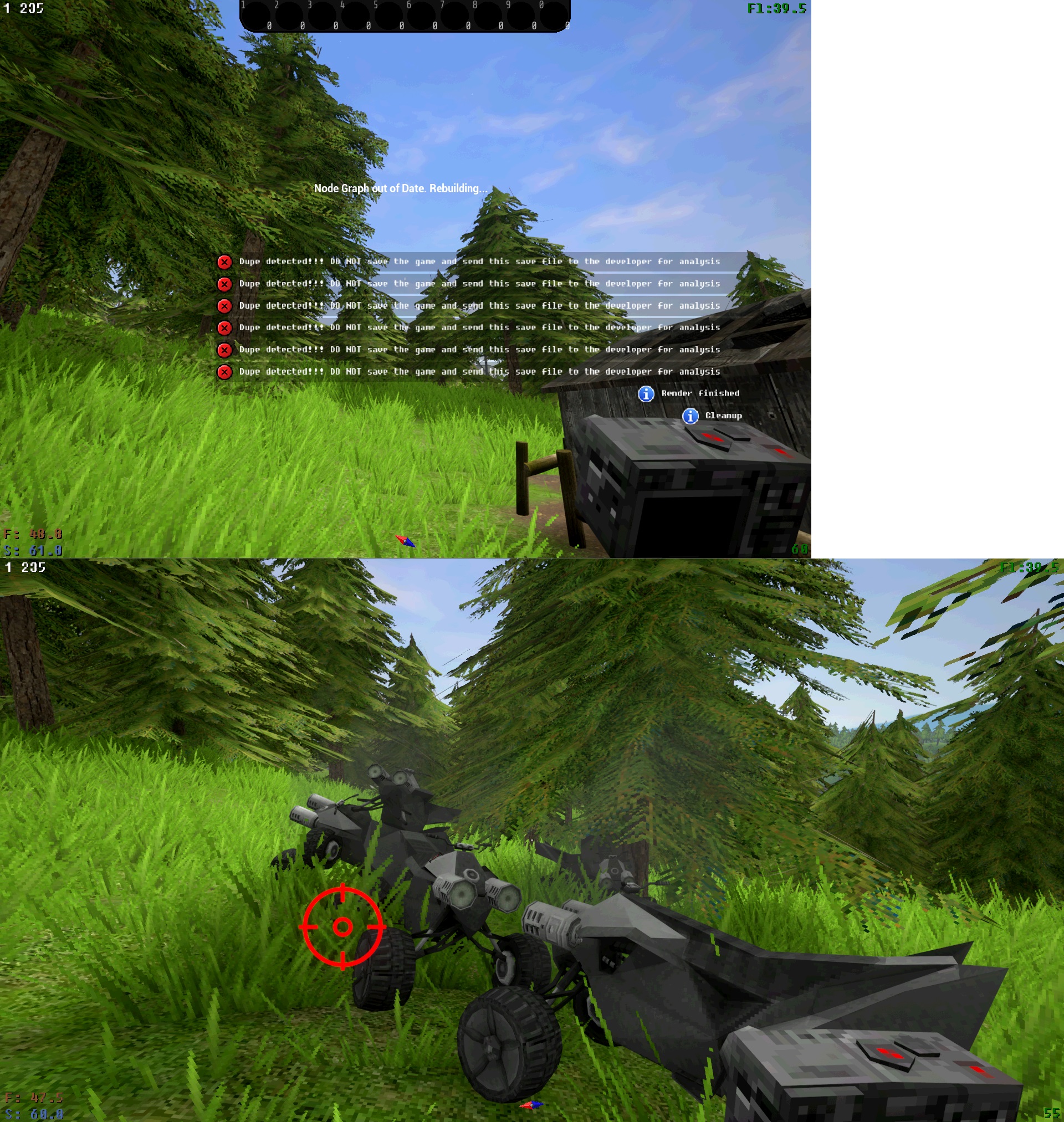
Launched myself off a cliff with the ATV and died, on reload the ATV duped and triggered the debug build's dupe detection: https://files.catbox.moe/quvzm1.sav
How bad would it be to continue on this save, by the way? I had just finished cleaning the base and migrating my things out of the mail box, but here's a few events that target the ATV and that sounds like trouble.
...On the other hand, I'm curious what would happen when there's multiple ATVs at play.