On Sale: GamesAssetsToolsTabletopComics
Indie game storeFree gamesFun gamesHorror games
Game developmentAssetsComics
SalesBundles
Jobs
TagsGame Engines

Impronivers

97
Posts
164
Followers
A member registered Jul 01, 2020 · View creator page →

Creator of

Recent community posts

Bonjour, si vous avez déjà acheté Sound Show vous pouvez redemander la clé de license automiquement la licence via ce formulaire: https://soundshow.app/license
Ou me contacter via cette page: https://soundshow.app/contactus

Sorry about this problem. I could not reproduce the issue on my devices. Maybe it is only on M1, M2 and M3 architecture, I'll have to acquire one. (or it could be to other external factors: encrypted disk, network drive...)
I'll soon update the audio engine, maybe this will fix it.
You are right, adding an option to pre-load sounds like it was before may be a reliable workaround, but it will be a bigger work.

Hello,
Did you try to change the driver in "Options" -> "Devices" ?
Do you have the problem with all the sound outputs?

Hello,
sorry for the issue you encounter.
I did not notice new performance issues on my devices.
Could you disable disable the waveforms to see if it is linked to it?
(In Options -> Visual -> Waveforms: uncheck "Show on play" and "Show on edition")

Hello, do you want the software to be translated or is it a problem with the arabic characters for the users content (sound names)?

Hi Ant,
Thank you for reporting the issue.
I just fixed it.
You can download the .apk again and it should work correctly.

Hello, You will need to use an external program such as VB-Cable (https://vb-audio.com/Cable/)

Hello, thank you for the feedback!
1. 2. Are you running on a recent/latest version of Sound Show? what is your OS (windows, mac, linux)? Those issues should not happen. Maybe contact me trough the contact form on my site so that I can further investigate https://www.soundshow.app/contactus
3. In the recent version, there is an aspect ratio option in the edit popup of the videos. But you are right that it cannot be changed once playing. I'll add that to my todo list.
What do you mean by "tiled manner"? Is it being able to play multiple video on the same screen and setting their position/size?
4. I have not noticed such issue. Maybe you could share a video so that I see/hear the issue.

Hello, Sound Show dooesn't  play sounds directly from youtube (in older version video from youtube where supported). You need to download the sounds locally first in a supported audio format.

An other Linux user had a similar issue. Here is how he solved it: 

"I was using directly the "SoundShow.x86_64" in the file. And my computer would not chose to use the dedicated GPU.
So what i did is : Right click on the Start Menu and then modify the menu Select the menu i wanted to put a new item in, and click on "New item" on the right And then set up a name and the path of the Soudshow.x86_64 and the most important thing : Check the box to ask linux to start the software with the GPU when available (Where OpenGL is installed)"
I hope it helps

Thanks for the kind word.

Spotify integration is something that has already been asked by other users but sadly that won't be added because of the restrictions to use the spotify API

You can see my detailed answer to another user on the Sound Show forum
https://www.soundshow.app/forum/feature-requests-2/spotify-integration-111

(2 edits)

Hello,
It should automatically open your older library. 
Did it start a new project with the default sounds?
maybe contact me through the contact form on my website so that I can help you by email.

Thanks for the kind words.
I plan to add the possibility to "lock"/"unlock" items and a "lock on played" option. It won't make items disapear but make them appear locked and prevent the trigger. 

For the users that already bought the software and don't find their key, there is now a way to automatically request by indicating your email : https://www.soundshow.app/contactus

I don't know what is Opus? Can you give additional info or a link

Bonjour, il y a désormais un seul téléchargement pour la version gratuite et Pro. La version Pro est activée via une clé. Vous avez du recevoir  votre clé par mail. Si vous ne la trouvez, n'hésitez pas à la redemander via le formulaire de contact: https://www.soundshow.app/contactus

Hello, you can't directly put a zip in Sound Show. 
Unzip first your filles. Then you can then drag and drop the entire folder (or the files) from your file explorer into Sound Show

(1 edit)

Hello, do you mean a translation of the software (menus, options...) or your own texts (button labels...)  ?
Arabic characters are supported for your custom label of buttons but it's seems missing the right to left options.
I'll try do to add full support in a future update.

There seems to have been an error during the upload. I re-uploaded it and it seems ok now. Sorry for the issue.

There is no direct integration of Stream Deck currently but you can make it work by using midi (need the Pro version of Sound Show).
Here are some information how to do it : Forum post

Thank you for the bug report!
I just uploaded a new version that fix the issue with the visual editor

Merci, très bonne année à toi aussi :-)

(1 edit)

Hello,
Sorry to hear about the crashes.
You can contact me through the contact form so that we can exchange about the issue by email (versions, logs..) : https://www.soundshow.app/contactus
In the meantime, maybe disable loading of waveforms if they are active to lower the burden on cpu/ram (under Options =>Visual)

Yes, you can bind keyboard keys to the Sound Show buttons. Don't hesitate to try the free version to see if it fits your needs

Thank you for sharing your workaround!
In the latest release of Sound show (with the Pro version), you can configure an output to go to multiple physical outputs at the same time.
Release note:  https://impronivers.itch.io/sound-show/devlog/852811/update-18122024

Thanks for the feedback. I replied to the message you posted on the discord server.

You should'nt have any performance issue on a modern laptop. You can contact me with the contact form here so that we can further investigate the problem : https://www.soundshow.app/contactus

Thank you for the nice comment :-)
Currently it is not possible in Sound Show to have the sound replicated on multiple output devices. That's definitively something that I would like to add in the future.
In the in the meantime, you could use external software to achieve the routing of the sound. If you are on Windows, you could use the software from https://vb-audio.com/

You can press "Esc" to have Sound Show in Fullscreen. Press "Esc" again to leave fullscreen. (Note, it is better to first maximize Sound Show to have the resolution correctly set).
Thanks again for the kind words!

Thank you for the kind words :)
Sadly, I can't add payment method. Payment methods are handled by the itch.io platform and are out my control. I could maybe also go on other platforms, but chance are they will have the same issues.

On windows, you can use  vb audio cable to make the output of Sound Show be seen as an input (microphone) for your recording software

I was unable to reproduce the issue. The software runs fine on my Mac. Could you provide me with the version information for your Mac (OS + hardware)? In the meantime, I will reactivate the download of an older version so that you can use that one (SoundShow-MacOS-Pro-20240828.zip).

I can't tell for sure since I don't own one but it should work with every standard midi controller. Thus it should be ok with nanopad 2.  If it wasn't the case, you could ask for refund to itch.io support.

Thank you for reporting the issue. While I try to fix it, I temporarily reverted the mac download to the previous release.

You could also make the latest version work by doing:

  1. Open Terminal
  2. cd to the soundshow.app folder
  3. xattr -rc *.app
  4. Double-click, it will open

Thanks for the feature suggestion, a visual editor would be a good addition. I'll consider adding it in a next release.

In the latest releases, the communication has been changed to websocket. This should hopefully fix your connection issues. Be sure to update both Sound Show and Sound Show Remote

Go to the Options view and then to the "button commands" tab. Then you can click on any button and changes it's assigne key. Note that you assign a key to a button and not directly to an audio clip. If you change the current tab it will be the other audio clip at that position that would be triggered.
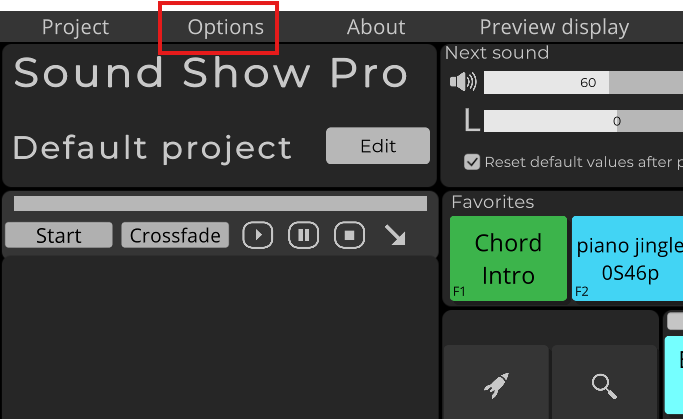
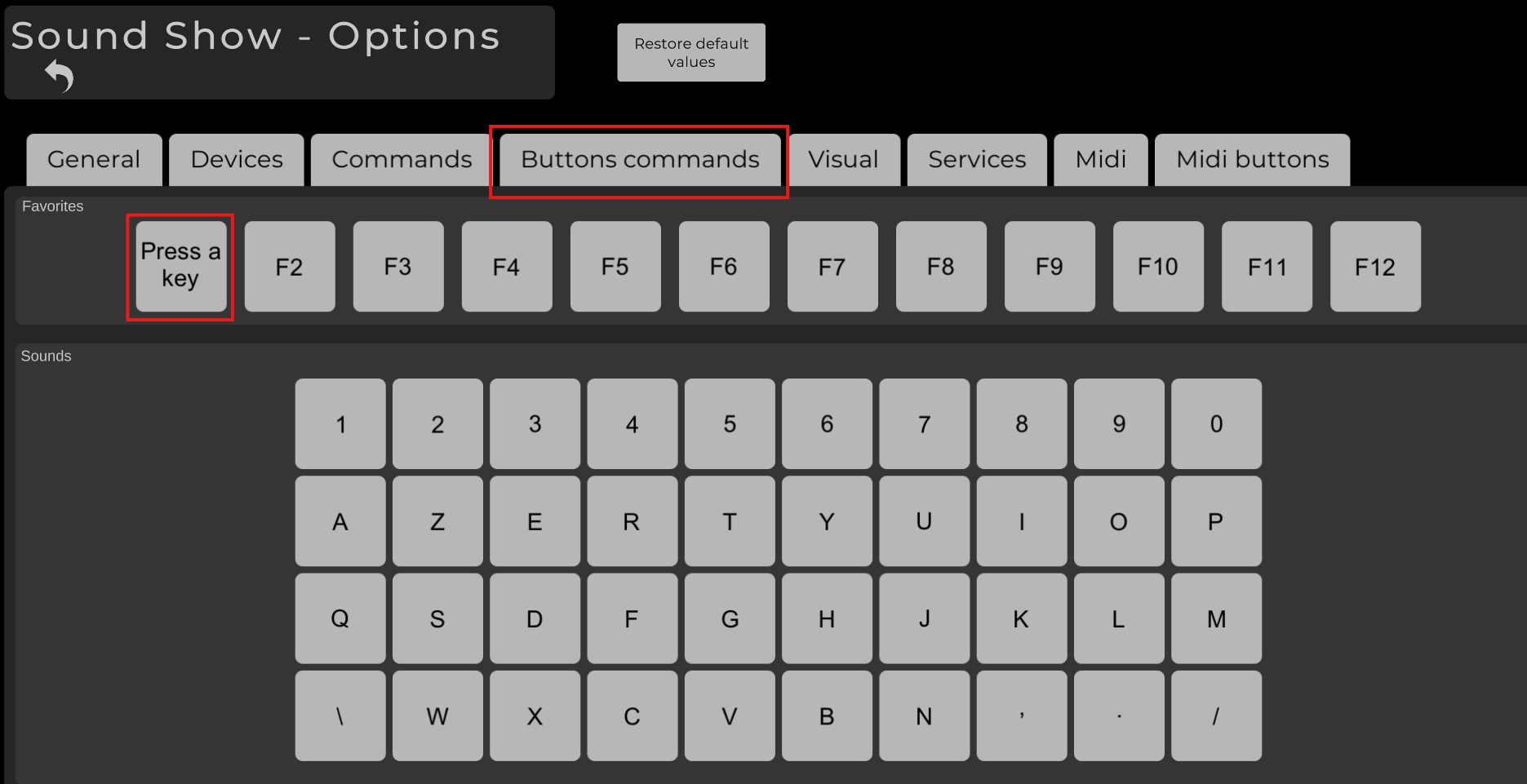

the buttons that where there have been replaced by the menu bar on top

Hello,
Not sure about your problem. Is it for streaming or sending in a voice chat?
If so, Sound Show plays sounds only your output device but you can use software like VB-Cable and voicemeeter (https://vb-audio.com/Cable/) to have your output goes into an input device.
Hope this helps.

Thanks for the additional info.
Yes, some UDP traffic may be blocked by some routers.
Websocket implementation will be more reliable in all kind of networks. I've a version that already works with websocket but that need some more polish. You can expect it to be part of a next release  (probably in max a month). If you need it before let me know. 

Hello,

Sorry for the connections problem

Could you tell me the info on the server window on Sound Show desktop ?
I noticed that there could be some problems when there are a lot of sounds preconfigured. If it is the case, maybe try with a smaller library. 
The current technology that I use for the communication seems not reliable on some network. I'll try to switch soon to a websocket implementation that will be more reliable (and that will allow external program interaction through an API)

I'll add the possibility for multi-window mode. Thanks for the suggestion!