

Linux version, please.
Gofri
28
Posts
2
Topics
5
Following
A member registered Jun 13, 2017
Recent community posts
Game won't even start, just immediately crash. This is what printed into the terminal:
Caught fatal signal - signo:11 code:1 errno:0 addr:0x16
Obtained 27 stack frames.
#0 0x007f36e123e540 in __sigaction
#1 0x007f36e28b1f58 in AtomicStack::Pop()
#2 0x007f36e21a8a17 in BucketAllocator::Allocate(unsigned long, int)
#3 0x007f36e21a954d in DualThreadAllocator<DynamicHeapAllocator>::Allocate(unsigned long, int)
#4 0x007f36e219b931 in MemoryManager::Allocate(unsigned long, unsigned long, MemLabelId const&, AllocateOptions, char const*, int)
#5 0x007f36e2196cf1 in malloc_internal(unsigned long, unsigned long, MemLabelId const&, AllocateOptions, char const*, int)
#6 0x007f36e1eee8b3 in FMODMemoryAlloc(unsigned int, unsigned int, char const*)
#7 0x007f36e3490075 in FMOD::MemPool::alloc(int, char const*, int, unsigned int, bool)
#8 0x007f36e34b624b in FMOD::OutputALSA::addALSADriver(char const*)
#9 0x007f36e34b64a8 in FMOD::OutputALSA::getALSAConfigDrivers(char const*)
#10 0x007f36e34b66ac in FMOD::OutputALSA::enumerate()
#11 0x007f36e34b68b4 in FMOD::OutputALSA::init(int, unsigned int, int*, int, FMOD_SOUND_FORMAT*, int, int, void*)
#12 0x007f36e34a75f8 in FMOD::SystemI::init(int, unsigned int, void*)
#13 0x007f36e349c9ae in FMOD::System::init(int, unsigned int, void*)
#14 0x007f36e1ef1523 in AudioManager::InitNormal(bool, FMOD_OUTPUTTYPE)
#15 0x007f36e1ef066a in AudioManager::InitFMOD(FMOD_OUTPUTTYPE)
#16 0x007f36e1ef3e2a in AudioManager::AwakeFromLoad(AwakeFromLoadMode)
#17 0x007f36e2a238d5 in AwakeFromLoadQueue::InvokePersistentManagerAwake(AwakeFromLoadQueue::Item*, unsigned int, AwakeFromLoadMode)
#18 0x007f36e2a231f0 in AwakeFromLoadQueue::PersistentManagerAwakeFromLoad()
#19 0x007f36e2a082ae in PersistentManager::LoadAndIntegrateAllPreallocatedObjects(PersistentManager::LockFlags)
#20 0x007f36e2a088d5 in PersistentManager::ReadObject(int, AwakeFromLoadMode)
#21 0x007f36e21e072e in PlayerLoadGlobalManagers(char const*, char const*, unsigned int)
#22 0x007f36e2758bbe in PlayerInitEngineGraphics(bool)
#23 0x007f36e2a3cac5 in PlayerMain(int, char**)
#24 0x007f36e1227675 in __libc_init_first
#25 0x007f36e1227729 in __libc_start_main
#26 0x00000000400569 in _start
Aborted (core dumped)
How to change the key for entering buildings from W to other key, in the linux version?
I have 3 save slots, and in two of those saves somehow the W-key is changed to other key that I want to use. For some reason in one save the key is not that what I want, but it is the default W. I don't know how I managed to chage, because there is no option for that in the settings menu. When I search for it on the internet, every single thing that I find are talking about settings.xml file. That file does not exist, all files (save and settings) are '.sol' files.
I recently find out about this game and I was so hyped about it! Nice looking simple (vector-graphics like) graphics, comnplex strategic gameplay and even it is free!
I wanted to try out, but I can't and now I'm very disappointed!
Fonts are unreadble, blurry. Not everyone has a wall-sized 8K resolution display. I tried it on a Core i5 laptop with 1366*768 resolution. No scaling option for the UI or the fonts, everything is so tiny. I can't read anything, it's just unplayable. Why don't you use normal TrueType fonts? Fonts that can have different sizes, and can be readable even if they are very small.
Why releasing a slow debug verison? Don't you know that debug versions at least 3 times slower than release versions? Why there are gazillions of runtime files for many different operating systems when the game is Windows only?
Why you ruined it with all those unnecessary garbage and other nonsense that I mentioned?
About the zoom issue:
I also thought about it; that maybe it is OS-related, because I'm using Arch Linux. I know that there is no version for that particular type of Linux; I downloaded the DEB-package and extracted the files using 7Zip, and find out which files needed. I copied the 'ditherista' binary file and the 'libdither.so' file into a folder and it worked. So, maybe that mess up with the mouse. I could use Wine-emulator to run the Windows version, but that is not really a great option. I will try out and see if this reversed-zoom issue still happens.
I didn't know about that how Amiga HAM works and that it is not that simple to implement it. Accuracy is important, at least to me, so loading palette in a image-editing software is not an option.
About those 32K and 64K colors. I think you misunderstood why I really like to see those. It's not about that, that with more color I can get better results. It is about emulating the early 90's DOS era look when video cards can't display 24bit True-color, only 15/16bit colors. It is more about emulating that look using different dithering, to achive that kinda oldschool aesthetics. How fast or slow will be the conversion is not really a problem to me; obvioulsy because of the whole retro-thing I don't work with really large images.
Plus/4 palette:
I use the Yape emulator which is an emulator for Commodore 264 series computers. IMO this emulator has the most accurate Plus/4 colors. http://yape.homeserver.hu
There is an SDL port of it (old version but the colors looks the same), you can check the source files and find out what palette it use. https://github.com/calmopyrin/yapesdl
The VICE emulator is more of an all-in-one Commodore emulator, and this one can load palette files, and also include different palettes! It is includes the palette from YAPE; the PAL palette looks the most accurate IMO. Other palette-files (or the built-in palette) looks weird; they are too much pinkish.
https://vice-emu.sourceforge.io/
If you grab the 'vice-3.10.tar.gz' and extract it, in the /data/PLUS4/ folder you can find the 'yape-pal.vpl' palette file. That is the good one. This palette extracted from a screenshot made with YAPE. I don't know how accurate palette you can get from a screenshot. But it is defenitely easy to use, it just a text file with RGB values.
Better to check the YAPE sources to be sure.
I use this tool recently a lot and there are some things that I like to share about this tool.
The thing, that the actual calculation instantly running, as soon as the user select a method, I think it is a bad practice. This is just simply wastes of time. In colored mode, there are many different settings you can choose from, in countless combinations.
Like different palettes, color comparison, color reduction mode, count unique pixels, etc. Every single time, when anything changed, it just re-runs the calculation. Because of this it is impossible to select certain combinations at once. This become annoying even if we have a tiny image, just the number of redoing the dithering makes it so slow. Unnecessary wasting of time and using the computer for unnecessary calculations.
No actual calculations should run, until the user want to do it. Add buttons to start/stop(cancel) the process.
Also related to this, to make things run even more smoothly is adding a 'preview'. Like a small window, a selected area in the image or something like that. Only show a small part of the image, which can be selected by the user. Doing the dithering just in that small window/small part of the image, saves a lot of time/calculation.
There is a thing, that I really don't like is that the software defaults to given method and color. Actually to mono and the very first method. When switchhing to color-methods, it is also defaults to given palette; Macintosh(16) sRGB. That would be nice if the program can remember the last used method. Also adding a 'settings' menu and the possibility to select what should be the default. Like different dithering method, mono or colored, and also which palette or any setting to use by default.
Why the zooming works backward? I don't think I can recall anything; any another graphic software, or even a game that using the mouse-wheel zooming by default like this tool. Even after so much time using it, still, every time I zoom the wrong way, because this reversed zoom. When rolling 'forward' that should be the zoom-in, and rolling the mouse-wheel 'backward' should be the zoom-out.
I really like those countless numbers of palettes, especially that there are palettes for old homecomputers. But I really miss the Commodore Plus/4's 128(121) color palette! Please, add it!
Also I really miss that when using reduced palettes there are no option for more than 256 colors. Like the 12bit 4096 colors on the Amiga. And the 32K (15bit) and 64K (16bit) number of colors for highcolor images.
Recently I use your tool a lot, and it is already annoying that the ditherig actually instantly running when you select a method.
Simply just don't run, start, calculate (or how I can say it) the dithering; just select it. Add a button to actually activate the calculation, so there will be no issue about freezing. I think the best solution would be that adding two buttons; one to actually run the calculation and obviously a cancel button. This eliminate the issues with large images.
Impossible to extract the Windows version on Linux, because of the Windowsian folder structure in the zip file. There is a bash-script I always use, that supposed to fix the folder structure within zip files for Linux. With this file it does not work. Never had this problem before. Please fix your messed up compression.
Edit: I downloaded the MAC version; there is no problem extracting that zip file. It is even possible to run the MAC version on a Linux, but only because the game is written in Java.
Thanks for the download.
I downloaded and tried it out. (Linux 64bit version.)
I expected a SMALL utility for quickly view textures with normalmaps. But the program is almost about 415 megabyte. Ten times more than my expectation for a tool like this!
And it is just the 64bit version, because the download include both 32bit and 64bit for some reson. So you need about a gigabyte space to decompress the ZIP. I think everyone will use the 64bit, maybe one or two people on Earth will download the 32bit. No-one want to download something twice, just than to delete the half what isn't needed. Wasting of download time and also storage space.
What is this weird look? It would be better if it looks like a normal program, that have normal looking windows and menus and text, the same as a theme that you use in your system. Like 99% of every other software tool.
Not to mention it can't load DDS texture files, which is de facto the most basic and useful texture-file format, IMO.
I did not bother to convert some texture and normal map to any other format, so I can't tell that only the DDS files not work or the program itself can't load anything.
AND WHY a simple viewing utility need to acess the Gnome keyring? For what reson?
So my answare to your question is that I really dislike your program. Useless bloatware. Or worse...
That is unfortunate. Can't you just simply change the permissions on those files?
If you don't have Linux on your computer, I think you can just boot into a Linux LiveCD and correct the permissions.
Meanwhile, I tried a few other games downloaded from ITCH.IO too, and it is very strange, but some of them have this exact same issues with permissions.
On the other hand, other native Linux games, like those I have on GOG or from Steam, never have any problems with permissions.
So it seems to be the problem not your fault!
I don't know how these things work, maybe it is somthing to do with ITCH.IO?
Or maybe the engine, the programming environment (sorry I don't know how it is called) those Linux games written, is responsible for this? Or maybe it is something to do with the Linux distro that I use? You know, there are lot of different Linux variants out there, lot of thigs are so different compared to other Linux, maybe on an other Linux this problem won't occures?
(I think I have an unused laptop somewhere, with different Linux istalled on it, so I can give it a try and see if that machine have this same issue. But, you removed the Linux download...)
I think you should keep the Linux version, please leave the download up, because -regardless of this problem- the games runs without any problem. And in my experience, this is a rare thing! Beacuse (sadly) ~50% of the Linux games I downloaded from here doesn't even work no matter what. They just simply doesn't work. But yours works perfectly after fixing those permissions.
So, how about keeping the Linux version, and simply write it in the descriptio, that on the Linux version maybe the user need to change the permissions. You know, more platform, more people can play your game.
And of course, I'm very happy that you considered what I wite about the gameplay. Keep up the work!
Hi. I checked the game and find a few things that prevent the game to run by default.
First:
I always using a file-manager and just simply clicked on the "Content" file. Nothing happened.
Turned out that the executable bit are not set at the "Content" shell-script, so the game won't run by default.
Second:
After I set the executable bit, and clicked on the file, the game still can not start.
So I run it in a terminal and saw that it gives this error:
"Content: line 17: /home/gofri/Games/Content/data/ags64: Permission denied"
I cheked that file and all the permissions are fine.
After a while I figured out what was the problem:
I never saw anything like this, but the problem was that the access permission of the "data" folder was "none" by default.
You should fix these, because an unexperienced, casual Linux user can't run the game and maybe think it is not working.
After I manually corrected all these things, the game runs perfectly, but I find some things that prevented me to play your game:
My native language is not English, I need way more much time to read everything; the text is changing too fast.
Because of this, I just quit the game at the "intro" sequence, I lost the whole thing about the third sentence...
It would be great if the texts advance only by pressing a button (mouse or keyboard).
Also I find the music too queit, and there is no option to set it separately.
I really want to play your game, because I really love your pixel art! Looks really cool! It reminds me of the DOS era adventure games, that I liked very much, when I was a kid.
Thanks for making it, I hope you will fix and improve the game!
I tried to run the Linux version, but nothing happened.
I'm using the latest Manjaro Linux and the latest (25.4.0) version of the Itch.io program. I downloaded it from the website and installed manually, because the verison from AUR is outdated and Linux users have to install manually the newer versions. Some (a very few, to be honest) games runs fine.
So I look at the files and find out there is a file called "heavensbelow" and it is 74.8 megabyte. That supposed to be the executable, right? I try to manually set it executable (I thought maybe that is the problem, because I run into this with some Itch.io Linux games.) Turned out I can't set it to executable.
So I grab a hexa editor and opened the file, and turned out the file contains NOTHING just zeros! So the file that the Itch.io program installs is corrupted. Not the first time this happened! There are a few games that is impossible to play on Linux because of this!
But the strangest thing is, when I download the compressed file from a web browser and unpack it, they are contains the working executable file.
Oh, and it would be very nice to mention in the game description or somewhere, those who-knows-what-and-never-ever-used-by-anything-else libraries, that we Linux users have to compile and install just to able to run the game.
I can't understand why those libraries are NEVER included in any Linux game, or at least mentioned in the games description what we, Linux users, need to install before we can run the games...
I done what I can; tested the game and shared my thoughts about it.
And asked some simple questions, because, if I get the answers, it can helps me understand more how the game works. And then, with that knowledge, I can find out more efficiently what are the bugs in the game.
But I didn't get answers; maybe the dev don't have time for that or doesn't even care that much about this game...
So I just posted it: if I get the answers, (than I know the dev really cares about this game) than I share more what I find in the game. Otherwise I don't waste my time on this...
Believe it or not, but I read all the posts here, but I don't care what are the other posts, because they are made long-long time ago and those tests are made on a different platform than mine. I don't even replied to another posts, because I simply focus just on the game, and not on other people (like you), and what they said. They have their own posts and replays from the dev. I don't care.
And you just come and said I'm rude... WHY? I don't said anything rude!!!
Your "thoughts in a few sentences" are nothing more just reposts to me.
Your replies has nothing to do with the game anymore. Just what you do, and what other things you try to do, or how long you are here, you and you and you...bunch of unrelated things. Just to make another useless reply to me...Oh, and I don't care that you are one of the first commenters!
"IM FIRST!!!"... Dude, get off your high horse, and stop picking on me.
Because all of this, from this point, I started to feel that you just try to insult me. You are the RUDE one, not my post!
Just stop it, don't reply to me anymore, please...
Post something about the game (in a new post), or make another video, or just go outside and get some fresh air and calm down...
RUDE? What is rude in my comment? That I shared my thoughts about the game? Or that I shared what bugs I fund in the game, so the developer can fix it? Or my suggestions what I like to see in the final game?
How about YOU play THIS game a bit and share what you think about THIS game in a few sentence?
WTF wrong with you, dude?!?!
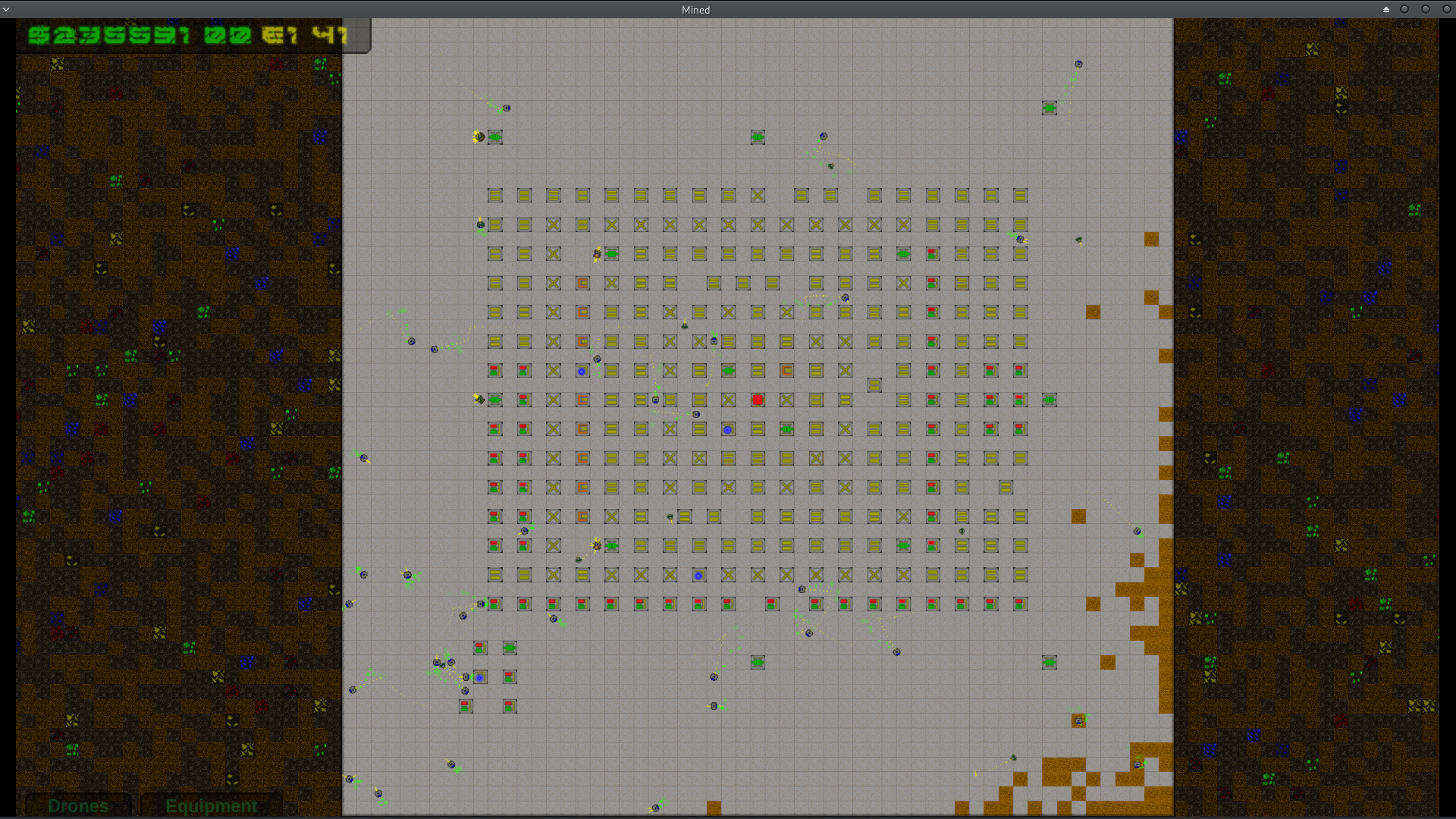
I played with it a few times, and I made more than 9 million, when get bored and quit the game.
Gazillions of drones on the screen, and I get no lag at all, even if I zoomed out as far as I can. I play it on a laptop with Intel 520 gpu. (On Linux.)
Some kind of a tooltips or something that explains more, what exactly some of the equipments do, would be very nice.
I can't figure out what the water pumps are doing. If I don't build any, the game seems to run just fine.
What the scanners actually do?
What are those distributors do exactly, how and where they distribute power?
Matter reactor seems to do nothing. Once I build some and stop mining, to see how much money they generate from power, I stared at the monitor for relative long time, but don't see anything.
What the pavings do? I see that the engineer drones build them automatically if they have nothing else to do, but why?
I have a suggestion, that if you select something to build, keep it selected, until I choose something else or close the popup menu, or maybe until I right-click with the mouse to "unselect" it. It is very annoying that I always have to navigate back to the bottom with the mouse and click on what I like to build. I don't build just one thing at a time, even in the very beginning of the game, I always build few generators. This one-by-one building is not good at all! I think there is even a bug, because sometimes it seems not selecting what I want to build; it build distributors, not what I clicked! It is do this randomly, like once when I tried to build several scanners to see what they doing, some of they somehow become distributors. There is no way that I missed the click, they are too far from each other!
And...well...the game seems to be a very-very pre-alpha something. Or at least, not much to do in it, and almost zero the challenge factor at this point. What I mean is that, when first started to play with the game, and figured out (or maybe doesn't even have to figure out anything, because it is so obvious) the coloured things are considered the ores or gems (you get the most money mining them) the light brown is the "dirt" (they mined fast, not much money in them) and the dark ones are the "rocks" (mined slower, not much money in them). So after I see this, I thought the best method is; if I try to mine in a way that I can reach the most of those coloured stuff, in the shortest path. Than I figured out, I just can literally select EVERYTHING and just sit back and watch how everything converted into money. All I need to do, sometimes build more power, more drones an collectors, maybe some drop-points so the collectors don't have to go that far.
Another thing that it is impossible to build if there is some drone on the tile or even if it just sit on the next to that tile, where I like to build. Because you can't control the drones directly to move away, you lose lot of building space because of it. When you build something they are just "blueprints", not actual things until the engineers start building them. Even all the drones can walk through them, so I consider this as a bug, that you can't put something down, when drones are nearby.
Last thing is what I like to see in your game, is that, if i can delete those "blueprints" while the engineers don't start building them, or maybe even delete the buildings.
Well, I enjoyed the game. It is very good if you have too much free time to kill or just like to watch for hours how little pixels running around in your monitor...
I really hope, in the future, there will be more things in the game. So it will be not just an "interactive screensaver".
P.S.: I found another bug. Sometimes the minders "freeze". They do mining on tiles that are already mined, and even have pavings on them. The green outline prove this, because they are there around those tiles, and the miners just stay there, don't go to mine other tiles. They just stay there forever mining the nothing...
First, you should know that I love every kind of 4X, strategy or management games.
So I really happy that you made a demo version that we can try out. This is a very rare things nowadays!
So I tried out the demo, and...I really-really-really pissed of, because of the HYPE you pushing; that your game is BENDING THE 4X GENRE! It turned out, that I don't play a SINGLE SECOND with your game, because I literally rage-quit at the character screen, and immediately deleted the whole thing!
The reason(s) why:
The text is so small, that it is Impossible to read anything, so I switched to the smallest possible resolution, because IN EVERY SINGLE GAME EVER, if you use smaller resolution the text become LARGER. I don't know what happening in your game, but the text are the same incredibly small. Literally just made out of 2 or 3 pixels and they smudged (antialiased, regardless it is turned off!). I can't even imagine what happens if I switch to larger resolutions...Maybe it is recommended to use an electron-microscope to read the text?
I started the game with the tutorial, of course, and it said if I move my mouse cursor over something it shows what it is. So I moved the cursor over a trait, and it started to write out the text about that trait, and about the 3rd row of text, the already incredibly small text become even smaller! What? Can you tell me how we supposed to read that text that is LITERALLY just a smudgy spot on my screen made out of 2-3 pixels? I never see this kind of thing what your game doing, why don't you simply just using normal fonts, so they can be read?
The next thing that made me hate your game on the first place, is those so annoyingly over-bloomed neon everything! Even the first comment on Youtube complaining about it! It literally made the whole thing ugly as hell.
Oh, and if I already mentioned the word UGLY, I tell you what is the 3rd thing (and the worst in your game) what made me "never-want-to-see-this-thingy-again".
The characters!
When I scroll through the possible characters at the character-screen, I totally understand why those kids become orphaned! 100% that their parents leave them behind; nobody want those so incredibly ugly, retarded faced abominations as their kids! Sorry, but this is the truth, they are ugly as f...! If I look at the title screen, the same that is here in the top of the page, with that 3 kid; that make those in-game character EVEN WORST! The title screen is a really masterpiece of art, I just can't believe how you managed to make them so bad looking?
I think you never will change and fix all what I mentioned, so I think you lose another customer who wanted to buy your game at first glance! Or prove me wrong!
THANK YOU THAT YOU MADE A DEMO, SO I DON'T LOOSE ANY MONEY!