Indie game storeFree gamesFun gamesHorror games
Game developmentAssetsComics
SalesBundles
Jobs
TagsGame Engines

DTMates

10
Posts
13
Followers
1
Following
A member registered 58 days ago · View creator page →

Creator of

Recent community posts

Hi,

Thank you for the detailed feedback and for taking the time to test the pack in your own map-building workflow.

Your questions were completely valid and highlighted an area where the original package was not clear enough.

While the terrain assets already contained the required road, terrain, transition, and water pieces, the pack did not explain their relationships, neighbor rules, or intended autotile usage clearly enough for users building their own map editors, TileMap systems, or procedural map tools.

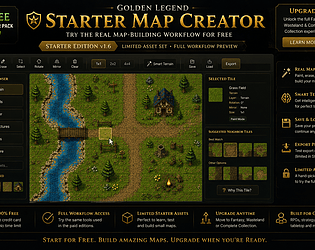
To address this, I have spent the last weeks improving both the asset workflow and the included Map Creator. The goal was to make the terrain system much easier to understand and much more practical for users who want automatic tile selection based on neighboring cells.

The new v1.4 update is specifically designed to cover the questions you raised:

• Which tile acts as the base tile  

• Which tiles are edges, corners, and inner corners  

• How roads connect and form straights, corners, T-junctions, and crossroads  

• How water banks and terrain transitions are intended to work  

• How neighboring cells affect tile selection  

• How autotiling can be implemented in external tools and game engines

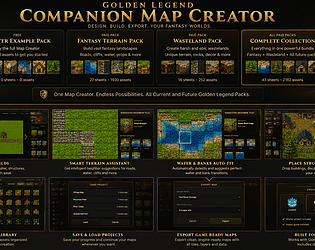
The updated Map Creator now includes:

• Terrain Paint workflow  

• Suggested Neighbor Tiles  

• Road Helpers  

• Water Helpers  

• Terrain Helpers  

• Smart Terrain suggestions  

• "Why Was This Tile Chosen?" explanations in plain language  

• Generic autotile metadata and starter export presets for Godot, Unity, and Tiled

The intention is that users can now understand and use the terrain system visually, without needing to manually inspect CSV files, JSON files, tile IDs, or bitmask values.

For users creating their own editors, HTML Canvas tools, Godot TileMaps, Unity workflows, or Tiled projects, starter export presets are now included as a practical starting point. These are generated from the same terrain relationship data used by the Map Creator.

Please note that these are starter integrations rather than full native engine plugins. Full native support for Godot, Unity RuleTiles, and Tiled WangSets is something I am actively exploring for future updates.

I am also currently working on additional improvements to the Map Creator, along with a dedicated character and creature asset expansion for the Golden Legend ecosystem.

Thank you again for the feedback. Comments like yours are extremely valuable because they help identify exactly where users get stuck and where the tools can be improved.

I hope the v1.4 update makes the terrain workflow much clearer and significantly more useful for your project. If you have additional suggestions after testing the update, I would be happy to hear them.

Thank you very much for supporting Golden Legend and for taking the time to leave feedback!

The current Map Creator version is still actively being improved, and I'm working on making the workflow much more streamlined, visually polished, and user-friendly.

To start the current version, please run:

RUN_MAP_CREATOR.command

which is included inside the GoldenLegend_MapCreator_Full_Version_v1.1.zip package.

I'm also preparing improved documentation and tutorial materials that will be published soon to make getting started easier.

Additionally, please note that the GoldenLegend_Fantasy_Asset_Pack_v1.zip already includes separated asset tiles and organized source assets, similar to those included with the Map Creator package. This means the assets can already be used directly in your own engines, editors, and workflows even without using the Map Creator itself.

The current Map Creator is an early version, and I'm actively working on improving the interface, workflow, usability, and overall experience in future updates.

Thank you again for supporting the project during these early stages of development. Feedback like this helps us prioritize future improvements.

Hi,

Thank you again for the continued interest in the Golden Legend ecosystem!!!

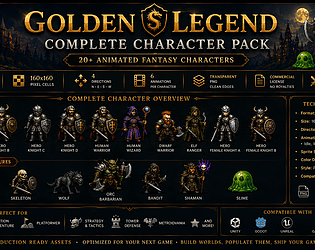
Yes, character, hero, NPC, creature, and monster asset packs are already part of the roadmap and are currently in active development.

In fact, I already have a number of working character and enemy assets internally, including directional sprite work and animation concepts. Before release, I’m focusing on the same usability improvements that were recently added to the terrain packs, such as validated exports, clean organization, ready-to-use assets, and a more developer-friendly workflow.

The goal is to provide assets that are practical for real game development rather than just artwork. Planned character packs are expected to include:

• Heroes and player characters
• NPCs and villagers
• Monsters and fantasy creatures
• Enemy factions and bosses
• Directional movement sprites
• Idle animations
• Walk/run animations
• Attack animations
• Death and hit animations (where applicable)
• Consistent naming and metadata structure
• Engine-friendly organization for Unity, Godot, Unreal, Tiled, HTML Canvas, and other frameworks

My immediate priority is finalizing the same kind of validated asset pipeline that was in the terrain packs. That includes making sure character assets can be used directly without requiring developers to manually clean up, separate, or reorganize files.

The first public character-related releases are planned within the next week or two, starting with foundational hero and enemy sets. After that, I plan to continue expanding the ecosystem with additional races, classes, creatures, equipment, items, and world-building content that all work together within the Golden Legend framework.

Thank you again for the feedback and support!!!

Hi,

Thank you again!.

Yes, I absolutely plan to continue improving and expanding the Golden Legend ecosystem. My goal is to turn it into a complete modular world-building toolkit rather than just a collection of asset sheets.

In the near term, updates will focus on making the assets easier to use in real projects, including:

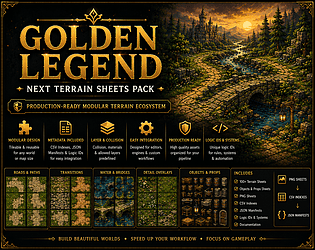
• Additional validated pre-cut tile libraries

• Expanded terrain categories and more tile variants per category

• Improved metadata and export workflows

• Better integration with Unity, Godot, Unreal, Tiled, Construct, GameMaker, and custom HTML Canvas projects

• Ongoing improvements to the browser-based Golden Legend Map Creator

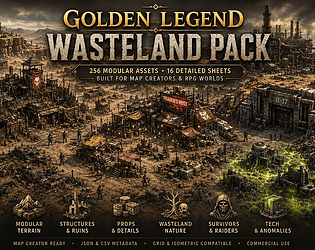
The Wasteland pack is following the same direction. The latest version already includes a 00_APPROVED_PRECUT_TILES folder containing validated ready-to-use tiles and reviewed crops. Future updates will continue expanding these libraries as new categories and variants are added.

Looking a bit further ahead, I'm also working toward a larger ecosystem that will include:

• Terrain expansion packs

• Structures and building collections

• Nature and vegetation packs

• Props and environmental objects

• Characters, heroes, enemies, NPCs, and creatures

• Items, equipment, and loot assets

• Better map-generation and world-building workflows

The long-term vision is to make all of these packs work together through a consistent asset pipeline, metadata system, and map-creation workflow, allowing developers to build complete fantasy worlds more quickly and with less manual setup.

I'm also committed to releasing improvements based on community feedback. The addition of the 00_APPROVED_PRECUT_TILES folders is a direct result of feedback like yours, and it has already helped shape the roadmap for future updates.

Thank you again for your support. Feedback from actual developers using the assets in real projects like yours! is incredibly valuable and helps form where the ecosystem goes next.

Best regards,

Golden Legend

Hi,

Thank you for your message and for supporting Golden Legend.

Yes — the files you are looking for are already included in the latest update.

Please download the newest versions of:

GoldenLegend_Fantasy_Asset_Pack_v1.zip

and/or

GoldenLegend_MapCreator_Full_Version_v1.1.zip

Both packages now include the new:

00_APPROVED_PRECUT_TILES

folder.

This folder contains validated, pre-separated PNG tiles that are ready to use directly in games and map editors without requiring manual slicing. It was added specifically to help developers who prefer to work with ready-to-use assets rather than source atlas sheets.

Regarding the issue you described, you are correct: some of the original atlas sheets contain embedded labels and metadata references, which makes them useful as source sheets but less convenient for direct use in tile-based projects. The new pre-cut folder is intended to solve exactly that problem.

For your HTML Canvas project, I recommend starting with the assets from:

00_APPROVED_PRECUT_TILES

instead of manually cutting the original atlas sheets.

For the Map Creator, the recommended version is the Browser Edition included in the package. If you still experience crashes, please let me know:

  • Your Windows version
  • Browser used (Chrome, Edge, Firefox, etc.)
  • Any error message or screenshot

and I will investigate it immediately.

Thank you again for the feedback. Comments like yours help improve the Golden Legend ecosystem and have directly influenced this update.

Hi,

Thank you for purchasing the pack, and I’m sorry you’re having trouble getting started.

I’ve just prepared an updated version of the package which includes a new 00_APPROVED_PRECUT_TILES folder containing validated ready-to-use tiles, so you no longer need to manually slice the assets yourself.

I also recommend using the included Golden Legend Map Creator (Browser Edition), which loads the assets, metadata, and workflows directly and provides a much smoother experience than manually cutting the sheets.

If you’re still experiencing crashes, please let me know:

• Your operating system (Windows / macOS / Linux) • Whether you’re using the Browser Edition or Desktop Version • Which asset sheet or file is causing the issue

I’ll be happy to help directly and can provide an updated package immediately if needed.

Thank you again for your support and for reporting the issue — feedback like this helps improve the project for everyone.

Wow, thank you so much for the kind words, I really appreciate it! That honestly means a lot to hear. I’ll definitely add you on Discord shortly. 🙂

I’d also love to see the game you’re currently working on. It sounds really exciting. In return, I can also show you the current progress of my Golden Age game project so you can see the direction we’re taking with the art and systems.

Godot + GDScript is a great choice. I’m not too familiar with it myself, but once we connect on Discord, I’ll gladly help guide you through the tilesets and explain how they’re structured and intended to be used properly inside a real workflow.

Also, regarding your tool/workflow setup — if the current tileset format is not fully usable with your pipeline or requires a different structure, let me know honestly. I can always separate, reorganize, or restructure the tiles properly for your use case. I’d rather make the assets production-friendly for your workflow from the start than force you to fight the format later.

The tool we’re working on should make things much easier for terrain generation, autotiling, transitions, and map creation overall.

Looking forward to chatting more on Discord and seeing what you’re building!

Hey again! And thank you once more for supporting the project 😊

For now, the easiest beginner workflow is usually:

- import the PNG tilesheet into your engine/editor,

- slice the tiles,

- create a tile palette/tilemap,

- then paint the map visually.

The PNG tilesheets are the main graphics files, while the CSV/JSON files are there for more advanced importing workflows supported by development tools/programs such as:

- Unity,

- Godot,

- Construct,

- GameMaker,

- Tiled,

- and others.

And of course, I can help guide you depending on what engine/tool you use and give you step-by-step setup instructions for each one 😊

About my map creator/editor tool:

I’m currently improving the production version of it and I think it will help a lot, especially for people new to tilemaps and CSV/JSON workflows.

The goal is not only terrain generation, but also automatic organization and categorization of different asset types such as:

- terrain tiles,

- structures/buildings,

- props/decorations,

- weapons/items,

- nature assets,

- blockers/collision layers,

- and more.

One important thing is that not all assets use the same size. Terrain usually works on a fixed grid like 16x16 or 32x32, while structures, trees, decorations, and weapons can have completely different dimensions.

So I’m updating the tool to support both:

- normal grid-based tile slicing,

- and separate object/sprite extraction for larger or mixed-size assets.

The long-term idea is to make the workflow much easier overall:

- visually create maps,

- organize assets automatically,

- export categorized folders,

- generate metadata/JSON,

Hope this helps 😊

Have an awesome day!

Hi ComplexNeko! I'm so happy you like it and that you purchased it as well. Also, as a first buyer, I decided I will provide all future assets, engines, and tools to you for free! 
That map creator tool will definitely help you. I will try to finish the production version during the weekend, then I'll give you access to it.
We can have a chat via Discord or something, so you can explain your goal to me, and I will guide you on how to use that pack of mine :) . 

Thanks a lot, man!!! I do have also almost ready map creator tool, which can separate and sort tiles into categories and layers to use. You can manually adjust the size of each individual tile one by one if you have incorrect resolution and/or want more spacing between each tile. You can also directly save and use those tiles in the map creator itself with the defined dimensions of the pixel size, and then create the map yourself!