



Hi - this helps a lot, thank you. The program wasn't correctly handling filepaths with spaces.
This is now fixed. The new build was just now uploaded and should resolve the issue.
I see. I'll try to add more info when I can. In the meantime:
username - this is your itchio username. It should match the url of your itchio page. Example: my itchio page is https://blendogames.itch.io so my username is: blendogames
project name - this is the name of your itchio project. To clarify, you'll want to create a project page in itchio before uploading your build. It should match the url of your itchio project page. Example: for my game Atom Zombie Smasher's url is https://blendogames.itch.io/atomzombiesmasher so the project name is: atomzombiesmasher
Additionally, in the platform field you'll want to write what platform the build is for. Common platforms are:
windows
osx
linux
Hi! I wanted to ask if it was possible to create a pay-what-you-want bundle:
Is this possible? I was looking at the bundle creation page, and it seems I can only pick games that have a minimum price. I'm not sure if I'm misunderstanding the interface, or if there's something I'm possibly missing. Thank you!
Hi all! I made a graphical interface tool for uploading builds to itchio.
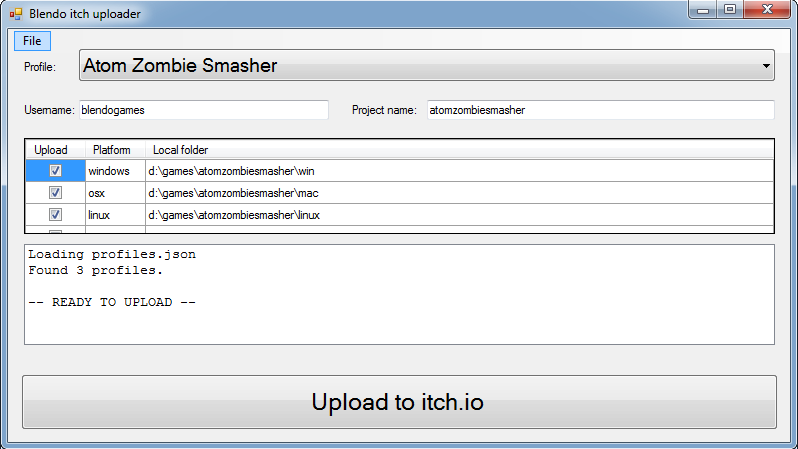
Under the hood, it's a GUI wrapper for Butler. I made this so I could have a more visual way of managing my builds.
Enjoy!
I'd like to use Butler to upload projects that are not games (i.e. soundtrack, book, etc) but I can't figure out how to do this.
I tried this:
butler.exe push localfolder username/gamename:book
But when I looked in the Itch dashboard, the upload appeared as a standard executable project, in a branch called "book." Is there a way to configure the type of upload via Butler?