On Sale: GamesAssetsToolsTabletopComics
Indie game storeFree gamesFun gamesHorror games
Game developmentAssetsComics
SalesBundles
Jobs
TagsGame Engines

Betshet

22
Posts
1
Topics
7
Followers
1
Following
A member registered Mar 29, 2016 · View creator page →

Creator of

Recent community posts

Thanks!

Unfortunately this was just a school project made in two weeks, and we already have another project coming up. I don't think we'll be coming back to this game, but I appreciate you playing it!

Thanks!

Unfortunately, we made the game in Unreal, which is a lot more difficult to port as a web game.

Trying to force it on the GPU with the NVIDIA panel or the Windows settings did nothing, it was still running on integrated graphics.

Disabling the Iris Xe driver made the laptop switch to "Microsoft Basic Display Adapter". When I re-enabled the Iris driver after downloading updates for both drivers, GameTranslate properly switched to the GPU. No idea if the issue was the drivers or Windows not switching the app to GPU correctly.

I managed to fix the issue. Not sure what exactly fixed it so here are some of the things I did : 

- Using NVIDIA control panel to force the app to run of the GPU didn't work

- Using Windows Graphic Settings didn't work either

- I updated both the Intel Iris Xe and the NVIDIA GPU drivers

- I updated Windows

- I disabled the Intel Iris Xe driver in the Device Manager,then enabled it again

After that last step it started working correctly.

(1 edit)

I do have integrated graphics (Intel Iris Xe) and GameTranslate does indeed use that.

Drivers have been updated, Automatic Color Enhancement was already off.

I've closed every app on my PC before trying again, and looked at every process running in the background, nothing seems to fix the issue.

GPU is NVIDIA GeForce RTX 3070 Laptop

CPU is 11th Gen Intel Core i7

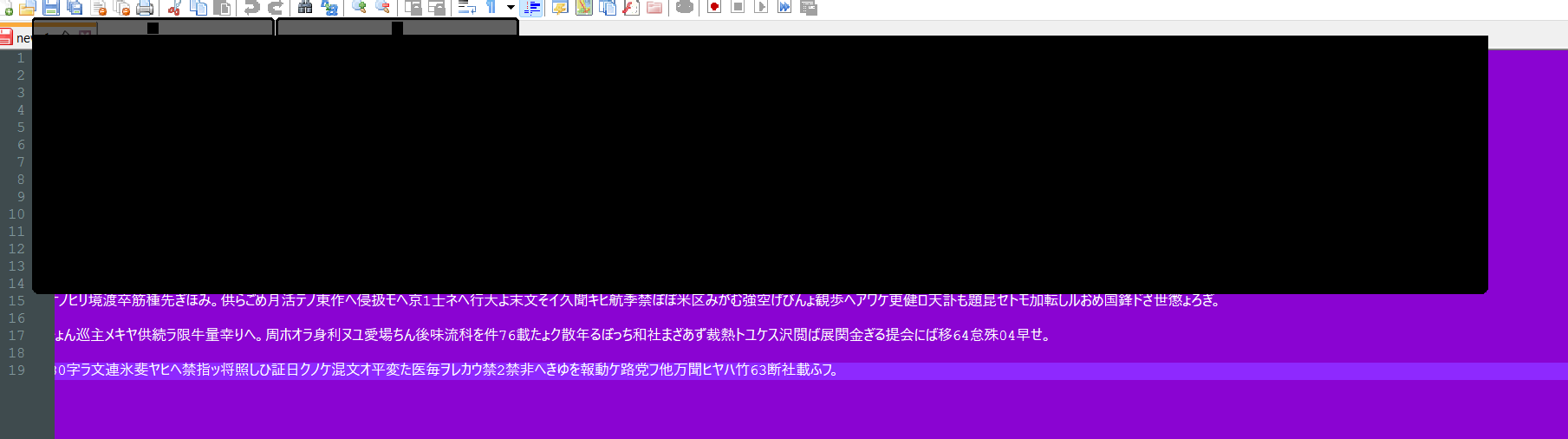
This is a screenshot of me trying to translate some japanese text in Notepad++ while GameTranslate is in desktop mode. The box is entirely black.

I've closed every app, rebooted multiple times, lowered the font size, no changes. I don't have RivaTuner, and I have 16Go of RAM.

(1 edit)

The software seems to work correctly, I have no issue with the launch or the config window

But when I try to translate anything, it displays nothing but black boxes.

Tested with different modes (desktop, attached,...) and different games.

I'm on Windows 11.

Small issue about the sequence of the story events

It is possible to advance Emma & Felicity's story quite a bit without doing Ashley's quest to search for Ren.

As such, there's a weird break in continuity where you can get the Stoneface reveal before any of the buildup through Ashley's story, and before his name is even mentioned in the story.

I was very confused by Felicity and Emma's story because of this, and only understood what when wrong when I finally got around to advance Ashley's quests and learned about Stoneface properly.

The theme here is a stretch. Is it really a game about loops if there's only one loop?

Aside from that, it's a pretty good game, with a good amount of mechanics considering the time frame, and it's enjoyable to play.

(1 edit)

A little rough around the edge. The theme is respected, but that doesn't make it a fun game, since all you're doing is repeating the same two levels but with more enemies each time. The enemies also have a tendency to swarm you when you change levels.

The game is built well and the art is good, but it's just not a lot of fun to play.

Thank you! Unfortunately, we made the game with Unreal Engine, which doesn't support WebGL integration.

(1 edit)

Pretty interesting concept!

I feel like the game would be benefit from speeding up in general, as it is it takes forever to get upgrades, and the star is pretty useless

Art is neat, no music is a shame, but overall great creativity and good execution.

Thank you!

I got this bug as well on a new save, I've never played any other version.

The game never asked me to choose Julian's gender at any point.

Using a genderswap potion worked though.

(1 edit)

Hi, thank you for playing our game!

Your deal damage when you hit the boss with your orbiting weapon. The faster your weapon spins the more damage you deal.

Thank you for the kind words!

To answer your question, you need to hold down left click to start spinning around your weapon, and releasing left click with the right timing to go where you want.

Winding down helps with that, since the faster you spin, the harder it is to choose the direction you'll be going in.

Thank you! Unfortunately we did not have enough time to finish our second boss, so there's only one to beat for now.

The art is good and the concept interesting, but there is a clear lack of objective. Also the resolution isn't set quite correctly, so I coouldn't even see the full quality calendar.

Could have been good, but as it is it's not very enjoyable to play. The die flies everywhere without you having much control over it, and the enemies can swarm you and lock you in a corner.

I mean if nothing else, this is a very funny game.

The gameplay is a bit lacking, especially since there is no player death, but the concept is hilarious. Great job!

This is a solid concept executed very well. The visuals are maybe a bit lacking, and the visual of the die roll is way too in-your-face, but overall this is very enjoyable.