

On Sale: GamesAssetsToolsTabletopComics
Indie game storeFree gamesFun gamesHorror games
Game developmentAssetsComics
SalesBundles
Jobs
TagsGame Engines

Ali107

211
Posts
26
Topics
39
Followers
8
Following
A member registered Dec 30, 2016 · View creator page →

Creator of

Recent community posts

When v2.0.0 got released, a 32x8 text display and a bunch of other features were added, which allows us to create a Hello World program.

First of all, Asembsim does not come with premade functions like a print function. So in order to print something on the screen, you must make your own print function.

Print function algorithm

The print algorithm we are writing would require a pointer to the message. We could do that by storing the two pointer values of the label into r0 r1 as shown below.

imd Message:0 r0
imd Message:1 r1

Then create label somewhere that labels a DB pseudo instruction as shown below.

.Message
db "Hello World!"

Now that we have setup the message, we also need to use the IMD instruction to store the length of the message into r2 and the position on screen to r3.

We begin by creating the print function, by adding a label ".print" then we use the IMD instruction to set values in r4 and r5 by zeroing out r4 as it would later contain the letter to print, and to set the value of r5 to be the video memory block (0xF).

We add a ".print_loop" label since we are about to loop through all the message characters. So now for every iteration in the loop, we would use the LDR instruction to load the character from the message we set earlier, and store it inside the video memory block, then we increment our pointers and jump back to print_loop as long as r0 is less than r2, in which r2 is the message length. One loop ends, you use the RET instruction. The print function is as shown below.

.print ; Print function; Requires 4 parameters placed in r0 to r3
     imd 0 r4 ; holds character to print
     imd 0xF r5 ; video memory block pointer
     add r0 r2 r2 ; Tells which part of the message to stop
     .print_loop
         ldr r0 r1 r4 ; Load a letter into r4
         str r4 r3 r5 ; Store letter in video memory
         inc r3      ; Increment iteration
         inc r0      ; Increment message pointer
         cmp r0 r2    ; Compares between r0 and r2
         jmp_ls print_loop ; loop back if r0 < r2
     ret


The full Hello World program code

imd Message:0 r0 ; 1st pointer to message
imd Message:1 r1 ; 2nd pointer to message
imd 12 r2 ; message length
imd 0 r3 ; Where it should be displayed on screen
call print ; Runs print function
hlt ; Stop the program
.print ; Print function; Requires 4 parameters placed in r0 to r3
     imd 0 r4 ; holds character to print
     imd 0xF r5 ; video memory block pointer
     add r0 r2 r2 ; Tells which part of the message to stop
     .print_loop
         ldr r0 r1 r4 ; Load a letter into r4
        str r4 r3 r5 ; Store letter in video memory
         inc r3      ; Increment iteration
         inc r0      ; Increment message pointer
         cmp r0 r2    ; Compares between r0 and r2
         jmp_ls print_loop ; loop back if r0 < r2
     ret
.Message ; Contains a message stored directly in code
db "Hello World!"
Just download the zip.

Unzip the zip file. 

Open the world game exe file. 

That's all. 

Graphics settings menu is planned, though I am quite busy these days, which means you have to wait around a month or 2 from now if I don't get busy again later on. 

Do you have worlds with the same name? 

If not, then manually go to %appdata% using windows key + R, and within .world_game folder, you find the saves folder. Just delete any folder with the same name as your world if you could find any. 


I mean it should work.

What name have you been giving the world? It should not have the same name of an existing world. 

Yeah, we already have a bunch of ideas thought up to improve upon the game.

Glad you liked it. How long did it take you to beat the game tho? 

Thanks, glad you liked it! 


Any feedback you would like to give on gameplay mechanics? 

lol, thanks

thank you so much! I'm glad you liked it.

Thank you. If you want, can you also share feedback on the game mechanics and balancing?

Thanks!

Thank you! Glad you liked it. 

(2 edits)

The Update v1.1.0 introduces an instruction that pauses program execution and wait for user's key character input. The update also introduces commenting.

I modified the "Power of" Script so that it allows the user to insert 2 numbers between 0-9, then calculates based on the user input.

; Input Number between 0-9
hlt_in
sub r0 48 r1
jmp_gr r1 9 0
 
; Input power number between 0-9
hlt_in
sub r0 48 r2
jmp_gr r2 9 12
 
; Calculates power between the two inputs
mov 1 r4
jmp_ge r3 r2 44
    mul r4 r1 r4
    add r3 1 r3
jmp 28
 
mov r4 rout ; outputs the result
hlt
(1 edit)

This script uses the `mul` instruction to do 2^4 and at the end will output the result as 16.

The first 2 lines tells what number power of what, you can change the values to whatever value you want, though it requires some changes to the first two lines if you want to put in a number greater than 127.

mov 2 r0
mov 4 r1
mov 1 r3
jmp_ge r2 r1 28
    mul r3 r0 r3
    add r2 1 r2
jmp 12
mov r3 rout
hlt
(2 edits)

This script multiplies 2 with 2 and at the end will output the result. (tbh this is just to show off as you can multiply using the 'mul' instruction)

The first 2 lines controls what gets multiplied with what, you can change the values to whatever value you want, though it requires some changes to the first two lines if you want to put in a number greater than 127.

mov 2 r0
mov 2 r1
jmp_eq r2 r1 24
    add r3 r0 r3
    add r2 1 r2
jmp 8
mov r3 rout
hlt
(1 edit)

This is a script you can load into AsembSim. Right now, this divides 127 by 2 and at the end will output the result and remainder.

The first 2 lines controls what get divided by what, you can change the values to whatever you want, though requires slight change to the first two lines if you want to put in a number greater than 127. Dividing by zero will just make it get stuck in an infinite loop.

mov 127 r0
mov 2 r1
jmp_ls r0 r1 24
    sub r0 r1 r0
    add r2 1 r2
jmp 8
mov r0 rout
mov r2 rout
hlt

thanks, but I feel like I have to first add more content before giving it a proper name based on what I add into the game. Combat is mostly unimplemented, there's not much exploration and the survival element is lacking. So, I'll decide later when I almost finish those or when I have a full plan/picture of what my game will be. Thanks for the names anyway! :)

The names you said would be nice if my game is intended to be a sandbox game. I plan to make the game focused on Combat and survival.


so this is the hierarchy of genres I will focus on 1 being the most:

1. Combat (high priority)

2. Survival

3. Exploration

4. Sandbox (Low priority)

(1 edit)

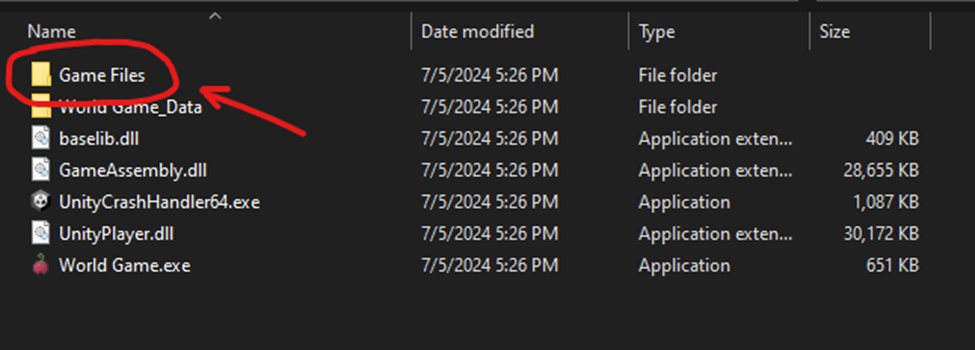
In the game's folder, you'll see a subfolder called "Game Files", which contains some of the game's files [duhh].

How to navigate to all the in-game inventory crafting recipes?

Within the game's folder, navigate to "Game Files -> Recipes -> Inventory Recipes".

Understanding Inventory recipe .json format

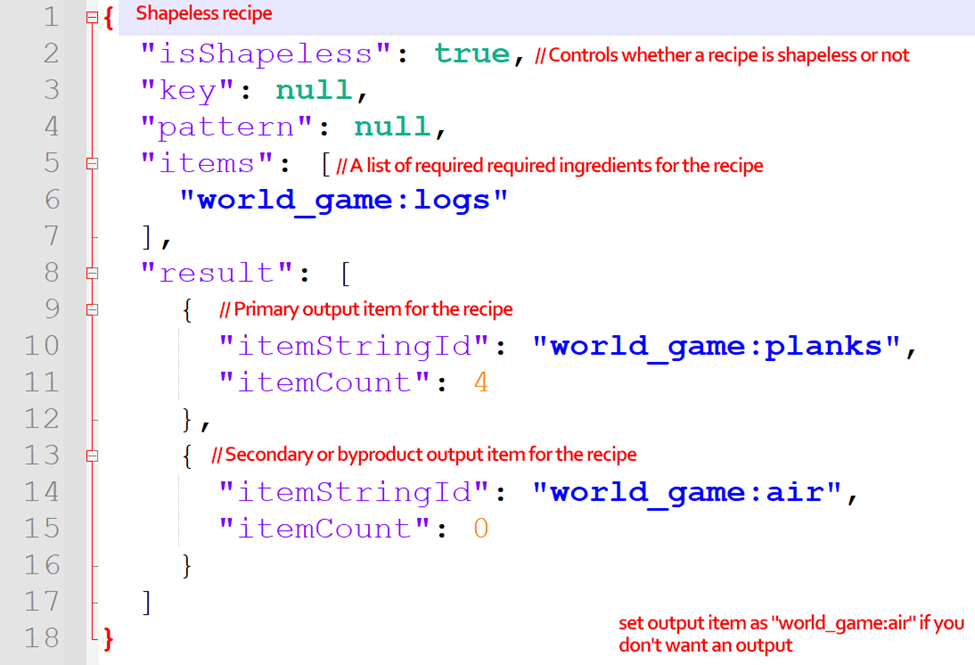
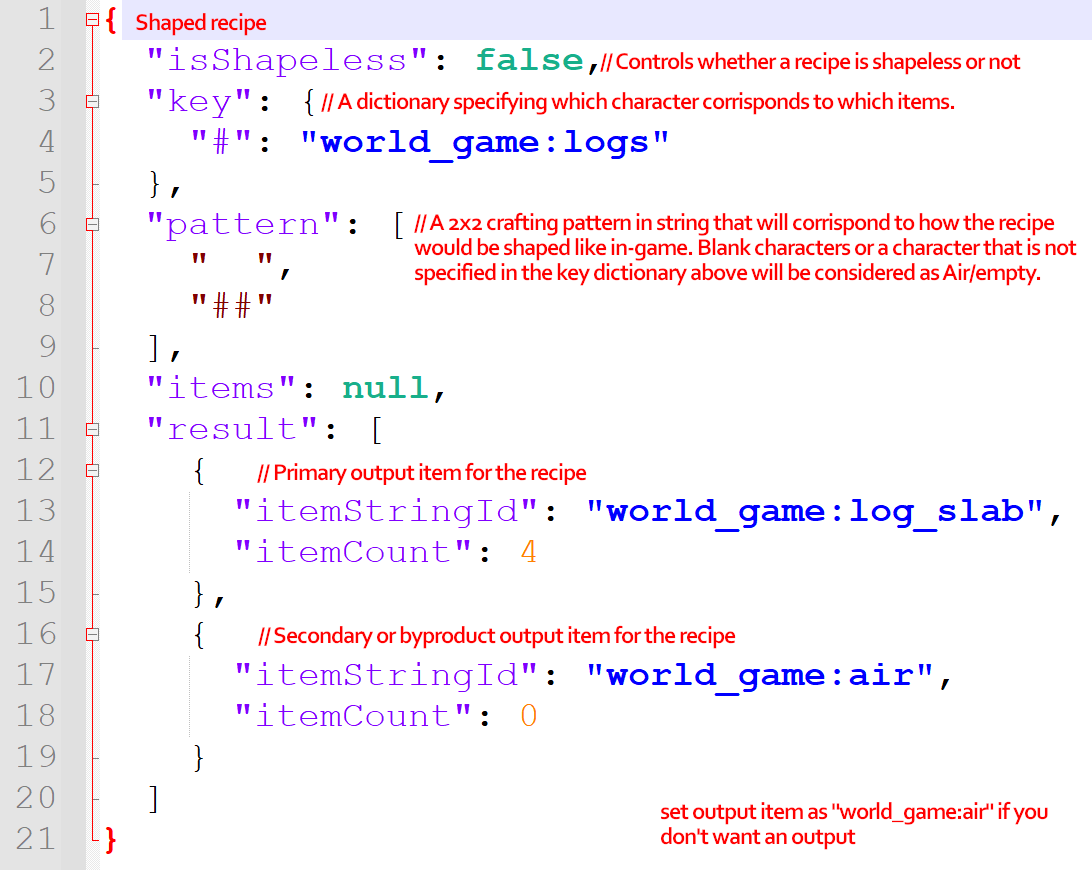
Inventory recipes are crafting recipes for the 2x2 crafting grid within the player's inventory. To add or edit any of these recipes requires you to understand how they work. The images below shows an example with comments explaining what each part of a recipe .json does in both shaped and shapeless versions.

  • Shapeless Recipe:

  • Shaped Recipe:

When you already have played the game before in an older version and updated to a newer version with new blocks that use new textures, the new blocks would look invisible, and may or may not have collision depending on the block type. 


  • Steps to fix the issue:
  1. Press "windows" key + R and type "%appdata%". It will open a roaming folder.
  2. Navigate to ".world_game" folder then "Resources" folder.
  3. Delete the Textures folder. (back it up if you have your own custom textures placed inside)
  4. Run Game or if it is already on, press the "Reload Textures" button inside the main or pause menu.


This will no longer be an issue if I completely rework my texture loading system. Though right now, the main focus is gameplay.

When you first launch the game, a folder is created at "%appdata%/Roaming" called ".world_game" with a Resource folder containing all the game textures. You can replace the textures with your own to change the look of the game. The game will load the textures in only when it launches or when you press the "Load Textures" button in the main or pause menu.

thanks! I plan to update the game often.

Nice demo. Though the game frequently drops in FPS when exploring.


I have also made a voxel game, check it out if you want. :p

Well not really. There's a minecraft modding discord server that I frequently post my progress in off topic chat. 

(1 edit)

For some reason the update button does not work, I am just stuck at 3.2.0


When I click it, it launches cmd for a few seconds before it turns off...


Man this is a full game, it just has some small bugs to it but still really a good game.

Just make some slight changes to the UI and you can turn it into a mobile game or something.

Great game, but I think it's a bit too easy because the supply of armor and tools are too abundant.

Nice classic doom aesthetic! The game's simple and empty, you should add more gameplay mechanics than just search and kill trespassers.

Game's great! I like that it has a level system when you offer flesh, you gain an ability.

The game looks great! But I have found a bug, some assets like one of the walls and a painting with canvas have no collision.

Great game! Love the background ambiance of the building.

Nice game, but man that grandson is ghost-hunting!

Interesting concept.

Those trees are longer than my life!

Great idea of a game, maybe you could add other levels with different scenarios like tornadoes or meteor showers.

Would be better if the player (cookie) levels up every minute or so and you choose what to enhance. Or maybe add different types of cursors to chase the cookie. Maybe add a clicker cannon that shoots cursors at the cookie or something.

Sounds like a cool idea, but the voice-controlled ghost for some reason doesn't work.

Feels satisfying to burn 100s of civilians in one breath.

The dragon's controls need fixing.

You could make the dragon's breath like a flamethrower, meaning you hold it down to constantly breathe fire. To make it less over powered, make the dragon have a fire gauge that drains slowly when breathing fire. It will regenerate back over time.

The game's mechanics are interesting, especially since you unlock abilities at every level.