
On Sale: GamesAssetsToolsTabletopComics
Indie game storeFree gamesFun gamesHorror games
Game developmentAssetsComics
SalesBundles
Jobs
TagsGame Engines
(7 edits)

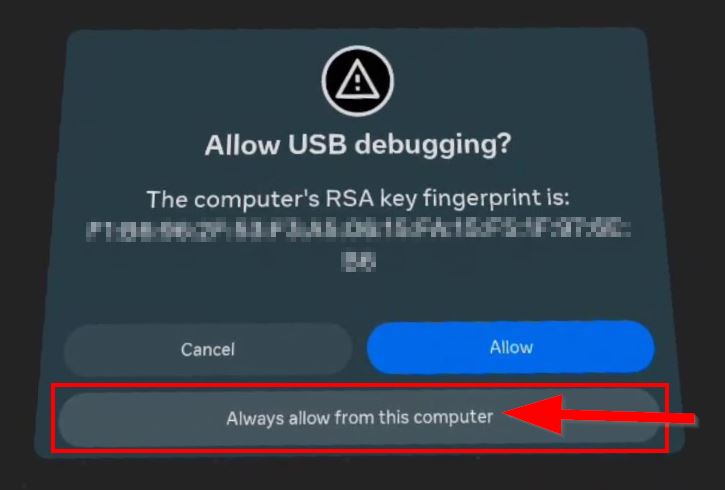
Hi @anagan79. I purchased the Optimiser tool yesterday and downloaded the Other Solutiion = APK + Installer file, not the  QuestGamesOptimizer_9.2.1.apk. I manged to install okay onto my Quest 3 via the Oculus Developer Hub, but the issue is I have to keep going to unknown sources on the Quest 3 and then click on the Optimiser tool to activate the app, but then as soon as I select any app and exit, or exit to home screen I need to do the process again. I thought we didn't have to keep selecting the app only on restart of the device. When installing though, the Always allow button did have a red box around it like the below but I did select it as far as I know. Is the red outline normal?


I have enabled Auto detection and selected Allow all the time on the boxes during installation. 

Also, I only received an email with the download link and a verification email but nothing after that. Is that correct?

(+1)

Hi, this screenshot is here to tell people to click on the correct button. During the installation you should have click 4 times on this prompt on the Always Allow button, the one with red border.

If this is installed correctly, all the next time you will reboot your Quest, you will have to open QGO and accept this prompt by clicking Always Allow. Thanks to QGO you don't need a PC anymore to enable AQB as you give QGO the permission to enable ADB by itself.

To resume : the prompt appears only 4 times during installation, then each time only once after every reboot if you clicked on Always Allow

After purchasing QGO, Itch.io sent to you an email with link and my own message.

Is it ok ? :)

Thank you for the reply. I think I only dragged the INSTALLATION.bat into the Oculus Developer Hub and not the ADF WIFI CONNECTION file so maybe that is the issue? Should I delete the  Quest Games Optimizer from my Quest 3 device, reboot it and then drag and  install the QuestGamesOptimizer_9.2.1.apk instead?

.bat files are for windows, not for the headset, so don't touch that if you have the developer hub or sidequest ;-)


Why not following my video ? : https://www.youtube.com/watch?v=inE6HTKZ-ZM

Or this : 

 Quest 3: How To Increase Graphics NOW (works on all games)

You also can check my FAQ

Thank you. I will try and let you know how it goes. I appreciate your patience.

I tried again and followed the instructions but still have to keep launching the optimiser when exiting another app as when I go to the apps the green HD symbols are not visible until I relaunch the app. Whenever I click on the ADB yellow logo a red sign with writing appears briefly but quickly disapears.

The steps I followed were

1) Check the transfer through Wifi option on my Quest 3

2) Connect the Quest to the Laptop via USB cable

3) Drag the whole QuestGamesOptimiser_9,2.1 zip onto the Oculus Developer Hub

4) Switch on Allow Debugging on the Oculus Developer Hub

5) Click the 3 dots on Oculus Developer Hub and press install

6) Go to my headset and press Allow all the time 4 times on for allow USB debugging box

7) Enter my email

8) Allow the Auto detect and optimise boxes.

8) Then restart the Quest 3

9) Relaunch the Quest 3 and launch the app and again select allow all the time.

(2 edits)

It seems you did a wrong installation, please uninstall QGO, reboot and install QGO again by following click by click and step by step what I do.

And you must click on Always Allow button each time you see the prompt, not the Allow button.


EDIT : if ADB is green, all is OK

(1 edit)

I have followed the instructions 3 times and same keeps happening. Only thing I can think is I am dragging the wrong file into the developer hub or there is a setting on the Quest that is incorrect. Is there anything wrong with the steps above that you can see? 

When I go into games though, the optimiser settings do not show up on the app when loading but apps don't show green writing after clicking off that window. 

(1 edit)

Please send me a video about what happen. I think I don't understand your problem. If ADB is green, all is OK. You can send me a video on google drive

Okay, will do

I sent a video to your support email. Please disregard my first 2 emails as sent wrong videos. Sorry for the hassle. 

Hi I didn't receive your emails. Did you send it to questgamesoptimizer@gmail.com ?